Dual R9700's AMD VLLM-Container woes

vllmmultigpulog.txt (38.8 KB)

I have been enjoying my single r9700 so much that recently i have added a second card to my server, and for ollama things have been mostly great (no speedup for a single user, but running gemma4-31B at full context is definitely a nice improvement, though i was hoping it would improve the tk/s for a single user if i’m honest),

VLLM however has proven more….problematic, whilst the official vllm/vllm-openai-rocm container works great when tensor-parallelism is set to 1 when i try to increase it to enable the second gpu it just won’t work despite my best efforts (i have attached the logs)

The logs seem to point to P2P/NCCL issues, So i have tried setting NCCL_P2P_DISABLE=1 to force use of the, trying and failing to make P2P work on the motherboard (its an old x570 am4 asrockrack with dual pcie 4.0 x8/x8 for the cards), but no matter what i do it always seems to fail with: [FATAL ERROR]: HIP failure: ‘the operation cannot be performed in the present state’

honestly i don’t mind if all the communication happens via the shared memory, and skip P2P entirely for now, i just want to see vllm utilize more than one graphics card.

I noticed this thread Does the LRLink PCIe Bridge Fix RCCL's Broken P2P on Dual R9700? is sort of similar but none of the options there seemed to help me much and its more focused on making the P2P work for training, whereas i just want to do inference.

My system:

-5950X

-64GB DDR4-3200

-dual R9700 connected in a pcie4.0 8/8 split directly to the CPU

-Asrockrack x570D4U-2L2T/BCM

specific software configuration:

Proxmox with an ubuntu 24.04 guest with both gpu’s passed through, amd SMI from guest:

±-----------------------------------------------------------------------------+
| AMD-SMI 26.2.2+671d39a71e amdgpu version: 6.16.13 ROCm version: 7.2.2 |
| VBIOS version: 00153259 |
| Platform: Linux Guest (Passthrough) |
|-------------------------------------±---------------------------------------|
| BDF GPU-Name | Mem-Uti Temp UEC Power-Usage |
| GPU HIP-ID OAM-ID Partition-Mode | GFX-Uti Fan Mem-Usage |
|=====================================+========================================|
| 0000:01:00.0 …Radeon AI PRO R9700 | 0 % 32 °C 0 15/300 W |
| 0 0 N/A N/A | 39 % 24.71 78/32624 MB |
|-------------------------------------±---------------------------------------|
| 0000:02:00.0 …Radeon AI PRO R9700 | 0 % 28 °C 0 3/300 W |
| 1 1 N/A N/A | 0 % 24.71 110/32624 MB |
±------------------------------------±---------------------------------------+
±-----------------------------------------------------------------------------+
| Processes: |
| GPU PID Process Name GTT_MEM VRAM_MEM MEM_USAGE CU % |
|==============================================================================|
| No running processes found |
±-----------------------------------------------------------------------------+

topo:

rocmbuntu@rocmbuntu:~$ amd-smi topology
ACCESS TABLE:
0000:01:00.0 0000:02:00.0
0000:01:00.0 ENABLED DISABLED
0000:02:00.0 DISABLED ENABLED

commands i have tried so far:

-docker run --rm --group-add=video --cap-add=SYS_PTRACE --security-opt seccomp=unconfined --shm-size=16g --ulimit memlock=-1:-1 --device /dev/kfd --device /dev/dri -v ~/.cache/huggingface:/root/.cache/huggingface -e NCCL_DEBUG=INFO -e NCCL_P2P_DISABLE=1 -e HIP_VISIBLE_DEVICES=0,1 -e HF_TOKEN=redacted -p 8000:8000 --ipc=host vllm/vllm-openai-rocm:latest Qwen/Qwen3-0.6B --max-model-len 18000 --tensor-parallel-size 2

-docker run --rm --group-add=video --cap-add=SYS_PTRACE --security-opt seccomp=unconfined --device /dev/kfd --device /dev/dri -v ~/.cache/huggingface:/root/.cache/huggingface -e NCCL_P2P_DISABLE=1 -e HF_TOKEN=redacted -p 8000:8000 --ipc=host vllm/vllm-openai-rocm:latest Qwen/Qwen3-0.6B --max-model-len 18000 --tensor-parallel-size 2

-many, many variations of the above

As mentioned single-gpu works great the problems don’t start until the parallelism is introduced, Trying to debug the logs with an LLM and following its advice has so far proved fruitless.

please help me obi wan janitobi you are my only hope

Just posted a reply. The PCIe switch works, but more questions to be solved.

i think i’m running into this issue [Issue]: RCCL 2.27.7 / ROCm 7.2.1 dual-GPU collectives fail on 2x Radeon RX 7900 XTX · Issue #6074 · ROCm/ROCm · GitHub , i’ve tried some of their docker recipes but so far no dice same issue,

If anyone with a similar setup has experience with multi amd gpu and vllm please let me know what rocm version you are on and the exact command you are using to launch it, and if your amd-smi topo shows P2P enablement

Rebuilding my vm on a lower version of rocm is something i’d like to avoid, but if someone has had success it would be worth the effort of doing

What’s your use case here? Is it multi-user concurrent inference, or just your own usage?

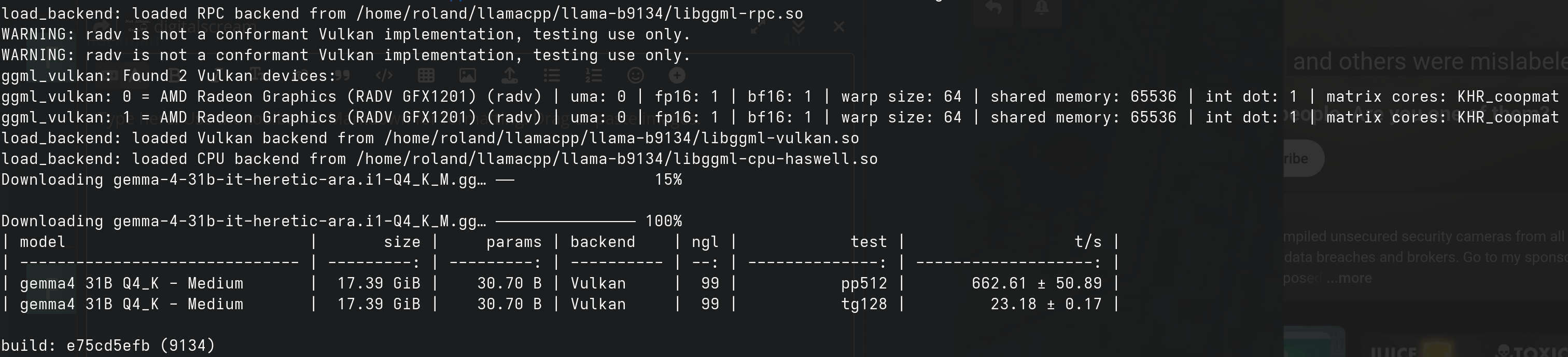
The reason I ask is…even though it doesn’t have usable tensor parallelism for non-CUDA backends, just running llama.cpp’s Vulkan backend with layer split might turn out to be faster than vLLM with full tensor split on ROCm.

That’s certainly what I’ve found. For almost every model I’ve tried, dual GPU on the R9700s with layer split gives a ~30-40% boost in PP versus single-GPU, and is only up to 5% slower in TG depending on the model. And it’s much faster than any ROCm implementation in any inference engine.

3 Likes

Thanks for replying,

For the most part i’m trying to give my family a private alternative to cloud providers, and whilst ollama has been fine for just my private use if i have to share it with 10-15 people i imagine VLLM would be a more scalable solution, Other than that its for expanding my experience and i just like to tinker and get stuff working.

I am curious though since i have only tried these cards on Rocm not vulkan , and i have only really benefited from the VRAM scaling and have not seen any improvement in token generation rates or prompt processing in a single-user usecase, does switching to vulkan on llama-server really allow for a performance boost? atleast for rocm on stock ollama it has been almost entirely flat for both PP and TG

PP especially interests me because when i start getting into the 100k+ context range thats where i spend most of my waiting time

Even if it ends up being slower, i’d still like to atleast get vllm to just start :stuck_out_tongue:

That’s the battle. In my experience, it can sometimes be hours of experimentation just to get vLLM to launch (not to mention the ludicrous time spent actually launching even when it does work).

By comparison, llama.cpp is the Swiss Army knife - launching a model is trivial, the only question after that is how much time you want to spend optimising.

For what it’s worth…here’s the bench for Qwen 3.6 35B A3B Q4_K_M under ROCm:

| model                          |       size |     params | backend    | ngl | n_ubatch |     sm | fa | dev          |            test |                  t/s |
| ------------------------------ | ---------: | ---------: | ---------- | --: | -------: | -----: | -: | ------------ | --------------: | -------------------: |
| qwen35moe 35B.A3B Q4_K - Medium |  20.60 GiB |    34.66 B | ROCm       |  99 |     1024 |   none |  1 | ROCm0        |          pp2048 |     3794.78 ± 306.14 |
| qwen35moe 35B.A3B Q4_K - Medium |  20.60 GiB |    34.66 B | ROCm       |  99 |     1024 |   none |  1 | ROCm0        |          pp4096 |      3788.20 ± 12.53 |
| qwen35moe 35B.A3B Q4_K - Medium |  20.60 GiB |    34.66 B | ROCm       |  99 |     1024 |   none |  1 | ROCm0        |           tg128 |         72.13 ± 0.28 |

…and under Vulkan:

| model                          |       size |     params | backend    | ngl | n_ubatch |     sm | fa | dev          |            test |                  t/s |
| ------------------------------ | ---------: | ---------: | ---------- | --: | -------: | -----: | -: | ------------ | --------------: | -------------------: |
| qwen35moe 35B.A3B Q4_K - Medium |  20.60 GiB |    34.66 B | Vulkan     |  99 |     1024 |   none |  1 | Vulkan0      |          pp2048 |      4079.94 ± 10.49 |
| qwen35moe 35B.A3B Q4_K - Medium |  20.60 GiB |    34.66 B | Vulkan     |  99 |     1024 |   none |  1 | Vulkan0      |          pp4096 |      4001.89 ± 15.93 |
| qwen35moe 35B.A3B Q4_K - Medium |  20.60 GiB |    34.66 B | Vulkan     |  99 |     1024 |   none |  1 | Vulkan0      |           tg128 |        140.64 ± 0.56 |

A small-but-noticeable increase in PP, but double the TG.

1 Like

Alright ill give it a go, do you remember what version of rocm that benchmark was on?, i don’t suppose theres a simple flag that would let me just “switch the backend to vulkan“, i’d like to keep it on this VM if at all possible without deleting the Rocm stack entirely.

And yeah i had a lot of issues getting vllm to work with even with a single gpu with a model i actually wanted to test, my dream goal would be to have a nice version of qwen3.6 27 or gemma 31b running on top of both cards in vllm for 2-3 concurrent users

I have great news for you…you can delete your ROCm stack entirely, because this:

…well, assuming you give up on vLLM :wink: Basically, that’s a portable package which includes nightly builds of llama.cpp and ROCm 7.2 (you’ll have to check the build scripts for the exact versions, I’m afraid). That’s how I keep an eye on ROCm performance; I keep the rest of my machine ROCm-free, on the grounds that it can interfere with Vulkan packages in negative ways.
Honestly, for 2-3 concurrent users I believe that most tests have llama.cpp running faster than vLLM, even with ROCm. vLLM only starts to pull ahead at a concurrency of 8-16 (which probably corresponds to 30+ users).

2 Likes

Ah well i do also use it for image and video gen, but that does look cool, im running through installing a fresh ubuntu 2404 vm(basically the same setup but with vulkan) with nothing but the two cards and vulkan for an initial test run, if i see a 30% lift in TG/s that would seal the deal for me, and make me very dissapointed in rocm

not exactly rigorous benchmarking but this one is on Rocm

and this is on vulkan

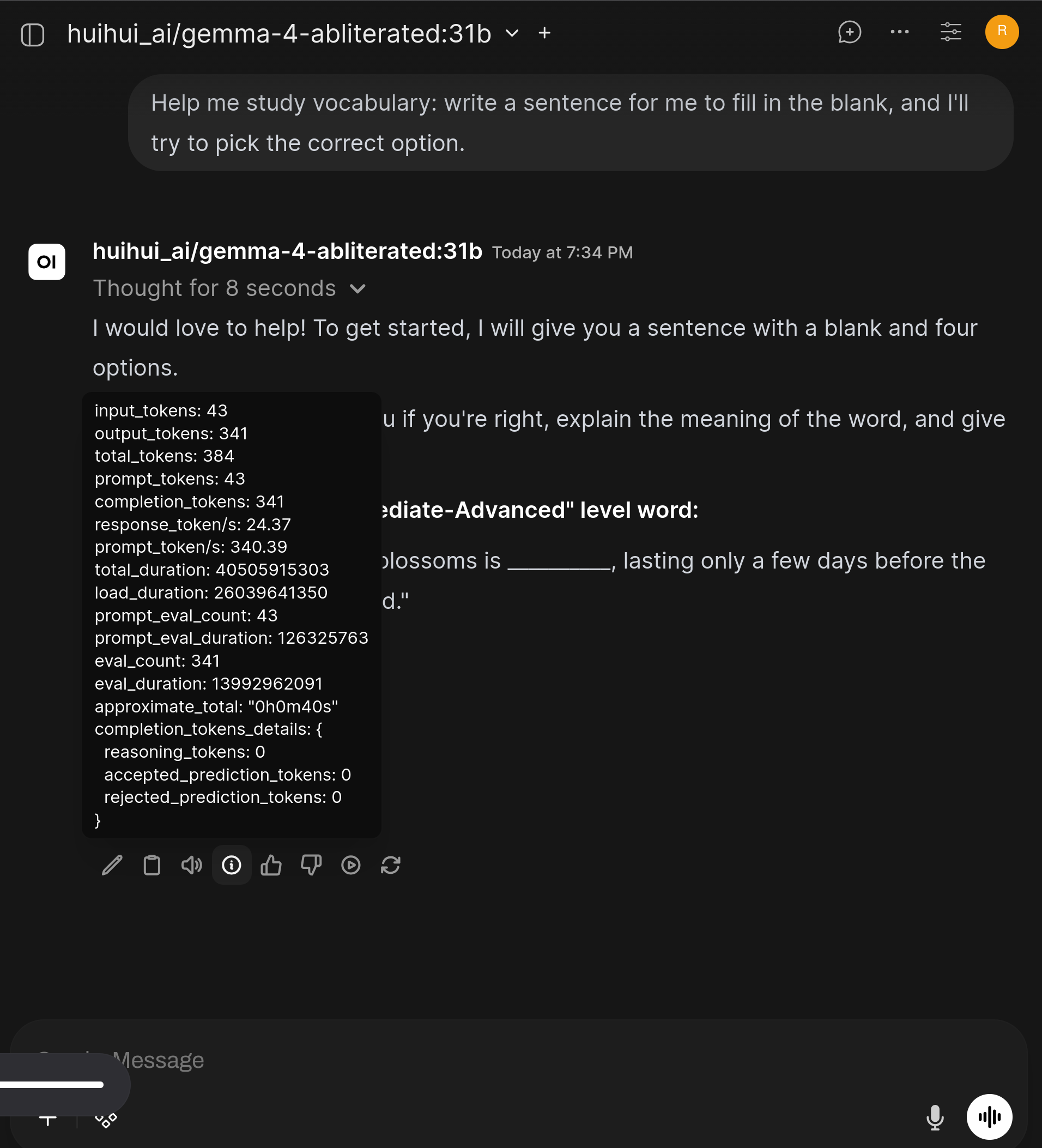
Atleast for ollama there doesnt appear to be much difference when doing multigpu (weights+KV was approximately 47GB fully loaded)

Not sure if running llama server has more of a delta, there is a 10% lead in prompt processing on vulkan though

Yes, Ollama is pretty bad in terms of performance. I run llama-server in router mode (where you specify a directory parameter instead of --model) with a config.ini for per-model config.

Just grab the latest binary build from the releases page on GitHub, and run it. Bear in mind that it’s worth keeping an eye on the release page, because they do 3-4 releases per day and at least every couple of weeks there’s something that improves performance.

Really? i always though ollama just repackaged llama.cpp?

I’ll give this a try on both stacks next

Guess i was just jumping to a conclusion, i never bothered much with llama server since i thought the performance would be near identical just with less convenience

It was previously.

I had no idea, now i’m even more keen to try it out, suddenly it makes much more sense why so many HF GGUF’s don’t work well on ollama, i always just assumed it had to do with that they were a couple of versions behind for stability or something

1 Like

I’ve stood up a couple different vllm builds, some local build others from release + nightlies, and franken TheRock monstrosities. Have not met satisfaction.

My experience is vllm can deliver relatively high throughput:

Qwen3.6-35b-a3b-fp8 2xR9700 ~98% vram usage:

  1. Throughput: 5.68 requests/s, 6546.32 total tokens/s, 727.37 output tokens/s
    Total num prompt tokens:  1024000
    Total num output tokens:  128000
    

Same setup as above, both 128k context, Qwen/Qwen3.6-27B-FP8:

  1. Throughput: 2.30 requests/s, 2647.82 total tokens/s, 294.20 output tokens/s
    Total num prompt tokens:  1024000
    Total num output tokens:  128000
    

The numbers above aren’t realized in practice with agent workflows I’ve run which typically however around 20t/s at best.

The RCCL segfault bug is the plague with Lemonade’s llama rocm stack. Best to go w/ an instance per-gpu than parallel across 2 gpus, or Vulkan. 10.4.0 has experimental vllm, but that segfaults immediately for me.

1 Like

tried the lemonade rocm branch and just that already gives a 10% boost in TG in gemma31, i’ll try vulkan next, i think this might have just killed ollama for me, still no multigpu boost though

Atleast for gemma vulkan seems to be slower than Rocm using llamaserver

yeah thats what i’d like to achieve with vllm, do you have P2P enabled on you setup to achieve this?

I’ll give vulkan a try

Yes, and I believed I’ve maxed out the capabilities for this WRX80 system.

Bytes Per Direction 268435456
Unidirectional copy peak bandwidth GB/s [Local read / Remote write] (GPU-Executor: GFX)
 SRC+EXE\DST    CPU 00       GPU 00    GPU 01
  CPU 00  ->     46.11        21.51     21.46

  GPU 00  ->     28.20       301.24     28.09
  GPU 01  ->     28.20        28.09    300.94
                           CPU->CPU  CPU->GPU  GPU->CPU  GPU->GPU
Averages (During UniDir):       N/A     21.48     28.20     28.09

Bidirectional copy peak bandwidth GB/s [Local read / Remote write] (GPU-Executor: GFX)
     SRC\DST    CPU 00       GPU 00    GPU 01
  CPU 00  ->       N/A        20.97     20.95
  CPU 00 <-        N/A        27.94     27.93
  CPU 00 <->       N/A        48.90     48.88


  GPU 00  ->     27.94          N/A     27.59
  GPU 00 <-      20.98          N/A     27.60
  GPU 00 <->     48.91          N/A     55.19

  GPU 01  ->     27.93        27.60       N/A
  GPU 01 <-      20.93        27.58       N/A
  GPU 01 <->     48.86        55.18       N/A
                           CPU->CPU  CPU->GPU  GPU->CPU  GPU->GPU
Averages (During  BiDir):       N/A     24.45     24.44     27.59
1 Like