I have a Toshiba Satellite L875D-S7332, which uses an A6-4400M (which includes the HD7520G graphics processor), and it came with 4GB+2GB of ram. I know APU’s benefit from faster ram and dual channel, and I have been considering upgrading to 2x4GB. I can’t find any documentation on my laptop on whether or not the motherboard (or even the processor) supports dual channel ram. Where could I get this information?
Not Sure how reliable this source is but here you go. http://cpuboss.com/cpu/AMD-A6-4400M
it does support dual channel memory.
Here is the official detailed documentation for it, found on Toshiba's website. Unfortunately it does not say which motherboard it has, but at the bottom it says something about the allocation of memory for the graphics. It is rated for 1600MHz (PC3 12800) memory and my guess is the two slots you have occupied is indeed dual channel. It is also my guess you cannot run faster memory as the motherboard is probably running at 1600MHz and will therefore downclock the memory if faster modules are put in (but you will get faster timings, which unfortunately does not give better graphics performance. I have tried asking here on the Tek about upgrading my laptop RAM for the exact same reason as you here). You can check if it is in dual channel configuration by downlading HWiNFO64 and down in the right hand corner in the "system summary" window that appears on opening the program you will see specs on the memory. If you want to investigate further and maybe find out what speed your motherboard is running you can see the name of it to the lower left hand side of said window.
Also, I don't think the GPU unit will be able to get more memory allocated than now by inserting bigger RAM. It is typically 1,7-2GB and thus you'd have 4 for the rest of the system. But now we are talking about speed so this isn't that relevant, just thought I'd throw it in there. I have not searched for detailed documentation for your APU, but it should be available somewhere online.
Yea but IRL , it's not going to be really any sort of boost in performance for the gpu.
The best it will do is make the ram faster , and there will be slightly more of it.
Thanks for the info everyone.
THAT is going on my short list of super useful programs. It, as expected, shows ram0 and ram1 separately, with no mention of dual channel mode. Unfortunately, I can't check if the motherboard will handle dual channel because I'm not going to spend $40 on a matching sodimm unless I'm sure it'll work. I have no problems with the amount of ram in the machine, I'd just like to give the gpu a little kick in the pants to increase frame rates. As an aside, the frame buffer is a measly 512 megs.
Edit: The name of the motherboard in that program is PLCSC8. I've searched it and only come up with "non-superuser" type manuals for various toshiba laptops.
Run Speccy or CPU-Z to check your current speed
Otherwise ya it'll help you if it's not already dual channel, but it's an A6-4400M, you aren't going to be doing too much there even with a boost from dual channel.
Glad I could help! Huh, 2 slot but not dual channel? I didn't expect that. Here is what mine looks like. The blue arrow is where I can see each of the modules and the red arrow is where it says it's in dual channel mode. Btw, you don't have to have matching RAM blocks for it to run dual channel, mine comes shipped with two different brand SODIMMS, not even at the same voltage. Just the way Lenovo want's it i guess. If you have 2 SODIMMS and that's all the slots available on the Mobo and it's not running dual channel, I'm afraid there is no way to run dual-channel.
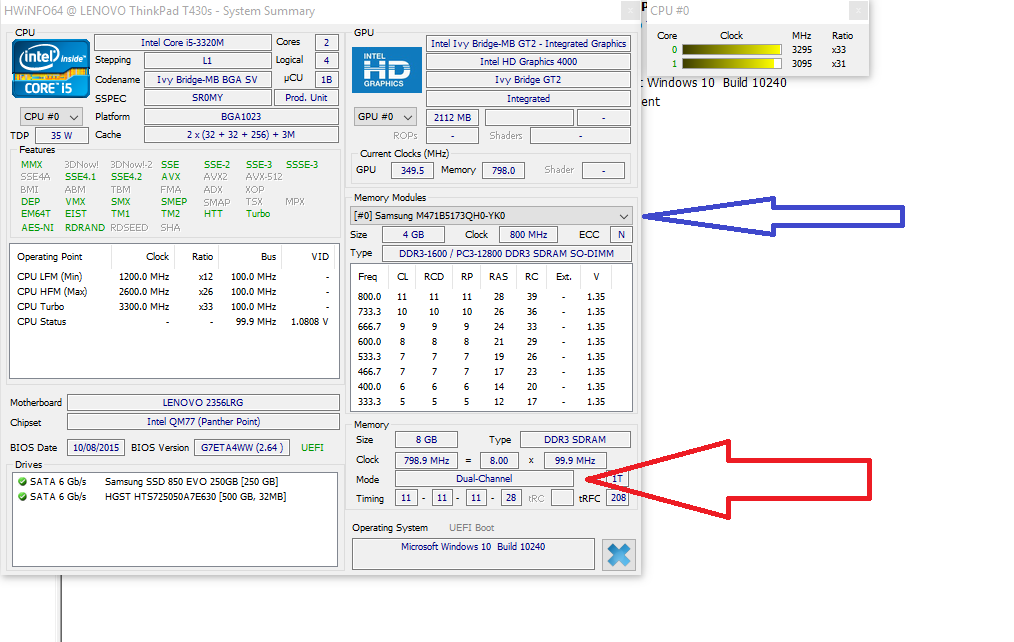
Exactly. Where the red arrow is, is just a blank space. I expected that because it's two different sizes, not just different manufactures, 4 and 2. As far as I know, the bare minimum for multi-channel ram is at least that they each have the same size, so they can be referenced with the same addresses and such.
If you have a local PC/Laptop repair shop you can probably bring it in and test out a dual channel kit, maybe see if they'd do some trade or credit for what you already have
Ah, I see, makes sense. Well maybe you can borrow a 4GB sodimm from one of your friends and swap out the 2GB and see if it makes a difference in hwinfo64. If it works and I were you I'd only go get (or salvage from a scrap laptop) one 4GB sodimm instead of two matching. I know it isn't kosher and there are good reasons as to why it's not recommended (which I don't remember), but I'm pretty sure it'll work.
its the clock that really matters here what is the highest your laptop can support? Once you find that find the lowest latency at the speed from reputable manufacturer and then find t he maximum density you can put in then youll be getting the best performance.