Dual actuator HDDs - are they here to stay?

Doesn’t sound like you actually did watch it. He steps through and outlines all of the data integrity errors, like the RAID5 write hole.

He speaks to modern RAID solutions no longer checking parity as they go, and instead relying on the drive to self report problems, which means you are never going to catch bit rot.

You absolutely cannot trust your hardware. There is no hardware on the planet that can be trusted, what with flip bits and other random errors being not only likely, but guaranteed if you process enough data.

ZFS verifies the parity of every single block as you read it, and if it doesn’t match, fixes it and rewrites the block on the fly. And it does it FAST.

Additionally - by default - it will scrub the pool every month, to detect any bit rot in data that is not frequently read.

I’d agree that BTRFS is an inferior solution. The only thing it has going for it is the kernel tainting license issues with ZFS as OpenZFS is released under a suboptimal license. It had merit when it started, but it just hasn’t panned out. Even many of the most die-hard Linux fans seem to agree at this point.

Modern hardware RAID is just a disaster waiting to happen.

Yes, I know, we should all have multiple offsite cold storage backups, but how long does it take you to restore from that backup when the shit hits the fan?
Nope. How can you have a >RAID-5 hole in a setup where HW RAID card does T-10-DIF ?

THis means that for each sector of user data that HWE RAID sends on disk, it also generates hash of the sectors which get stored in in dedicated tail of that sector. When HW RAID card reads the sector later, it gets also the saved hash. SO card calculates the hash of that sector it just received and compares calculated cache with the saved one.

Even if drive hasn’t detected and reported an error with that sector, HW RAID should detect it.

SO, how can you have a RAID-5 hole in such setup ?
And what exactly can ZFS do so much better here ?

Keep in mind that in order to do some of the same job, CPU has to hash EVERY BYTE that get sent to disk or received from it.

With no evidence to support that.
This makes no sense. Extra HW for that is almost trivial in the whole scheme of things and this is one of the big features of HW RAID.
That and battery backup for data in flight.

Yes, many SATA drives don’t support that, because WD/SGT/TOSH want to push their “industrial” SAS drives, but nowadays price difference ain’t big and all good HW RAIDs are primarily for SAS (and can do SATA), so who cares.

What can be faster than a hash checker/generator ON THE CARD that does it as the data passess through the controller, before it even hits the RAM, let alone CPU ?

Yes, people agree on that now, after shit hit the fan couple of times.
Before that, I was a clown and an asshole for even doubting in BTRFS.

Imagine that, Facebook was using it. Company billion times of my size.
Who was I compared to wisdom of all that manpower ?

Again -what is supposed to be so magical about this ?
You can do it trivially on any FS with HW RAID with T10-DIF protection.
Just read all files once a month. If there is a problem, HW RAID will do its job and OS should be informed if that fails.

I’m not going to lie. I don’t have any experience with T10-DIF.

It’s great that the drives are going for more parity embedded in the blocks themselves. It’s a little worrisome that this parity is stored in the same block, in the same region on the same device as the data, but every little bit helps.

Are you sure your controller is actually doing what you think it is doing though? Actually verifying this on read?

Common wisdom is that modern RAID controllers - in order to speed things up don’t even bother computing the parity on read, unless the device reports an error. And even then, if the parity does not match the data cross multiple drives, unless there is a drive reported error, instead defaults to re-writing the parity, not fixing the data on the drives, thus making the corruption permanent.

I have never seen any tests on this. What controllers are you thinking of that support this feature?

Are you sure your CPU is doing what you think it’s doing ?
With all those Spectre exploits, undetectable FW leaks etc etc ?

Yes, you can wear fifty condoms just to feel safe but at some point your protection might cut your blood circulation and…

Do you check the sources of your kernel and ZFS drivers, before you compile them ?

I understand that we live in the times when everything out of your reach and control WILL be used to control you.
But just hoarding new levels of protection while remaining clueless of what’s going on inside just aggravates the problem.

That “wisdom” is DUMB. CRC calculation is TRIVIAL, especially on serial stream. It can be done LITERALLY with a few flip-flops and XOR gates.

Beware of the “common wisdom” of a herd of sheep.

I feel like there is some context missing from the video in this regard.
These DIF formatted drives that the old hardware raid cards took advantage of back in the day were before the advent of advanced format which changed everything.
Once we got 512e/4kn drives the DIF formats became redundant because of the impressive code rate on their LDPC.

Basically what happened was that sector integrity became so perfect at the harddrive level that it became redundant to maintain it anywhere else.
In my experience the most likely source of corruption comes for errant writes from buggy software (which neither AF, DIF or ZFS will help with) or the problems with the implementation of the software raid/file system itself.

There are of course still issues that can cause unrecoverable read errors in harddrives, but almost all of these should dictate you stop using the hard drive and recover from a parity drive anyways (delamination of media, failed actuator, bad bearing).

You don’t even need DIF to accomplish this, hardware parity raid will run scrubs that verify all information on the array at whatever interval you set.

A benefit this operation has on HW raid over ZFS is that it produce less seek behavior and less wear and tear on the drives.

1 Like

Nonsense. Linux SW RAID does this, because it doesn’t have anything else to go on. And even then one would expect of tit to at least warn OS of the error.
Since SW RAID (linux dm) has no clue which drive has a faulty sector it can’'t repair it.

HW RAID with T10-DIF doesn’t need to. It doesn’t have just RAID_5/6 parity sectors, it has CRC/hash of ALL sectors in the stripe. So it can know which drive has presented faulty sector even if that drive doesn’t report an error. And it can recalculate it from RAID parity and write it back, along with new hash.

BTW: this kind of fault should be very rare. It usually manifest itself with frequent brownouts, when disks could do weird things during shutdown, especially cheap ones.
BUt alleviating this is simple: just have a solid PSU ( nothign fancy, just not crap) and UPS.
And drives have to be cooled and shock&vibration free.

Bingo, 99,999% of those faulty sector writes problems will dissapear.
But even in those cases, drive has its own CRC AND ECC data so it can detect and often correct bad sectors. It can correct maybe a few bad bits, but it is likely to detect and any damage.

So that extra T10-DIF hash that HW RAID can generate and check is for those exceedingly rare cases when the drive itself failed.
What more do you need ?

Well, Drives have had internal error correcting algorithms forever. This is how the hard drive industry keeps increasing platter density. They have moved to a probabilistic parity based model internal to every drive. When you read the SAS data from the drive, that’s what those CRC error reports are for.

SSD’s do the same thing to keep the varying NAND cells in check, as their voltages degrade.

Yet drives like these still produce flipped bits on a not that infrequent basis in the grand scheme of things.

Again, I have no personal experience with T10-DIF, but experience tells me that you just can’t trust the drive itself to report its own failure data. Silent data corruption is real, and you need a parity distributed across multiple storage devices to be sure you are actually capturing it.

The zero trust model ZFS uses is unparalleled.

With CRC32 AND ECC on every sector?
I HIGHLY doubt it. If you have those errors,. check your HW, above all power supply stability and vibrations in environment.
If you need more, well HW RAID can do extra hash for you.
At the end of the day, all ZFS can ever do boils down to exactly that - a hash.

What a joke. You still have to trust ZFS driver and all of the HW stack that is underneath it.

BTW, clueless people often make mistakes trying to emulate big data centers by cramming many HDDS in a tight bunch within shitty cages made of plastic and thin metal that have almost no ventilation and are ideal lightning rod for every vibration anything makes.

Datacenters do care about drive longevity up to a point. They have to last until they are couple generations old and space is precious in datacenter, hence the compromise.
This is also why drives have distinctive vibration protections that enable high-end drive to endure in bigger clusters for longer time ( more aggressive and complete anti-vibration protection)

In a homelab, one can make much more massive and sturdy cage that filters both drives and environment vibration and give them extra inertial and thermal mass and usually there is ample space for cooling.

One extra thing that one has to be careful about in homelab is extra moisture and especially moisture and temperature changes, both because the condensation and thermal stresses.

Once that and power supply is taken care of, most usual error sources should vanish.

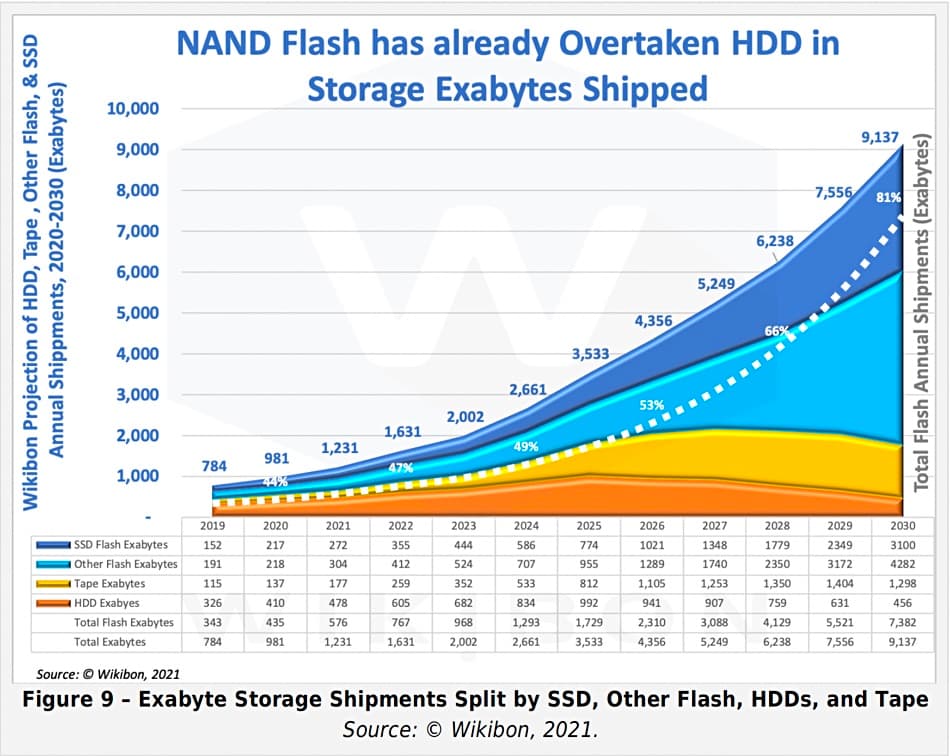
Whooo boy… Data from 2021 source:

Already back then, Flash storage overtook HDD in capacity shipped, which tells me that more SSD than HDD is already happening. To quote Tony Seba, I do not care what your opinion is, cost curves are like gravity. They are more or less inevitable. You can ignore gravity at your own peril.

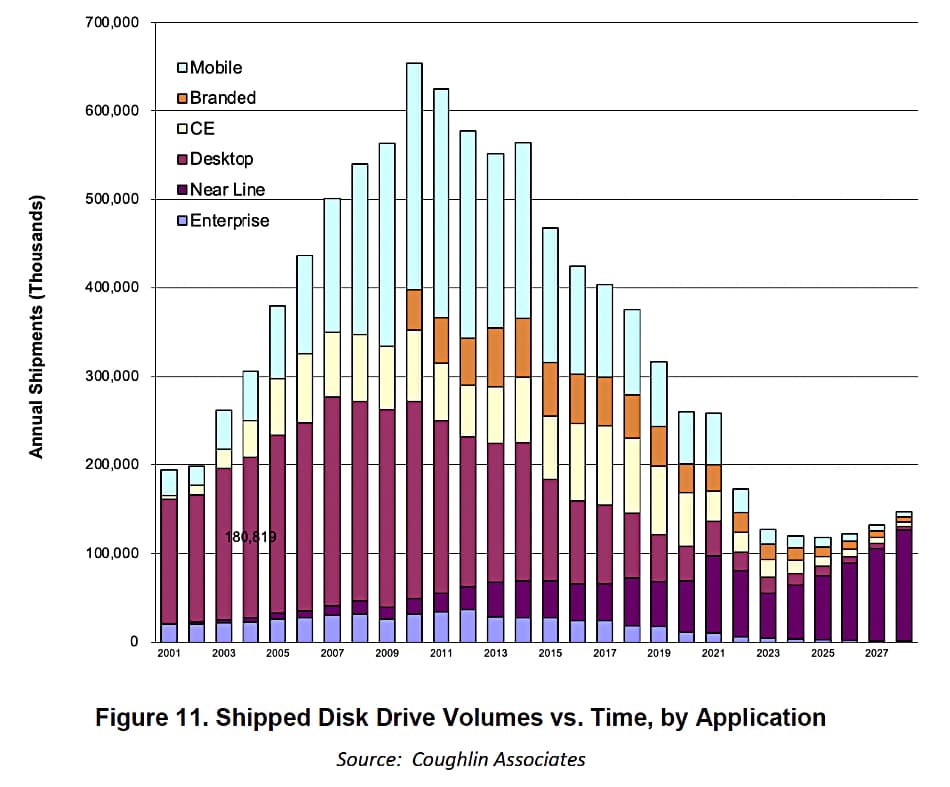
Exhibit B, HDD manufacturers are putting their faith in Nearline Storage, this is their projection from last year: source:

This suggest that nearly all hot storage in modern enterprise is SSD, and it seems like nearline will be squeezed out pretty soon.

Furthermore, that link also has an interesting table on both HDD and SSD roadmap tech, and it appears HDD will reach 100 TB in roughly 2037. Meanwhile, 1TB NAND chips were released last year, enabling 122 TB drives, and by 2029, 8TB chips will most probably be available. That would enable drives capable of storing around 980 TB of data on one single SSD.

Sure, said SSD would be pricey, but a 1 PetaByte SSD by 2030 is not only plausible, but likely. Knowing this, do you really, honestly, think that if a 1 PB drive is on the market by 2030, a 16TB SSD will not cost below $300? What about a 32TB drive? A 64TB drive?

We’ll see. It’s not my job to make your decisions. But I do want to point out that, “HDDs will be just fine” is not going to be true forever, and given the numbers, not last until the end of the decade.

That does not make HDDs a stupid decision today. There are niche use cases still. But those are rapidly being eaten by SSDs and I believe that once you have a choice between a 30TB HDD and a 60TB SSD for 4x the money, you will go for the more expensive option as that has everything but price in favor of it.

So, it is time to start eyeing the new stuff, without actually committing to anything more than you have to at the current time. Sooner or later it will make sense to switch - that is when you switch. Not before.

1 Like

SO what ? That doesn’t contradict me.
What exactly can replace hdd in cold storage ?

Tape and SSDs.

SSD and HDD are about as reliable in cold storage, both require a power on once every 18th month or so to renew and verify the data. Which, to be frank, is fine as you might want to put your backup drive online every 3rd month or so to, you know, back up data.

If you want to write stuff to archival data, Tape is probably your best option.

1 Like

NOt even close. Tapes need data serialization and their access time is awful.

SSDs lack longevity for data retention.
HDD can survive for couple decades in a drawer easily.

There is big difference between you having to backup some data and your backup SSD having to back-up itself. So it doesn’t lose data that already has. At least not until the next scheduled backup.

No. This is a myth that needs to die. The data on HDDs degrade quite a bit faster than that, but yes if you are lucky enough of it is still there to recreate the data from patchwork.

I can’t seem to find the study right now, but I know I read a research paper on this a year or so back.

HDD data corruption, especially with SMR, is a thing and the higher the capacity of the drive, the more fragile the magnetic traces and the more at risk your data is. Modern harddrives vs SSDs, it’s basically a wash.