I figured you would. My experiments with RCCL have failed thus far. I got a decent decode gain but my prefill plummeted with RCCL on. It’s been a journey just getting as far as I have on it. Running Qwen 3.6 27B Q8 at ~65t/s single stream with Llammacpp.

3 Likes
This is exactly what I’ve been day dreaming about for a few weeks as I ponder the $3500 cost of an Max 395 system of 128GB. 4U chassis, ITX, MCIO breakout cable, mounted GPUs to the expansion slots with the MCIO daughter boards.
Big kudos!
2 Likes
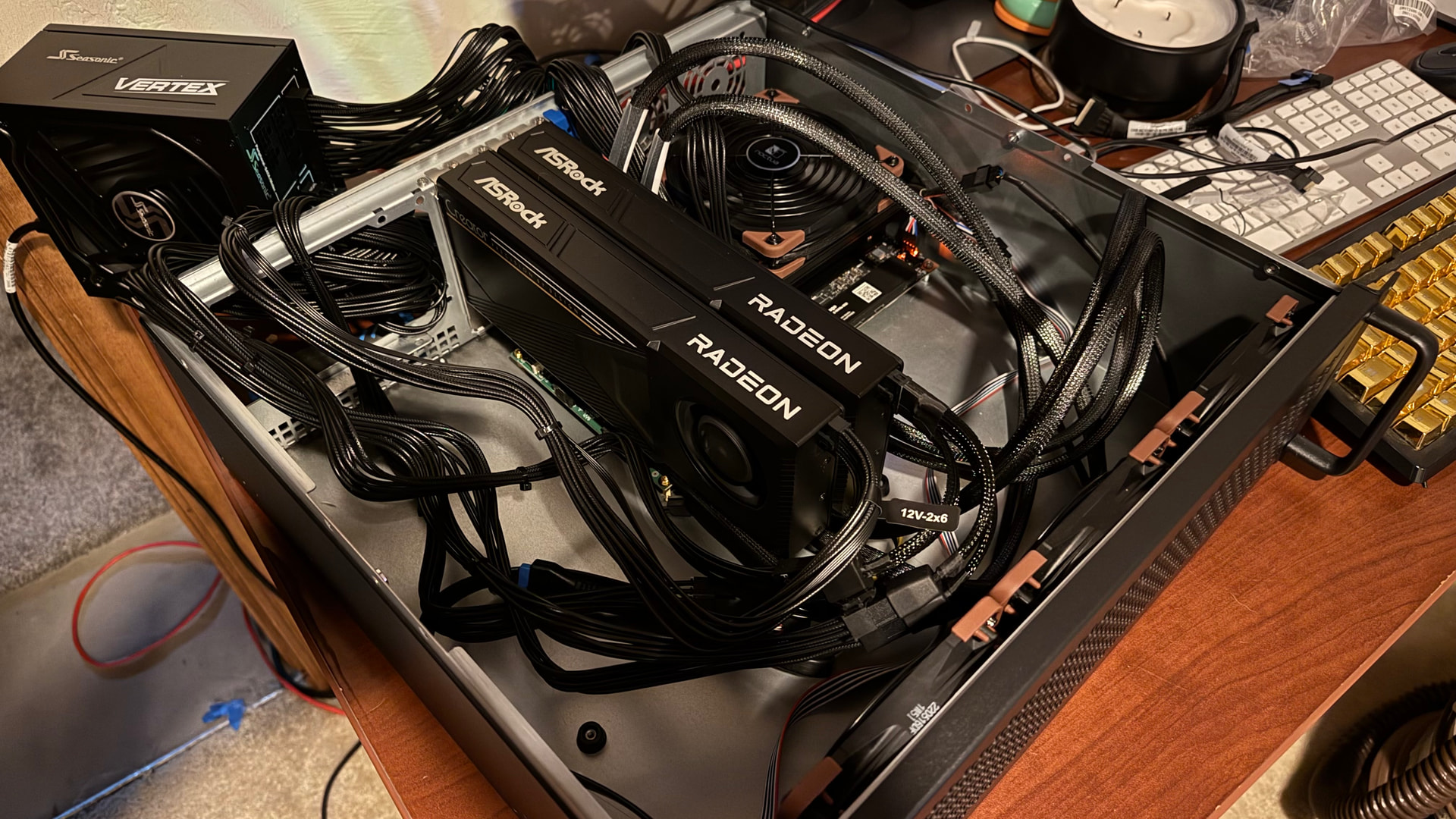
I ordered the motherboard back in November of 2025 for $1,700, a couple weeks before the first price jump. My original plan was for just the Strix Halo in a cheap 3U chassis using a 500 watt PSU that I already had. The Strix Halo is great, but once you load it up with context, things really come to a crawl. Ordered the first R9700 and an 850 watt PSU and hooked it directly to the x4 slot, and within 3 months I ordered the next R9700, the PCIe switch, carrier boards, cables, and a 1200 watt PSU. It’s just been a “one more thing” box for a while now. I think I’m done. I’m done, right?
3U is all I had left in my 15U rack. As long as I stick to blower style cards, 3U is great. It’s the cheap one on Amazon, like $140 or something.
The software has been the hardest part. Getting this whole thing to work on a “consumer” board, especially a unique one, was not easy.
1 Like
are you using all 3 gpus? it might be faster on just the 2 r9700
I have two instances of Llamacpp running, one on the Strix Halo GPU, the other on the two R9700’s.
Strix Halo: Deepseek V4 Flash Q2
2xR9700 + P2P: Qwen 3.6 27B Q8 MTP - split mode: tensor - context to max 256k
This keeps that x4 uplink from the PCIe switch to the main board fairly irrelevant during inference. I have to keep enough spare main memory to run the two separate instances (~8GB each). That leaves Deepseek seriously pressured. I was running Qwen 3.5 122B Q4 on the Strix Halo GPU previously, so Deepseek at Q2 is a bit of an experiment yet. I’ve considered sacrificing one of the M.2 slots to a fast RDMA capable NIC and possibly clustering another Strix Halo board into it, but I have 3U left in my rack so that would bring a whole new set of challanges.
If someone is out there that builds rackmount chassis: 3U, studs and I/O for two MicroATX, two ATX PSU’s, at least 5 (ideally 9) PCIe expansion slots, solid airflow front to back…I’d buy one today. Oh and an internal mount for a PiKVM.
Yes, I’ll be trying out Qwen 3.8 27B tonight when I get home from my office.
Not Thunderbolt / USB?
I don’t know of any USB or Thunderbolt NIC adapters that can do RDMA, which is a hard requirement to get any sort of performance when building an inference cluster. That said, Thunderbolt is effectively PCIe under the hood, but I’d try to keep it on real PCIe cards to minimize failure points. Also, I don’t generally like external adapters sticking out of the back of my racked machines. My USB Google Coral TPU’s are even inside my main NVR box on internal USB headers.
I logged in here with the intention of searching for the answer to this very question, and what do you know, it’s at the top of the forum. I guess I’m not the only one who is feeling the kick in the nuts from NVIDIA.
2 Likes
I thought ai 395 had Thunderbolt natively
Why don’t you want a rtx pro class card that costs just 10k? Plus tax of course
What is this thing pulling from the wall in terms of watts at idle?
It has USB 4, but I try to keep everything inside the chassis. Plus it’s all PCIe under the hood anyway, you’re just lane shifting to the port on the back.
As far as the RTX pro cards, a few reasons. First, I started with just the Strix Halo, and expanded from there. Second, you can’t get a 64GB RTX Pro setup for what I have into this these days. Last summer sure, but 6000’s are going for $12k+ today (tomorrow probably more) and I’d still need a box to house it. The R9700’s were $1,350 a piece, plus the switch for a similar amount. Lastly, I’ve always kinda been a red team guy, old habits.
Edit: I’m getting effectively 1TB of memory bandwidth (~1.2 theoretical) for decode with the way I have it setup. Thats RTX Pro 5000 72GB territory, those are $8600 alone without a box to put it in.
It pulls about 750 full tilt (CPU, all GPUs maxed out). The Strix Halo part is truly crazy how little power it pulls, maybe 140 watts max. The GPU’s run 300 watts each. The fans and PCIe switch are negligible compared to everything else. I’m not sure about idle, it’s on a UPS with my gaming rig. When they are both running and just idle, the UPS shows ~90 watts. The (rack mounted) gaming rig is a 5800X3D/7900XTX though so it can draw a decent amount just idling.
Edit: The framework desktop board ships with the APU at a modest 100w TDP. I have not played with raising it to the spec’s 120, but I plan do. I am also going to cap the big cards to 250 I think.
Prom21 Sidebar
(this might deserve its own topic, or it might have already been talked about elsewhere but I couldn’t find it)
If anyone out there was hoping the prom21 chipset pcie card from wisdipi would function in a similar manner to the lrlink but at a lower link speed and width, it does not seem to. It appears to have a much more complex switching topology than I had hoped.
Here is the lstopo output for my 2 r9700s using 2 of the prom21 chips nvme slots. c5 and c9 are the r9700 cards.
Prom21 → nvme1/2 → occulink → minisforum dock → r9700 pro c5/c9
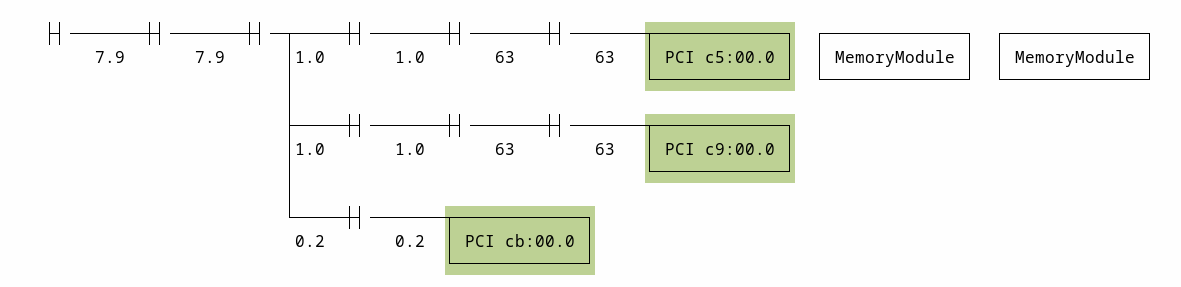

Tensor parallel performance of qwen 3.8 27B UD_Q8 using llama.cpp drops from 25tps decode using a dumb bifurcated 2x occulink card to 17tps decode using the prom21.
1 Like