Does the LRLink PCIe Bridge Fix RCCL's Broken P2P on Dual R9700? (Update: Yes it does!)

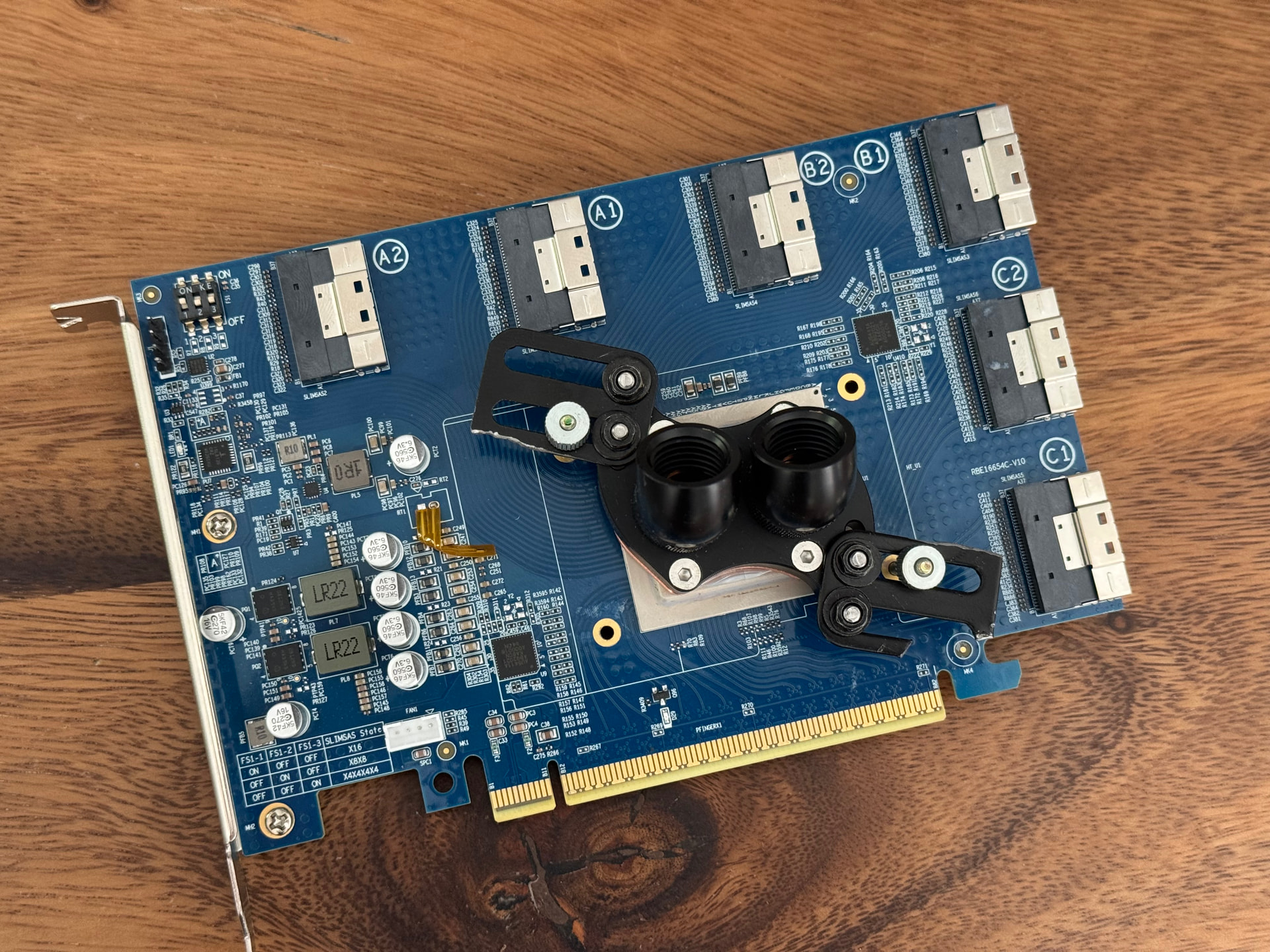
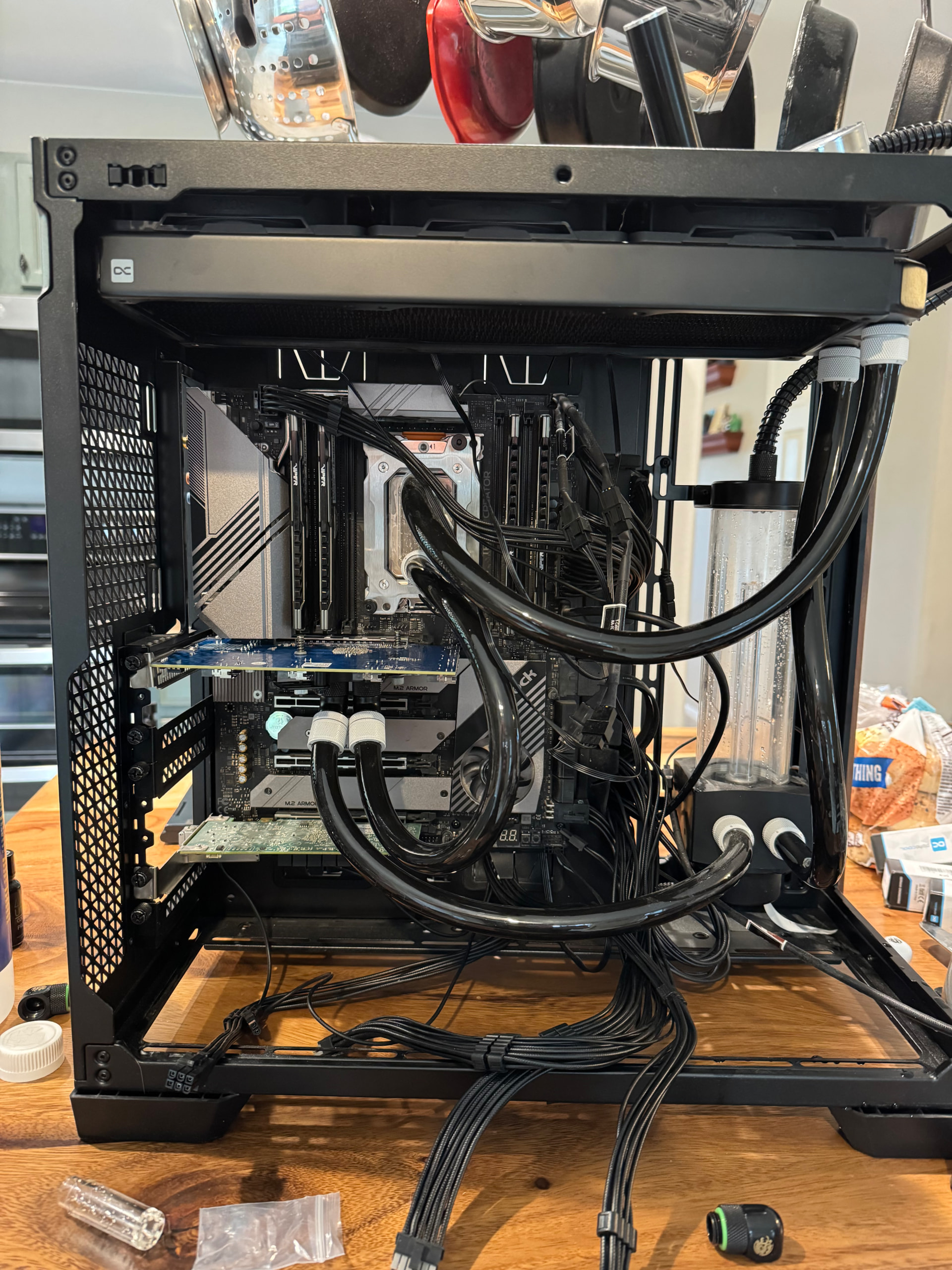
I also installed a cheap generic water block from Amazon. However, it did need some modifications to fit.

This is not a tutorial. :upside_down_face:

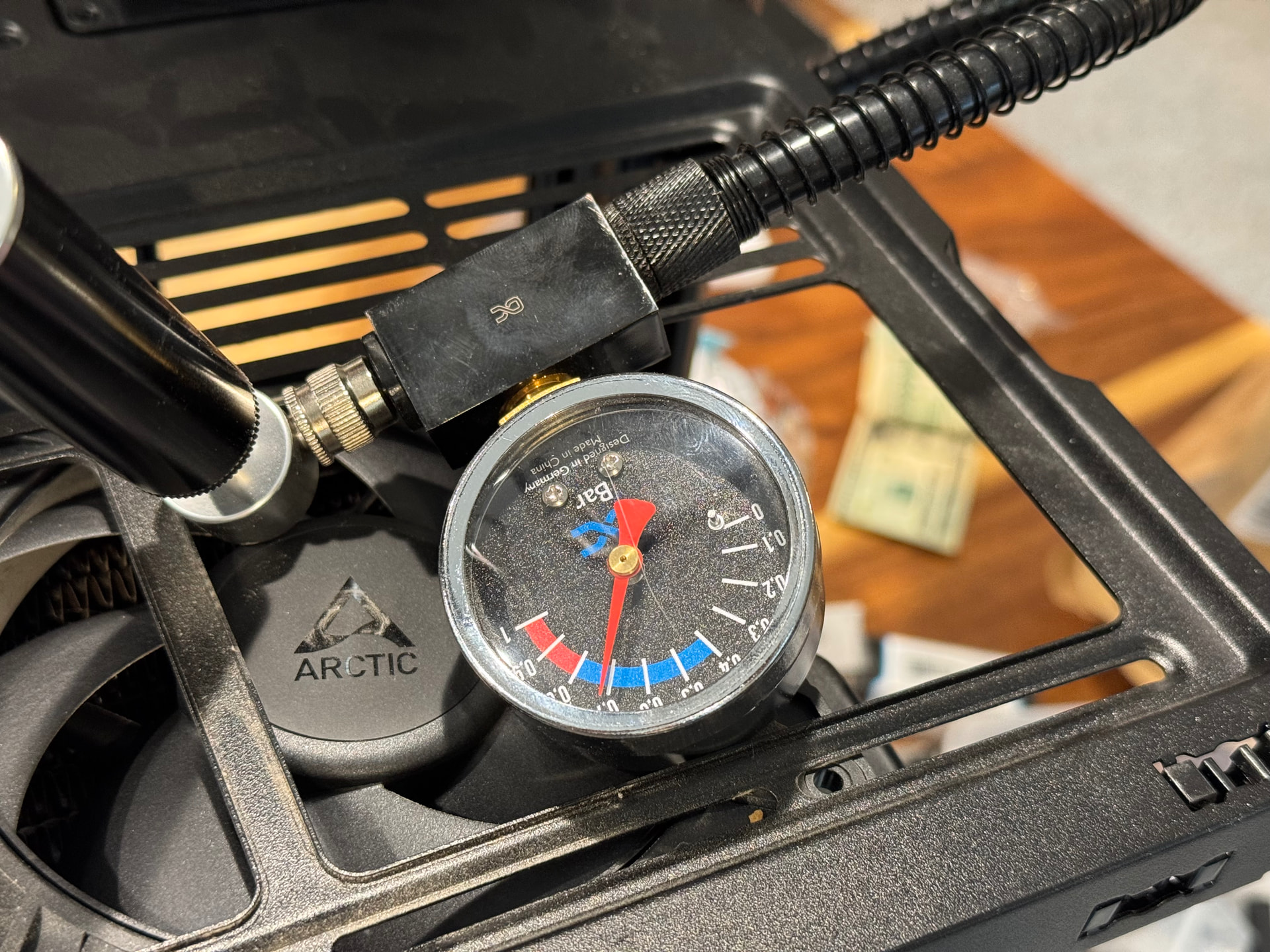
pressure tested since half my net worth is in this system.

The block is putting in a lot of work. The back of the card went from uncomfortably hot to slightly warm after a heavy task.

1 Like

Is that AI testing methodology? Or yours?

Seeing that reminds me of a rabbit hole I need to go down about Design of Experiments.

Instead of testing all variables one-by-one, use fractional factorial designs, Latin Hypercube Sampling (LHS), or Monte Carlo simulations to cover the design space with minimal trials. This vid gave me the idea.

Video: https://www.youtube.com/watch?v=5oULEuOoRd0

There are several different methods for particular purposes. I need to see if AI can use them, or even just implement them, and cut down on the number of experiments needed to cover all possible needed parameters.

1 Like

Claude.

And thank you for reminding me this channel existed! I’ll need to go at catch up on a few of their videos!

Edit: Yeah, that methodology would have been a HUGE help while working on this. I wonder if I can leverage Claude to build a skill that could apply this when troubleshooting?

*Tosses idea into overflowing hopper full of other ideas*

So this has one flaw that I can see. It doesn’t really work for pass/fail conditions. When there is no gradient to measure against, the system can’t really cope with that.

That said, this is a VERY powerful skill to leverage when you are dealing with degradation and/or tuning efforts. Being able to quickly run through multiple variables to understand how to optimize configs is for sure a tool that any IT/Arch pro can use daily.

It doesn’t work as well, sure, but you can narrow down faster.

The others i mentioned have different use cases.

Search Google with this phrase β€œyoutube engineering sampling multiple options in effiecient way” to get a decent quick look to see which tool might work best for your current project.

Of course, there is probably tons of research on Arxiv on the subject.

1 Like

So I wrote a quick skill based on the Taguchi method and used it to run a tuning test against the Qwen3-0.6B model I’ve been using for smoke testing and validation.

taguchi-skill.zip (28.5 KB)

The results were VERY exciting!

Method: Taguchi L9 orthogonal array (fractional factorial)
What it does: Tests 4 variables simultaneously across 3 levels each
in only 9 experiment configs β€” instead of 81 for a full factorial.
The array is structured so each variable’s effect can be isolated
by averaging results across rows where that variable is at the
same level. The effects of other variables cancel out mathematically.

Model: Qwen3-0.6B (small model for fast iterations, ~30-60s per config)
Data: tatsu-lab/alpaca (52K real training samples, not synthetic)
Hardware: 2Γ— R9700 PRO via PEX88096 PCIe switch, DDP LoRA training
Steps: 100 optimizer steps per config, 2 replicates each
Padding: Fixed-length (padding=β€œmax_length”) β€” required workaround
for gfx1201 caching allocator fragmentation bug
Total wall time: ~38 minutes for the full experiment

Factor table:
β”Œβ”€β”€β”€β”€β”¬β”€β”€β”€β”€β”€β”€β”€β”€β”€β”€β”€β”€β”€β”€β”€β”€β”€β”€β”€β”€β”€β”€β”¬β”€β”€β”€β”€β”€β”€β”€β”€β”€β”€β”€β”¬β”€β”€β”€β”€β”€β”€β”€β”€β”€β”€β”€β”¬β”€β”€β”€β”€β”€β”€β”€β”€β”€β”€β”€β”
β”‚ #  β”‚ Factor               β”‚ Level 1   β”‚ Level 2   β”‚ Level 3   β”‚
β”œβ”€β”€β”€β”€β”Όβ”€β”€β”€β”€β”€β”€β”€β”€β”€β”€β”€β”€β”€β”€β”€β”€β”€β”€β”€β”€β”€β”€β”Όβ”€β”€β”€β”€β”€β”€β”€β”€β”€β”€β”€β”Όβ”€β”€β”€β”€β”€β”€β”€β”€β”€β”€β”€β”Όβ”€β”€β”€β”€β”€β”€β”€β”€β”€β”€β”€β”€
β”‚ A  β”‚ Batch size / GPU     β”‚ 4         β”‚ 8         β”‚ 16        β”‚
β”‚ B  β”‚ Gradient accum steps β”‚ 1         β”‚ 2         β”‚ 4         β”‚
β”‚ C  β”‚ Max sequence length  β”‚ 64        β”‚ 128       β”‚ 256       β”‚
β”‚ D  β”‚ LoRA rank (Ξ± = 2Γ—r)  β”‚ 8 / 16    β”‚ 16 / 32   β”‚ 32 / 64   β”‚
β””β”€β”€β”€β”€β”΄β”€β”€β”€β”€β”€β”€β”€β”€β”€β”€β”€β”€β”€β”€β”€β”€β”€β”€β”€β”€β”€β”€β”΄β”€β”€β”€β”€β”€β”€β”€β”€β”€β”€β”€β”΄β”€β”€β”€β”€β”€β”€β”€β”€β”€β”€β”€β”΄β”€β”€β”€β”€β”€β”€β”€β”€β”€β”€β”€β”˜

Baseline: batch=4, accum=2, seq=512, rank=16 (prior working config)
L9 experiment matrix:
β”Œβ”€β”€β”€β”€β”€β”¬β”€β”€β”€β”€β”€β”€β”€β”€β”¬β”€β”€β”€β”€β”€β”€β”€β”€β”€β”€β”¬β”€β”€β”€β”€β”€β”€β”€β”€β”¬β”€β”€β”€β”€β”€β”€β”€β”€β”€β”€β”
β”‚ Run β”‚ Batch  β”‚ GrAccum  β”‚ MaxSeq β”‚ LoRA r/Ξ± β”‚
β”œβ”€β”€β”€β”€β”€β”Όβ”€β”€β”€β”€β”€β”€β”€β”€β”Όβ”€β”€β”€β”€β”€β”€β”€β”€β”€β”€β”Όβ”€β”€β”€β”€β”€β”€β”€β”€β”Όβ”€β”€β”€β”€β”€β”€β”€β”€β”€β”€β”€
β”‚  0  β”‚ 4      β”‚ 2        β”‚ 512    β”‚ 16 / 32  β”‚  ← baseline
β”‚  1  β”‚ 4      β”‚ 1        β”‚ 64     β”‚ 8 / 16   β”‚
β”‚  2  β”‚ 4      β”‚ 2        β”‚ 128    β”‚ 16 / 32  β”‚
β”‚  3  β”‚ 4      β”‚ 4        β”‚ 256    β”‚ 32 / 64  β”‚
β”‚  4  β”‚ 8      β”‚ 1        β”‚ 128    β”‚ 32 / 64  β”‚
β”‚  5  β”‚ 8      β”‚ 2        β”‚ 256    β”‚ 8 / 16   β”‚
β”‚  6  β”‚ 8      β”‚ 4        β”‚ 64     β”‚ 16 / 32  β”‚
β”‚  7  β”‚ 16     β”‚ 1        β”‚ 256    β”‚ 16 / 32  β”‚
β”‚  8  β”‚ 16     β”‚ 2        β”‚ 64     β”‚ 32 / 64  β”‚
β”‚  9  β”‚ 16     β”‚ 4        β”‚ 128    β”‚ 8 / 16   β”‚
β””β”€β”€β”€β”€β”€β”΄β”€β”€β”€β”€β”€β”€β”€β”€β”΄β”€β”€β”€β”€β”€β”€β”€β”€β”€β”€β”΄β”€β”€β”€β”€β”€β”€β”€β”€β”΄β”€β”€β”€β”€β”€β”€β”€β”€β”€β”€β”˜
Results table:
β”Œβ”€β”€β”€β”€β”€β”¬β”€β”€β”€β”€β”€β”€β”€β”€β”€β”€β”€β”€β”€β”€β”€β”€β”€β”€β”¬β”€β”€β”€β”€β”€β”€β”€β”€β”€β”€β”€β”€β”€β”¬β”€β”€β”€β”€β”€β”€β”€β”€β”
β”‚ Run β”‚ Config           β”‚ Samp/sec    β”‚ CV     β”‚
β”‚     β”‚ b / a / s / r    β”‚ (mean Β± Οƒ)  β”‚        β”‚
β”œβ”€β”€β”€β”€β”€β”Όβ”€β”€β”€β”€β”€β”€β”€β”€β”€β”€β”€β”€β”€β”€β”€β”€β”€β”€β”Όβ”€β”€β”€β”€β”€β”€β”€β”€β”€β”€β”€β”€β”€β”Όβ”€β”€β”€β”€β”€β”€β”€β”€β”€
β”‚  0  β”‚ 4/2/512/16 base  β”‚ 27.33 Β±0.01 β”‚  0.0%  β”‚
β”‚  1  β”‚ 4/1/64/8         β”‚ 53.74 Β±0.82 β”‚  1.5%  β”‚
β”‚  2  β”‚ 4/2/128/16       β”‚ 54.51 Β±0.07 β”‚  0.1%  β”‚
β”‚  3  β”‚ 4/4/256/32       β”‚ 49.48 Β±0.02 β”‚  0.0%  β”‚
β”‚  4  β”‚ 8/1/128/32       β”‚ 76.07 Β±28.2 β”‚ 37%  ⚠ β”‚
β”‚  5  β”‚ 8/2/256/8        β”‚ 43.83 Β±0.44 β”‚  1.0%  β”‚
β”‚  6  β”‚ 8/4/64/16        β”‚104.15 Β±8.17 β”‚  7.8%  β”‚
β”‚  7  β”‚ 16/1/256/16      β”‚ 52.38 Β±14.2 β”‚ 27%  ⚠ β”‚
β”‚  8  β”‚ 16/2/64/32       β”‚171.02 Β±38.1 β”‚ 22%  ⚠ β”‚
β”‚  9  β”‚ 16/4/128/8       β”‚108.60 Β±0.07 β”‚  0.1%  β”‚
β””β”€β”€β”€β”€β”€β”΄β”€β”€β”€β”€β”€β”€β”€β”€β”€β”€β”€β”€β”€β”€β”€β”€β”€β”€β”΄β”€β”€β”€β”€β”€β”€β”€β”€β”€β”€β”€β”€β”€β”΄β”€β”€β”€β”€β”€β”€β”€β”€β”˜

⚠ = GPU inference sidecar (bge-reranker) was running during
    these configs, causing contention on shared GPU memory.
    Clean runs had CV < 2%.
Factor ranking:
β”Œβ”€β”€β”€β”€β”€β”€β”¬β”€β”€β”€β”€β”€β”€β”€β”€β”€β”€β”€β”€β”€β”€β”€β”€β”€β”€β”¬β”€β”€β”€β”€β”€β”€β”€β”€β”€β”€β”€β”€β”¬β”€β”€β”€β”€β”€β”€β”€β”€β”€β”€β”€β”€β”€β”€β”€β”€β”€β”€β”€β”€β”€β”€β”€β”€β”€β”€β”€β”€β”€β”€β”€β”€β”
β”‚ Rank β”‚ Factor           β”‚ Effect     β”‚ Level averages (samp/sec)      β”‚
β”‚      β”‚                  β”‚ (samp/sec) β”‚                                β”‚
β”œβ”€β”€β”€β”€β”€β”€β”Όβ”€β”€β”€β”€β”€β”€β”€β”€β”€β”€β”€β”€β”€β”€β”€β”€β”€β”€β”Όβ”€β”€β”€β”€β”€β”€β”€β”€β”€β”€β”€β”€β”Όβ”€β”€β”€β”€β”€β”€β”€β”€β”€β”€β”€β”€β”€β”€β”€β”€β”€β”€β”€β”€β”€β”€β”€β”€β”€β”€β”€β”€β”€β”€β”€β”€β”€
β”‚  1   β”‚ Max seq length   β”‚ 61.08      β”‚ 64β†’109.6  128β†’79.7  256β†’48.6  β”‚
β”‚  2   β”‚ Batch size/GPU   β”‚ 58.10      β”‚  4β†’52.6     8β†’74.7   16β†’110.7 β”‚
β”‚  3   β”‚ LoRA rank        β”‚ 30.14      β”‚  8β†’68.7    16β†’70.4    32β†’98.9 β”‚
β”‚  4   β”‚ Grad accum       β”‚ 29.06      β”‚  1β†’60.7     2β†’89.8     4β†’87.4 β”‚
β””β”€β”€β”€β”€β”€β”€β”΄β”€β”€β”€β”€β”€β”€β”€β”€β”€β”€β”€β”€β”€β”€β”€β”€β”€β”€β”΄β”€β”€β”€β”€β”€β”€β”€β”€β”€β”€β”€β”€β”΄β”€β”€β”€β”€β”€β”€β”€β”€β”€β”€β”€β”€β”€β”€β”€β”€β”€β”€β”€β”€β”€β”€β”€β”€β”€β”€β”€β”€β”€β”€β”€β”€β”˜

Baseline:           27.33 samples/sec  (batch=4, accum=2, seq=512, r=16)
Predicted optimal: 171.04 samples/sec  (batch=16, accum=2, seq=64, r=32)
Actual measured:   171.02 samples/sec  (prediction error: 0.01%)
Improvement:       +525% over baseline

Full factorial equivalent: 81 runs
Taguchi L9 actual:         9 configs Γ— 2 reps = 18 runs + 2 baseline = 20
Savings:                   4Γ— fewer experiments

The best knob to turn (for small models anyway) is sequence length. The baseline config padded every sample to 512 tokens. Alpaca’s median sequence is 62 tokens. That means 87% of every training step was processing padding zeros. Cutting max_seq from 512 to 64 more than doubled throughput BEFORE any other change.

Batch size amplifies the seq-length effect but can’t overcome it:

  • At seq=64: batch 4β†’54, batch 8β†’104, batch 16β†’171 (linear scaling)
  • At seq=256: batch 4β†’49, batch 8β†’44, batch 16β†’52 (flat/negative)

Doubling batch size at long sequences actually HURTS because the GPU is saturated processing padding. This interaction would have been invisible with one-variable-at-a-time testing.

I’m going to run this on a larger 14B model tonight. In the mean time I’m going to take this concept of troubleshooting skills and build it out to a whole suite so when I’m trying to figure something out I can just point the skill at it and triage from there:

Experimental Design & Troubleshooting Skill Suite

#379 Epic
β”œβ”€β”€ #380 Root Triage/Router                    HIGH  ← build first
β”œβ”€β”€ #381 Taguchi Refactor (exists, integrate)  NORM
β”œβ”€β”€ #382 Delta Debugging (ddmin)               HIGH  Tier 1
β”œβ”€β”€ #383 Covering Arrays                       HIGH  Tier 1
β”œβ”€β”€ #384 Constrained Bayesian Optimization     NORM  Tier 2
└── #385 SPRT Acceptance Testing               NORM  Tier 2

The root router (#380) is the keystone β€” everything else plugs into it. Its decision tree classifies on three axes:

Axis 1: What happened?
  β”œβ”€β”€ Something broke (regression)    β†’ Delta debugging FIRST
  └── Want to improve / understand    β†’ continue to Axis 2

Axis 2: What's the response variable?
  β”œβ”€β”€ Binary (crash/boot/pass)        β†’ Covering array β†’ Logistic GLM
  β”œβ”€β”€ Continuous (throughput/loss)     β†’ Taguchi β†’ BO β†’ RSM
  └── Both (optimize subject to       β†’ Constrained BO
       "doesn't crash")

Axis 3: How many variables?
  β”œβ”€β”€ 1-2                             β†’ OVAT / direct test
  β”œβ”€β”€ 3-7                             β†’ Taguchi L9 / fractional factorial
  └── 8+                              β†’ Covering array / LHS screening

And the multi-method sequencing Joe asked about β€” the router should be able to say "run these in order":

Example pipeline for "training is crashing after updates":
  1. Delta debug β†’ isolate which change broke it
  2. Covering array β†’ test remaining config interactions
  3. Logistic GLM β†’ statistical attribution on pass/fail
  4. Constrained BO β†’ optimize throughput with crash constraint
  5. SPRT β†’ acceptance test before multi-day run

Ok… I’mma need someone to peer review this because we are moving out of β€œOh neat! it works!” to, β€œThis is competitive with cards 3X-5x the cost…”

I extrapolated out the values that worked for the Qwen3-0.6B and had Claude apply them to Qwen3-8B:

Predicted config for Qwen3-8B:

batch=8 / GPU, grad_accum=2, max_seq=128, lora_r=32 (alpha=64)
effective_batch = 8 Γ— 2 Γ— 2 GPUs = 32

Reasoning per knob:

  • batch=8: largest that fits the ~14GB activation budget at seq=128
  • seq=128: matches Alpaca’s distribution after Taguchi taught me
    longer seq is pure waste; can’t go to 64 because batch ceiling
    kicks in before I run out of VRAM
  • r=32: Taguchi rank 3 factor, near-free at 8B scale
  • accum=2: Taguchi rank 4 factor, best level
Prediction vs actual (Alpaca-52K, 1 epoch, bf16, eager attn, dual R9700):

β”Œβ”€β”€β”€β”€β”€β”€β”€β”€β”€β”€β”€β”€β”€β”€β”€β”€β”¬β”€β”€β”€β”€β”€β”€β”€β”€β”€β”€β”€β”¬β”€β”€β”€β”€β”€β”€β”€β”€β”€β”€β”€β”€β”€β”€β”¬β”€β”€β”€β”€β”€β”€β”€β”€β”
β”‚ Metric         β”‚ Predicted β”‚ Actual       β”‚ Delta  β”‚
β”œβ”€β”€β”€β”€β”€β”€β”€β”€β”€β”€β”€β”€β”€β”€β”€β”€β”Όβ”€β”€β”€β”€β”€β”€β”€β”€β”€β”€β”€β”Όβ”€β”€β”€β”€β”€β”€β”€β”€β”€β”€β”€β”€β”€β”€β”Όβ”€β”€β”€β”€β”€β”€β”€β”€β”€
β”‚ Wall time      β”‚ ~30 min   β”‚ 29.81 min    β”‚  0.6%  β”‚
β”‚ Throughput     β”‚ 28.6 s/s  β”‚ 29.07 samp/s β”‚ +1.6%  β”‚
β”‚ Peak VRAM/rank β”‚ ~27 GB    β”‚ 29.02 GB     β”‚ +7.5%  β”‚
β”‚ Final loss     β”‚ 1.0-1.5   β”‚ 1.3041       β”‚ in bandβ”‚
β””β”€β”€β”€β”€β”€β”€β”€β”€β”€β”€β”€β”€β”€β”€β”€β”€β”΄β”€β”€β”€β”€β”€β”€β”€β”€β”€β”€β”€β”΄β”€β”€β”€β”€β”€β”€β”€β”€β”€β”€β”€β”€β”€β”€β”΄β”€β”€β”€β”€β”€β”€β”€β”€β”˜

Compare this to the same test I did a few posts back:

I’m not just getting β€œgood’nuff”, I’m getting better than a runpod with dual RTX 4500s/ Granted, I’m hyper-tuning for a workload so putting the same effort into an Nvidia setups would net good results. However, the point is that I still have more theoretical bandwidth to tap into if I moved from a Gen4 switch to a Gen5 switch. Additionally, Flash Attention isn’t ported well for gfx1201, so this is all eager attention. A proper FA2/3 port on this hardware probably leaves another 30-50% on the table.

This is really starting to make me feel like AMD has been sandbagging/ignoring their software stack for consumer lines to protect their enterprise lines. If people knew they could get such a good $/compute they’d fill racks with R9700s.

So after the Taguchi experiment from my last post, I wanted to see how far I could push training. Applied that same optimized recipe (push batch to VRAM ceiling, hold a=2 s=128 r=32) to Mistral-Nemo-12B as a third validation point. Predictions landed within 1% on every metric:

Three-anchor hardware ceiling:
β”Œβ”€β”€β”€β”€β”€β”€β”€β”€β”€β”€β”€β”€β”€β”€β”€β”€β”€β”€β”€β”€β”€β”¬β”€β”€β”€β”€β”€β”€β”€β”€β”¬β”€β”€β”€β”€β”€β”€β”€β”€β”€β”€β”¬β”€β”€β”€β”€β”€β”€β”€β”€β”€β”€β”€β”€β”€β”€β”
β”‚ Model               β”‚ Params β”‚ Samp/sec β”‚ paramΒ·tok/s  β”‚
β”œβ”€β”€β”€β”€β”€β”€β”€β”€β”€β”€β”€β”€β”€β”€β”€β”€β”€β”€β”€β”€β”€β”Όβ”€β”€β”€β”€β”€β”€β”€β”€β”Όβ”€β”€β”€β”€β”€β”€β”€β”€β”€β”€β”Όβ”€β”€β”€β”€β”€β”€β”€β”€β”€β”€β”€β”€β”€β”€β”€
β”‚ Qwen3-0.6B          β”‚  0.75B β”‚ 171.02   β”‚ ~30 T        β”‚
β”‚ Qwen3-8B            β”‚  8.2B  β”‚ 29.07    β”‚ 30.5 T       β”‚
β”‚ Mistral-Nemo-12B    β”‚ 12.3B  β”‚ 18.91    β”‚ 29.7 T       β”‚
β”œβ”€β”€β”€β”€β”€β”€β”€β”€β”€β”€β”€β”€β”€β”€β”€β”€β”€β”€β”€β”€β”€β”Όβ”€β”€β”€β”€β”€β”€β”€β”€β”Όβ”€β”€β”€β”€β”€β”€β”€β”€β”€β”€β”Όβ”€β”€β”€β”€β”€β”€β”€β”€β”€β”€β”€β”€β”€β”€β”€
β”‚ Mean                β”‚        β”‚          β”‚ 29.9 T Β±1.5% β”‚
β””β”€β”€β”€β”€β”€β”€β”€β”€β”€β”€β”€β”€β”€β”€β”€β”€β”€β”€β”€β”€β”€β”΄β”€β”€β”€β”€β”€β”€β”€β”€β”΄β”€β”€β”€β”€β”€β”€β”€β”€β”€β”€β”΄β”€β”€β”€β”€β”€β”€β”€β”€β”€β”€β”€β”€β”€β”€β”˜

Three different architectures, 15Γ— parameter range, same ceiling. The dual R9700 saturates at ~30 T paramΒ·tok/s for LoRA training. Period.

There is a hard wall here.

I also tested whether the switch was leaving bandwidth on the table. lspci -vvv showed the PEX88096 running MRRS=128 (should support up to 4096) and ExtTag=OFF on the switch ports. Looked like free performance sitting there. Nope… setpci writes get silently rejected. The firmware locks DevCtl at 0x083f. Both AMD (Navi 10 bridges) and the card OEM (switch ports) lock their registers independently. 19.60 GB/s is the ceiling and no amount of software tuning moves it.

Hoping to find more throughput, I installed AOTriton flash attention. It works on gfx1201 (TORCH_ROCM_AOTRITON_ENABLE_EXPERIMENTAL=1) but the throughput gain is <1% across all three model sizes. What it DOES give you is VRAM savings that scale with batch Γ— seqΒ²:

FA A/B on training (eager vs SDPA):
β”Œβ”€β”€β”€β”€β”€β”€β”€β”€β”€β”€β”€β”€β”€β”€β”€β”€β”€β”¬β”€β”€β”€β”€β”€β”€β”€β”€β”€β”€β”€β”€β”¬β”€β”€β”€β”€β”€β”€β”€β”€β”€β”€β”€β”€β”€β”€β”€β”
β”‚ Model           β”‚ Throughput β”‚   VRAM        β”‚
β”œβ”€β”€β”€β”€β”€β”€β”€β”€β”€β”€β”€β”€β”€β”€β”€β”€β”€β”Όβ”€β”€β”€β”€β”€β”€β”€β”€β”€β”€β”€β”€β”Όβ”€β”€β”€β”€β”€β”€β”€β”€β”€β”€β”€β”€β”€β”€β”€β”€
β”‚ Qwen3-0.6B      β”‚ +1.29%     β”‚ βˆ’30 MB        β”‚
β”‚ Qwen3-8B        β”‚ +0.24%     β”‚ βˆ’590 MB       β”‚
β”‚ Mistral-Nemo-12Bβ”‚ +0.47%     β”‚ βˆ’300 MB       β”‚
β””β”€β”€β”€β”€β”€β”€β”€β”€β”€β”€β”€β”€β”€β”€β”€β”€β”€β”΄β”€β”€β”€β”€β”€β”€β”€β”€β”€β”€β”€β”€β”΄β”€β”€β”€β”€β”€β”€β”€β”€β”€β”€β”€β”€β”€β”€β”€β”˜

Free VRAM headroom, but the ceiling doesn’t move because training is compute-bound, not memory-bound. Worth enabling, just don’t expect speed gains.

Corrections to my last post: I hoped a Gen5 switch and proper FA2/3 could unlock more training performance. Both wrong. Training is compute-bound so Gen5 doubles bandwidth but that’s not going to translate into extra training speed. The remaining training levers are more GPUs (cuz I haven’t burned enough money on this rig) or waiting for AMD to ship better ROCm kernels (lul).

So with training maxed out, I looked at how to boost inference. Same methodology, different problem. Built a Taguchi L8 (8 runs, 7 binary variables) on Qwen3-Coder-30B-A3B (MoE, 17 GB) using both the ROCm and Vulkan llama-bench binaries:

Factor table:
β”Œβ”€β”€β”€β”€β”¬β”€β”€β”€β”€β”€β”€β”€β”€β”€β”€β”€β”€β”€β”€β”€β”€β”€β”€β”€β”€β”€β”¬β”€β”€β”€β”€β”€β”€β”€β”€β”€β”€β”€β”€β”€β”€β”¬β”€β”€β”€β”€β”€β”€β”€β”€β”€β”€β”€β”€β”€β”€β”
β”‚ #  β”‚ Factor              β”‚ Level 1      β”‚ Level 2      β”‚
β”œβ”€β”€β”€β”€β”Όβ”€β”€β”€β”€β”€β”€β”€β”€β”€β”€β”€β”€β”€β”€β”€β”€β”€β”€β”€β”€β”€β”Όβ”€β”€β”€β”€β”€β”€β”€β”€β”€β”€β”€β”€β”€β”€β”Όβ”€β”€β”€β”€β”€β”€β”€β”€β”€β”€β”€β”€β”€β”€β”€
β”‚ A  β”‚ Backend             β”‚ ROCm         β”‚ Vulkan       β”‚
β”‚ B  β”‚ Split mode (-sm)    β”‚ layer        β”‚ tensor       β”‚
β”‚ C  β”‚ RADV_DEBUG          β”‚ (unset)      β”‚ nocompute    β”‚
β”‚ D  β”‚ Flash attention     β”‚ -fa 0        β”‚ -fa 1        β”‚
β”‚ E  β”‚ Batch size (-b)     β”‚ 512          β”‚ 2048         β”‚
β”‚ F  β”‚ MMAP (-mmp)         β”‚ 1 (default)  β”‚ 0 (disabled) β”‚
β”‚ G  β”‚ Ubatch (-ub)        β”‚ 256          β”‚ 1024         β”‚
β””β”€β”€β”€β”€β”΄β”€β”€β”€β”€β”€β”€β”€β”€β”€β”€β”€β”€β”€β”€β”€β”€β”€β”€β”€β”€β”€β”΄β”€β”€β”€β”€β”€β”€β”€β”€β”€β”€β”€β”€β”€β”€β”΄β”€β”€β”€β”€β”€β”€β”€β”€β”€β”€β”€β”€β”€β”€β”˜

Ran all 8 configs in ~15 minutes. This highlighted something that I haven’t quite processed yet, but reinforces my belief that LLMs are a tech stack more than a mythical black box where one config is perfect for every model and/or situation.

β”Œβ”€β”€β”€β”€β”€β”€β”€β”€β”€β”€β”€β”€β”€β”€β”€β”€β”€β”€β”€β”€β”€β”€β”¬β”€β”€β”€β”€β”€β”€β”€β”€β”€β”¬β”€β”€β”€β”€β”€β”€β”€β”€β”€β”€β”€β”€β”€β”¬β”€β”€β”€β”€β”€β”€β”€β”€β”€β”€β”€β”€β”€β”€β”€β”
β”‚ Config               β”‚ Backend β”‚ tg128 (t/s) β”‚ pp4096 (t/s)  β”‚
β”œβ”€β”€β”€β”€β”€β”€β”€β”€β”€β”€β”€β”€β”€β”€β”€β”€β”€β”€β”€β”€β”€β”€β”Όβ”€β”€β”€β”€β”€β”€β”€β”€β”€β”Όβ”€β”€β”€β”€β”€β”€β”€β”€β”€β”€β”€β”€β”€β”Όβ”€β”€β”€β”€β”€β”€β”€β”€β”€β”€β”€β”€β”€β”€β”€β”€
β”‚ ROCm default         β”‚ ROCm    β”‚    68       β”‚    245        β”‚
β”‚ Vulkan default       β”‚ Vulkan  β”‚   131       β”‚   3260        β”‚
β”‚ Decode-optimal       β”‚ Vulkan  β”‚   147.86    β”‚   2743        β”‚
β”‚ Prefill-optimal      β”‚ ROCm    β”‚    76       β”‚   5060        β”‚
β””β”€β”€β”€β”€β”€β”€β”€β”€β”€β”€β”€β”€β”€β”€β”€β”€β”€β”€β”€β”€β”€β”€β”΄β”€β”€β”€β”€β”€β”€β”€β”€β”€β”΄β”€β”€β”€β”€β”€β”€β”€β”€β”€β”€β”€β”€β”€β”΄β”€β”€β”€β”€β”€β”€β”€β”€β”€β”€β”€β”€β”€β”€β”€β”˜

Decode-optimal:  Vulkan, -sm layer, RADV_DEBUG=nocompute, -fa 0, -b 2048, -mmp 0, -ub 256
Prefill-optimal: ROCm,   -sm layer, -fa 1, -b 2048, -mmp 0, -ub 1024

The big surprise was flash attention. Everyone (myself included) treats it as β€œturn it on, it’s faster.” On RDNA 4 inference it’s actually a workload toggle:

  • FA ON: +55% prefill, -23% decode

  • FA OFF: worse prefill, much better decode

If you’re doing interactive chat, turn FA off. If you’re doing RAG or processing long contexts, turn it on. Not both. This may not be a hard truth, but more a reality of using workaround to get consumer hardware to work with industry standards.

The other shock: ROCm default prefill is leaving 95% of performance on the table. Out of the box: 245 t/s. Add three flags (-b 2048 -fa 1 -mmp 0): 5060 t/s. That’s a 20Γ— improvement from flags that should probably be defaults.

A few other notes from the test:

  • -sm tensor is broken when combined with -mmp 0 on both backends. Crashes at context creation. Had to fall back to -sm row on two runs. Use -sm layer for now.

  • RADV_DEBUG=nocompute does help Vulkan decode on MoE, confirming what @digitalscream found.

  • -mmp 0 and -b 2048 are consistent wins on both metrics, both backends. No reason not to use them.

The practical takeaway: if you’re running llama-server or llama-swap, you want two configs:

  1. A Vulkan instance for chat
  2. A ROCm instance for heavy context work.

Same model, same hardware, different flags. The routing layer handles the rest.

Next up is a concurrency sweep on the Vulkan decode config and a dense model panel to see if the ROCm-vs-Vulkan picture changes on non-MoE architectures.

The Taguchi skill ZIP from my last post is what drove all of these experiments. @BillDStrong You legit inspired this testing so major shoutout!

Here is a troubleshooting skill that I put together from your pointers. I made it generic so you can point it at pretty much any issue and it’ll help route you to a few testing methodologies to try and figure out the solution. It’s made for Claude, but should be easy enough to tweak for another harness.

troubleshooting-suite.zip (34.7 KB)

2 Likes

Thanks for the shoutout!

And thanks for the testing as well as the skills.

Might I suggest a new topic for this? This seems useful enough that others will find it useful.

Also, looking at the bandwidth limit, do we know if the limit is the switch, or the cards themselves?

A common refrain is cards don’t take advantage of PCIe bandwidth, so we don’t need faster PCIe speeds. So, is that the same limit you get from the Nvidia cards, and if you married the Nvidia and AMD cards with the vulkan backend, does that increase the bandwidth the switch hits?

This would allow us to see if the switch would be useful for adding a 100Gbps+ cards there too give extra bandwidth between 2 sets of switches.

1 Like

Very cool results! Honestly, a useful benchmark would be one that would upload the results of tests like these and allow an reconfiguration dependant on device type/architecture, etc.

Compute. At least, as far as I can tell. GPUs are at 100% so while there are possible optimizations, that’s deep in the driver level for training.

So, funny you say that. I had the idea that for AMD cards, it would be a hoot to get two more PCIe switches, and have two switches connect into one so we still avoid the p2p issue, but then can have 6-10 cheap AMD cards in a cluster.

It would be an absolute spaghetti monster of a system, but the MEMES!

                         CPU
                          β”‚ x16
                     β”Œβ”€β”€β”€β”€β”΄β”€β”€β”€β”€β”
                     β”‚ Switch Aβ”‚  (spine, in PCIe slot)
                     β””β”€β”€β”¬β”€β”€β”€β”¬β”€β”€β”˜
                x16 β”€β”€β”€β”€β”˜   └──── x16
           β”Œβ”€β”€β”€β”€β”΄β”€β”€β”€β”€β”      β”Œβ”€β”€β”€β”€β”΄β”€β”€β”€β”€β”
           β”‚ Switch Bβ”‚      β”‚ Switch Cβ”‚  (leaves, cable-connected)
           β”‚ 10-port β”‚      β”‚ 10-port β”‚
           β””β”¬β”¬β”¬β”¬β”¬β”€β”€β”€β”€β”˜      β””β”€β”€β”€β”€β”¬β”¬β”¬β”¬β”¬β”˜
            β”‚β”‚β”‚β”‚β”‚                β”‚β”‚β”‚β”‚β”‚
           GPU 0-4              GPU 5-9
1 Like

So long as that worked, then the bandwidth between the 2 switches would be faster than 100Gbps networking, by 3x times for PCIe 4, or 6x times for PCIe 5. The PCIe 5 are not that much more expensive than the 4, so may be worth it.

The 2 100Gbps cards and 2 switches would be cheaper, though. By about 200 bucks for the PCIe 4 version switch, which at the cost of 8 cards, that may not matter at all

I would worry about the interactions of multiple layers of switches. You could do an experiment with a slot on a motherboard that is coming from the chipset, that should be a cheap PCIe switch, right?

Now that I think about it, if the 21GBps is compute bound, and I assume it is GPU compute, then even with 4 GPUs, you only need the PCIe gen 4 then get one PCIe gen 5 for the spine to handle the bandwidth of both? Or is this to naive?

One thing to be aware of, at least the people I have spoken to about trying to get more than 8 GPUs in one machine, the BIOS must support dealing with that much memory. One guy I talked to said most MB max out at 8 GPUs, and he thought it had something to do with allocating memory. He was dealing with 16 3090’s, and the most he could get was 12 in one system, but it was not usable, so he went with 2 systems and networking.

A system with 16 GPUs would be an interesting test, though. If its doable, it would probably be on Enterprise boards. I haven’t tested it, just giving you a heads up so you can do some reasearch for your setup, and don’t spend and can’t use it.

The issue with AMD consumer cards is going through the CPU breaks P2P. So, yes, it would work, but with a big hit due to having to run things in turn based fust concurrent. While I get the logic of using the chipset as a switch, I’m not aware of any chipset that acts as a standalone switch in that way. It would still try to leverage the CPU.

Yeah, I am using switch as a shorthand for bandwidth management in this case rather than as a network switch which can address directly.

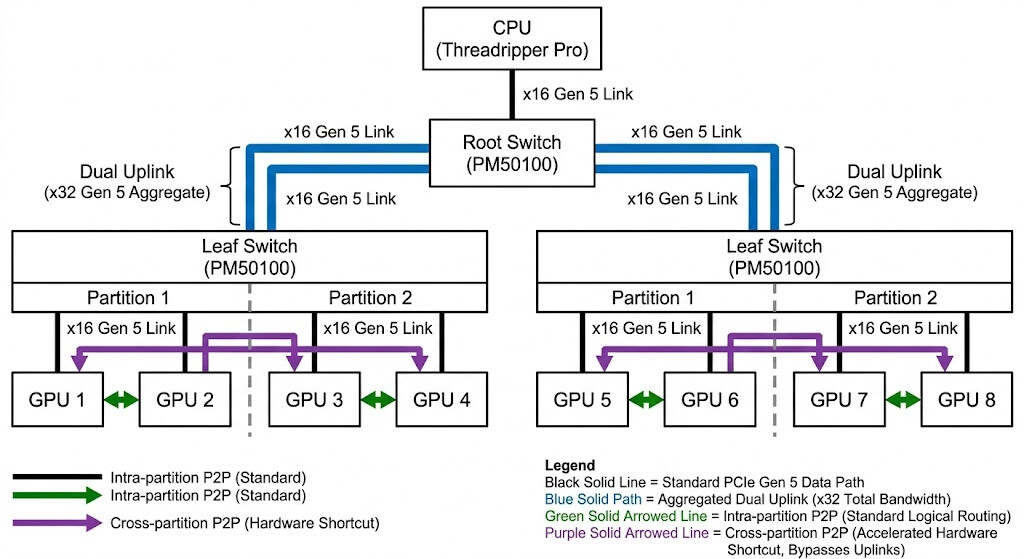
If you want to talk to guyZ doing nested pcie switching for TP16 builds this is one of their diagrams:

one super noteworthy thing: you can partition pcie switches into logical switches within the same actual plx chip.

each of these logical switches can have its own x16 link back to the CPU. AND still talk directly between partition 1 and 2 on that plx chip at line rate.

easy way to double your bandwidth and have switch-x32-cpu-x32-switch or just go 3 switches and bypass the cpu entirely.

3 Likes

Note Taking GIFs | Tenor

1 Like

Chat, is this a bot?

(Context: There was someone triple posting from two accounts. Mods cleaned it up.)

Funny, those accounts were created on the same day as well. What are the odds!

Now, if we can trace the IP to how many other accounts here…

1 Like

New here to the forums. After fighting with firmware, rebar support, MMIO windows, etc, I was able to get a Highpoint Rocket 1628A(Gen 5 switch) working with two R9700’s hanging off the Gen 4 x4 slot on the Framework Strix Halo board. Framework’s UEFI doesn’t have any toggles for ReBAR and MMIO sizing, so I had to handle it all with boot time kernel parameters, but it does work. The stock Highpoint firmware was a giant tree and wanted 1TB of addressable memory by default between all of the placeholder endpoints. Their support was pretty great and sent me a 2x x16 and a 4x x8 firmware for the board. The only thing I have to get working now is RCCL to boost the p2p path. Getting ~54GB GPU to GPU traffic according to the ROCm bandwidth test which means it cannot be going over the x4 uplink, everything is staying on the switch. I know everyone here is running big Epyc boards with a gazillion PCIe lanes, but there’s a few of us poors that might want to know that a good switch configured properly will work just fine over the tiny x4 slot on the Strix Halo boxes. I bought one R9700 and realized very quickly that I wanted two, and then realized I was going to have to get creative with the PCIe layout.

3 Likes

we demand pictures

1 Like