I used to do remote backups from my NAS to a secondary server I had stashed in a different location using ZFS Send/Recv commands over SSH.
This worked really well, but my situation where I could host my secondary server in a different location wound up wrapping up, so I am looking for an alternate solution for backups.
My local NAS is a ZFS setup, so I was looking for a cloud based ZFS Send/Recv backup solution, but the only one I located was VERY expensive. I started looking into ways to get ZFS to back up to AWS, but I didn’t like any of the solutions I was figuring out.
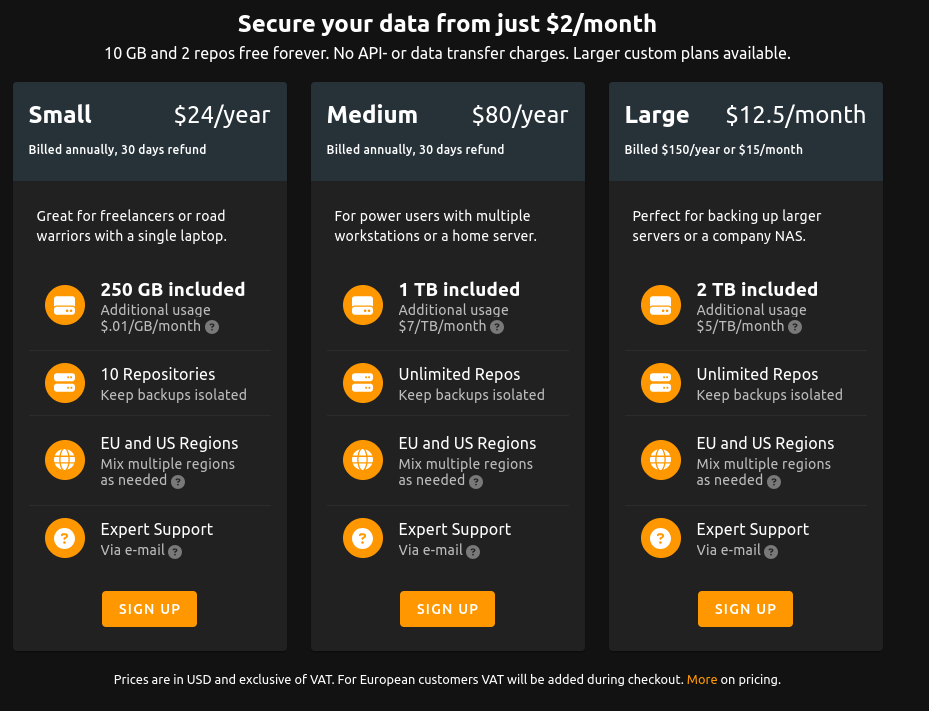
In the mean time I found a service called BorgBase. Pricing at BorgBase is surprisingly reasonable.
It uses the open source Borg Backup solution to back up to a cloud backup service. It claims backups are encrypted in the open source tool prior to being sent, so privacy and security appears to be pretty good.
That said, I have no personal experience with it.
So, has anyone used Borg Backup or the BorgBase cloud storage service?
I’d appreciate anyone input or take on this software and company.
I borg backup locally, then use rclone to replicate to B2 cloud object storage.
Pros: Cheap and fast. (object storage allows async transfers). Restores are fast due to local borg repo.
Cons: Requires local storage for borg backup. Less flexible then other solutions
From what I can see BorgBase stores the borg repo only in the cloud. So it reduces the requirements for local storage, and simplifies the backup procedure.
Pros: Doesn’t need local storage.
Cons: Restores slow, locks you in to their platform.
Yeah, another option would be something like a Hetzer Storage Box.
I’m not sure quite how locked in one would be. Would you have to re-upload the data if you changed providers? Sure, but unless you are severely bandwidth limited, that isn’t a big issue.
Heck, even if you can achieve 10mbit upstream to the server you ought to be able to replace the backup in ~ 1TB per day. Some people have gigabit bandwidth. You could upload 10TB a day.
No clue what the practical bandwidth to the server is, but if you soured on them, and you had - say 3TB - on their servers, even if you only get 30Mbit up to the server, which I think is a conservative estimate, that is only ~10 days of uploading.
Not the end of the world.
I could technically do a local backup first, but I am not convinced I want to. I likely have all the hardware that would be required, but where would I put it? I already have one location for my storage and server, I wouldn’t want to put noisy hardware in another location… And it would make little sense to put them right next to each other, as that kind of defeats the purpose of backups, should that location get somehow compromised (flooding, fire, etc.)
You have given me some things to think about though, and I appreciate that.
My biggest concern is regarding the encryption and security of Borg, which I will have to do some reading on.
One big gotcha is that you lose all your backup history when migrating, but as you said easy to move.
The most common use case for backups is recovering from hardware failure, operator error and things like crypto lockers. So having backups that are onsite and replicated offsite does make a lot of sense.
Borg encryption is more than sufficient, no one will be breaking the encryption in the next few decades. Just set a passphrase of 10 or more characters with repokey mode.
https://zfs.rent is an intriguing option, though I have not used their services. $10/mo/HDD (any size, 20TB etc. is fair game) and although the name implies ZFS-only, that’s not true. It’s a full VM you can do whatever you want with, though with only 2GB RAM and 25GB storage for your OS, you probably aren’t doing much other than what the service is built for.
I also like that you can ship them a HDD that has been pre-loaded, that way from then on out you’re only uploading the incremental difference. You don’t have to do a massive upload after signing up which can take a very long time if you have cable internet with slow upload speeds.
The AES-256 / HMAC-SHA-256 encryption is certainly strong, but the implementation of that also matters such that it cannot be circumvented. They do appear to encrypt before transmission which is good, but it doesnt hurt to carefully review the architecture and how it works.
The question is also if an attacker stores ones backup, and is able to brute force decrypt it in a few decades, is the data contained within still relevant from a privacy perspective? Most of it may not be, but some things still might be.
Would have to think about how one does this to gain adequate redundancy at the lowest possible cost.
A single drive worth of redundancy is insufficient, especially considering the amount of time it would likely take to ship a replacement drive to them, and then resilver it.
I’d consider two drives worth of redundancy an absolute minimum, with maybe a third thrown in for good measure to account for the higher replacement time.
This means that the lowest cost one would be looking at is 4 drives in a 4-way mirror config (as a 4 drive RAIDz3 makes absolutely no sense).
So, a minimum of $40 per month.
1TB of internet data per month is included. Additional is $5 per TB. Other than the initial upload and potential recovery, I don’t think I’d use more than the 1TB of data per month.
One could get around the initial upload filling the drives locally, and then shipping them to them, and doing a zpool import, but that is probably not worth it, as the additional shipping cost would likely be more than the additional bandwidth cost.
But then there is the cost of the drives to factor in.
Since they are backup only drives they don’t need to be fast. All they need to do is keep up with WAN speeds which doesn’t take much. The slowest 5400rpm drives would likely do the trick, as long as they are not SMR.
But you’d probably want pretty reliable drives in this role, so basic consumer drives are probably not a good idea.
I have 2.4TB I need to back up right now, and I’d need at least a bit of a buffer above that. Smallest I’d thus consider is probably four high end, reliable 4TB drives. Maybe something even larger.
I’d probably be looking at WD Gold drives (based on the old bulletproof HGST drives after WD’s acquisition) four 4TB drives right now would cost me $676. Four 6TB drives (next size up) would be $876.
I’d also need to destroy my local pool and recreate it (which would be difficult) as in my naivete when I set it up a decade ago, I didn’t see the need for encryption, and ZFS send/recv can’t encrypt in flight. It needs to be a part of the pool from the get go. Considering the size of the pool I’m backing up from (192TB, only a small fraction of the data would actually be backed up as much of it is replaceable) this would be challenging and require some planning.
So I’d have to consider the cost.
While I really appreciate the possibility of doing a native ZFS Send/Recv backup with native encryption, the $876 upfront investment in drives, followed by $10 in initial data transfer costs, and $40 per month for the service is pretty steep compared to the ~$14 per month with no upfront cost for one of the BorgBackup hosts.
I love native ZFS, but the cost just feels really difficult to justify. It makes you wonder how the like of Hetzner and their “Storage Box” and BorgBackup can do it at the cost they do.