
The Vision
DIY a network storage fabric for VFX type workloads. These workloads tend to be latency sensitive and one or two VFX artists working on rendering can wreck the latency experience for other users on the storage network because the rendering workload chews up all the available network throughput.
Meanwhile Enterprise drives, such as the Kioxia CM7 shown in the video, can easily sustain 15 gigabytes per second throughput each.
I also discovered that there hasn’t been as much innovation that should be “enthusiast accessible” to connect the pieces that already exist for anyone looking for this level of performance.
So I’ve started to write down the steps I took and what my experiences were.
Pre-reqs for > 25g DIY storage networking on Linux
The biggest thing to clarify is that this level of performance requires tighter software and hardware coupling. So there are excursions we’ll have to undertake together to make significant modifications on the software side and your hardware has to have good support in Linux for what we’re going to do.
That means a good nic that supports RDMA offload (RoCE and good linux support implies that); a networking switch that supports RDMA and a robust software stack that can take advantage of these features in hardware.
Not every combination has been tested and “working” may not imply “stable.”
With this thread, and our user community, my aim is to try to distill this from less arcana and more into something accessible given that 100 gigabit+ is sort of accessible in an era of incoming volume 1.6 terabit optical links at the top end…
DIY in this context is decidedly not a commercial offering. Pure Storage and Wekka at the top end, and with solutions like from iX systems with TrueNas Enterprise editions somewhere in the middle.
Threading the needle on “everyday RDMA” is long overdue, imho, for reasons I explained in the video.
The key constraint for us : stock Linux, and even Rocky/RHEL we use in the video, userspace Samba is straightforward, but SMB Direct on Linux is tied to the kernel SMB server (ksmbd) path, not ordinary smbd.
The important gotcha for Rocky specifically: on stock Rocky Linux 10, you can create a normal Samba share, but you probably cannot make it SMB Direct (RDMA) capable for Windows clients with the shipped Rocky/RHEL stack**.** Rocky’s docs cover standard Samba (smbd), while the Linux SMB Direct docs describe SMB Direct for the kernel SMB server (ksmbd), not ordinary Samba. Red Hat also states that ksmbd is not included in any shipping release, which means a stock Rocky 10 system normally won’t have the needed server-side kernel piece. (Other non-stock things, like adding ZFS support to Rocky, are generally much less unpleasant than via “default” RedHat options.
Rocky Linux 9 vs 10
As of now, Rocky Linux 9 is still the safer choice if ZFS is a hard requirement: OpenZFS does publish EL10 packages, but recent EL10 users have still hit lag and compatibility gaps around newer 10.x kernels (for example, an OpenZFS issue documented kmod-zfs-2.3.5-1.el10 installing on EL10.0 but not the newer 10.1 kernel until rebuilt).
Rocky 10 is fine if you want the newer platform and are comfortable with more churn, but for a storage box where stability matters, Rocky 9 remains the more mature, better-proven path in April 2026 because its ZFS packaging and kernel compatibility story is less likely to surprise you.
Rocky Linux 9…but what kernel?
Rocky Linux 9 is not without its own quirks. The shipping kernel 5.14.0 predates ksmbd’s integration in 5.15.0 so we find ZFS working but no ksmbd. We can turn instead to the ElRepo kernels looking at either kernel-ml (6.19.11) or kernel-lt (6.1.167). Strictly speaking, the ZFS 2.2.9 DKMS package we need explicitly conflicts with kernels past 6.17.999.
This means kernel-lt sounds like the best choice to avoid ZFS compatibility non-sense. We can swap to it to find ksmbd working but need to build ZFS for the kernel:
# Confirm kernel version
uname -r
6.1.167-1.el9.elrepo.x86_64

# ZFS stops working, even if it was configured before
modinfo zfs
modinfo: ERROR: Module zfs not found.

# Install kernel-specific zfs with dkms
sudo dkms install zfs/2.2.9 -k $(uname -r)

# Check that ZFS is alive
sudo zpool status
no pools available

# We had an existing zpool, let's check import it
sudo zpool import -a

# Confirm it imported
sudo zpool status
  pool: zfspool
 state: ONLINE
config:

        NAME                                         STATE     READ WRITE CKSUM
        zfspool                                      ONLINE       0     0     0
          raidz2-0                                   ONLINE       0     0     0
            nvme-KIOXIA_KCM7XRJE3T84_XDP0A04S0333_1  ONLINE       0     0     0
            nvme-KIOXIA_KCM7XRJE3T84_3DU0A00D0331_1  ONLINE       0     0     0
            nvme-KIOXIA_KCM7XRJE3T84_3DT0A01C0331_1  ONLINE       0     0     0
...
Getting ahead of ourselves a bit, we can even run rping to confirm RDMA is functioning
# Let's now check if rdma is working (run rping -c instead of -s from client PC)
rping -s -a <ip-address> -C 10 -v
server ping data: rdma-ping-0: ABCDEFGHIJKLMNOPQRSTUVWXYZ[\]^_`abcdefghijklmnopqr
server ping data: rdma-ping-1: BCDEFGHIJKLMNOPQRSTUVWXYZ[\]^_`abcdefghijklmnopqrs
server ping data: rdma-ping-2: CDEFGHIJKLMNOPQRSTUVWXYZ[\]^_`abcdefghijklmnopqrst
server ping data: rdma-ping-3: DEFGHIJKLMNOPQRSTUVWXYZ[\]^_`abcdefghijklmnopqrstu
server ping data: rdma-ping-4: EFGHIJKLMNOPQRSTUVWXYZ[\]^_`abcdefghijklmnopqrstuv
server ping data: rdma-ping-5: FGHIJKLMNOPQRSTUVWXYZ[\]^_`abcdefghijklmnopqrstuvw
server ping data: rdma-ping-6: GHIJKLMNOPQRSTUVWXYZ[\]^_`abcdefghijklmnopqrstuvwx
server ping data: rdma-ping-7: HIJKLMNOPQRSTUVWXYZ[\]^_`abcdefghijklmnopqrstuvwxy
server ping data: rdma-ping-8: IJKLMNOPQRSTUVWXYZ[\]^_`abcdefghijklmnopqrstuvwxyz
server ping data: rdma-ping-9: JKLMNOPQRSTUVWXYZ[\]^_`abcdefghijklmnopqrstuvwxyzA
server DISCONNECT EVENT...
wait for RDMA_READ_ADV state 10
However, when we actually try to access the share from another computer we get an instant kernel NULL pointer deref and server reboot.
BUG: kernel NULL pointer dereference, address: 000000000000003c
RIP: 0010:opinfo_put+0x5/0x30 [ksmbd]
Your mileage may vary with kernel-lt, but maybe we can find a way to get ZFS supported under kernel-ml after all…
Threading the needle for compatibility
Let’s switch to kernel-ml using --allowerasing to autoremove conflicting packages like zfs-dkms and reboot to apply
sudo dnf --enablerepo=elrepo-kernel install kernel-ml kernel-ml-devel --allowerasing
sudo reboot now
Now confirm the kernel version and verify that ksmbd is still happy
uname -r
6.19.11-1.el9.elrepo.x86_64

sudo modprobe ksmbd

lsmod | grep ksmbd
ksmbd                 425984  1
nls_ucs2_utils          8192  1 ksmbd
libarc4                12288  1 ksmbd
We need to build ZFS from source to work with this kernel, so let’s ensure we have the packages to build with
sudo dnf install autoconf automake libtool openssl-devel libtirpc-devel libuuid-devel \
libudev-devel libact-devel libattr-devel libaio-devel ncurses-devel readline-devel \
zlib-devel pam-devel
Now we need the source code and build away
git clone https://github.com/openzfs/zfs.git
cd ./zfs
./autogen.sh
./configure --with-config=all ## Review for other missing packages, install and rerun if necessary
make -j$(nproc)
sudo make install
ZFS should now be able to start running
sudo modprobe zfs
lsmod | grep zfs
zfs                  6750208  4
spl                   163840  1 zfs
We need to check zpool using the full path for now
sudo /usr/local/sbin/zpool status
no pools available
We can go through the same process as before to import our zpool again, then change the mount point to /srv/share with
sudo /usr/local/sbin/zfs set mountpoint=/srv/share zfspool
Don’t forget to ensure your ksmbd.adduser account (‘w’ in our case) has proper permissions to edit
sudo chown -R w:w /srv/share
Now we can safely browse and even transfer files to and from the share
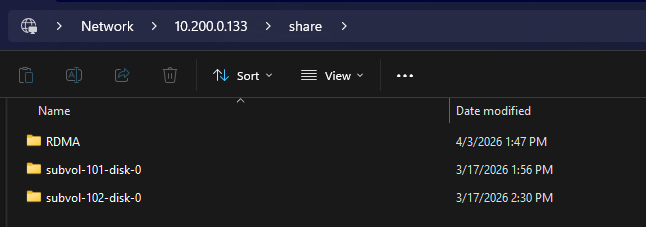
The catch? ElRepo doesn’t build kernel-ml with CONFIG_SMB_SERVER_SMBDIRECT enabled.
Stay tuned for a Part 2 on that adventure, but for now we will need to forge ahead without ZFS just yet and substitute in a RAID0 array.
Storage Config
I’m assuming you’ve created your storage pool and it is accessible and mounted at /srv/share. If not, check out some of our other guides on setting up storage.
If you’re using ZFS it will be important to understand aspects of ZFS volumes such as atime, record size, performance impact of raidz(1-3), draid and/or striped mirrors; flash vs hdd storage types and much more. If this is your first adventure with ZFS I suggest setting up a linuxMD raid with a filesystem like XFS which will give you an idea of the maximum performance you can expect from your storage and network stack.
This storage configuration is dangerous however for long-term use because it doesn’t have good resilience or data integrity. One variable at a time?
ksmbd server config
dnf install -y samba
mkdir -p /srv/share
semanage fcontext -a -t samba_share_t "/srv/share(/.*)?"
restorecon -Rv /srv/share
The configuration in the install we did in the video is at /usr/local/etc/ksmbd/ksmbd.conf and contains:
[global]
    server multi channel support = yes

[share]
    path = /srv/share
    read only = no
    writeable = yes
    browseable = yes
multichannel is still documented as experimental in the ksmbd.conf man page, with a warning that it may corrupt data under race conditions. I would not use this as a production file server unless you are comfortable with that risk…
Networking config
In the video we’re using LR Link 2x 200G Broadcom adapter. It’s great! Note: If using in not-a-server it REQUIRES ample airflow to not throttle/overheat.
We’re going to have to build the kernel for ksmbd so might as well grab the deps:
sudo dnf config-manager --enable crb
sudo dnf install -y epel-release
sudo dnf install -y dkms git gcc make perl kernel-devel-$(uname -r) \
  kernel-headers-$(uname -r) elfutils-libelf-devel \
  autoconf automake libtool pkgconf meson ninja-build gawk \
  libnl3-devel glib2-devel rdma-core
Building ksmbd on Rocky Linux 10
export KSMBD_VER=git-l1t
cd /usr/src
sudo git clone https://github.com/cifsd-team/ksmbd.git ksmbd-$KSMBD_VER
cd ksmbd-$KSMBD_VER
Use this custom dkms.conf for the module:
sudo tee /usr/src/ksmbd-git-l1t/dkms.conf >/dev/null <<'EOF'
PACKAGE_NAME="ksmbd"
PACKAGE_VERSION="git-l1t"
BUILT_MODULE_NAME[0]="ksmbd"
DEST_MODULE_LOCATION[0]="/extra/ksmbd"
AUTOINSTALL="yes"
MAKE[0]="make -C /lib/modules/${kernelver}/build M=${dkms_tree}/${PACKAGE_NAME}/${PACKAGE_VERSION}/build CONFIG_SMB_SERVER=m CONFIG_SMB_SERVER_SMBDIRECT=y KCFLAGS='-DCONFIG_SMB_SERVER -DCONFIG_SMB_SERVER_SMBDIRECT' modules"
CLEAN="make -C /lib/modules/${kernelver}/build M=${dkms_tree}/${PACKAGE_NAME}/${PACKAGE_VERSION}/build clean"
EOF
then
sudo dkms add -m ksmbd -v $KSMBD_VER
sudo dkms build -m ksmbd -v $KSMBD_VER
sudo dkms install -m ksmbd -v $KSMBD_VER
…if for some reason that fails you can reset and try again, or comment below:
export KSMBD_VER=git-l1t

sudo dkms remove -m ksmbd -v $KSMBD_VER --all || true
sudo dkms add -m ksmbd -v $KSMBD_VER
sudo dkms build -m ksmbd -v $KSMBD_VER
sudo dkms install -m ksmbd -v $KSMBD_VER
ksmbd-tools
The how-to there works fine, git clone in /usr/src and set it up. It’ll install to /usr/local so keep in mind the ksmbd.* commands will want a full path or PATH should include /usr/local/sbin and /usr/local/bin for your user and for root.
Use the example session documentation there as a guide for setting up the user and share, and for starting/restarting the services.
Rocky Firewall?
sudo firewall-cmd --permanent --add-service=samba
sudo firewall-cmd --reload
Don’t forget to allow samba through Rocky’s firewall.
Windows Setup
Windows version requirements
Microsoft is unsurprisingly finnicky about how and where it allows RDMA to work. The official documentation indicates that SMB Direct is supported on regular old Windows 11 Pro but notes the caveat that it is “restricted to client-only and can’t act as an SMB Direct server.”
It turns out that is only half true, and not the half we need. RDMA can function under Windows 11 Pro, but SMB will stick to the TCP/IP stack and ignore SMB Direct entirely. Instead, you have to use Windows 11 Pro for Workstations (Or, of course, Windows Server) even if you only ever need the device to be an SMB client.
Mellanox driver installation quirks
There can be some buggy behavior with the Mellanox ConnectX-5 WinOF2 installer. Running the installed unprivileged will result it in failing and rolling back.
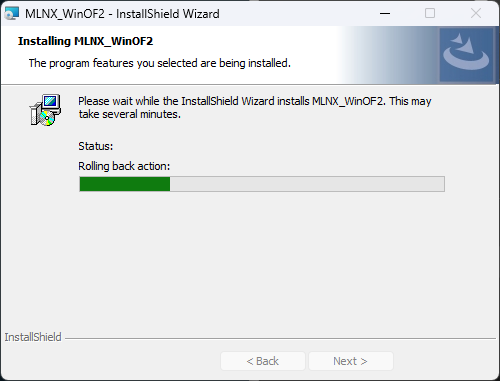
So run it as Admin, right? This time it complains that it can’t find the files it just extracted to Temp, and no amount of spamming Retry will help. If you browse to the specified %LOCALAPPDATA%\Temp directory, you’ll find the randomized folder it extracts to only has the user’s permissions assigned but is running the installer under System context.
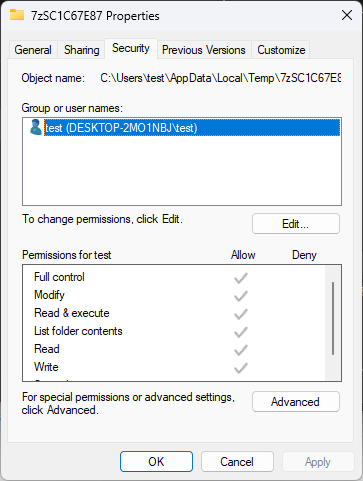
The fix here is thankfully simple. While that retry window is open, go in here and click Edit, then Add SYSTEM and assign it Full Control (This directory will be deleted by the installer when it completes).
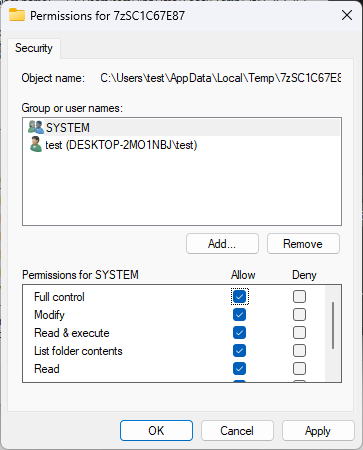
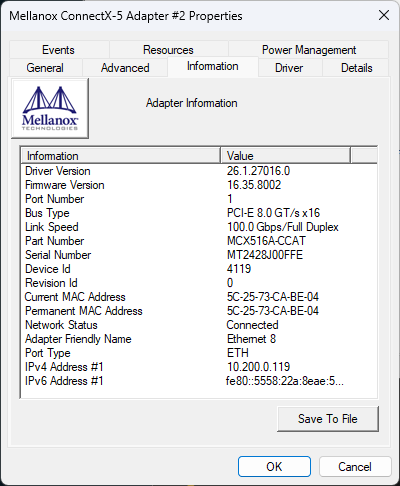
Now go back and click Retry and you should have a successful driver installation. Validate it in Device Manager by checking that the NIC properties now have an Information tab and the correct driver version
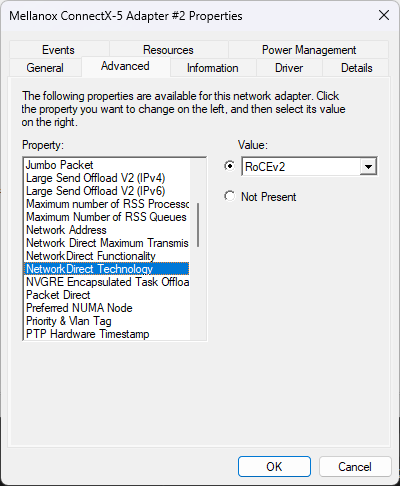
We aren’t quite done yet though. Click over to the Advanced tab and scroll to NetworkDirect Technology. Change this setting from Not Present to RoCEv2.
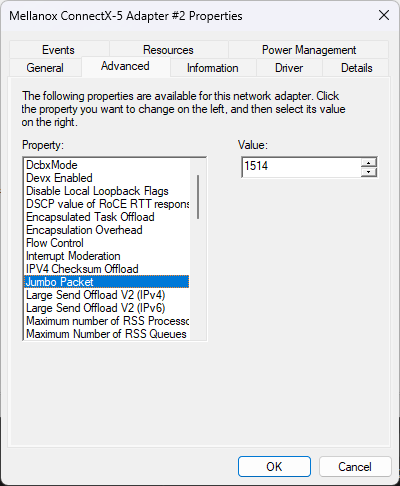
It doesn’t hurt to validate that NetworkDirect Functionality is set to Enabled as well, but this should be the default. You can optionally configure Jumbo Packet to taste as well, but we’ve kept the default 1514 size. If you do adjust MTU here, don’t forget to update the SMB server and any networking path in between as well.
At this point browsing to \\ip\share should work.
Configuring PFC the network switch
Our devices are linked through a MikroTik CRS812 which provides 100G networking for speedy transfers. For RDMA to flow, though, we need to enable Priority-Based Flow Control (PFC) on the respective ports.
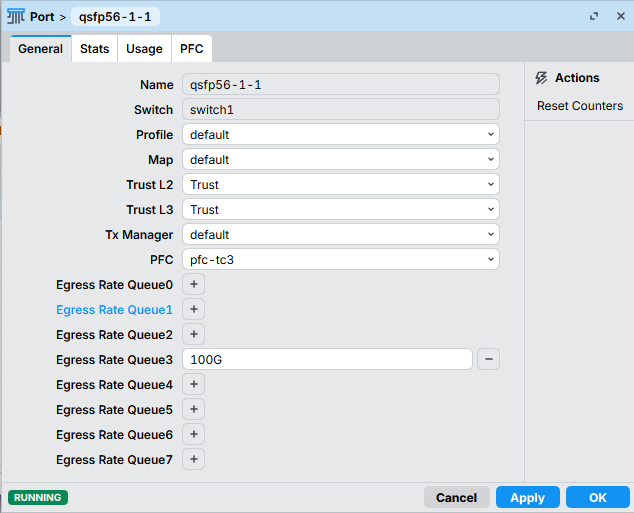
Using WinBox, we can hop under Switch>QoS then double-click our interface to configure it. We need to set PFC to pfc-tc3, configure its Egress Rate Queue to 100G, and it doesn’t hurt to set Trust L2 and Trust L3 to, well, Trust.
Configuring PFC on Linux
We will create a QoS policy on each of our endpoints to match Traffic Class 3. On Linux, we can check for existing QoS settings with dcb pfc show dev <DEV>.
w@dumptruck:~$ dcb pfc show dev ens8191f0np0
pfc-cap 3 macsec-bypass off delay 0
prio-pfc 0:off 1:off 2:off 3:off 4:off 5:off 6:off 7:off
Before we can set this directly, we need to do some mapping and assign bandwidth to different traffic classes. We’ll assign TC3 80% of available bandwidth and the rest to TC0. You can assign whatever allotments you like as long as this adds up to 100% across classes.
w@dumptruck:~$ sudo dcb ets set dev ens8191f0np0 prio-tc 3:3
w@dumptruck:~$ sudo dcb ets set dev ens8191f0np0 tc-bw 0:20 1:0 2:0 3:80 4:0 5:0 6:0 7:0
Now we can apply the QoS settings to our interface.
w@dumptruck:~$ sudo dcb pfc set dev ens8191f0np0 prio-pfc 3:on
w@dumptruck:~$ dcb pfc show dev ens8191f0np0
pfc-cap 3 macsec-bypass off delay 0
prio-pfc 0:off 1:off 2:off 3:on 4:off 5:off 6:off 7:off
Configuring PFC on Windows
On Windows, we’ll first need to make sure the Data Center Bridging feature is enabled. We’ll use Enable-WindowsOptionalFeature because we are on Windows Desktop, but Windows Server users will want to use Install-WindowsFeature instead.
PS C:\Users\test> Enable-WindowsOptionalFeature -Online -FeatureName DataCenterBridging


Path          :
Online        : True
RestartNeeded : False


PS C:\Users\test>
Check for existing QoS settings with Get-NetQosFlowControl and confirm the name of your adapter with Get-Adapter.
PS C:\Users\test> Get-NetQosFlowControl

Priority   Enabled    PolicySet        IfIndex IfAlias
--------   -------    ---------        ------- -------
0          False      Global
1          False      Global
2          False      Global
3          False      Global
4          False      Global
5          False      Global
6          False      Global
7          False      Global


PS C:\Users\test> Get-NetAdapter

Name                      InterfaceDescription                    ifIndex Status       MacAddress             LinkSpeed
----                      --------------------                    ------- ------       ----------             ---------
Ethernet 15               Intel(R) Ethernet Network Adapter X7...      31 Disconnected BC-FC-E7-71-B2-BD          0 bps
Ethernet 8                Mellanox ConnectX-5 Adapter #2               14 Up           5C-25-73-CA-BE-04       100 Gbps
Ethernet 16               Intel(R) Ethernet Network Adapter ...#2      13 Disconnected BC-FC-E7-71-B2-BE          0 bps
Ethernet 7                Mellanox ConnectX-5 Adapter                   7 Disconnected 5C-25-73-CA-BE-05          0 bps


PS C:\Users\test>
Now apply Priority 3 and verify results.
PS C:\Users\test> Enable-NetQosFlowControl -Priority 3
PS C:\Users\test> Get-NetQosFlowControl

Priority   Enabled    PolicySet        IfIndex IfAlias
--------   -------    ---------        ------- -------
0          False      Global
1          False      Global
2          False      Global
3          True       Global
4          False      Global
5          False      Global
6          False      Global
7          False      Global


PS C:\Users\test>
We now need to tell the system what traffic to map to Priority 3 by creating a New-NetQosPolicy and then Set-NetQosFlowControl for our NIC
PS C:\Users\test> New-NetQosPolicy "SMB" -Priority 3 -SMB -PolicyStore ActiveStore


Name           : smb
Owner          : PowerShell / WMI
NetworkProfile : All
Precedence     : 127
Template       : SMB
JobObject      :
PriorityValue  : 3


PS C:\Users\test> Set-NetQosFlowControl -InterfaceAlias "Ethernet 8" -Priority 3 -Enabled $True
PS C:\Users\test>
Checking if RDMA is working
On the Windows client
Windows uses SMB Multichannel to discover RDMA and enable SMB Direct. Microsoft says SMB Multichannel must be enabled, and the client can use SMB Direct if the adapter is RDMA-capable.
Check the RDMA plumbing itself is alive:
Get-NetAdapterRDMA
Get-SmbClientConfiguration | Select EnableMultichannel
Get-SmbClientNetworkInterface
You want to see the client NIC listed and RDMA Capable = True. Microsoft’s multichannel verification flow uses these commands.
PS C:\Users\test> Get-NetAdapterRdma

Name                      InterfaceDescription                     Enabled     Operational     PFC        ETS
----                      --------------------                     -------     -----------     ---        ---
Ethernet 8                Mellanox ConnectX-5 Adapter #2           True        True            True       True
Ethernet 7                Mellanox ConnectX-5 Adapter              True        True            True       True


PS C:\Users\test> Get-SmbClientConfiguration | Select EnableMultichannel

EnableMultichannel
------------------
              True


PS C:\Users\test> Get-SmbClientNetworkInterface

Interface Index RSS Capable RDMA Capable Speed    IpAddresses
--------------- ----------- ------------ -----    -----------
8               False       True         0  bps   {}
15              True        True         100 Gbps {}
14              False       False        0  bps   {}
7               False       False        100 Gbps {}
Then start a long file copy from \\rockyserver\share and, while it is running:
Get-SmbConnection
Get-SmbMultichannelConnection
Get-SmbMultichannelConnection -IncludeNotSelected
PS C:\Users\test> Get-SmbConnection

ServerName ShareName      UserName             Credential           Dialect NumOpens
---------- ---------      --------             ----------           ------- --------
dumptruck  ksmbdtestshare DESKTOP-2MO1NBJ\test DESKTOP-2MO1NBJ\test 3.1.1   1


PS C:\Users\test> Get-SmbMultichannelConnection -IncludeNotSelected

Server Name Selected Client IP    Server IP   Client Interface Index Server Interface Index Client RSS Capable Client
                                                                                                               RDMA
                                                                                                               Capable
----------- -------- ---------    ---------   ---------------------- ---------------------- ------------------ --------
dumptruck   True     10.200.0.119 10.200.1.25 15                     2                      False              True
dumptruck   False    10.200.0.119 10.200.1.25 15                     2                      True               False


PS C:\Users\test>
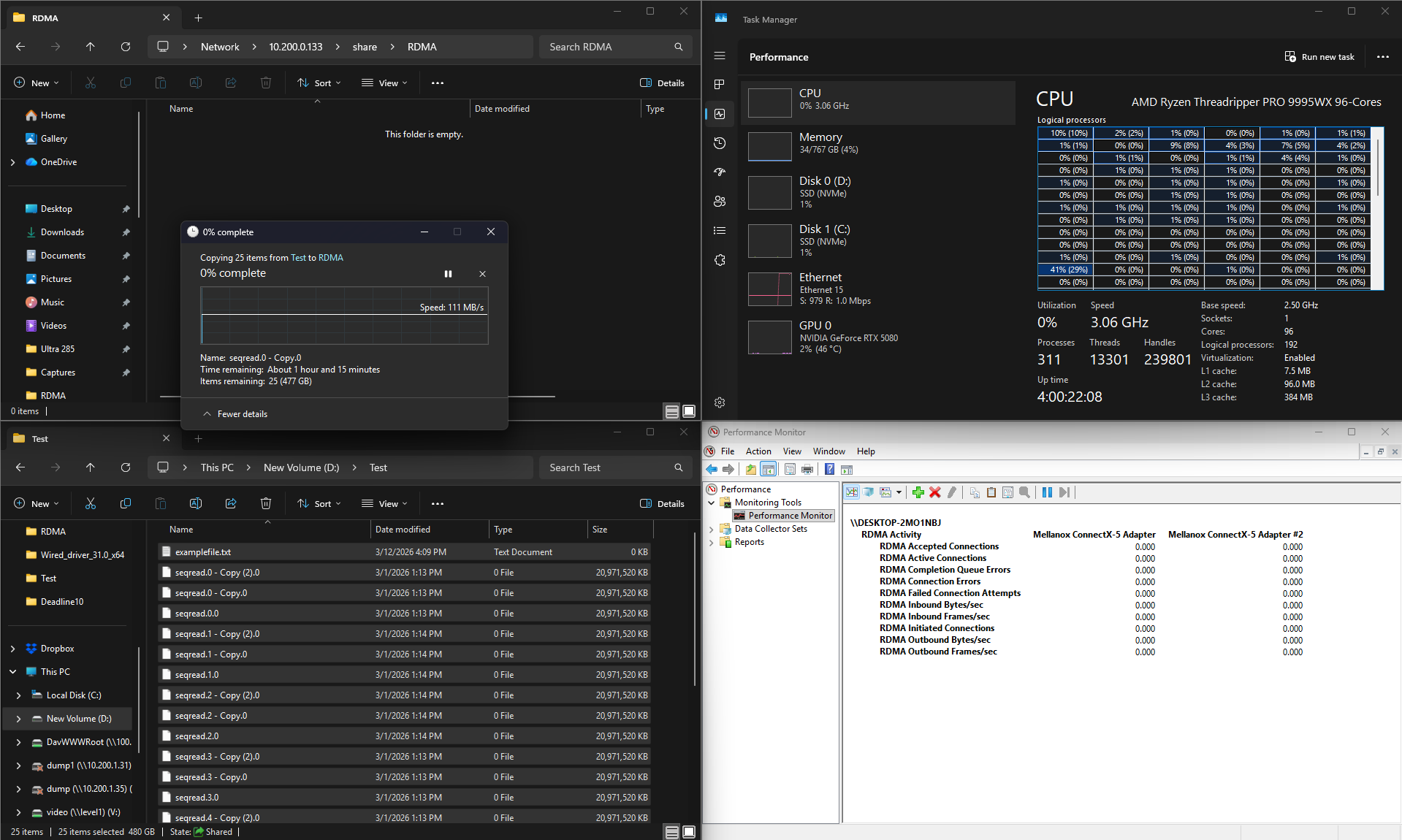
PerfMon can also help validate if RDMA is working. Go into Performance Monitor, flip the graph view to Report and add counters for RDMA Activity.
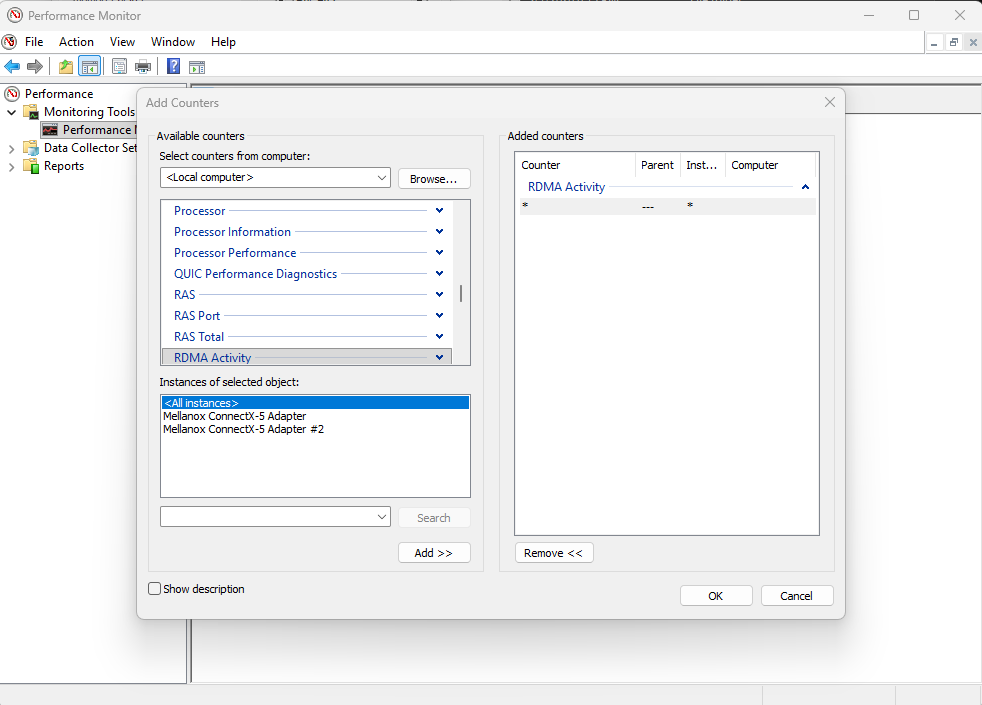
Everything should initialize to zeros at first.
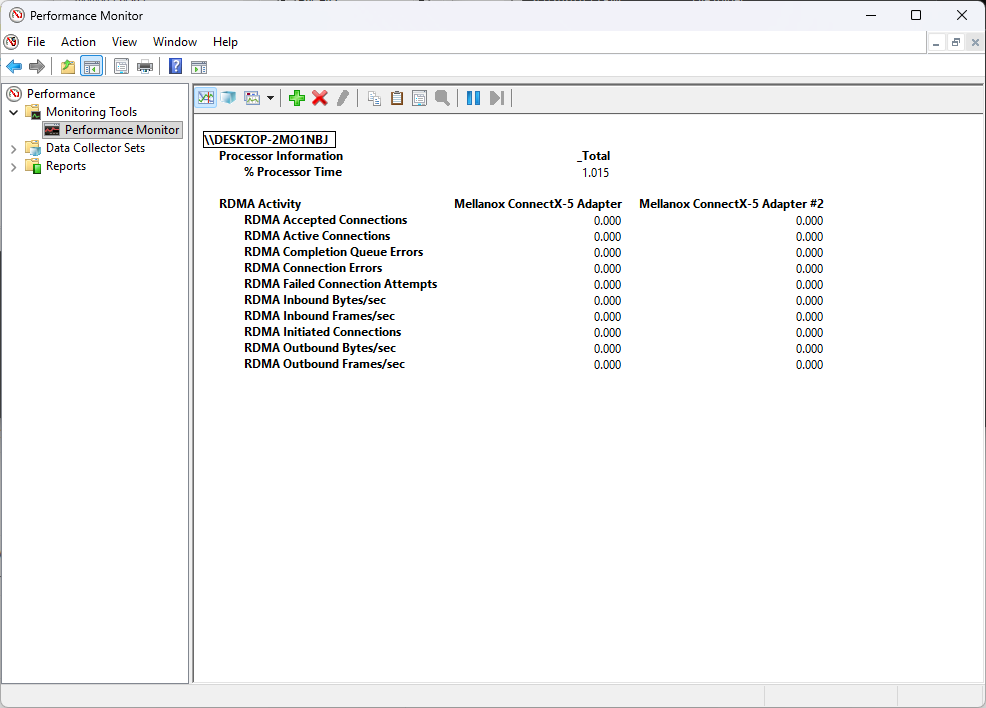
But if we start a SMB transfer you should see the counters wind up.

Note that Task Manager shows disk writes as we pull from the server, but the Ethernet interface does not report any meaningful activity because RDMA is completely offloading the traffic.
Checking for errors in the windows event log is also a good idea:
Get-WinEvent -LogName Microsoft-Windows-SMBClient/Operational | ? Message -match "RDMA"
Also handy:
Get-SmbMultichannelConnection | Select-Object 'ServerName','ClientRdmaCapable'
It should be ‘true’ for your server connection.
PS C:\Users\test> Get-SmbMultichannelConnection | Select-Object 'ServerName','ClientRdmaCapable'

ServerName ClientRdmaCapable
---------- -----------------
dumptruck               True


PS C:\Users\test>
NOTE: it is useful to bind ksmbd ONLY to the fast interface. If you have a fast and slow interface, windows might be limited/attach to the slow interface. If you have two fast interfaces, you pretty much need working dns to have rdma. rdma by IP address is never reliable for me fwiw.
If it shows this, you have more work to do to get the drivers working properly (or switch from Windows 11 Pro to Windows 11 Pro for Workstations):
PS C:\Users\test> Get-SmbClientNetworkInterface

Interface Index RSS Capable RDMA Capable Speed    IpAddresses
--------------- ----------- ------------ -----    -----------
15              False       False        0  bps   {}
14              True        False        100 Gbps {}
17              False       False        10 Gbps  {}
On the Linux side
For the Linux SMB client, kernel docs say a successful RDMA mount logs:
CIFS: VFS: RDMA transport established
rdma link show
ibv_devices
lsmod | egrep 'bnxt_re|ib_core|rdma_cm|iw_cm|ib_uverbs'
SMB Direct on Linux requires a working RDMA device/stack and a kernel with SMB Direct support in ksmbd.ko. The kernel docs state the server and client side SMB Direct support is available in 5.15+ and is enabled in ksmbd.ko when that support is built in.
sudo /usr/local/sbin/ksmbd.control -d rdma

# [ksmbd.control/7194]: INFO: smb auth vfs oplock ipc conn [rdma]
Alternative RDMA testing with RPing
SMB transfers are not the only use case for RDMA and it can be helpful to have another option to sanity check with. In particular, if you are using Windows 11 Pro, you can still leverage RDMA for other applications even if SMB Direct is squashed.
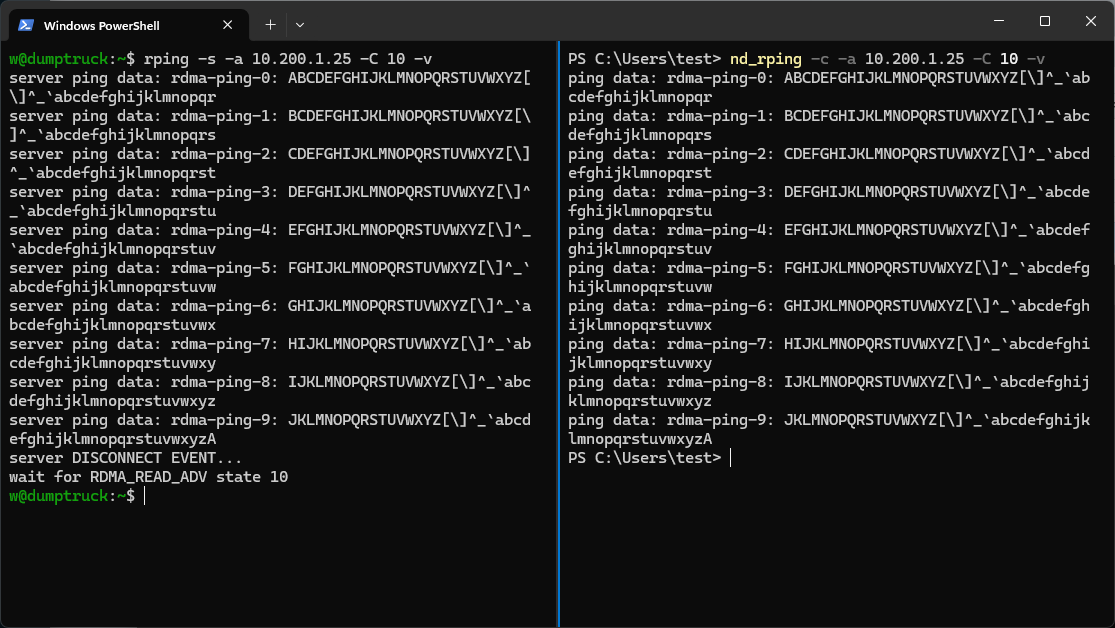
RPing is a simple utility that runs like iperf to test if the RDMA protocol is working. We can start a listener on the Linux server. We recommend using -a to pin the rping to your RDMA interface, especially if you have multiple NICs in use.
w@dumptruck:~$ rping -s -a 10.200.1.25 -v
Now on the Windows client side, run the equivalent nd_rping command pointed at your server
PS C:\Users\test> nd_rping -c -a 10.200.1.25 -v
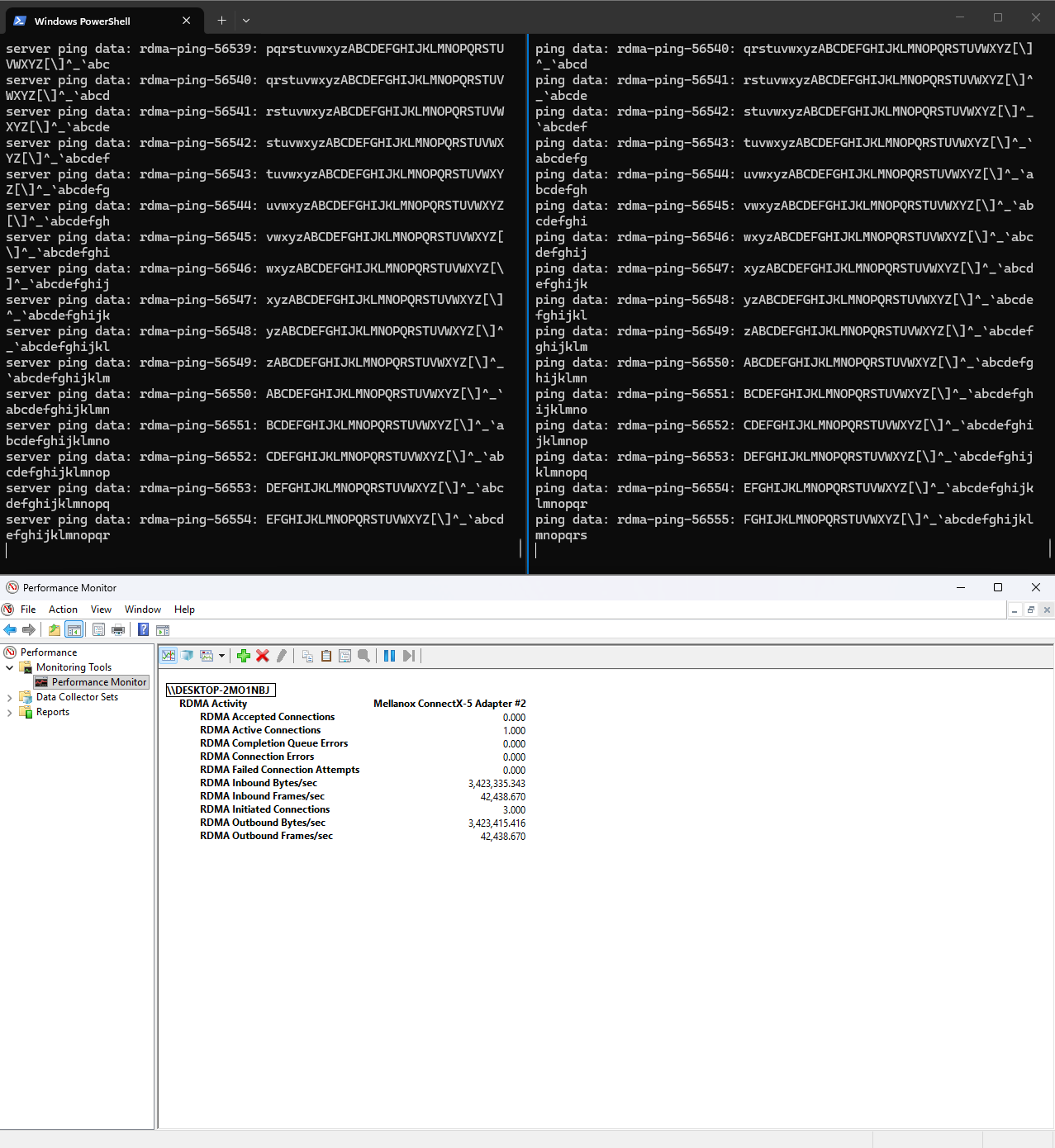
You should see a barrage of rdma-ping lines. We added -C 10 to stop after 10 pings here, but it will continue endlessly with that omitted.
You can also bring up PerfMon here to confirm RDMA activity while it runs.
 25G was obviously good enough without RDMA.