Disconnecting Wireless Radio on LG C3 series TV (2023)
This probably works the same on many other LG models but I have only attempted it on this model. I did this first thing when I got the TV back in 2023 before powering it on. I don’t know if newer firmware might react differently to this. My use case is to connect external devices like computer, android and consoles and I only use the TV remote for input switching and volume.
The upside of doing this is that you get better confidence in that the TV does not connect to the internet than just never connecting it to wired or wireless (as there are various technologies for devices go get online without you providing network connectivity, see Amazon Sidewalk and similar or a family member or friend might connect it for you).
The downside to it is that the TV will sometimes display a notification about Bluetooth not working at the bottom of the screen for a few seconds when using the remote. Since I seldom use the remote this is fine for me but you might find additional downsides with a different use case.
IMPORTANT SAFETY NOTICE
If you open this TV or any electrical device with a PSU you may expose electrical componentry that can kill or cause severe injury, even when the devices is not plugged in because of its capacitors still being charged.
Steps
Remove back cover by unscrewing the philips head screws and sliding the cover sideways and popping it off. A prying tool might be useful for this.
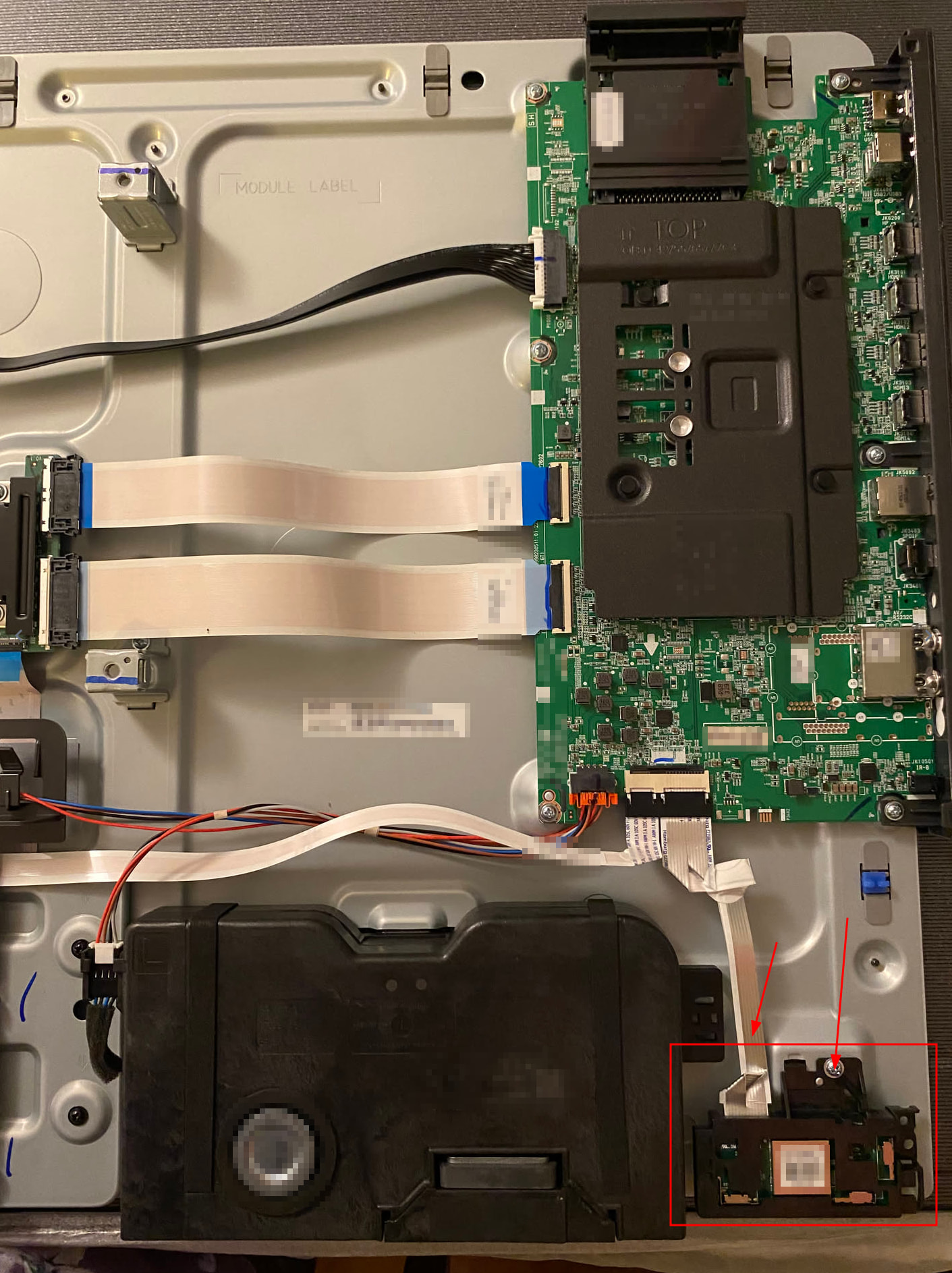
The WiFi and Bluetooth radio is found on the lower right as seen in the picture.
Unscrew the radio board to access and unclip the ribbon cable (read up on how ribbon cables attach if you are unfamiliar).
I would just leave the radio in the TV and the cable loose and reattach the cover.
I’m gonna look into doing this to my LG OLED. I will reply back with my findings. I find it odd that you cannot disable WiFi/Bluetooth on my TV. I have also never agreed to the terms of service for my TV. I get the message and turn the TV off, then back on. I have never clicked agree.
Inspired by this post, I did this on my LG C1 77" from 2022. Removing the lower rear casing was easy, 4 screws and some robust plastic clips. The wifi / bluetooth daughterboard was in a slightly different location than pictured above on this set, but it was plenty easy to find and trivial to disconnect.
All of the remote buttons still work (they seem to be sent over IR). The annoying gyroscopic “mouse cursor” feature for TV menus no longer works (gyro seems to have worked over bluetooth) but I’m calling that a bonus. After about an hour of testing I have yet to see any error messages (this C1 is on firmware 03.41.00).
The TV now has no network access unless I plug in a network cable (useful in case I want to do a firmware update for some reason). It is connected to an AppleTV 4k, which does have network access, has all the TV apps I want, and there is no evidence it does any spying.
This would not be the method for you if you need your TV’s bluetooth for other things (sound bar?) or if you need to run apps that require network access on your TV itself instead of an external box like an AppleTV, Android stick, home theater PC, game console, or similar. And it’s not the cheapest method (an AppleTV 4k costs $200).
But otherwise? I can easily recommend this approach. It’s easy (took half an hour), requires no software fiddling, and is pretty foolproof. The thing can’t spy if it doesn’t have any way to phone home.