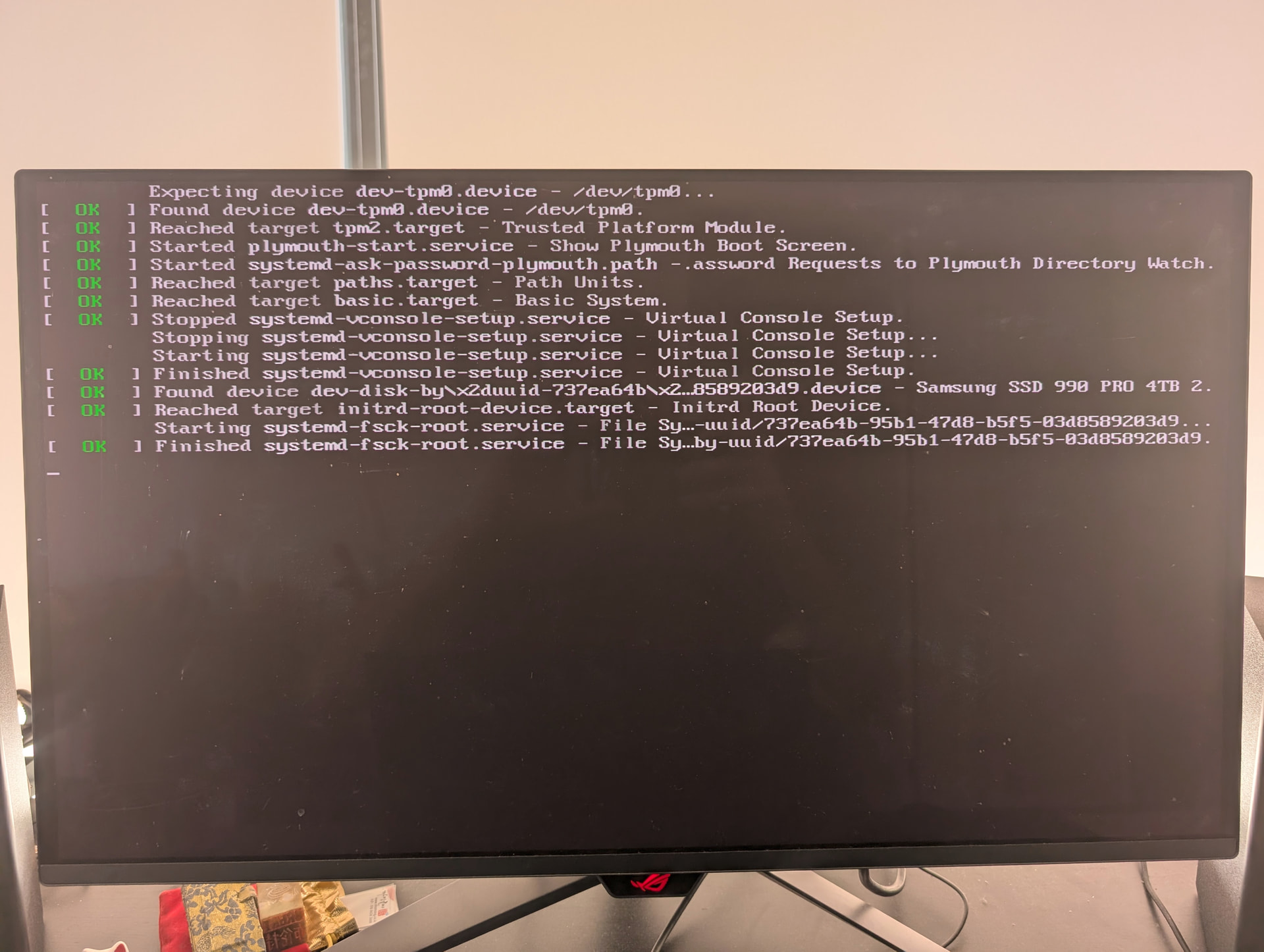
I was hoping to have my Debian 13 and Fedora 43 OS share a partition (XFS) of “project” files (source code, images, etc.) to avoid duplication. I’m multi-booting, so only 1 OS can be active at a time, and I’ve had a similar configuration before on a laptop.
I have created the XFS partition and mounted it in Debian /etc/fstab and successfully began adding data. The problem arose when I added the XFS partition to Fedora’s /etc/fstab. I did it incorrectly and Fedora wouldn’t boot. I have now reverted that change in Fedora /etc/fstab and Fedora works again, but now Debian does not boot.
The Debian boot process hangs before I can get to a terminal. There are no failed checks that I can see - the boot process just stops after fsck finishes w/o errors. This is true for each available kernel / recovery mode / rescue mode. I have commented out the XFS mount from Debian /etc/fstab and it still does not work.
(image is the most recent kernel: I can post others if they may be helpful)
The disk layout (briefly) is
- NVME0: Linus OS disk w/: /boot (2 GB), Debian / (1 TB), Fedora / (1 TB), 2 TB XFS (data)
- NVME2: Window 11 / EFI (4 TB)
- NVME1: Swap mounted by either Linux OS (512 GB)
bcmcpher@fedora:~$ lsblk -a
NAME        MAJ:MIN RM   SIZE RO TYPE MOUNTPOINTS
sda           8:0    1   192K  1 disk
└─sda1        8:1    1 160.5K  1 part /run/media/bcmcpher/SCARLETT
zram0       251:0    0     8G  0 disk [SWAP]
nvme0n1     259:0    0   3.6T  0 disk
├─nvme0n1p1 259:6    0   1.9G  0 part /boot
├─nvme0n1p2 259:7    0 929.9G  0 part
├─nvme0n1p3 259:8    0 931.4G  0 part /
└─nvme0n1p4 259:9    0   1.8T  0 part
nvme2n1     259:1    0   3.6T  0 disk
├─nvme2n1p1 259:2    0   200M  0 part /boot/efi
├─nvme2n1p2 259:3    0    16M  0 part
├─nvme2n1p3 259:4    0   3.6T  0 part
└─nvme2n1p4 259:5    0   735M  0 part
nvme1n1     259:10   0 465.8G  0 disk
└─nvme1n1p1 259:11   0 465.8G  0 part [SWAP]
Briefly, my system (Ryzen 9800, ASROCK X870 Tai-Chi, 128GB RAM, RTX-5080) has been successfully running a multiboot Debian 13 / Fedora 43 / Windows 11 since January.
I can just reinstall Debian, but because I have no idea what’s gone wrong I’d rather understand this. I am mystified as to how temporarily messing up /etc/fstab in Fedora can completely break Debian.
I was hoping to have a more fun first post here. I appreciate any help,
Brent
From the place the boot messages are holding up (after fsck of root), it’s quite reasonable to think it’s still trying to find and mount subsequent filesystems.
Take the nvme0n1p4 out of debian fstab, or at least make it ‘noauto’. I’ll withhold speculating on what ‘not added correctly’ to fedora means but check it’s blkid is still the same as when you added it to debian in the first place.
You can also use grub to add ‘single’ to the kernel args, go in as root and then see what (-v) manual mount reports from debian.
1 Like
That makes sense. Unfortunately, I’ve not made much progress. I’ve tried ‘noauto’ and have fully commented out the nvme0n1p4 from the Debian fstab. It’s still hanging at the same point. Adding ‘single’ to the kernel args in grub also stops at the same point.
You pretty well guessed the initial problem - the fstab entry in Fedora had the wrong blkid. It was an easy fix and everything in that OS works now.
For reference, the full sequence of events has been:
- Install OS-es.
- Everything worked / rebooted fine.
- In Debian, create
nvme0n1p4 XFS partition and mount in fstab
chgrp / chown to for access.- Worked fine after reboot, added some data.
- In Fedora, add
nvme0n1p4 in fstab w/ wrong blkid
- Try to reboot into Debian
- Fails to boot with current issue
- Boot with Fedora live image and fix Fedora
fstab
- Fedora reboots fine, mounts partition
- Debian fails to boot with current issue
Currently, Fedora works and mounts nvme0n1p4 with no issues. Debian has the current issue, even after removing nvme0n1p4 from fstab.
Could the user ‘owning’ the partition in Debian be causing the problem?
if it’s not mounting it, no. Though I’m not completely unsuspicious that the mount locking up is out of the equation.
try the verbose boot arguments from here:
And/or try chroot, and look through the debian /var/log/syslog, run journalctl --system -b -1 (for the -1th (last) boot, but maybe run without -b at all)
and if you’re in that far, regenerate the initrd update-initramfs -u -k all since you’re in there (will require bind mounting /boot, /boot/efi) to be sure it’s not something baked into that. and check /etc/systemd for any mount unit files.
I got further with chroot. Looking through journalctl --system --root . -b -1 from the Debian / in Fedora, it appears the first thing after fsck finishes is nouveau crashing. Which explains why it just stops, I suppose? I’m not sure how or why nouveau is even enabled - I’ve been running the nvidia drivers since January from the repo (v590).
edit: verified nouveau is blacklisted in modprob.
Mar 09 18:42:13 fedora systemd[1]: Finished systemd-fsck-root.service - File System Check on /dev/disk/by-uuid/737ea64b-95b1-47d8-b5f5-03d8589203d9.
Mar 09 18:42:13 fedora kernel: nouveau 0000:01:00.0: enabling device (0002 -> 0003)
Mar 09 18:42:13 fedora kernel: nouveau 0000:01:00.0: NVIDIA GB203 (1b3000a1)
Mar 09 18:42:13 fedora kernel: nouveau 0000:01:00.0: gsp: RM version: 570.144
Mar 09 18:42:13 fedora kernel: Console: switching to colour dummy device 80x25
Mar 09 18:42:13 fedora systemd[1]: Mounting sys-kernel-config.mount - Kernel Configuration File System...
Mar 09 18:42:13 fedora systemd[1]: Mounting sysroot.mount - /sysroot...
Mar 09 18:42:13 fedora kernel: nouveau 0000:01:00.0: vgaarb: deactivate vga console
Mar 09 18:42:13 fedora kernel: BUG: kernel NULL pointer dereference, address: 00000000000000cc
Mar 09 18:42:13 fedora kernel: #PF: supervisor read access in kernel mode
Mar 09 18:42:13 fedora kernel: #PF: error_code(0x0000) - not-present page
Mar 09 18:42:13 fedora kernel: PGD 0 P4D 0
Mar 09 18:42:13 fedora kernel: Oops: Oops: 0000 [#1] SMP NOPTI
Mar 09 18:42:13 fedora kernel: CPU: 12 UID: 0 PID: 497 Comm: (udev-worker) Not tainted 6.18.5-200.fc43.x86_64 #1 PREEMPT(lazy)
Mar 09 18:42:13 fedora kernel: Hardware name: ASRock X870E Taichi/X870E Taichi, BIOS 4.10 02/10/2026
I do not have a lot of experience with grub / chroot / system repairs like this, so I really appreciate the help. If nvidia really is the issue, the timing for this is something else.
Am I interpreting this log correctly? Is there anything else worth looking up? What’s the easiest path forward from here?
You may be able to blacklist it pre boot (before initrd reads the modules.conf)
You can test this with the grub line editor without having to reinstall grub or chroot again (yet). I’d probably test it. But it’s not clear how we got to here if it previously worked and you didn’t make changes (major version updates? odd repos? testing, unstable? you can uninstall them, or packages or update again from a chroot) so I’d not want to lay a confidence value on it.
can you ping the machine, while it is ‘locked’
If so, can you ssh into it (and dmesg)
If so, is it in fact defaulting to the 2x core igpu in the 9800x3d (if you have that) on the oss amdgpu driver. What is the shown monitor actually wired to. If you plug it into the onboard (if your exact cpu has iGPU), do you get a display output. what does lspci -k |grep -A3 VGA say from fedora.
https://www.if-not-true-then-false.com/2025/debian-nvidia-guide/
(which is sufficiently detailed perhaps you’ve already seen it), but i’d probably want to scrape out all trace and see if nouveau will, un-blacklisted show the whole boot process to even a text login console. could be dkms didn’t trigger the last update before you added the xfs at fedora.
I plan to explore this more ASAP, but weather today is making my power flicker enough I’m getting some unexpected resets, including my screen that will (hopefully, eventually?) be back soon.
I do appreciate the help so far, this has been a helpful learning process.
Hopefully I can report something back soon.