Data Pit Build

I’ll just start.

About a year ago I was playing around with ChatGPT, I had been watching various server builds and various builds in general and I was annoyed about my lack of cohesive data storage solution. So I got ChatGPT to build me one I spent hours on that build. I’m more of a software guy ive only ever had laptops. My goal was to make server that would be various things host game servers run plex store everything i could in true datahoarder fasion. Figured id make a server that would last me 2 decades while also not needing any upgrades… at least that was the logic in the decisions I made. I regret some choices but they were made and paid for. Two things, this was never supposed to be a gaming rig. It was built around data storage messing with various virtual machines and so on. Prices went up before I bought hard-drives

My build

Case - Fractal Design Define 7 XL

Motherboard - ASRock X870E Taichi

CPU - AMD Ryzen 9 9900X

CPU Cooling — Arctic Liquid Freezer II 280 AIO

Ram - Patriot Viper Elite 5 Ultra 48 GB (2×24 GB)

PSU - be quiet! Straight Power 12 1500 W

HBA: LSI 9300-16i, SAS-3, IT mode

2.5" cage: ICY DOCK MB038SP-B, 8-bay

No GPU as of yet. That will probably change.

So I was gonna use Unraid get 3 26Tb used exos from amazon but when I finally paid off the Mobo and CPU and Case the price had gone from 400 to 700 and that plan went to hell. Now the plan is to buy 1 26tb as parity and shuck my current external drives. However ive run into a small issue. In my infinite wisdom i didnt do enough research (or just ask a human with computer building experience) my PSU (which i bought because it was strangely 70 dollars cheaper than the 1000 PSU I was gonna get) doesn’t have enough sata connections. It has 3 now 3 x 4 is 12 connections. My drive plan was 16 3.5s + a bluray + the 2 cage connections. I’ve had to modify that number down bit because of the cage and the blu ray. So i settled on 13 considering my case that number can change which was the point of that case.

That’s 13 + 3

16 connections i have 12.

I own 5 3.5s drives already and just need to get the 26tb

Thats 6 3.5 2 for the cage and one for the blue ray. Thats 9.

However I will be looking for deals and eventually have 13 drives hell if I find a good deal and have the cash probably more. Point is I dont have enough sata power connections. In the meantime I’ll use what I have when I finally set everything up. In the meantime I want to figure out what to do for when i DO have the HDDs… buy a new psu?

Please help.

I can’t be the only smo who has come up against this problem. Drives are too damn expensive now. I regret not buying those first.

Now I’m probably gonna buy a 5080 as drives are just too expensive rn. I dont have the “right” cpu for it but at this point I really dont care. I’d rather use it as my gaming rig in replacement of my laptop with a mobile 4090 then just let it continue collect dust.

TLDR

Bought hardware while being stupid, PSU doesn’t have enough power sata connections. I want to solve this problem BEFORE I get to the point of having the drives. That way it’s a simple unplug remove case side and install.

Thoughts on my build? Advice on new PSU? Should I keep my PSU?
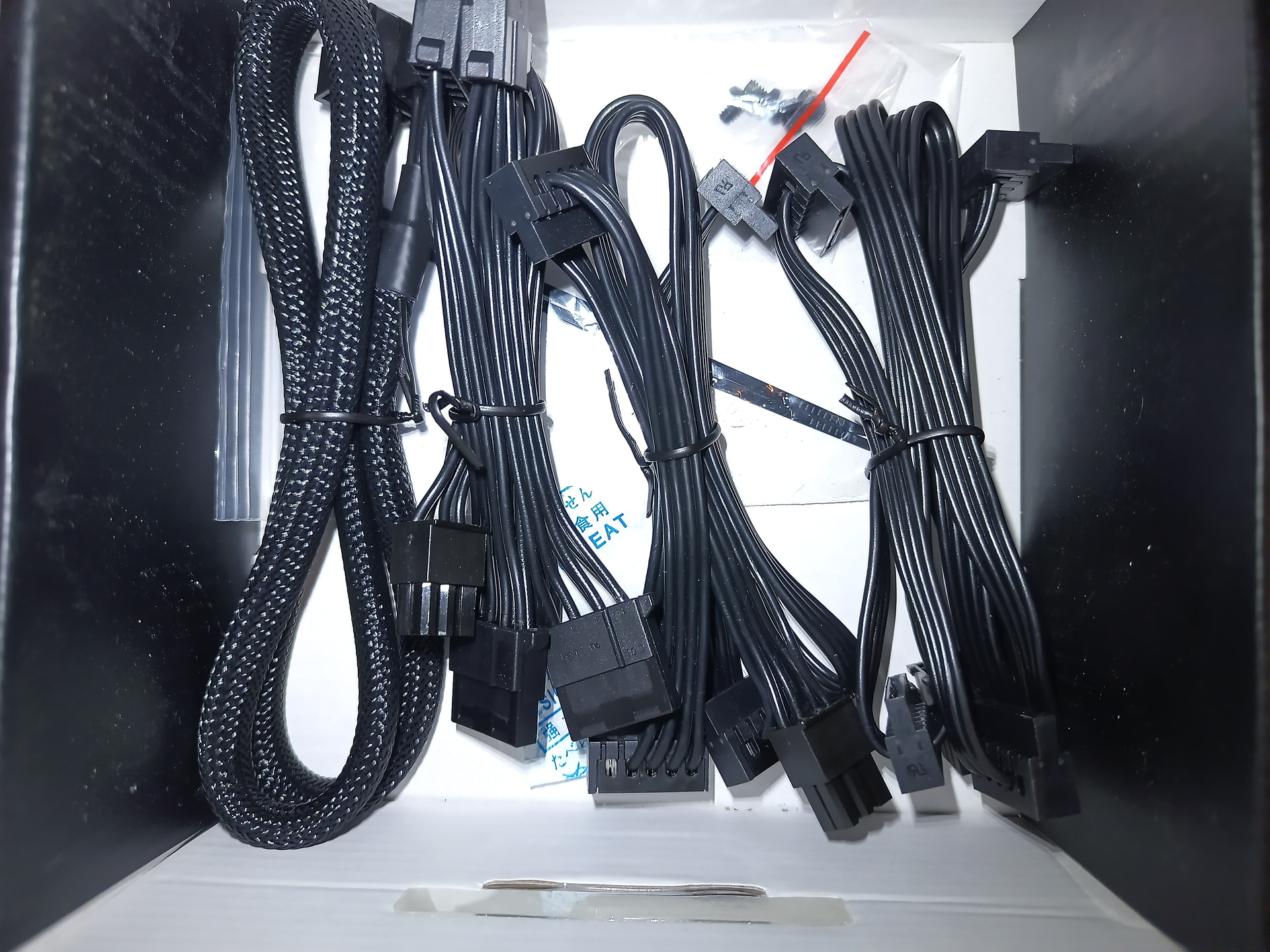
Just get a Y-splitter or three. The 12V they are connected to can handle dozens.

Welcome!

I don’t think you need to buy a new PSU, the one you have should satisfy the power requirements of the drives.

If it were me I’d just make some new cables for the PSU to plug the drives into, that way you could make the build tidy without all the extra bunches of cables.

If you don’t’ feel comfortable making your own cables you could use sata power splitters but I think this option is less desirable because it introduces a bunch of extra connections that could be flaky and lead to data loss from intermittent power to the drives.

A middle ground between these two options is one of those Corsair 5v load balancers, while they do create extra connections, those extra connections are the more robust 6/8 pin PCIe connectors and not the finicky sata power connectors:

Edit:
Each of one of the load balancers comes with the cabling for 8 sata and 4 molex; you just need to feed it with 1 8pin CPU connector.
Just remember that it only provides 5v and 12v power, so if you tried to use it with *some NVMe drives it might have problems.

Would the Corsair load balancer work with my PSU? Would I need to buy any specific cables to connect that to my PSU? From what ive read, I’ve always seen dont mix cables between PSU brands as warnings about PSUs. Also thank you for the reply.

(Just saw your reply. After I posted this)

Nope.

https://www.amazon.com/s?k=sata+power+y-splitter+cable&crid=3SP0NP396B16D&sprefix=sata+y-ca%2Caps%2C329&ref=nb_sb_ss_p13n-expert-pd-ops-ranker_3_9

This is very good advice.

These are the cables that come with the load balancer:


From left to right they are the PSU to load balancer 8 pin, x4 molex, x4 sata and x4 sata.

Basically you’d only use the two sata power connectors on the right. You’d want to use 8 pin CPU power connector that came with the Be Quiet! PSU to give power to the load balancer instead of the cable it came with (which is some Corsair pinout).

Beautiful. That solves the problem ive been thinking about since I realized my mistake of getting that psu with 3 sata power connections thats 12 but that wasnt enough for what the original intention of my build. Thank you. Any thoughts on my build? I regret not paying more attention to the specifics. I wish I had gotten a different psu but 165 for the one I got was too tempting. The original PSU ChatGPT picked only had 3 as well so I would have been in the same boat.

Thank you for the quick replies and information.

The 9300 series HBAs are power hogs, if you got a LSI 9305 or 9306 HBA the power consumption goes down significantly (but probably still need to be active cooled if not in a server case).

I also picked an AMD CPU for my storage server and was alittle surprised at how high the idle power consumption was. AMD APUs tend to do much better, however I don’t think I’ve seen any AM5 Zen 5 APUs out so I guess there aren’t really to switch to if you cared about idle power consumption alot.

https://www.ebay.com/itm/165522543628

This is the exact model I got. I’ve heard theyre both power hogs and run very hot. Hopefully with the fans and general size of the case and my current lack of a GPU it running hot won’t be an issue. I cant do much about it being a power hog. Hopefully my power bill doesn’t go up too much but I expect a jump however small.

I did a lot if thinking about the motherboard but ultimately it was the amount of sata connections (6). And when I looked at cpu prices amd was cheaper. Even tho it is a stupid reason I also liked the name of the motherboard Asrock Taichi X870E. It just kinda rolls off the tongue. It also wasnt covered in LEDs.

This video tests all 16i HBAs for power consumption. It provides hard data allowing you to make data driven decisions.

Here is the screenshot of the results to potentially save you some time:

The channel has additional videos for all other LSI HBAs (8i, 8e, 16e, etc.).

1 Like

So I have a question, I have an opportunity to get 32gb of ram for 250. 2 16gb sticks. However its a different brand and ive always thought mixing ram was bad. Different sizes different brands. Any of you guys ever mix brands?

Patriot Viper Elite 5 Ultra: 2×24GB DDR5-6400 CL32Corsair Vengeance RGB: 2×16GB DDR5-6000 CL36
Total: 80GB, four DIMMs

The reason it is not strictly recommended has to do with timings. You can use all that RAM if you need to; but you might run into weird bottleneck situations that makes throughput stutter. And you might be forced to run it at JEDEC 4800 speeds instead of 6400.

That is the theory. In practice? Since there are only three actual memory manufacturers today and standards have improved a lot the last 20 years, there are little to no drawbacks mixing RAM sticks. Worst case you will see maybe a 2% decrease in performance here.

I figured. I was planning on setting them both at 4800, Just wanted to be sure.

One other question, my icy dock cage will have 5 WD Red SA500 2.5" SATA SSDs. I was wondering if having them connected to single 6-port M.2 SATA card was a good idea. I kinda dont want my hba or my mb sata ports taken up by those. Since I definitely won’t be using more than one m2 slot as I only own one, would that be a good alternative? That said any brand recommendations? I was looking at this odroid one.