I built Crucible LLM — a terminal-based benchmarking suite that stress-tests any OpenAI-compatible inference server and measures what a real user actually experiences. One static Rust binary. No Python. No venv. No dependencies.
Why it exists
Most benchmarks shout “xx.x tokens/sec!” and stop. But when 32 users hit that server at once, each one gets 2 tokens/sec. A number that looks fast in the aggregate can feel painfully slow per user. Crucible measures that gap — the difference between a server’s peak throughput and what each individual connection actually gets — as well as how competent the LLM is at real tasks.
What it does
- Single static binary — built in Rust, runs from any terminal on any box. No install, no runtime, no system libraries.
- TUI-first — a 60 Hz interactive dashboard with real-time throughput graphs, live model discovery, and per-engine metrics.
- Seven benchmark engines covering the full arc: speed → concurrency → long-context retrieval → reasoning → structured output → energy → flat-out max throughput.
- The “practical sweet spot” — not just where aggregate throughput plateaus, but the maximum number of users where each one still gets a comfortable ≥ 30 tokens/sec.
- Reasoning-model aware, done right — separates a model’s chain-of-thought from its actual answer, judges on the answer, and reports an over-thinker honestly instead of scoring it as a failure.
- Deeper-context NIAH — drive your own retrieval matrix and probe RoPE/YaRN-extended windows well past 128k.
- Multi-vendor GPU monitoring — auto-detects NVIDIA, AMD, or Intel. Live power, utilization, VRAM, temperature, and energy-per-token (Linux).
- Any OpenAI-compatible server — vLLM, Ollama, llama.cpp, LM Studio, SGLang, Unsloth, TGI. Point it at a
/v1endpoint and go. - 3 visual themes — Cyberpunk, Vampire, or Monochrome Pastel. Pick on first run, change anytime.
- Headless / CI-ready — pure-JSON output, meaningful exit codes, and export to JSON, Markdown, or CSV for automated regression pipelines.
See it in action
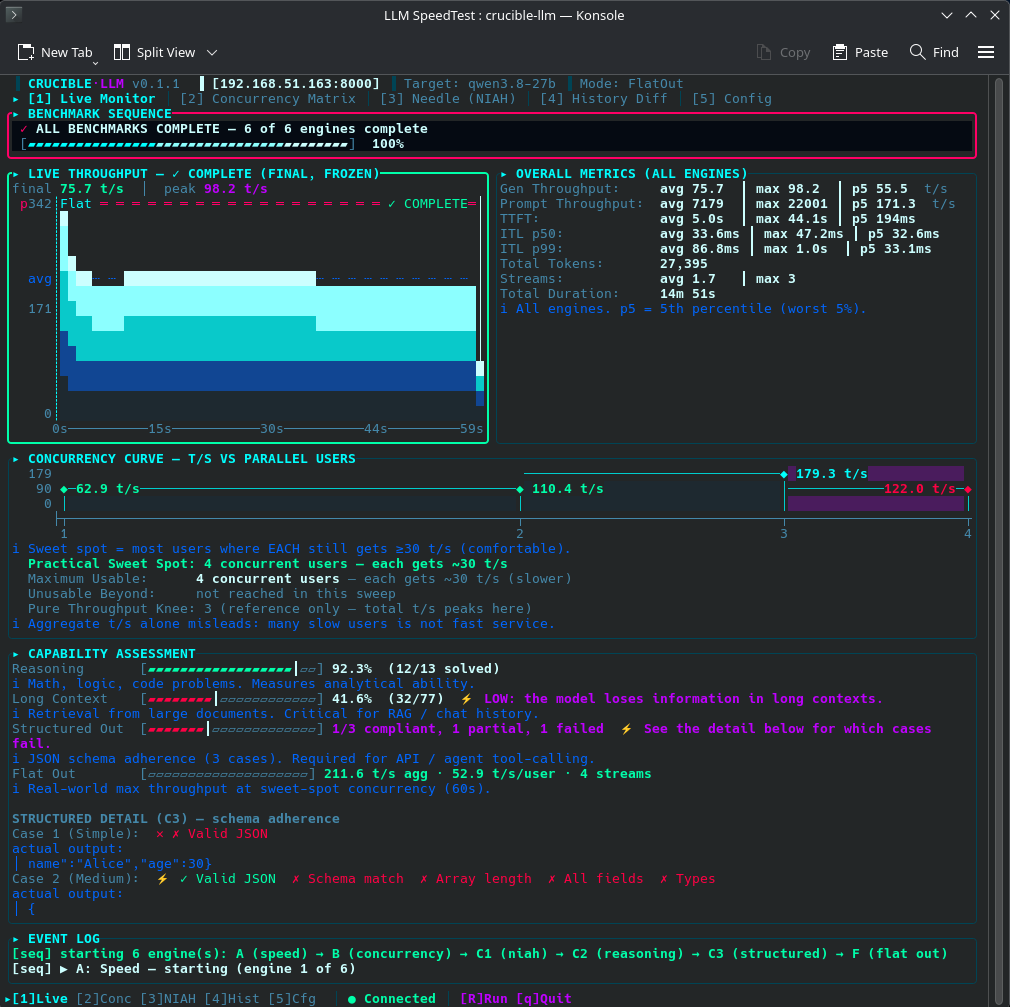
Live Monitor screenshot — real-time throughput graph with auto-scaling y-axis, engine-transition markers, and live event log.
Try it
Grab the latest pre-compiled binary from the Releases page:
chmod +x crucible-llm-v0.1.5-linux-x86_64
./crucible-llm-v0.1.5-linux-x86_64
Or build from source (requires a stable Rust toolchain):
git clone https://github.com/MadGoatHaz/crucible-llm
cd crucible-llm
cargo build --release
./target/release/crucible-llm
On first run, the TUI asks you to pick a theme, then walks you through entering your server URL and picking a model.
— Crucible LLM v0.1.5 — Reasoning, Done Right
A foundational one. The last release tried to suppress a reasoning model’s thinking to keep the capability tests fair — and it mostly worked, right up until you hit a server that ignores per-request suppression (which a lot of newer “config-only” inference servers do) or a Qwen that won’t honor /no_think. That silently turned capable models into fake failures. So 0.1.5 changes the philosophy.
Stop guessing The correctness guarantee is now the token budget — the one knob every server honors. A reasoning model gets enough room to finish its chain-of-thought and commit the answer (C1 default raised to 2048, C3 to 4096, both now tunable with --niah-max-tokens / --structured-max-tokens). Suppression is kept, but only as a best-effort speed optimization — fast where a server honors it, harmless where it drops the field. No more per-backend matrix.
Over-thinkers are reported, not failed. If a model spends its entire budget thinking and never answers, that’s now its own honest outcome — truncated_by_reasoning — shown as 74/77 pass, 3 truncated instead of counting them as capability failures. A wrong answer is still a fail; a no-answer-from-overthinking is its own category, surfaced in the terminal, --json, the database, and the TUI. (C2 is deliberately left alone — it needs the chain-of-thought and scores fine with it.)
Deeper context, your numbers. The needle-in-a-haystack engine is now fully yours to drive:
--niah-contexts 16k,64k,256k,1Mand--niah-depths 0,25,50,75,100— build your own retrieval matrix at runtime (no recompile).--niah-custom 500k— a single-window “count test” for probing RoPE / YaRN-extended context and seeing exactly where your model’s recall falls off.- The haystack generator scales unbounded (a 1M-token document builds in milliseconds), and a size past the server’s limit degrades to a labeled per-cell error — never a crash, never a silent zero.
- Sizes are honestly labeled
(approx.)everywhere (log, TUI, JSON) unless you give it a--tokenizerfor exact counts.
Cleaner transport. The client no longer guesses the stream type from the first byte — it routes on Content-Type, so servers that open a stream with :keep-alive comments (llama.cpp does) stream correctly instead of misrouting to the JSON path and poisoning the result.
Thanks
Two people drove a lot of this. @harshithmohan — five precise issues, plus a sharp follow-up on exactly why per-request suppression can’t be trusted — is what pushed the design to this point. And @strawberry — whose needle-in-a-haystack and pre-fill observations started the whole “make the numbers true” effort in the first place. Thank you both for the time and the rigor; this release is a direct result of your feedback.
 Would love eyes on it
If you’re running a reasoning model — vLLM, llama.cpp, Ollama, LM Studio, SGLang, TGI — grab 0.1.5 and tell me:
- Do NIAH / Reasoning / Structured look right for your model now?
- Are you seeing any
truncated_by_reasoningcases, and does that read honestly? - Trying a RoPE/YaRN build? What does
--niah-customshow at the edge of your context window?
Post your numbers and what you’re running. Issues and war stories especially welcome.
Changelog
| Version | Date | Highlights |
|---|---|---|
| 0.1.5 | 2026-10-12 | Reasoning, done right: hybrid design (token budget = correctness guarantee, best-effort suppression, truncated_by_reasoning over-thinker outcome, content-only scoring, C2 untouched), configurable C1/C3 budgets (defaults 2048/4096 via --niah-max-tokens/--structured-max-tokens), --no-disable-thinking, NIAH runtime ladders + --niah-custom high-context (RoPE/YaRN) + unbounded 1M+ haystack, (approx.) token-honesty across log/TUI/JSON, SSE Content-Type routing fix. |
| 0.1.4 | 2026-10-11 | Measurement integrity: reasoning-aware NIAH/Reasoning/Structured, pre-fill split into TTFT latency + long-prompt throughput, per-user vs. capacity dual denominators, canonical MTP ratio, all 7 engines selectable, full run traceability, 100 ms-trace energy, real json_schema constrained decoding. |
| 0.1.3 | 2026-10-05 | GPU & Power Monitor (View 4): multi-GPU table, power-over-time graph, system power, idle baseline, energy + $/1M token cost, efficiency metrics |
| 0.1.2 | 2026-10-04 | Multi-vendor GPU monitoring (NVIDIA/AMD/Intel), auto-detection, NVIDIA on by default, J/token |
| 0.1.1 | 2026-10-03 | 3 themes, Flat Out engine, accurate token counting, 30 t/s sweet spot, methodology transparency, history view |
| 0.1.0 | 2026-10-01 | Initial release: 6 engines, TUI, headless CLI, SQLite history, export, concurrency sweep |
Contribute
 github.com/MadGoatHaz/crucible-llm — star the repo, open an issue, or fork and contribute.
Feedback: If you’re running any of these backends, hit me up with your numbers — especially on 0.1.5 with a reasoning model. I want to know if the sweet spot, Flat Out, and the new truncated_by_reasoning / deep-context results match what you’re seeing. Issues, PRs, and war stories all welcome.

 . I know it’s a volunteer project, but I’m very excited.