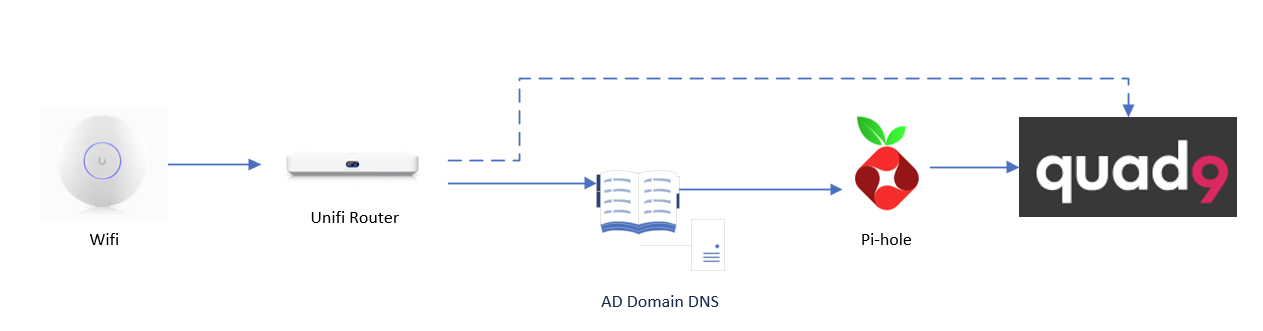
Got a bit of a dilemma right now because of how DNS works. Before I go into the question proper, I have somewhat of a network DNS solution like the one below:
I need to have the Domain to answer DNS calls for Domain exclusive purposes so it needs to be in the chain
Pi-hole sinkholes anything telemetry from all of the network environment
Fallback for the overall network to Quad9 directly (dotted line) in case of issues
All of the hosting infrastructure is within a hypervisor, so if I’m troubleshooting the hypervisor, the AD is off and most likely the Pi-hole will be off at the same time. This setup works, including the fallback (useful when you have more than just one person in a household), but the problem is that the Unifi Router doesn’t switch back to the main DNS once it comes back online, and I would like for it to switch back to the AD/Pi-hole path.
Now, I understand how DNS selects and prioritizes and leverages the primary and alternative servers, and how it will keep using the one server until that one times out and move to the next one; but the only path I see is to jerry-build a script within the Unifi router to kill dnsmasq every half hour or so. Since it’s a household deployment, it should work fine - but it feels wrong to do it this way. My question is: Do you know of any other alternative way to do this?
According to dnsmasq’s documentation there looks like there’s no concept of “dead servers”, it uses (by default) round-robin and if the query files it relies on the client to re-issue a new query.
Not janky, but a bit convoluted as AD needs to be in the path, even though it’s not the main DNS provider (just for DS stuff). The main issue is how Unifi handles its DNS (i.e. it’s dnsmasq). Now, the UCG Fiber Router does not run UnifiOS (that’s the standalone OS that runs the controller), but its firmware version of that - so most likely it means that I may have to deal with dnsmasq, and write a script for restarting DNS. Not nice, but it’ll work.
Does the AD Server listen to specific domains? E.g. *.lan or *.some-domain.net?
You can use unbound to forward requests for this domain’s to AD. You could do clients → pihole → unbound → AD if you want to see the hostnames on pihole.
I could do DNS forward to the AD for the domain only, and then the rest to Pi-hole directly, but the challenge still is when both go offline (which is probably 90% of the times) how do I tell Unifi to go back to these DNS servers rather than Quad9 directly
To be sure: The clients receiving DNS servers from the Unifi DHCP are receiving Unifi’s gateway, or the AD server?
i.e. Client → Unifi DNS → AD DNS → PiHole → Quad9, instead of Client → AD DNS → PiHole → Quad9
When you say ‘fallback’, is that a separate host/hypervisor running DNS, or are you having DHCP hand out two DNS servers – one of which is the AD DNS stack and the other of which is quad9?
The ‘simple’ and/or ‘correct’ solution would be another hypervisor running a duplicate of your AD DNS->Pihole stack, and handing out only the AD DNS addresses via DHCP. That way you can mess around with one hypervisor and the other one is still serving traffic in your preferred way. Of course, the correct solution involves expense. But maybe you have an old PC lying around somewhere that’s getting voluntold into this new lease on life.
As far as the ordering of DNS goes, PiHole’s conditional forwarding could be in front of AD DNS (i.e. Client → Pihole → AD DNS (if needed) → Quad9. That way you get the telemetry in pihole per-client instead of only seeing things coming from AD. This may help:
Ah, I thought the pihole was a physical device. If Unifi does not switch properly you will need another device that stays online and hosts at least unbound and / or pihole. A Rasperry Pi Zero would be enough to do so.
The issue lies in the inability to run suitable software on the unifi router which is the only available device except for the AP. You can ~shoehorn this into OpenWRT but then you’d give up the vendor firmware on the AP unless “WIFI” is actually WAN.
This is the main path. The “fallback” path or secondary DNS is, when the main path fails or is offline is:
And as follow-ups for the other items:
Separate HV: At the moment I don’t have dedicated hardware to run a standalone hypervisor to have a duplicate of these systems
Conditional forwarding: Both AD and Pihole typically go offline at the same time, so placing them in different order wouldn’t achieve much. Also, Unifi being the primary DNS (i.e. first in the chain) to consolidate queries.
That doesn’t mean you can’t run a script directly on it
 But maybe you have an old PC lying around somewhere that’s getting voluntold into this new lease on life.
