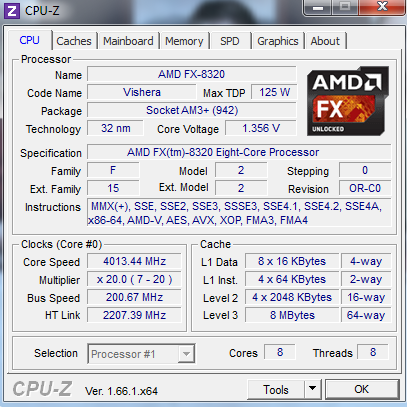
So for the past month I've had my 8350 running at 4.5ghz @ 1.55v with a max temp of about 63c with the Evo 212.
today I've installed windows 8.1 and updated the bio and when I booted up I noticed my CPU was idling at 50c! holy shit (it was normally 30c) so I booted up prime95 and I stopped after it reached 68c.
So I'm wondering what could be causing this since the bios settings are the same as before.
wow 4.5ghz @ 1.55v is probably why...anything past 1.50v AMD even states that's dangerous levels unless you do liquid cooling. Idk if you got really unlucky in the silicon lottery but you should be getting 4.5ghz @ 1.42v. I did some searching and found out that with the BIOS update the voltage ramps up and down more rapidly and if you are at a constant 1.55v it's expected to hit 68c which is dangerous past 65c. I would definitely lower the voltage, you're just killing your chip.
Try 4.4ghz on stock voltage. then only adjust voltage a little at a time. Windows 8 and 8.1 can handle better clocks with less voltage than Windows 7. It has better instruction strings. I would seriously look at the amd guide.
http://sites.amd.com/us/Documents/AMD_FX_Performance_Tuning_Guide.pdf
http://rog.asus.com/forum/showthread.php?11338-Crosshair-V-Formula-amp-AMD-FX-8150-CPU-Overclocking-Guide
Well I've been going Prime95 and ramping up the voltage if it failed.
I'l look into it.
ok update, I dialed back my voltages at put my CPU back at 4.5ghz (1.45v) and so far it seems stable.
if all goes good might bump it up to 4.6ghz
Ok update, I got a stable 4.5 oc @ 4.5v on the dot and my temps are normal so thank you really helped, and yes by the looks of it I lost the silicon lottery.
cool, yeah sounds much better. I'd say 4.6-4.8ghz is where the 8350 really maxes out depending on the luck of the silicon. 4.6Ghz is a good overclock, also make sure to to keep the LLC somewhere near medium-high, anything more will cause overvolting. Should be able to hit with 1.45v. I've done 4.9Ghz once on 1.5v but i did that only to see the limits...though i think i got a good board and good chip, just very lucky. Also remember that the NB VID may affect the clock performance. Personally i keep mine at 1.2V(stock is i believe 1.175v)..the slight bump is so that the link between the RAM and CPU is fed enough if you do overclock RAM because if the RAM isnt getting sufficient voltage your CPU may throttle. Southbridge has no effect at all to the CPU performance.
Also just a heads up the M5A97 boards aren't generally meant to go that high because it is 4+2 you may not have stable performance during gaming, so even 4.5ghz i would be happy with, quite hard to achieve. I would also test the RAM and PCI lane to make sure that they are not suffering from the 4+2 power phase. 6+2 or 8+2 will yield better more stable results so be aware of that.
Could you elaborate? I have everything at stock/auto speeds atm except for the CPU voltage (1.45) and the cpu multiplier (22.5)
The vrm design on your board is 4+2 which in turn means the systems delivering power to your 8350 are running incredibly hot under load. This will eventually damage your 8350 and could hurt the graphics card and ram. Basically running the volts you need at stock on that board is dangerous. You will most likely ruin the 8350 soon at those volts on that board. You run the risk of the vrm's overheating and popping. This can ruin anything on the motherboard. It could fry everything on the motherboard. 99% of the time it goes and doesn't hurt anything. But it is more likely with the shit ton of volts on that weak vrm system. Its recommend that you use a 990fx chipset board with a 6+2, 8+2 or higher vrm design. That means the system can handle more volts and run cooler. Also the hyper 212 + is really not sufficient to run with that many volts.
I have already dialled back the volts on my board m8
Stock volts are pushing it! Take off the overclock or get a new motherboard and cooler! YOU RISK FRYING EVERYTHING!
you really must be trolling
After any bios update, it is best to clear load defaults, then set your overclock manually again. Sometimes, a company will release an update that may change the way the LLC runs, or in a rare case (more common on older gen boards relative to the CPU, the old bios did not fully support the CPU, and thus defaulted to a different voltage from which you applied an offset to, then the bios update detects it properly, and the offset causes far too high of a voltage
For an 8350, 1.55V (and possibly higher), are mainly for if you are looking to hit 5GHz
1.375v is the FX8350's stock voltage have you got turbo enabled in the bios? turbo bumps up the voltage to 1.45v (it does the same thing to my FX8320 if i enable turbo. my cpu runs at 1.35v stock 1.45v turbo with turbo off i run my FX8320 @ 4Ghz on 1.35v)
You shud be able to hit 4.5ghz on stock volts as its the cpu's turbo speed.
remember updateing a bios reset's it go back over all your setings and swich off all the power saveing and turbo modes.
yeah he's trolling, those boards are made for overclocking, just not at the level of a 990fx chip.
What i mean try not to hit further than 1.45v because you may get unstable clocking past that. Which means overheating, like cooperman stated as well, ur cpu at turbo will run 1.45v because AMD deams it safe on all fx certified boards to be the turbo voltage. Usually that's the basis of where i start. 1.45v is safe.
The 970 boards are not made to be pushed all the way because you'll instability throughout the northbridge. So if you overclock RAM for example, you may have to dial back the overclock on the CPU because of the 4+2 phase. If you had something more like 6+2 or 8+2 then you could max out everything. The way AMD does on the AM3/3+ socket is that the northbridge is the watchdog to the CPU and RAM so if something happens to one another it may affect the other in a serious way. It tells how much voltage the CPU needs to have and same with RAM. With Intel, the CPU has full control of EVERYTHING while AMD doesn't want to give CPU full autonomy.
Long story short don't push it too far because you want to leave headroom for the rest of the motherboard, if you push the CPU too far the PCI lane or the RAM may suffer from not enough voltage being properly given. I've had a buddy who hit 5ghz on their 970 boards but they would blue screen because the RAM would fail cuz the CPU was maxing out the power phase. The blue screen would say the ram failed. he dialed back the cpu clock and the ram stopped failing.
In your case i would probably be happy @ 4.5Ghz running at 1.45v or if you can push it higher with that voltage then go for it, but try not to exceed 1.45v and you should be fine.
I hope i'm not confusing you, if you need more elaboration feel free to ask.
Yea I don't plan on pushing it more.
My only question is right now my ram and NB are all on default/auto should I tweak my ram and up the nb or leave it? (its stable so I guess this could be a stupid question)
yea we covered that earlier, my BIOS wasn't ramping up the voltage (so p95 would fail) so I would up the voltage. Its 1.45v now and stable 4.5ghz
no u don't have to unless you're doing extreme clocking like 4.8ghz and up.
ok thanks! you where a big help.