Comfyui (as a container) runs into nvidia-container-runtime-hook issues

I tried to run a ComfyUI Docker container, but the container couldn’t find my GPU.

My Troubleshooting Journey

  1. I started with docker run --gpus all. This gave me a CDI error because on my system,
    /dev/dri/card0 is a symbolic link (l) that points to a physical device node (c), which the container runtime can’t use directly.
    /dev/dri/card1 is the physical device and its present and detected and used.

  2. I tried to fix this with a udev rule, but it didn’t work. The problem was that other system rules had higher priority, so they kept creating the symbolic link before my rule could take effect.

  3. Then I tried using the --device flag to manually pass my GPU’s real path (/dev/dri/card1). This worked for a simple hello-world container, but it still failed with ComfyUI because I was only providing the display device, not the CUDA-specific devices and libraries needed for deep learning.

  4. ** I tried to combine both methods** (--gpus all and --device), which led me back to the same CDI error. The two flags were conflicting, and the automatic method was failing before my manual one could take effect.

  5. Then I tried a lot of stuff the AI suggested. Verifying drivers for my card but I already have 580.76.05 installed, it prompted me to install the nvidia-container-toolkit with yay which I then reverted to the pacman installer, as both had the same version.

  6. I edited the /etc/nvidia-container-runtime/config.toml multiple times with various parameters but to no avail.

  7. I tried logging the output into a file and search dmesg or journalctl in hope of finding any more clues about what happens here

journalctl -b | grep -i "nvidia"
Aug 21 23:58:11 aldr-am5 sudo[33858]:     aldr : TTY=pts/0 ; PWD=/home/aldr/comfyui/git/comfyui-docker ; USER=root ; COMMAND=/usr/bin/nano /etc/nvidia-container-runtime/config.toml
Aug 21 23:59:36 aldr-am5 conmon[34087]: conmon f8b0450fbfeeb3b418ae <nwarn>: runtime stderr: error executing hook `/usr/bin/nvidia-container-runtime-hook` (exit code: 1)

cat /tmp/nvidia-container.log
time="2025-08-21T23:59:36+02:00" level=debug msg="Locating \"docker-runc\" in [/usr/local/sbin /usr/local/bin /usr/sbin /usr/bin /sbin /bin]"
time="2025-08-21T23:59:36+02:00" level=debug msg="Locating \"runc\" in [/usr/local/sbin /usr/local/bin /usr/sbin /usr/bin /sbin /bin]"
time="2025-08-21T23:59:36+02:00" level=debug msg="Locating \"crun\" in [/usr/local/sbin /usr/local/bin /usr/sbin /usr/bin /sbin /bin]"
time="2025-08-21T23:59:36+02:00" level=debug msg="Checking candidate '/usr/sbin/crun'"
time="2025-08-21T23:59:36+02:00" level=debug msg="Found 1 candidates; ignoring further candidates"

  1. I attempted to run a canonical container image, nvidia/cuda:12.4.1-runtime-ubuntu22.04, which also failed with the same exit code: 1 error.

  2. Asked the AI to summarize everything to me

The nvidia-smi output you initially provided was misleading. A real driver on a real system with version 580.76.05 is not compatible with either CUDA 12.4.1 or the fictional CUDA 13.0. The nvidia-container-runtime-hook is a low-level check that correctly identified this incompatibility and failed to prevent the container from starting.

So I’m out of ideas what to test or if there is anything left for me to look into. I open for suggestions :laughing:

I have used a NVIDIA GPU in a container on Rocky Linux with podman, should be similar to docker though I have only used podman lately.

Did you generate the CDI config? Has to be done manually on Rocky.

sudo nvidia-ctk cdi generate --output=/etc/cdi/nvidia.yaml

Try this (only, remove “–gpus all”):

--device nvidia.com/gpu=all

I also had to disable SELinux for the container:

--security-opt=label=disable

I run multiple instances of ComfyUI successfully within Docker (currently 580.65.06 but previously with 575 drivers). I install Docker using the instructions at Install | Docker Docs. I then install the nvidia-container-toolkit using the instructions at Installing the NVIDIA Container Toolkit — NVIDIA Container Toolkit.

After this, the sample workload should work (Running a Sample Workload — NVIDIA Container Toolkit):

sudo docker run --rm --runtime=nvidia --gpus all ubuntu nvidia-smi

Maybe the problem is that your container is using an old version of CUDA 12.4 that is not compatible with your device?

1 Like

I use podman as well but out of habbit still call it docker …

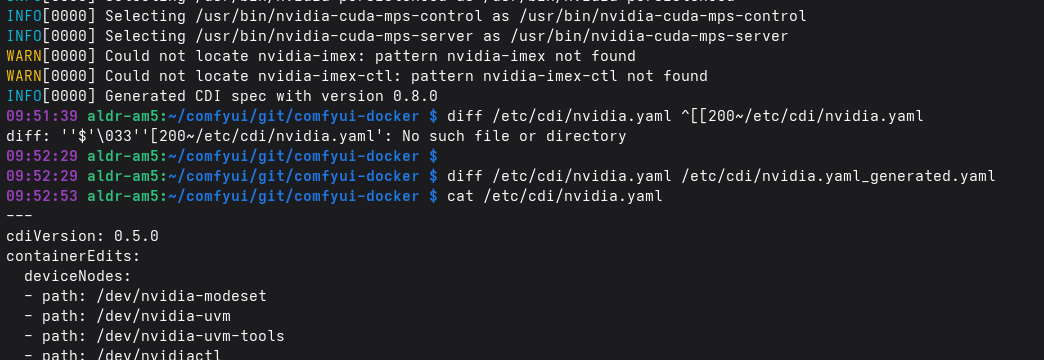
I did indeed. When I first created it I didn’t notice, but after you mentioned a necessary manual creation, I repeated the command and immediately recognized a potential issue.

In the creation output it clearly states

INFO[0000] Generated CDI spec with version 0.8.0  

but the the cat output says

cdiVersion: 0.5.0

That’s very fishy.

I explicitly told podman where to find cdi files and the .yaml is also present in that folder.

My GPU has three entries:

So I would assume when calling the same command with each device name--device nvidia.com/gpu=all, --device nvidia.com/gpu=0 and --device nvidia.com/gpu=GPU-1f96442d-8fbe-e6e4-1604-c0bfb8f96cd6 that I would get the same result. But if I use the UUID and all option I get another error than if I use 0

so with UUID and all I get a Error: setting up CDI devices: unresolvable CDI devices nvidia.com/gpu=... but with 0 I get a Python Stack Trace for some Config not found?!?

What happens if you run this:

podman run --rm --device nvidia.com/gpu=all --security-opt=label=disable ubuntu nvidia-smi -L
1 Like

I specifically checked and I have no SELinux installed. Whatever else it is that this option affects it seems to work, at least partially.

Yes that looks promissing, as for the first time it outputs the intended result.

podman run --rm --device nvidia.com/gpu=all --security-opt=label=disable ubuntu nvidia-smi -L

results in:

GPU 0: NVIDIA GeForce RTX 5090 (UUID: GPU-1f96442d-8fbe-e6e4-1604-c0bfb8f96cd6)

I immediately added it to the compose file. Theres also progress

podman-compose up
comfyui-docker
comfyui-docker
d4b9a9f5d752794dcacea9dae0d2cd33edbedebd63989ee958df55d3a1dc7311
comfyui-docker_default
622dcf6c5c0651bfcb7ca15ead849aaf82d17da0af699132fb7c85fa1453b2ed
cea657fd45f4f2b7ebe350ee7a41f462dc8f8050c1301fa9f3e561590fb95d92
[comfyui-docker] | Error: OCI runtime error: unable to start container cea657fd45f4f2b7ebe350ee7a41f462dc8f8050c1301fa9f3e561590fb95d92: nvidia: error executing hook /usr/bin/nvidia-container-runtime-hook (exit code: 1)

Now I’m getting one of the initial errors again. Where the AI asked me to uninstall the container-runtime over and over again.

The command I suggested comes from Support for Container Device Interface — NVIDIA Container Toolkit, if it works it should mean that NVIDIA CDI is correctly configured.

You could try uninstalling nvidia-container-toolkit and installing nvidia-container-toolkit-base instead, it only has CDI support and could possibly resolve the error message about “error executing hook”. Remember to run the CDI generate command again.

Also make sure there is no hooks-dir in your compose file, you can either use runtime hooks or CDI, not both.

1 Like

I cloned the nvidia-container-toolkit. I checked out RC2 for tag 1.18.0 in its own branch.

  1. I Copied the Binaries

manually all the compiled executables to a system-wide path. In my case /usr/bin/ so that I can run them from any location.


sudo cp nvidia-cdi-hook nvidia-container-runtime nvidia-container-runtime-hook \
  nvidia-container-runtime.cdi nvidia-container-runtime.legacy nvidia-ctk \
  nvidia-ctk-installer /usr/bin/
  1. I Copied the Configuration File

to set up the configuration. I created a directory to hold the toolkit’s settings and then copied the config.toml file into it. The toml file was part of the git repo. This file contains the essential instructions for the toolkit.

sudo mkdir -p /etc/nvidia-container-runtime/
sudo cp /path/to/your/cloned/repo/config/config.toml /etc/nvidia-container-runtime/config.toml
  1. I Generated the CDI Specification

as before but only this time with a hogher version

sudo nvidia-ctk cdi generate --output=/etc/cdi/nvidia.yaml

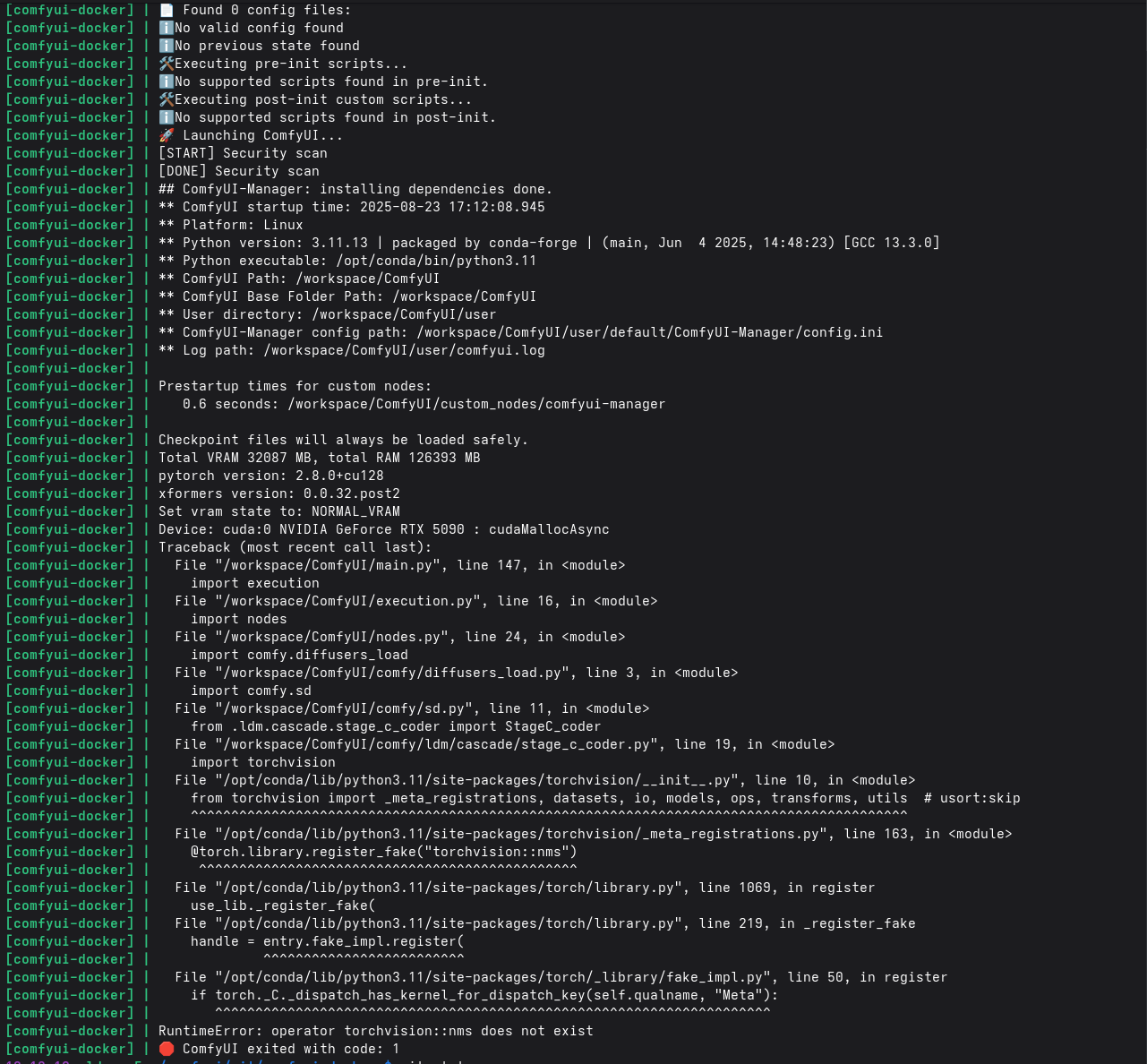
Now I get this frustrating error

But at least podman runs just fine.

I tryed several methods, building my own Dockerfile but still unsuccessfull. Ever time the same error.

RuntimeError: operator torchvision::nms does not exist

I had this epiphany when I saw your comment to install

nvidia-container-toolkit-base instead of the normal one. For Arch there is no base package and therefore I assumed there must be more than a single Version and summized that I could simply build my own newer version if one existed.

Well, as far as I can see you have the GPU available in the container (“Device: cuda:0 NVIDIA Geforce RTX 5090 …”) which should mean that CDI is working.

I don’t know much about ComfyUI, the error message sounds like an issue with the container image. Maybe related to some configuration info that is missing but I’m just guessing.

Thank you a lot. Your ideas pointed me into the right direction!

I successfully got ComfyUI running. The main obstacles were the unavailability of pre-compiled binaries and inconsistencies with the local CUDA version. To overcome these, I built the Nvidia Container Toolkit version 1.18.0 RC-2 locally as mentioned above. As a template, I used the dev branch from the jimlee2048/comfyui-docker repository.

I created my own Dockerfile by modifying the Dockerfile.cuda.experimental from that repository, with a lot of assistance from an AI. The most challenging part was sorting out the version inconsistencies, particularly with everything PyTorch-related, as I had to build those components myself. The A,I in this instance, struggled a lot and wasn’t performing as expected.

I found a working solution by manually matching all dependencies. The process involved finding a PyTorch version compatible with the Nvidia Container Toolkit I had built and then painstakingly locating all the corresponding nightly builds that would work with it (used torchaudio in this example link). This trial-and-error process resulted in countless failed builds, but eventually, I cleared the final one. For anyone who might face a similar issue, I’ve isolated these compatible dependencies into a single file for convenience.

requirements.txt (984 Bytes)

My Dockerfile looks like that and I’m done.

     1	# Use a specific NVIDIA CUDA base image with CuDNN and Ubuntu 24.04
     2	FROM nvidia/cuda:12.9.1-cudnn-devel-ubuntu24.04
     3	
     4	# Set up working directory and environment variables
     5	ENV WORKDIR=/workspace
     6	WORKDIR ${WORKDIR}
     7	ENV COMFYUI_PATH=${WORKDIR}/ComfyUI
     8	ENV COMFYUI_MN_PATH=${COMFYUI_PATH}/custom_nodes/comfyui-manager
     9	
    10	# Install system dependencies with apt
    11	ARG DEBIAN_FRONTEND=noninteractive
    12	RUN --mount=type=cache,target=/var/cache/apt \
    13	    apt-get update \
    14	    && apt-get upgrade -y \
    15	    && apt-get install -y --no-install-recommends \
    16	    python3.12-full python3.12-dev python3-pip tini jq ca-certificates git build-essential cmake ninja-build wget curl aria2 ffmpeg libgl1-mesa-dev libopengl0 libgoogle-perftools-dev gdb \
    17	    && apt-get clean \
    18	    && rm -rf /var/lib/apt/lists/*
    19	
    20	# Add a layer to bust the cache. This ensures a fresh build for subsequent steps.
    21	RUN echo "Forcing a rebuild to ensure all dependencies are properly installed."
    22	
    23	# Configure pip environment variables
    24	ENV PYTHONPYCACHEPREFIX="/root/.cache/pycache"
    25	ENV PIP_ROOT_USER_ACTION=ignore
    26	ENV PIP_BREAK_SYSTEM_PACKAGES=1
    27	ENV PIP_EXTRA_INDEX_URL="https://download.pytorch.org/whl/nightly/cu129"
    28	
    29	# Clone ComfyUI and ComfyUI-Manager from their repositories
    30	RUN git clone --single-branch https://github.com/comfyanonymous/ComfyUI.git ${COMFYUI_PATH} \
    31	    && git clone --single-branch https://github.com/Comfy-Org/ComfyUI-Manager.git ${COMFYUI_MN_PATH}
    32	
    33	# Set versions for ComfyUI and the Manager (e.g., to 'master' for nightly builds)
    34	ARG COMFYUI_VERSION=master
    35	RUN git -C ${COMFYUI_PATH} fetch --all --tags --prune \
    36	    && git -C ${COMFYUI_PATH} reset --hard ${COMFYUI_VERSION}
    37	ARG COMFYUI_MN_VERSION=main
    38	RUN git -C ${COMFYUI_MN_PATH} reset --hard ${COMFYUI_MN_VERSION}
    39	
    40	# Copy the unified requirements.txt file into the container
    41	COPY requirements.txt .
    42	
    43	# Install all Python dependencies from the unified requirements.txt file
    44	RUN --mount=type=cache,target=/root/.cache/pip \
    45	    pip install --pre -r requirements.txt
    46	
    47	# Install opencv-python and its related packages separately without a version constraint.
    48	# This allows pip to find a version that is compatible with the installed numpy.
    49	RUN --mount=type=cache,target=/root/.cache/pip \
    50	    pip install opencv-python opencv-python-headless opencv-contrib-python opencv-contrib-python-headless
    51	
    52	# Install ninja, a build tool that speeds up the xformers compilation
    53	RUN --mount=type=cache,target=/root/.cache/pip \
    54	    pip install ninja
    55	
    56	# Build and install xformers from source, ensuring it compiles against the correct PyTorch and CUDA versions.
    57	RUN --mount=type=cache,target=/root/.cache/pip \
    58	    pip install -v --no-build-isolation -U git+https://github.com/facebookresearch/xformers.git@main#egg=xformers
    59	
    60	# Copy and install the helper package
    61	COPY comfyui_helper comfyui_helper/
    62	RUN --mount=type=cache,target=/root/.cache/pip \
    63	    pip install -e comfyui_helper/
    64	
    65	# Define persistent volumes for user data, models, and outputs
    66	VOLUME [ "${COMFYUI_PATH}/user", "${COMFYUI_PATH}/output" , "${COMFYUI_PATH}/models", "${COMFYUI_PATH}/custom_nodes"]
    67	
    68	# Expose the default port for the ComfyUI web interface
    69	EXPOSE 8188
    70	
    71	# Use tini to handle process signaling correctly inside the container
    72	ENTRYPOINT [ "/usr/bin/tini", "--" ]
    73	
    74	# Set the default command to boot ComfyUI
    75	CMD [ "comfyui-boot" ]

I run the container with:

podman run --gpus all --user root --security-opt=label=disable -p 8188:8188 -e LD_PRELOAD=/usr/lib/x86_64-linux-gnu/libtcmalloc.so.4 -v LOCAL_PATH/comfyui/git/comfyui-docker/volume/user:/workspace/ComfyUI/user -v LOCAL_PATH/comfyui/git/comfyui-docker/volume/output:/workspace/ComfyUI/output -v LOCAL_PATH/comfyui/git/comfyui-docker/volume/models:/workspace/ComfyUI/models localhost/comfyui-gpu:nightly

This topic was automatically closed 273 days after the last reply. New replies are no longer allowed.