What I essentially want to do is have the Windows 10 OS guest be visible on my physical network. Based on the various wikis and guides I've read, this means I need a bridge as NAT and User Mode networking will not allow this.
I've configured a bridge using netctl with three devices. enp7s0 (my physical ethernet), br_0 (my bridge) and tap_0 (my tap device for QEMU).
Note: My terminal fonts are currently such that _ are not visible. I will fix that later. Any instance of tap 0 and br 0 are really tap_0 and br_0.
enp7s0's netctl config: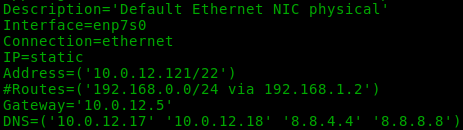
tap_0's netctl config: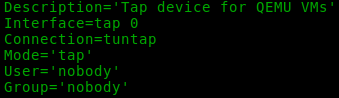
br_0's netctl config:
My understanding has been that I would then tell the virtual machine to bind to the tap_0 device, but trying to do that within virt-manager results in the following error:
Setting it to br_0 works but then the guest OS doesn't have an IP address or access to the internet. It just has the usual 169.x.x.x "I can't get an IP address from DHCP" Windows networking.
Here is my list of network devices:

Note that the bridge and my physical ethernet have the same MAC (I blacked them out).
I realize virbr0 and virbr0-nic are created by virtual manager on it's own. Using either of those has the same error as using tap_0.
I am not sure what I should be doing with this. My understanding of bridges is that I should have the two interfaces I want to bridge be listed in BindToInterfaces in the /etc/netctl/br_0 file. I have both my physical nic and the tap device listed there.
I feel like I should be listing tap_0 as the device for my VM to use, but virt-manager wants a bridge. I don't know why. Why it would create virtbr0-nic then ask for a bridge? No clue.
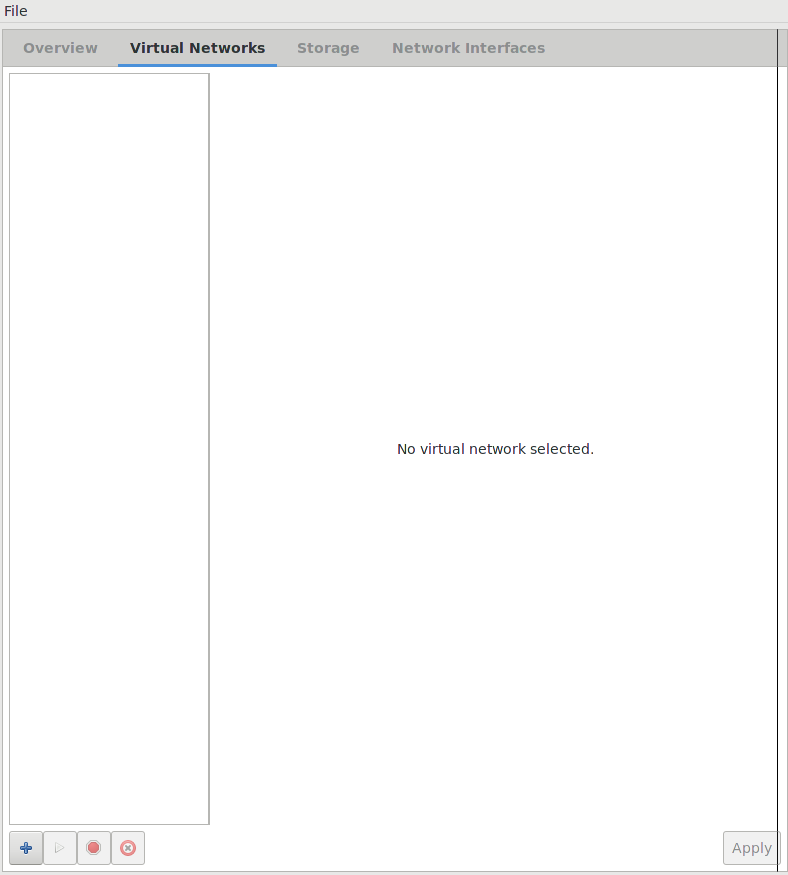
Do I need to add the interfaces I've created in the virt-manager Virtual Network and Network Interfaces under Edit > Connection Details to use them correctly?