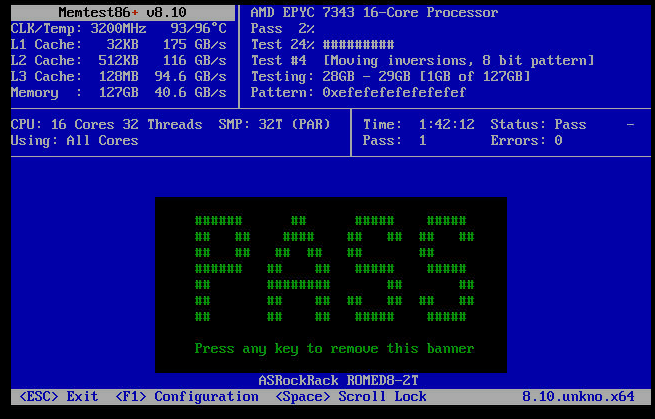
I have an issue that I cannot install PVE 9.1 or 9.2 or debian 13.5.0 on my new Romed8-2T from asrock rack. I can get it to the installer selection 100% of the time, but somewhere between my selection of the install method and finishing the install, it always crashes and reboots. I have gotten to the end of PVE 9.2 with all settings and it went through the entire installer just fine, except it didn’t: it was frozen on 100% and after 30 mins, I restarted the server. Of course there was nothing to boot, and it restarted back into the installer…
Hardware:
EPYC 7343 (previously a 7282 that did not boot with code d0)
not on the QVL, but off by ending in TI, instead of UI. and boots, unlike the SKhynix that i had before
SeaSonic Prime TX 1300W
WD SN850X 2TB [2x] (for VMs)
LSI 9400-16i IT-Mode
Intenso High (120GB) for boot
Silverstone RM-61-312 (if that matters at all)
1x10G LAN and IPMI LAN are connected to the router
I have tried pretty much everything I can think of:
IOMMU, above 4G decoding, SRIOV, rebar: off and on
CMOS reset multiple times
Reseated cpu
reseated RAM
memtest (from the PVE iso): 100% pass, 0 errors
several install methods:
USB via fedora mediawriter on 3.0 and 2.0 stick
Motherboard IPMI
ventoy
checked checksum for both PVE 9.1 and 9.2, both pass
secure boot is off
install with nomodeset and normal setting
graphical install and terminal install
updated Bios to newest, 4.10
everything is unplugged, save for one stick of ram and one sata ssd
logs don’t tell me anything but I am also stupid noob
I have been beating my head against this rock wall for the past 3 days. No matter what I do I get the same result: a crash somewhere between selecting the installer and finishing it. usually it happens before the proper installer UI even opens.
Here are some examples of the installer crashing/failing/whatever you want to call it. These are “more successful”, as in: I got marginally further in the installer.
Please don’t judge my hardware choices, a lot of it are things I already had or had access to. Berate me on the dual 120gb boot ssds if you wish.
PS:
I purchased most of this hardware 6 weeks ago and had issues with the RAM and CPU already. I thought I could finally catch a break but this project seems to just be cursed.
Also, I am not a complete noob, as I do have a TrueNAS core server and daily drive Linux since over a year (CachyOS & distrohopping on my FW13 Laptop, currently fedora KDE). I know how to install a damn OS, unless it does not let me of course.
Yeah, so NPS1 (default) fails obviously. Auto, NPS2 and NPS4 fail too. Anything else i can set in the memory settings (see image)?
keep in mind that I only have one stick in there right now
Asrock Rack is quite unhelpful right now, I was hoping they could tell me something.
I have also updated to BIOS 4.30 and BMC 3.08, which is the most current. Made no difference.
With the auto NUMA setting I can get into the installer, but I was able to complete the installer previously too, so that is no progress in my eyes. (it went to 100% but froze and did not install anything afaict)
If it does this for any OS, even one already installed, I would then next suspect:
The disk interface/cable/controller. A bad cable, bad/overheating SATA/SAS controller or faulty backplane can cause no end of trouble. To test this you’d need an nvme drive or try different slots/cables, or even a usb adapter (which is it’s own can of worms they can be finicky, and often need a heatsink added to the adapter controller)
The PSU. If the power supply is bad, this can also manifest as weird problems. Only way to diagnose that those is to have a known good one handy and be able to hook it up to the system.
Thanks, Log.
I am at work now so I can’t test it yet but about the drives:
1a) This crash also happens with no drives attached, I can try unplugging the cable MoBo side as well.
1b) It is not the backplane since the drives are direct sff8643 to Sata, with the Asrock provided cable. I can test with the second cable that came with it, but I do not see it making a difference, because it crashes with no drives as well.
the PSU could be the issue of course but those glitches seem to be more inconsistent from what I know. Worth a try nonetheless (it will be a pinta to get the other one out of my desktop tho)
if memtest passes, dies lowering the speed make much difference? I understand that memtest is not perfect and that we don’t trust any part of the equation, but I do not know the confidence delta between memtest passing and memory/mem controller working.
Honestly I’m grasping at straws myself, basically adjusting the memory speed down is just a quick and easy thing to eliminate.
I typically use Passmark’s Memtest86 (which has ECC reporting) to test my ECC memory, and in my experience it does a fantastic of reasonably quickly revealing the sort of instability which can’t be ignored. I would normally expect the memory operations that come from running/installing a linux OS to be close enough to the memtest tests, that a problem would be revealed, but error generation from workloads can be very weird sometimes.
What’s strange is you can run proxmox’s Memtest86+, but no other OS. At this point it sounds like an issue with some setting in the bios, but I’ve no idea what would cause this, and updating your bios should have reset things into a reasonable default. It’s possible that proxmox’s Memtest86+ cannot see ECC errors being reported on your system, so you could be getting a bunch silently when doing the test, and then when running a real OS the errors escalate further into multi-bit errors.
Other things to try:
Checking the voltage of the CMOS coin cell.
Checking that the misc jumper headers are in a reasonable state. For example the multiple NVDIMM Power Support Jumpers probably shouldn’t be enabled.
Check if the watch dog timer is enabled in bios. I believe this can attempt to reboot the system if it somehow detects that a chosen kernel hasn’t booted correctly. Not sure how this works.
Thanks for both your input.
Once I am back from work, I will try those options. The IPMI did not complain about cmos battery being bad, it did notice when it was missing, so the sensor works at least kek.
What is the voltage that a charged cmos cell should have?
I will try swapping with my desktop, if i need to try a different PSU, I can take the cmos out as well.
I bought other ECC RDIMMs first. From skhynix, they did not work. Code 16 if i recall correctly, not documented in the manual…
Also tried known working standard non ecc DIMMs (UDIMM, right?), those gave me code 16 as well. It seems the board (or cpu) is quite picky with memory. My desktop’s corsair vengeance RAM kit is the last one I can try, but I am not expecting it to work.
About checking the rail: should I unplug the psu and jump the pwr btn & check with multimeter or are the motherboard’s IPMI report good enough?
People usually say that the onboard sensors are not to be trusted but that may be more from consumer level stuff, not server mobos. Also that may have gotten better in more recent years
CMOS battery voltage is about 3.066V just after pulling it out.
Ok, so while gathering my thoughts in this draft, i tried the 7402P that I just posted about again, and… the system boots with no issues. straight into the already installed PVE on mirrored btrfs ssds. I still need to try it with all 4 sticks but damn