Can a Mikrotik switch be locked down to a similar security level as a dumb switch?

Today I don’t have a managed switch. I had one years ago, but it was user hostile - it would try phone home without asking me, it also wouldn’t let me lock down access to the admin web interface as well as I’d have liked - I presume that was to make it harder to brick.

I’ve grown up building networks out of OpenBSD/OpenWRT/Debian (routers/APs/firewalls) with dumb switches.

I don’t use VLANs, since dumb switches are so cheap I just have (real) RLANS.

But maybe it’s time I joined the mainstream.

If I look at the switch architecture that 1.3 Gb/s link between the switch and “CPU” is my main concern. I’d like the “CPU” to be effectively off the network, just there to configure and monitor the switch. If that can all happen over I2C or SPI that’s cool.

The ideal position would be not having to update the firmware, because the “CPU” side isn’t easily able to be exposed to malicious input. Also not having the firmware in a position to be trying to phone home.

In such a setup I could, say, replace two dumb switches with 1 switch and 2 VLANs without increasing the vulnerability surface much. (It will increase it somewhat as the switch chips have their own bugs, eg: malicious packets may take advantage of errors in parsing logic, but I like to think those are largely going to cause crashes or DoS type issues and not RCEs).

What do people think? Is this asking too much? Other paths I could try are OpenWRT switches (at least I can trust the firmware) or DIP switch configured switches (limited but a step above regular dumb switches).

For years the big networking brands have been great targets for hacking, take over a router or switch and a malicious actor has a very useful asset - people don’t pay much attention or scan such network devices much for malware, they by definition have a lot of power over the network and often have a lot of bandwidth. And take over they have been, such that I’ve become sceptical of them, like a lot of other embedded devices.

I don’t agree at all with your statements about phoning home and security. But since you are not using VLANs, I will not engage in that discussion.

I just can tell you that I own that switch and that you can put SwOS on it.
SwOS is pretty much stripped down. It also lets you lock down the admin access web interface.

1 Like

Heh, I got that exact switch not a few days ago. Sadly there is nothing which really matches your criteria as far as I know - all managed switches expect a “privileged” vlan where the management interface is exposed with password protection where you can do all kinds of fun things. I dream of running my “standard debian” on a managed switch, but there is no such thing, at least in the home/soho/prosumer space. Can’t afford $10k switches to find out about them.

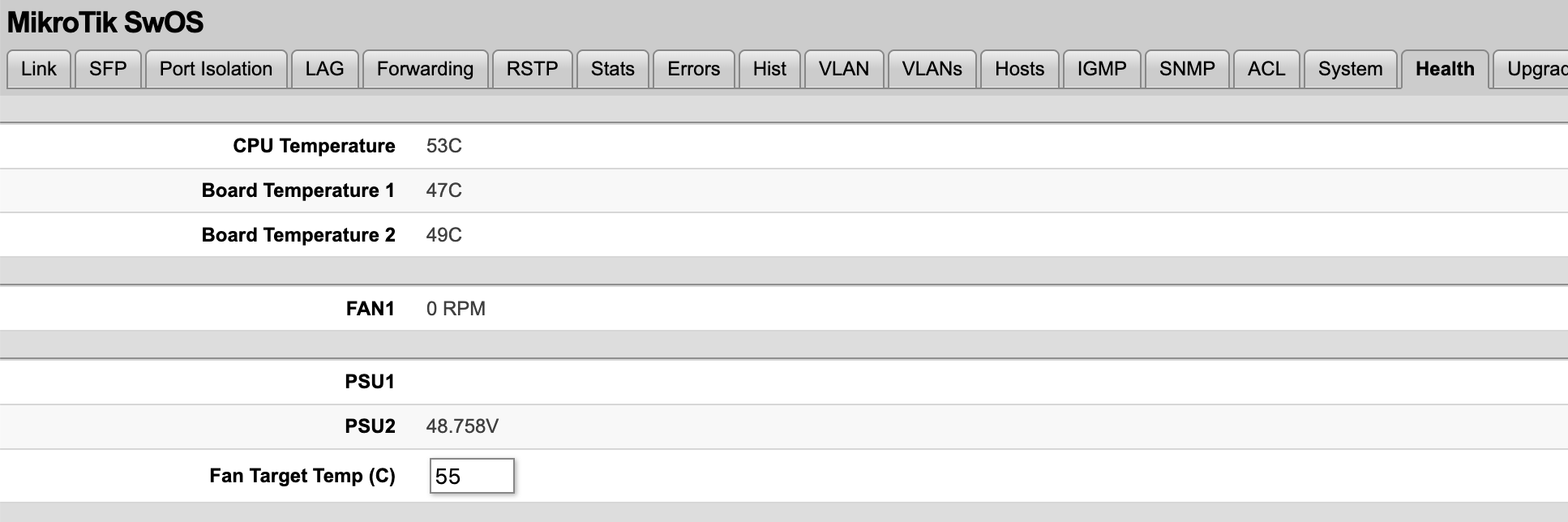
SwOS is the next best thing, however be aware that for that particular model, SwOS runs the fan at 100% 24/7, it doesn’t have fan controller management.

1 Like

You can achieve this without VLANs by delegating a specific port to be a management port.

Remove a specific port (usual practice is either the last port to be management) from a bridge, give it a separate IP, DHCP address, IP pool and a DHCP server. Test that access works and then only permit winbox/management only on that port.

This shouldn’t hurt any hw bridge offloading

alternatively if the switch has a serial port you can disable winbox/ssh/webfig completely and just manually manage the switch via console without having to sacrifice a port

1 Like

I bought 2 Zyxel XGS 1250-12, but I’ve not tested OpenWrt on them yet.

The switch is managed, with both 10G ports and SFP+, and supports open firmware.

It is expensive if you don’t need a managed 10G switch.

True, but since the newest update, you can define at what temp the fan will turn on. For me, that means that the fan never runs. Even with power hungry 2.5GBit/s copper.

That switch has a serial port (standard cisco rj45 serial port), called “console” on the front, it’s the “ethernet” port at the top without the leds. So you can just delete the IP configuration and it will not access the network anymore. Disable also the services Services - RouterOS - MikroTik Documentation since it still has winbox service that listens to packets to connect to Winbox management application.
Serial console works only with RouterOS so don’t run SwitchOS.

On RouterOS you can disable services and harden it without need to actually turn everything off like this.

But imho this is a good moment to learn VLANS. If you have no network segmentation you cannot just have a dedicated VLAN with all the management interfaces so nobody in the normal network can access it. So you are forced to go over the top on security on everything because everything can access everything. Which is dumb, you have bought a managed switch. The entire point of a managed switch is network segmentation with VLANs among other things.

What’s a RLAN? I don’t find meanings that are relevant in this context.

2 Likes

Fair point. It seems to consider SFP temps also though, my 10G copper SFPs run insanely hot :frowning: I wasn’t able to configure it in a way to get the fan to stop, so I ended up removing it.

Yeah, DAC is way better in terms of temps.

1 Like

Please let me offer a little perspective on the OP and your prior experiences.

Whatever frustrations you had with that previous switch, don’t apply them to the way you look at hardware from reputable makers. Saying you don’t believe in using VLANs because of that one crappy switch is like cutting off your nose to spite your face.

Be secure. Follow best practices. Update the firmware, especially for fixing security issues. Yes, you got burned before, but now you want to do things the wrong way. If you want better security then implement actual modern security features. Zero trust, device and user authentication, certificate management, encryption, network segmentation, etc…

1 Like

I think being SwOS being web only rules it out for me.

Happily serial port is my favourite way to manage headless devices :slight_smile:

That’s a very interesting switch, if you get OpenWRT do post how it went, what shortcomings there were. How hot it got (10GbE has a rep), how fan control went.

Done! Long ago.

Not all management interfaces are over Ethernet, but I agree, if you bought a managed switch it would be a good idea to consider using VLANs!

A not very good joke, instead of defining multiple VLANs using one managed switch, I have multiple real LANs with multiple dumb switches. The net result is the same, network segmentation.

What’s wrong about what I want? :slight_smile:

dumb switches are more insecure since you can’t configure any access controls or per port vlans, flood control, dhcp guarding/control, etc

Whether the use of dumb switchs is more or less insecure depends on the overall network architecture.

My routers connecting the network segments provide access control.

The reason I’m looking at Mikrotik et al is network ASIC chips would provide much better performance per dollar than what I currently do. It would also simplify cabling.

But there are downsides.

yeah but you can’t make per port vlan policies to make sure guests don’t just connect their devices to your main network. Also you can’t properly configure ports to be trunk ports for APs

The wifi is isolated from the rest of the network.

I don’t use VLANs right now, though I have in the past, I was only using dumb switches then too.

You don’t need managed switches to use VLANs (1,2).

Worth noting that some dumb switches strip out VLAN information, although nowadays they are always vlan capable chipsets run in dumb mode. Either way you find out quickly

2 Likes