Building a local AI Workstation / AI server with some moderate power - New to Local AI

Hello everyone!

New to the Community and this is my first post. Please let me know if I missed some important rules or maybe a related post.

Please excuse the verbosity of the post, I want to make sure I give a solid overview.

I’d like to ask for some guidance/feedback on a local AI build I’m trying to put together. I think the rules mentioned that I can’t post (many) links before having a high enough trust level so I’m just giving the names of the parts here but I can obviously provide links later on.

I do have a background in computer science but my education was mainly software side and rather theoretical. I do know how how “AI” works from a theoretical point of view as well as the math behind most of it, however I am not really familiar with hardware and I tend to get overwhelmed by all the choices, different platforms and considerations regarding things like PCIe-Expansions (lanes, electrical slots etc.)

Goal

I’d like to build a local server or workstation to have a decently powerful platform for some AI experiments and “real independence” from the large companies.

Obviously I cannot replace Anthropic, but I want to be able to do some serious work and maybe even provide AI for a small team of researchers, local projects in my community etc.

All this to say, that my endeavor is as much of “philosophical” nature as it is technical.

Budget

The approximate Budget would be about $10.000. However I am based in Europe and in my experience prices can differ widely between the US and the EU so it’s really just a ballpark.
Obviously, if I can get away with spending less I would do that but I don’t wanna compromise too much just to save a few bucks here or there.

Current State of Deliberations

After some days of research I arrived at my current idea of building a system based on the Threadripper platform.

CPU

More specifically I was thinking about the

  • Threadripper Pro 7955wx or the
  • Threadripper Pro 7965wx

Depending on which one I can get the best deal on.

As I understand it, the CPU is not really the important factor when talking about AI performance but a bit of CPU compute shouldn’t hurt when there might be other tasks to be done. Maybe some protein folding (I remember Folding At Home being a thing during the height of COVID), simulations, etc.

Mainboard

As a mainboard I am currently looking at the

  • ASUS PRO WS WRX90E-SAGE SE or the
  • ASRock WRX90 WS EVO

I chose these because of the availability of enough PCIe x16 slots (they both have 6 slots at PCIe Gen 5 x16 electrically AND bandwidth wise)

Case

I’m looking at the

  • Fractal Define 7 XL Black TG Dark

because so far that’s the only case I could find with enough space for a 4 GPU setup. Which leads neatly in the last main point.

GPU(s)

I am thinking about (ultimately) getting

  • 4 AMD Radeon AI Pro r9700

I was looking around a bunch and I also saw Wendell made several videos on it.
There even was a giveaway at some point where people were chosen to receive a rather similar system to what am I planning (as far as I can tell).

I might start with only 2 or 3 and get an additional 1-2 later depending on the market but as far as I can foresee it, prices will go up rather than down at least for the next year or so.

RAM, Storage, Cooler and PSU

Here I would simply take whatever is available and fits the criteria.

  1. I would start with a smaller amount of RAM for now to keep costs down a little and grab used RAM if & when I spot a good deal
  2. I would start with any 1TB or 2TB NVME (gen 4 maybe) I can find a good deal on
  3. I haven’t looked too much into coolers but these days they all seem pretty good to me
  4. I would get a 1600W or maybe even 2000W PSU (to future proof)

There doesn’t seem to be that much choice for PSUs in that wattage range and RAM is expensive no matter which brand.

Questions, Alternatives

With my plan presented I would like to ask you, the Community, for input.

  • Did I miss any important things?
  • Do you have some swap in recommendations that are better than what I found so far?
  • Are there alternatives I have not mentioned (found) yet?
  • I am currently deliberating if I also need a NIC (my home network would also need to be upgraded to use more than 2.5gig networking)
  • Am I maybe completely on the wrong path and would be better off with one or more Strix Halo (or comparable hardware) units?
  • Are there any prebuilt options that are comparable and fit 4 GPUs. I couldn’t find any and they seem to be much more expensive

One alternative I was looking at thus far was a used Gigabyte G292-Z20 GPU-Server. There are some offers with an EPYC 7452 (or other 7000-series chips) 32gigs DDR4 and PCIe Gen 4 Slots I could get for around $2000.

However, my thinking was that a Threadripper 7000 series based machine would be a little more future proof maybe. Additionally I don’t really have a space for a server rack and am hesitant to just put a “blade” server in my home naked like that. (Not to mention the noise)

I have some experience building PCs myself (my current mini-itx is build in an NCASE M3), so I am not too concerned with the whole DIY aspect.

Thank you for your time and feedback.

Cheers!

1 Like

By my estimate, the R9700 uses ~350-400W when the power limit is set to 300W. That would suggest that, for four of them, you’re going to hit 1600W on the GPUs alone. The Threadripper Pro 7955wx has a TDP of 350W, so…even in the best case scenario, should you hit the GPUs and CPU hard at the same time you’ll likely exceed 2000W.

That suggests two PSUs might be sensible.

2 Likes

Thank you for the heads up!

That’s really interesting to know, did you test that yourself? Or do you have some articles with data on that?
I didn’t find much data on the r9700 power consumption beyond the advertised 300W yet. I think in his Video Wendell even says it doesn’t go above 300W. So more data would be appreciated. :slight_smile:

Beyond that: I found some PSUs with 2200W, 2500W or even one at 3000W capacity. Do you reckon one of those would be enough? Logistically a second PSU would be hard to fit into the chassis.

That’s based on my own experience - I have a pair of R9700s. I haven’t done extensive testing, but running two of them in tensor split under ROCm (ie maxing them out) tripped an 850W PSU’s safety cutout when the rest of the system (5700X, 65W and a couple of SSDs) was basically idle. It didn’t trip it when running with a 1000W PSU.

EDIT: For reference, the PSUs in question were RM850x and HX1000.

1 Like

Wouldn’t a Xeon 6 be faster due to higher memory bandwidth (assuming you can populate all the slots for a decent cost)?

Something like 658x or better.

You might want to check with others, I’ve heard there are issues with running multi GPU setups on Intel due to some P2P bug.


You might want to spring for Nvidia if CUDA is important for you.

1 Like

Heyho,

thanks for the input!

I researched it a bit and from what I can gleam the Xeon 6 line would be more enterprise-y than the the Threadripper lineup which is more workstation-y.

You are correct that the memory bandwidth is technically higher on the top class Xeon 6 than on the top class Threadripper 9000 series but there are some other areas where the Threadrippers faster single cores give some advantage too. (At least that’s how I would parse the info I could find)

Additionally it seems to me that the TRX50 platform seems to be a bit more mature especially for “home use”.
And if I start with a 7000 Threadripper now I also have a solid upgrade path to a maxed out 9000 Threadripper once they hit the used market at more reasonable prices maybe.


Regarding CUDA. I feel like getting some AMD GPUs now doesn’t lock me into anything, insofar that I can “just swap the cards later”.

Of course all that hinges on the world not ending in some AI apocalypse :grin:


However I would be interested if anyone else maybe can give me some more input on the Xeon vs Threadripper question.
Maybe I missed some crucial info.

Threadrippers might be limited in actual memory bandwidth due to CCD count. The smaller 16core TRs are lower die count parts.

Other stuff -

  1. https://www.youtube.com/watch?v=SDSZb0xwlRk

  2. https://www.youtube.com/watch?v=y7CqJ8kKTbo

You can possibly build something similar to this (maybe with different parts) - Reddit

1 Like

Before getting bogged down in memory bandwidth questions, ask yourself this: are you actually going to be splitting model layers across your GPUs and the CPU? Not MoE layers, actual dense models?

If not, and therefore you’re planning to fit your models entirely in VRAM, then you really shouldn’t care about system RAM bandwidth.

I mean which models are you planning to run here? Bear in mind that it looks like Qwen 3.8 27B is perfectly capable of trading blows with Opus 4.6 Max. Sure, it’s early stages and nobody’s really found any of the gotchas yet, but we’re in a world where that’s not actually all that surprising. Point is, you can run that unquantised entirely in the 128GB VRAM you’ve got there, with all the bells and whistles, and you can run it at Q8_K_XL on just two of those GPUs.

Basically, think about your actual requirements (not including “future-proof”, because that’s just an invitation to drop a load of cash on hardware you don’t even know if you’ll use), then add a bit of headroom. You’ll be frustrated as hell to drop $10k on a machine with all that grunt, only to find that you’re running the same models at the same speed as someone with a couple of R9700s in an old $500 desktop they had lying around.

1 Like

That’s some good info there. Thank you.
It’ll take me a while to parse through that. Got a busy schedule this weekend but nonetheless thanks for the input! :slight_smile:

I think you are right :thinking:

Premature optimisation: The bane of my existence :pensive_face:

At first I would like to create a “drop in” replacement for things like chatGPT and Copilot/Claude Code for a small team, maybe 3-5 people.
Of course I cannot compete with those large corporations, but I’d at least try to mitigate dependency on the whims of our corporate overlords.

I’ve obviously got some more soul searching to do before I proceed. Good thing I posted here beforehand :smiley:


I just stumbled upon the whole MoE thing yesterday (it’s obvious in hindsight but I just didn’t think about it) so I still have to figure out how all that works with local AI and what that would require from a local build.

I should also just plain look at model benchmarks to gauge which ones I would actually like to run. I am a bit confused with all the letters and numbers people keep throwing around, so I’ll have to try and find a good benchmarking page/collection where I can get meaningful comparisons. (Suggestions of course welcome)

Once again, thanks for your input!

My advice would be…set aside a small-ish budget of $100 (small relative to your overall budget) or so for experimentation, and grab a GPU instance on Linode or similar so you can experiment. For example, 1 x RTX 6000 Blackwell (96GB) is about $3/hour, or 2 x RTX 4000 ADA (20GB * 2) is $1.05/hour.

Then muck around with models etc as much as you like in a remote setting, and see what you like/don’t like.

1 Like

I would also consider a Ryzen 9 server as a first step.

If you buy a B850 board for $200, 9900X for $350 and 2x32 GB RAM for… $1k :sob:, you have an experimental server base. Pair that with an R9700, a decent 2000W PSU and a decent 2TB drive, and you are potentially throwing away $600-$1.5k (if you care about ECC RAM) for something that might save you $5k in hardware costs in the long run.
If the Ryzen turns out to be too little .. Then you upgrade.

1 Like

I really need to just put this in a reference post somewhere so I can just point to it…

Your answer is, “it all depends”. What do you want to do? For me, I have a Strix Halo GMKtec box with 128 gig of unified memory. I run Qwen/Qwen3-Coder-Next-GGUF:Q8_0 (almost 90 gig) on it at over 44 tps. The context window is maxed out at 262144. But i have nice long chats with Claude code, so I need the largest context window that I can get. Bless Wendell, he sold me on the box when it as $1999. And I know that I’m slow, but 44 tps doesn’t make me wait too long. Also, I have had cloud based interactions that don’t come close to the Strix Halo.

So I also have a crappy old 3060 NVIDIA card with 12 gig of memory. So I can run basic stuff on that as well. My e-mailer AI filter agent runs just fine. In vscode, I have the autocomplete to also point to the small, local instance of qwen35. I was doing a README.md file the other day, the autocomplete coming off of a 8gig qwen35 model was pretty impressive.

Finally, I do love the tool use. Running Claude locally. I use Cline and Continue in VScode. Just doing the git work…. I asked Claude the other night to generate an antenna pattern, call gnuplot, and spit out a PNG file. It wasn’t 20 seconds. I had never asked it to use gnuplot or produce a PNG file before.

So, back in the dark ages, about two months ago, loading a 27 gig model that is designed to be loaded into 32 gig of memory, You could do a lot of the local stuff. SIMPLE tools use wasn’t that bad. Don’t expect much, but it can certainly create directories and do builds and interact with github.

From what I have seen, qwen 3.8 27B has made major improvements in tool use. A 32 gig card would be much faster than the Strix Halo (it has a 110 Watt power limit, can’t ask too much), and probably do much of what someone could want.

My friend was over the other day with his Mac with 24 gig of unified memory. We put ollama on it and a 9 gig qwen3.8 27B quant. It was actually very fast. He was working away in VScode. Made his fans come on for the first time. But it was nice. Great simple tool use, very good autocomplete. They have come very far. But, you are not going to have very long planning chats. He did the generate a TIC-TAC-TOE demo and it just barely made it in context window.

I also have an AMD account and an Anthropic account. The other night, I asked the agent to add OpenMP to my simulator project. That did not go well. After about 15 minutes, it blew out the context and fell over in a heap. It was fun watching it desperately making changes and running build and test cycles. So then I can ask Anthropic. Don’t need to send my emails there, don’t need my autocomplete going there, the local models can check in code and do pull requests. Even have decent planning sessions.

So what do you want? Serve an office of 50 developers? Just local services? You can get a whole lot done on 32 gig. When I got the Strix Halo at $1999, I was thinking…. well, we’ll see. Now, I’m thrilled with it, but it is now $3600.

How important is speed to you? I see a lot of folks talking about how important speed is. I prefer accurate results over speed. How many models do you want to run at the same time - it isn’t one. I only run code assist models. My friend with the Mac also runs image generation models (that I know nothing about). It all has to fit into memory.

My 2 cents

1 Like

A few months ago I started a similar adventure at home with hardware I mostly already had:

  • Gigabyte G242-Z11
  • CPU EPYC 7502P
  • 512 GB DDR4 memory
  • RTX 6000 Quadro 24 GB

Additonal hardware:

  • RTX 4080 16GB
  • RTX 2080 ti

The G242-Z11 was fine to run in the office computer room, but for running it at home it was much to loud. Even it was placed in the basement behind 2 doors, it was noticable everywhere in the house when it ran at full power.

So I decided to do a new build with the components available and some new ones:

  • Fractal Design Define 7 XL
  • Asrock Rack ROMED8-2T

Of course, I also bought a lot of used storage during the last months, but this is not important in this regard.

So the current setup look like this:

  • Fractal Design Define 7 XL
  • Asrock Rack ROMED8-2T
  • CPU EPYC 7502P
  • 512 GB DDR4 memory
  • RTX 4080 16GB

Beside others I did some experiments with this setup:

  • GLM5.2 744B Q4 MoE with Colibri (without GPU)
  • Kimi K3 2.78T Q4 with Colibri (without GPU)
  • Kimi K2 2.78T Q4 with WASTE/WARP (without GPU)
  • Qwen3.8 27B Q6 (with GPU)

The first three were interesting experiments that used the capabilities of the EPYC hardware (RAM + CPU cores), but are not really useful as the t/s is below 1. This is nothing for interactive chat, but one can run longer Jobs overnight, or longer periods of time. Of course, this EPYC Gen2 hardware is not the fastest. But even with the fastest Gen5 EPYC and the maximum number of available cores, it wouldn’t be comfortable to run an interactive chat.

Pure CPU power will somewhat work with smaller models, but why run them on CPU when the fit in the VRAM of one or more GPUs. GPUs are 100+ times faster than CPUs on inference at the same or lower cost.

So more interesting are models that can fit into the VRAM of GPUs. But as GPUs with a lot of VRAM are expensive, most people are certainly limited by their budget when building their local LLM lab.

The intensive tests with Qwen3.8 and GPUs on current hardware gave me the following insights:

  • select so much VRAM capacity that the model and context fits completely into VRAM
  • take a CPU with best single-core performance as possible
  • main memory size is not that important
  • look for best performance per cost for a specific total VRAM size
  • use a graphics card vendor the is has good software support by the community

The first insight should be clear, as GPUs are much faster than CPUs at inference, for best performance the models and context used must fit into VRAM. Don’t be to tight regarding VRAM size. Always have some extra room available, for more context and memory requirements of additional features like MTP. But don’t realiy overdo it by having twice as much VRAM as necessary. This may hurt the performance in order to stay within budget.

The second insight may look strange in the light that inference runs on the CPUs. But to run it on the GPUs the CPU must orchestrate everything, and most of this code still running on CPU is single-threaded, with llama.cpp at least. I currently use llama.cpp only, so take this info with a grain of salt. It seems to be my current config is hit bei Amdahl’s Law here, as on average I get only about 90 % of CPU usage (beside it not beeing balanced between both GPUs with different performance), because the CPU cannot keep up controling the GPUs. The llama-serve thread uses only one core and it is at 100 %. Binding the server process and the memory used to one specific chiplet helped minimally. I will try to fix this by replacing the 7502 by a 7A23 cpu improved CPU single core performance of about 30 %. The new CPU probably arrive today. So when you want to run models fully on GPUs, then don’t look for a high core CPU with mediocore single-core performance. Instead look for a low core cpu with best single-core performance, combined with high memory bandwidth to feed the CPU. But there should be some locality in CPU processing, so large caches will help to compensate for lower memory performance.

The main memory size isn’t that important as the model and context is stored in VRAM. So it isn’t necessary to have 512+ GB of expensive RAM. 64 GB or even 32 GB should do. Saved money be spend on other items.

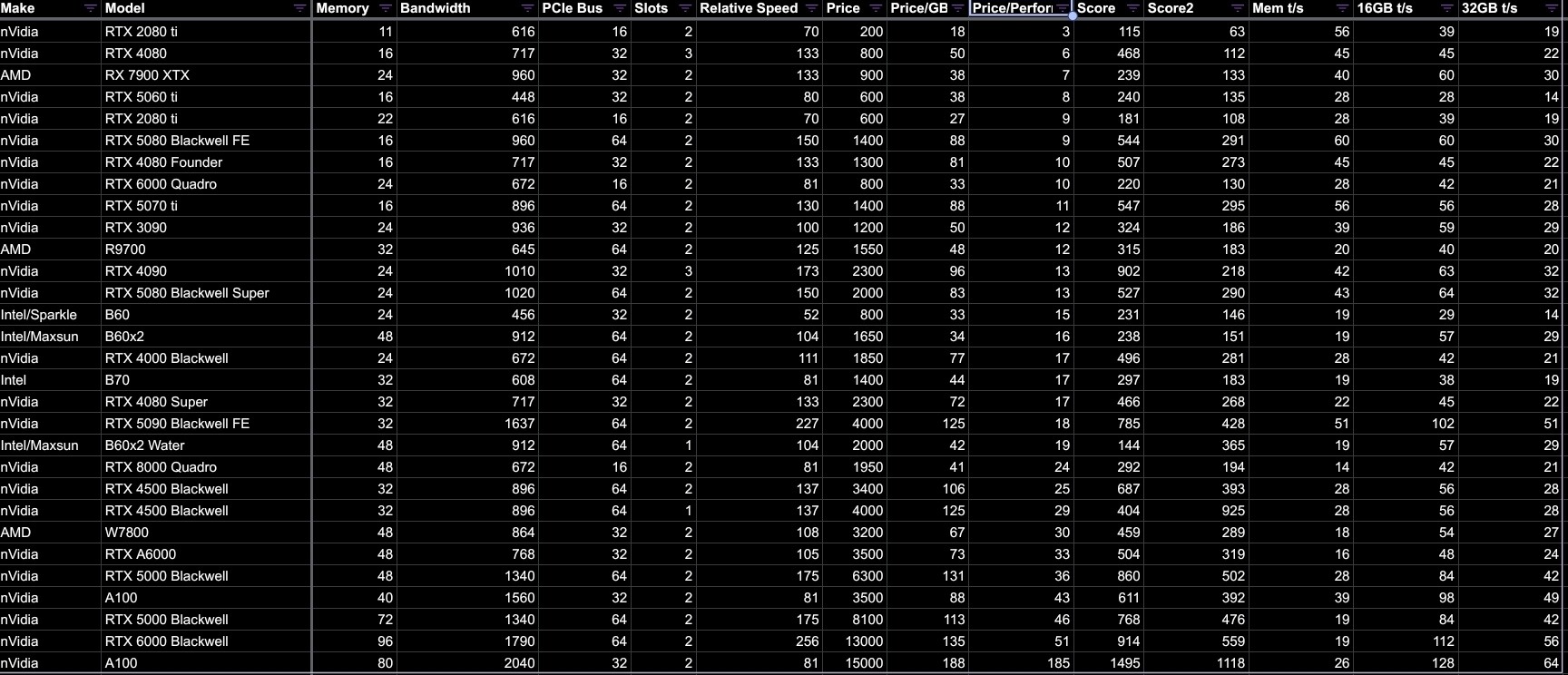
Regarding selection of specific GPUs you should look into the following table I created:

This shows newer and also some older GPUs with some technical Information:

  • Memory - size of VRAM
  • Bandwidth - memory bandwidth in GB/s
  • PCIe bus - bandwidth of PCIe interface in GB/s
  • Slots - number of slots used
  • Relative Speed - relative speed in % compared to a nVidia RTX 3090 from Techpowerup
  • Price - Price at eBay in Euro, may change daily, but gives a rough estimate
  • Price/GB - cost in Euro per GB of VRAM - lower is better
  • Price/Performance - cost in Euro per relative performance - lower is better
  • Score - (“Price/GB” + 3 ”Price/Performance”) * “Slots” - lower is better
  • Score2 - “6 Slots” / “slots” * (“Price/GB” + “Price/Performance”) - lower is better
  • Mem t/s - “Bandwidth” / “Memory” - estimated tokens per second
  • 16GB t/s - “Bandwidth” / 16” - estimated tokens per second with 16 GB model
  • 32GB t/s - “Bandwidth” / 32” - estimated tokens per second with 32 GB model

Don’t take the calculated values to serious. They are just a coarse indicator to help comparision of different cards.

How can this table help?

If you want a specific total VRAM size than if possible you can try to find one card that fits, or split to multiple cards. The latter doesn’t come without cost regarding performance and more slots to use. Regarding performance I would deduct about 20 - 30 % from the sum. And of course, if you are limited by the number of available slots, you have to select accordingly.

If you are on a tight budget both colums Price/GB and Price/Performance are important. I.e, if you want to fit Qwen3.8 27B into 32GB VRAM you can look for 32GB card and for best performance take the following cards:

  • RTX5090 32GB with total bandwidth of 1637GB/s and relative performance of 227
  • 2x RTX5080 16GB with total bandwidth of 1920 GB/s and relative performance of 300
  • 2x RTX4080 16GB with total bandwidth of 1434 GB/s and relative performance of 266
  • 4x RTX2080 ti 11GB with total bandwidth of 2464 GB/s and relative performance of 280

The first sets you back about 4000 Euro, the second combination about 2.800 Euro, the 3rd combi is 1.600 Euro, or the 4th combi 800 Euro only. You get similar results when looking in the top of the range like the RTX6000. Multiple smaller cards may win regarding price/performance.

Regarding Price/GB and VRAM on a single card the Intel Maxsun Dual GPU Water Cooled locks attractive. But the performance is similar to the RTX3090 only, and you have 2 GPUs per card.

Here it finally depends on what you want. Newest technology with top performance, or the best bang for the buck. YMMV.

What make to use also depends on whether you want to be at the front of development or just geht something that works for a good price. nVidia has the best support, AMD and Intel are getting better.

Finally it is no easy decision, especially as we also talk about a lot of money. If privacy is no concern the cloud offers may be still the best choice. But for the homelab especially Qwen3.8 27GB on LocalLLM opens up a whole bunch of new possibilities.

1 Like

I’m totally new to this space, please excuse me if I’m stating something dumb/obvious. But if your budget is $10k you might be able to work out a setup like Wendell talked about with the HP Z8 Fury: Stop Wasting Cloud Tokens - Local AI FTW

I’ve been looking at what the options are on the HP website (Wendell does call out not buying directly from the website, so keep that in mind) and the base model is about $8600. Changing the CPU, changing/adding GPUs, etc, will change the price, but you may be able to keep it at or below budget, especially if you can source some of your own hardware.

Just a thought, I have not built a local AI workstation, so take this post with a grain of salt.

128gb ddr5 ecc memory today 4500 euro minimum 256gb but only quad channel on two cpu and 10000 euro.For two cpu eight channel 512gb memory 20000 euro and you have nothing another component.And two A100?

If model is fully running in VRAM you don’t need much DDR4/5 ram.

Yes i understand this but the system and the cpu(s) yes ,and for ewery core need ram.

Oh boy, I missed quite a bit of input here. Thank you all for contributing.

Sometimes life throws a wrench in the works. So here I am back again.

  1. I want to thank the folks on the discord as well, I hopped on there and got some good inputs as well.
  2. I’ll mark @Emil_N’s as the solution. Not necessarily because I followed it 1 to 1 but because I think it’s really a good write up of much of the things I looked at as well and seems to be a generally good guideline for decision making.
  3. I think I arrived at a build that’ll work fine for me, but I think there’s also a lot of trial & error in the whole self hosting thing. So I’m pretty sure my journey is not yet done.
  4. Lastly I realised that my use case was much more clear in my head and I made a bunch of assumptions implicitly but did a bad job of communicating them. So I’ll try to just show my work in a short form and try to give a better goal description.

Goal

I want to start with trying to create a “drop-in replacement” for ChatGPT (and similar tools) as well as Claude Code (and similar tools) for a small team of 3-5 people as a proof of concept.

It doesn’t have to be perfect but it should help me (and by extension the people I work with & for) understand the self hosting side better. Especially in regards to affordability (vs subscription models) and privacy concerns (there are some legal concerns for sensitive data etc. in my field of work).

That means, that inference is the most important thing for now. Also, it should be able to handle some capable models at fairly high speeds.

Build

The current build was made with help of you all and some nice folks over on the discord server, so go check it out!

  • Platform: ASRock Rack ROMED8
  • CPU: AMD EPYC 7532
  • RAM: 256gb DDR4 RDIMM 2966 (8*32gb)
  • Case: Fractal Define 7 XL
  • PSU: Corsair WS3000
  • GPU: 2x RTX PRO 4500 Blackwell (for now)

For now that’s the build, let’s see how it goes. Maybe I can present some insights in the future. Here or in a dedicated post. (Maybe I can even garner some support from the higher-ups.

Not a dumb thing at all.

I looked into some prebuilt workstations etc. The specific one you/the video mentioned is not yet available here (at least I couldn’t find it anywhere. Regarding other workstations, I simply didn’t find anything that was close to being good price/performance compared to a custom solution.

Doesn’t mean that it’s not a solution for some people. Market conditions change through time and locality so maybe now was just a bad time.

From when I started this thread to now there’s been some significant changes for my local market alone. I think it’s just a weird time right now.

1 Like