I’d love to know what kind of idle power draw you get out of that EPYC4000D4U. Without the chipset it could be surprisingly good.
2 Likes
But BMC adds to power as well. It has the newer AST2600 with dual ARM cores and is supposedly way lower power draw. My X570 with AST2500 uses 8W on stand-by. And the x570 chipset needs active cooling, runs very hot (=uses power).
I will post stand-by and idle for board+cpu+memory once I get the CPU cooler and can finally start building the stuff. I expect 5-10W saving with newer BMC and without chipset compared to my X570 board. It all adds up after all and saving Watts is a nice side benefit I gladly take.
I’m still waiting on 80mm case fans and the Noctua L9x65 CPU cooler, . Can’t really do much without them 
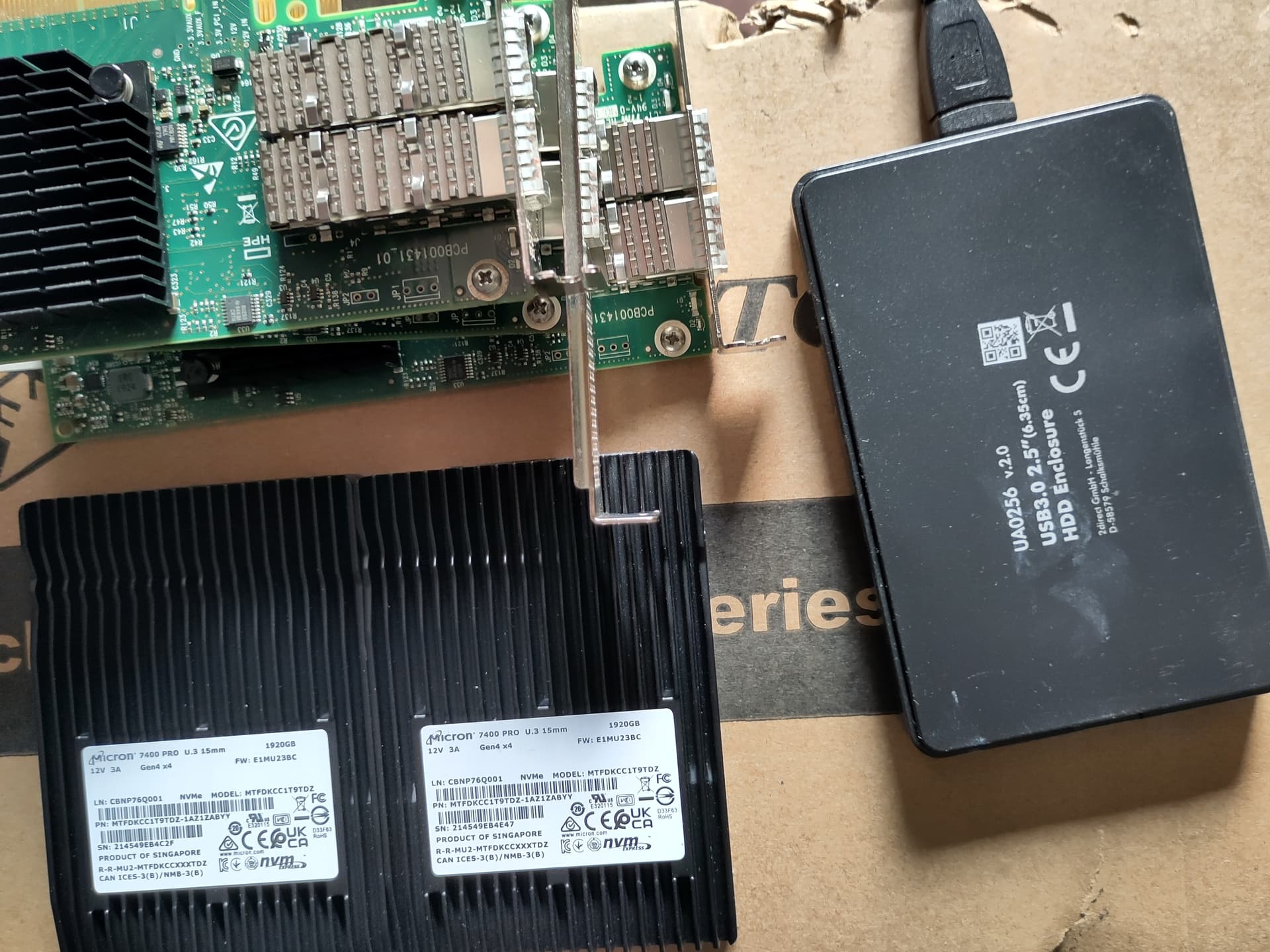
Sneak peek on stuff piling up, just waiting to push GB/s (case, drives and NICs):
2 Likes
Man if that Windows driver was more friendly to use…
But what I use CEPH for it’s actually not so bad really. I can deal with a bit of hit in performance honestly. It’s a catch all for all my downloads for when I install stuff on all of my boxes (and VMs).
But man I like what your doing. Deff following to see what you will end up with after it’s all said and done.
Alright, weekend time is serverbuilding time!
The damn 80mm fans…ordered twice, cancelled twice after a week by both retailers (suddenly “out of stock” wtf?). Now got Noctua 80mm. The Micron EU-DIMMs from the QVL were rather hard to get too.
Did some barebones work, tomorrow I will install the rest and see how this all works out. Will do power draw testing while I build, so I can better pinpoint single components.
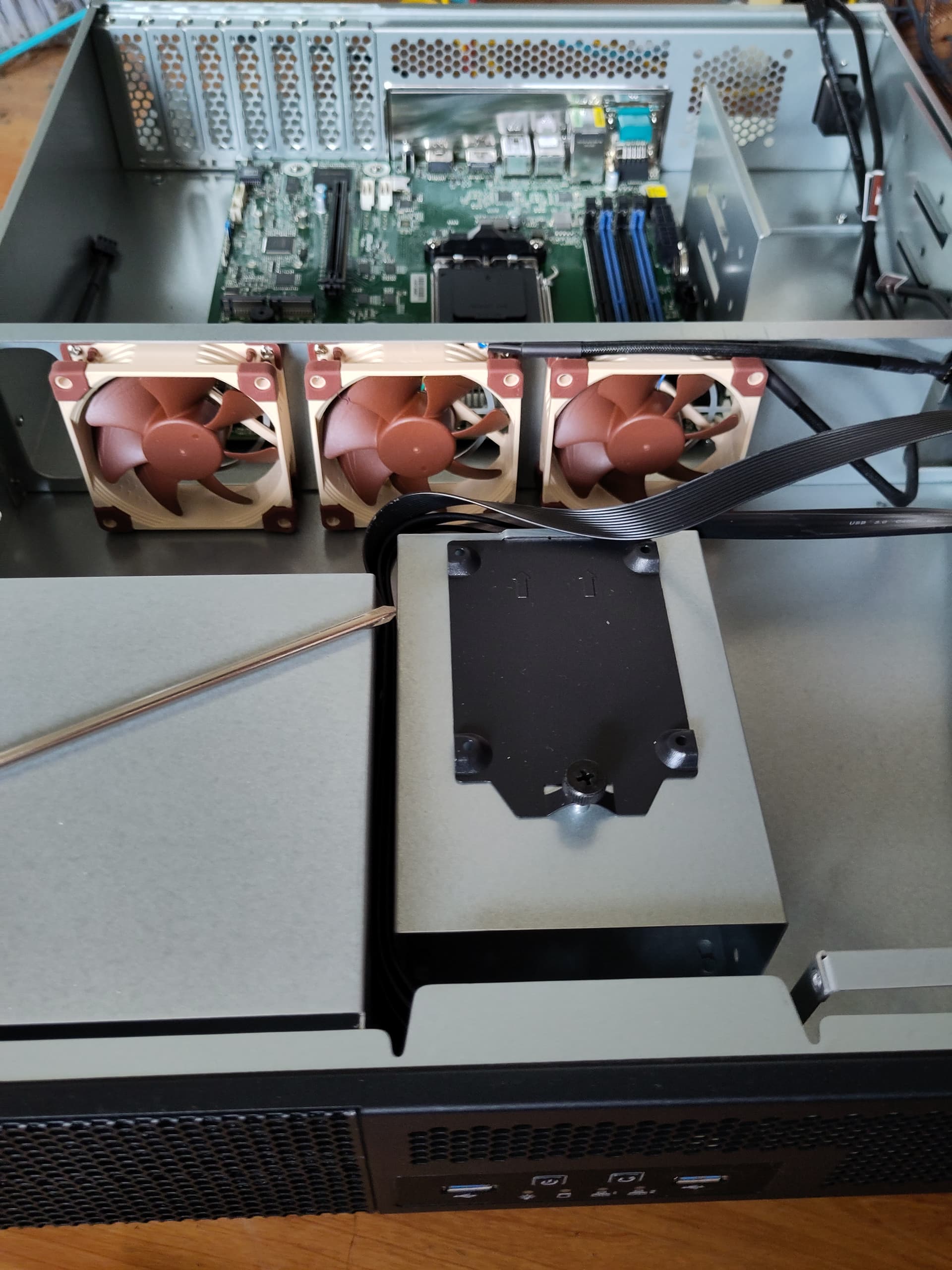
interesting find on the board I didn’t expect:
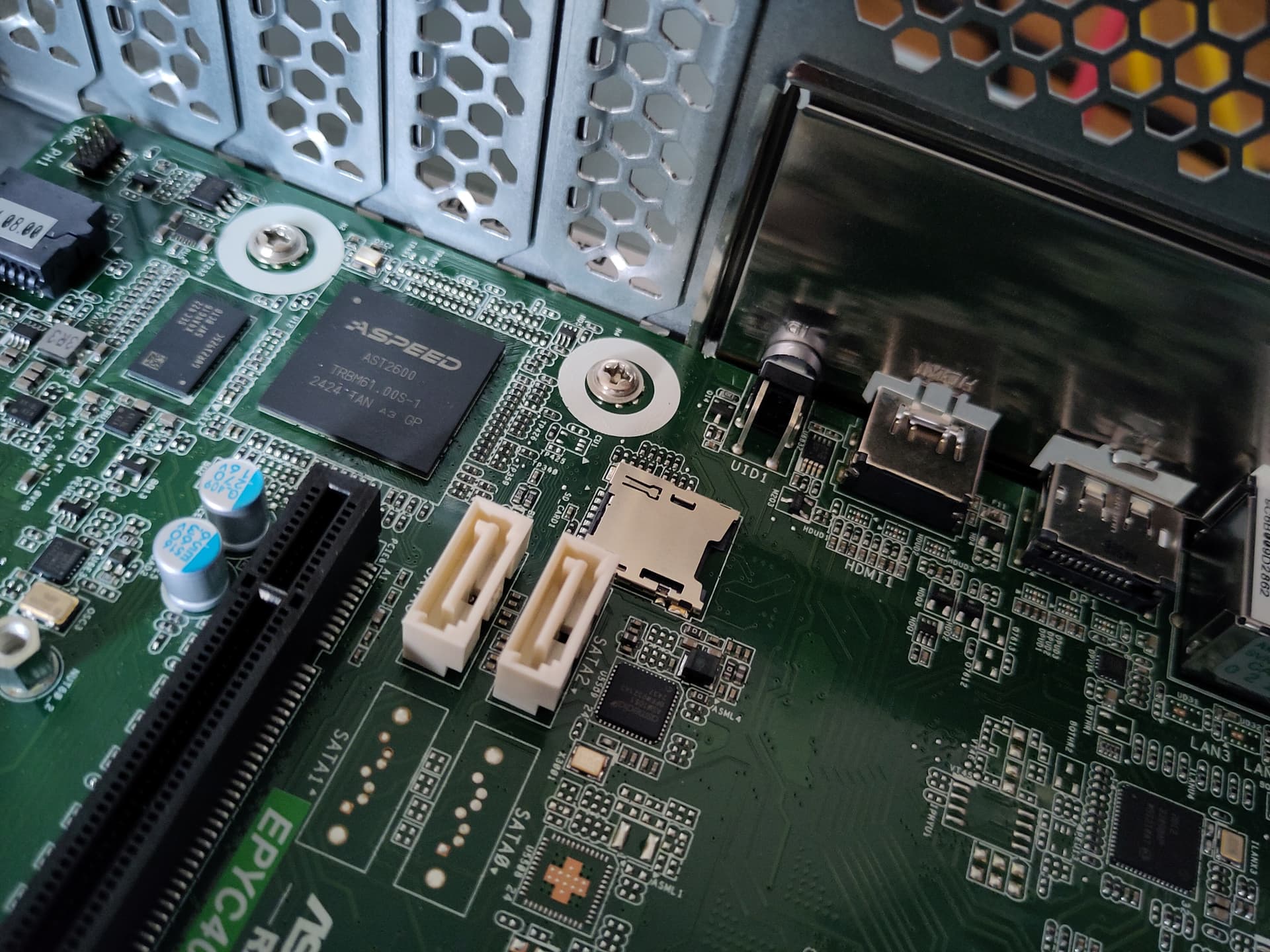
An SD-card slot! not mentioned in the specs afair. Looks like we have a dedicated slot for a boot disk after all!
I use my external USB SATA SSD as planned, but good to have options. Anyone got a recommendation for an SD-card brand with high endurance (by SD-card standards, I don’t expect 1DWPD or so, I use old SATA SSD after all).
Oh and the PLX card didn’t work with the backplane. I don’t think it’s the cables or the card (all 8x ports listed in lspci, all fine). I will try to get an Icy Dock with SFF-8643 backplane at some point to continue this endeavor, but first things first.
1 Like
Progress.
Because people (and me too) were interested in power draw: @electric_anteater @homeserver78 @jode
The ASpeed 2600 IPMI/BMC is 3.9-4.2W.
The older AST2500 is 7.9-8.3W. Both measured while powered down via wall plug. So the high “power tax” of IPMI basically was cut in half with the new 2600 version (runs on dual ARM cores).
Power without drives is —>27W idle<— sitting in login shell on fresh Proxmox install, no tweaks outside of setting CPU governor to conservative, fans running 30% RPM:
- EPYC4000D4U board including Aspeed 2600 BMC (2x1Gbit links active)
- Ryzen 7900 (no X, the 65W TDP SKU)
- Noctua L9x65 CPU cooler (single 92mm fan)
- 2x32GB Micron EU-DIMMs (5200MT/s at 1.1V)
- 3x Noctua 80mm case fans
- 2x Noctua 40mm (backplane running, but I pulled the drives)
- Be Quiet 750W Titanium PSU
- (And that old SATA SSD for boot).
That’s really good. I like it. Too bad that the U.2 NVMe will use like 10W each once Ceph gets its hands on them, cluster is always chatter, logs and traffic and little time for SSD deep sleep states.
With 4x NVMe, 2x HDD and the 25Gbit Mellanox I expect around 70W idle and 150 full load.
Will do installs, benchmarks and stuff in the coming days and setup Rocky Linux Ceph VMs.
Goal is to have 2x Proxmox server with 3 VMs for Ceph and 6x U.3 NVMe as OSDs. I can’t add HDDs as OSDs for now (all my SATA cables are actually too short, SATA ports next to rear IO).
I got the NICs, but I didn’t order the switch or cables yet, so I have to stick to dual bonded 1Gbit connection for a couple of weeks. Not practical by any means, but enough to get stuff online and do some 4k random IO testing.
Oh right…while AM4 was servery-consumer boards with AsRock, The EPYC4000D4U is full blown server BIOS. No vendor splash screen, just good old stats, because the pro people like their hexadecimals over nice graphics:
edit: with plugged in 4x Micron 7400 NVMe, not mounted → ~60W idle. Adding the ConnectX-4 25G NIC is 67W total (no link, just running idle).
They are the core of the server after all…burn more power than HDDs 
4 Likes
27W is fantastic, I expected much higher given Ryzen desktop chips being less efficient than Intel at idle. Given that you have fans, ram, motherboard and ipmi, it sounds like the CPU itself is only consuming maybe 15W.
The power consumption shooting up to 60W from the 4 x Micron 7400 means ~7.5W at idle even with no load on the SSDs?
Besides the components, could you post links or how much you paid for them? I’m planning to do something similar and was curious where to get some of these parts for reasonable prices. Are you getting everything brand new?
1 Like
Normal for U.2 drives. And the 7400 are a bit older generation (first batch of PCIe4 drives), so use more than newer drives. But 5-10W idle is expected.
They make up for the majority of idle power and cooling is the highest source for noise too (2x40mm Noctua at 3000-3500rpm).
But it’s a rather quiet build that only gets loud under heavy load (Ceph loves taking all the cores it can get). And the more or less underspec 2U cooler has a hard time keeping up with full 95W of CPU. But that’s more a consequence of me going 2U.
The second node (with the EPYC4000D4U I posted recently) was ~2050€ incl. 19% tax and excluding drives. Drives were 65€/TB (which is why I got them, dirt cheap by U.2 standards). So add 4x130€ for the drives.
And I plan on incorporating 2xHDD per node to have a HDD pool in Ceph for mostly media. My old HDDs are just sitting around atm 
But the drives also need proper networking, especially in a cluster. And the upcoming 25Gbit upgrade certainly isn’t cheap.
Bought the ConnectX4 NICs on ebay, otherwise all new. New tech is very power efficient (AST 2600 IPMI, RAM, Zen4), which is why I prefer new stuff and CPU@65W TDP. And MCIO connectors have proven to be very reliable on PCIe4 speeds and easy to work with.
I use mostly Geizhals and Idealo to check for retailers (EU). List of components is somewhere in this thread. Nothing too fancy or rare outside of the board and the DIMMs which were a bit more special.
Also keep in mind that the backplane+2xMCIO cables were 500€ alone. If you get a 4x U.2 PCIe card, that’s way cheaper. But I like my bays and blinking lights. Certainly more of a “nice to have” thing.
1 Like
Cluster update:
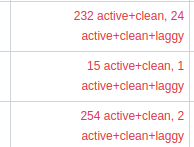
Second node added to the cluster, doing great. Everything is running quiet and well for the last days. I am however severely bottlenecked by the bonded 1Gbit NICs atm. DO NOT run Ceph on 1Gbit networking…until my switch arrives, I have to bear this. It’s not even functional and Ceph is complaining a lot and I encountered deadlocks and all kinds of pain associated with it and PGs going nuts :
Server is great so far. Next stop: 25GBase-SR, to infinity and beyond!
P.S.: getting the U.2 drives to work was just flipping the PCIe slot from x16 to x8x4x4. MCIO just works, plug&play. really satisfied with the board, can recommend it if the “special” layout fits your needs.
2 Likes
I’m doing preliminary network,cable and NIC tests for my 3x ConnectX-4 and the cables I bought (1m and 5m DAC, many thanks for pointing me to the correct gear @EniGmA1987 ).
Tomorrow the switch should arrive via UPS and I just checked if everything is working via direct NIC ↔ NIC DAC links between the hosts. Didn’t have any trouble, plug&play cards for Linux, just setting up IP and ready to go.
I was a bit skeptical on 5m DAC latency and link quality, but turns out it’s fine. Saved myself the purchase of expensive SFP28 transceivers with the DAC.
Every host set to “network-latency” tuned profile.
Latency RTT for where I'm coming from (present temporary 1G networking via switch):"
64 bytes from 192.168.0.23: icmp_seq=15 ttl=64 time=0.150 ms
64 bytes from 192.168.0.23: icmp_seq=16 ttl=64 time=0.158 ms
64 bytes from 192.168.0.23: icmp_seq=17 ttl=64 time=0.146 ms
64 bytes from 192.168.0.23: icmp_seq=18 ttl=64 time=0.116 ms
64 bytes from 192.168.0.23: icmp_seq=19 ttl=64 time=0.142 ms
64 bytes from 192.168.0.23: icmp_seq=20 ttl=64 time=0.135 ms
64 bytes from 192.168.0.23: icmp_seq=21 ttl=64 time=0.124 ms
64 bytes from 192.168.0.23: icmp_seq=22 ttl=64 time=0.155 ms
64 bytes from 192.168.0.23: icmp_seq=23 ttl=64 time=0.137 ms
64 bytes from 192.168.0.23: icmp_seq=24 ttl=64 time=0.174 ms
64 bytes from 192.168.0.23: icmp_seq=25 ttl=64 time=0.146 ms
10GBase-T connections were more like 250us on average despite my best efforts to get this closer to my 1/2.5G connections.
Now with the power of SFP28 and Mellanox (similar latency on all nodes and ports, checked all):
Latency on the 25G links between any of my machines
64 bytes from 192.168.5.21: icmp_seq=15 ttl=64 time=0.045 ms
64 bytes from 192.168.5.21: icmp_seq=16 ttl=64 time=0.054 ms
64 bytes from 192.168.5.21: icmp_seq=17 ttl=64 time=0.048 ms
64 bytes from 192.168.5.21: icmp_seq=18 ttl=64 time=0.049 ms
64 bytes from 192.168.5.21: icmp_seq=19 ttl=64 time=0.052 ms
64 bytes from 192.168.5.21: icmp_seq=20 ttl=64 time=0.061 ms
64 bytes from 192.168.5.21: icmp_seq=21 ttl=64 time=0.050 ms
64 bytes from 192.168.5.21: icmp_seq=22 ttl=64 time=0.054 ms
64 bytes from 192.168.5.21: icmp_seq=23 ttl=64 time=0.049 ms
64 bytes from 192.168.5.21: icmp_seq=24 ttl=64 time=0.046 ms
64 bytes from 192.168.5.21: icmp_seq=25 ttl=64 time=0.053 ms
That’s quite a reduction. But these are connections without a hop via the switch/across firewall and on an otherwise zero traffic link. But 45us got me impressed for sure!
iperf3 results:
iperf3 Daily driver <-> any cluster node
iperf3 -c 192.168.5.21 -t 20
Connecting to host 192.168.5.21, port 5201
[  5] local 192.168.5.5 port 43422 connected to 192.168.5.21 port 5201
[ ID] Interval           Transfer     Bitrate         Retr  Cwnd
[  5]   0.00-1.00   sec  2.74 GBytes  23.5 Gbits/sec    0   4.06 MBytes
[  5]   1.00-2.00   sec  2.74 GBytes  23.5 Gbits/sec    0   4.06 MBytes
[  5]   2.00-3.00   sec  2.74 GBytes  23.5 Gbits/sec    0   4.06 MBytes
[  5]   3.00-4.00   sec  2.74 GBytes  23.5 Gbits/sec    0   4.06 MBytes
[  5]   4.00-5.00   sec  2.74 GBytes  23.5 Gbits/sec    0   4.06 MBytes
[  5]   5.00-6.00   sec  2.74 GBytes  23.5 Gbits/sec    0   4.06 MBytes
[  5]   6.00-7.00   sec  2.73 GBytes  23.5 Gbits/sec    0   4.06 MBytes
[  5]   7.00-8.00   sec  2.74 GBytes  23.5 Gbits/sec    0   4.06 MBytes
[  5]   8.00-9.00   sec  2.73 GBytes  23.5 Gbits/sec    0   4.06 MBytes
[  5]   9.00-10.00  sec  2.74 GBytes  23.5 Gbits/sec    0   4.06 MBytes
[  5]  10.00-11.00  sec  2.74 GBytes  23.5 Gbits/sec    0   4.06 MBytes
[  5]  11.00-12.00  sec  2.74 GBytes  23.5 Gbits/sec    0   4.06 MBytes
[  5]  12.00-13.00  sec  2.74 GBytes  23.5 Gbits/sec    0   4.06 MBytes
[  5]  13.00-14.00  sec  2.74 GBytes  23.5 Gbits/sec    0   4.06 MBytes
[  5]  14.00-15.00  sec  2.74 GBytes  23.5 Gbits/sec    0   4.06 MBytes
[  5]  15.00-16.00  sec  2.73 GBytes  23.4 Gbits/sec  105   3.09 MBytes
[  5]  16.00-17.00  sec  2.73 GBytes  23.5 Gbits/sec    0   3.57 MBytes
[  5]  17.00-18.00  sec  2.74 GBytes  23.5 Gbits/sec    0   3.96 MBytes
[  5]  18.00-19.00  sec  2.72 GBytes  23.4 Gbits/sec  1402   2.81 MBytes
[  5]  19.00-20.00  sec  2.73 GBytes  23.4 Gbits/sec    0   3.42 MBytes
- - - - - - - - - - - - - - - - - - - - - - - - -
[ ID] Interval           Transfer     Bitrate         Retr
[  5]   0.00-20.00  sec  54.7 GBytes  23.5 Gbits/sec  1507            sender
[  5]   0.00-20.00  sec  54.7 GBytes  23.5 Gbits/sec                  receiver

iperf Done.
not an expert, but I ran this multiple times and it is very constant in the 2.74GBytes and 23.5Gbit/s figures. I assume that’s a pristine connection.
Client uses PCIe3 x4 slot (CPU lanes), so despite downgraded link speed compared to the full x8 the card has, it’s delivering solid 25Gbit.
So if you want to use x8 card in a x4 slot, one 25Gbit port seems to work great so far.
Tomorrow is switch day, maybe I can set up everything for my Ceph VMs after setting up the switch config, but weather is great…bike needs love too.
edit: Oh right, temperatures…
mget_temp -d 01:00.0 -v
#     name                 T/V   temp            thresh
1     iopx                 T     74              130
2     iopl                 T     74              130
3     yu                   T     73              130
That’s after 5min of iperf3 load. Can’t find any official numbers, but if threshold is 130°C (!!!, the PCB will probably melt before that), doesn’t look too bad…right?
Client is a Fractal Torrent, so everything gets airblasted anyway. The figures are from the servers.
2 Likes
Did you consider going for 3U cases? It is an extra 1U of height, but I believe those will allow for full-height cards and larger fans. 3U cases are harder to come by though.
What file system will you run on the U.3 and HDDs beneath Ceph? I notice that you have even numbers of HDDs and U.3 on each node, so are you using them in something like a ZFS mirrored configuration (not sure what the Ceph term is)? Otherwise from a power draw perspective, it could be better to have fewer but larger drives.
You mentioned using a PCIe switch in one of the above posts. What else were you putting behind it besides the 25GBE card? If I’m not mistaken, the 25GBE card takes 8 lanes, but I don’t have one and am confused by the many ConnectX4 variants.
0.05ms looks great, so if my math is right, theoretical max of 20k write iops, but I’m sure the actual number in practice will be lower due to other sources of latency. Will you be looking at using something like Mellanox Tune, RDMA or ROCe to try to further reduce latency? I am not sure if Ceph supports RDMA / ROCe though.
Are those temps on the card (73 C) normal? That seems really hot, or is this normal, even with enough airflow?
I wanted my Ryzen servers to be 2U and I want to eventually get an EPYC 8000 (Siena) for the 3rd one, which I plan to make 4U. Cooling, general space and (non-datacenter) CPU cooler availability is “ok” for 4U (e.g. Arctic Freezer 4U-M), while 3U CPU cooler for EPYC suck. Allows for 120mm fans and proper ATX mounting, but is otherwise very limited and I didn’t find one that I like yet.
Core/Ryzen should have much wider options for 3U than 2U has, I’m fairly certain there are good aftermarket coolers for the added height over 2U.
My Noctua L9x65mm are doing their job, but I wouldn’t use them to cool down anything down with >65W TDP. Which works for me.
I just didn’t want to get a Dynatron with 8k RPM although they have a lot of nice low-profile coolers for servers.
They all run on Ceph Bluestore OSDs. You just tell Ceph you want to add the drive to the cluster and Ceph deploys an OSD daemon (the “drive-nanny”). What happens on the drive…no clue, that’s Ceph magic. I know older Ceph versions used an actual filesystem like xfs to write stuff. Not longer the case with Bluestore OSD.
The VM disks and stuff I run on the cluster are all kinds of FS…ext4, BTRFS, NTFS and also one RBD with ZFS so far. For filesharing I made a pool for my CephFS.
With File, Block and Object storage, Ceph has everything covered 
One node is my old server which has two x8 slots. One x8 is for the U.2 and the other one is for the ConnectX-4). The new server just has a single x8 slot with a ConnectX4, but has 2xMCIO8i ports on-board for 4x U.2.
theoretical in the sense that processing in NIC, CPU,memory, cables and SSD are instantaneous, then that is correct for QD=1 4k writes
In practice, stuff has to be sent to several OSDs (and thus to 3+ nodes) and only after ALL of them report back to the client, the write is done. If you can get this <1ms, that’s good baseline with NVMe. Anything >1k IOPS on QD=1 4k blocksize write is good.
Reads are different because of caching…hard to benchmark, but reads are way easier and faster for Ceph.
Ceph is built to run on commodity hardware (Enterprise NVMe being the sole exception, and while not required, it’s very very recommended, because EVERYTHING is sync writes for data integrity). While I’ve seen support, I’ve also seen reports that it doesn’t improve things and people in the broader Ceph community generally aren’t using RDMA. And I checked a lot of tuning and lectures to give myself a primer on Ceph.
Not sure. I’m very new to all this myself. The cluster is to do new things, work and learn with new and exciting hard- and software. So far I haven’t seen any throttling or nasty kernel messages.
But I was lazy on the cable management so far and I see some optimization in airflow to less cool cables and get more flow to the card. Maybe next week or so.
Will later post some benchmarks with the new 25Gbit networking at play in Ceph.
1 Like
With switch (Mikrotik CRS510-8XS-2XQ-IN) and moving the public network of Ceph to the 25Gbit interfaces (that was quite a tedious effort), First impressions and fio results are done:
Measured via fio on my workstation with mounted RBD image formatted with ext4. imagine iSCSI, but Ceph.
Replication= mirror.
sequential reads 2x replication RBD Throughput
fio --ioengine=libaio --filename=blub2 --direct=1 --rw=read --bs=4M --numjobs=1 --iodepth=1 --runtime=60 --time_based --name=fio --size=32G

READ: bw=1656MiB/s (1736MB/s), 1656MiB/s-1656MiB/s (1736MB/s-1736MB/s), io=97.0GiB (104GB), run=60001-60001msec

using numjobs=4:

READ: bw=2720MiB/s (2852MB/s), 680MiB/s-680MiB/s (713MB/s-713MB/s), io=159GiB (171GB), run=60002-60004msec

3x Replication was 950MB/s and  2.7GiB/s
fio sequential writes 2x replication RBD Throughput
fio --ioengine=libaio --filename=blub2 --direct=1 --rw=write --bs=4M --numjobs=1 --iodepth=1 --runtime=60 --time_based --name=fio --size=32G

  WRITE: bw=1110MiB/s (1164MB/s), 1110MiB/s-1110MiB/s (1164MB/s-1164MB/s), io=65.0GiB (69.8GB), run=60001-60001msec

using numjobs=4

  WRITE: bw=2422MiB/s (2539MB/s),

3x Replication was 480MB/s and 1360MB/s
fio 4k writes 2x replication RBD IOPS
fio --ioengine=libaio --filename=blub1 --direct=1 --rw=write --bs=4K --numjobs=1 --iodepth=1 --runtime=60 --time_based --name=fio --size=32G

iops: min= 912, max= 1792, avg=1230.97, stdev=158.27, samples=120
fio 4k reads 2x replication RBD IOPS
fio --ioengine=libaio --filename=blub2 --direct=1 --rw=read --bs=4K --numjobs=1 --iodepth=1 --runtime=60 --time_based --name=fio --size=32G

iops: min= 2058, max= 4324, avg=2912.15, stdev=472.63, samples=120
Bonus fantasy big number episode EP1:“The CPU broke before the drives did”:
fio 4k random IO 2x replication RBD all guns blazin' IOPS
fio --ioengine=libaio --filename=blub1 --direct=1 --rw=randwrite --bs=4K --numjobs=16 --iodepth=128 --runtime=60 --time_based --name=fio --group_reporting --size=32G

randwrite: IOPS=29.8k, BW=116MiB/s
randread: IOPS=74.6k, BW=292MiB/s

Bottlenecked by Ryzen 5900x on random writes. There just isn't enough CPU to feed 2x U.2 drives.
So far so good. I like the boost in IOPS…latency certainly played a big role in that. It’s around +50% IOPS from 1-10G networking to 25G I have now.
The rather high standard deviation comes from me only having 2x OSD per node and nodes having different CPU performance numbers (+800MHz on Zen4 vs. Zen3 is better latency, ask the gamers). Expected. Will be way narrower with 3 nodes and more drives per node.
Throughput is mainly bottlenecked by either 25Gbit maximum or applications just not using enough threads or queues.
In terms of utilization when talking drives and CPU on the servers…I’m pretty sure the servers could do 6GiB/s if I had a client with 100Gbit NIC (or the PCIe lanes to use it). And I’m also sure once the two VMs don’t have to share the same NIC, stuff is running bare-metal and the 3rd Node is up, the cluster can deliver 10GiB/s of throughput on reads. I don’t think (single-client) IOPS will change much from now on. Total cluster IOPS will scale with additional nodes and cores.
Overall a good purchase with the networking gear I bought. I got what I was paying for and everything is more or less in range of what I expected.
Lessons learned:
- Writes are just tough for Ceph.
- And I now know why everyone dealing with Ceph is talking about IOPS/Core

- Changing MON IPs in Ceph is a bitch
- SFP28 is great latency and fast
- CPU, memory and software is the bottleneck now, but we can get more CPU and memory with more nodes (Cluster ftw? “just one more node!”)
3 Likes
How is the inter-node latency now that the switch is involved? Any noticeable increase from the 0.05ms you got previously?
Your drives are capable of over 70k 4k write iops at QD1, but Ceph’s overhead brings that down to an average of 1230. R4k reads at QD1 are also down to an average of 2900. That is pretty painful given how much you paid for your SSDs. I wonder if database or VM workloads would even be viable since I assume they involve a lot of reads and writes, and the writes are sync writes.
That’s pretty wild to me that there is so much CPU overhead. I wonder if this is also the cause of the huge performance hit. Would the upcoming Crimson OSD improve this?
Switch itself didn’t add any noticeable amount to latency. The two VMs sharing a passthrough port each saw latency increase to ~70-80us from 60-70us average.
There is no real inter-node communication as everything runs on the same link.
As soon as a software stack and networking gets involved, things are just way slower. That’s the nature of networking and storage software. I could trade NVMe for HDDs and 50 IOPS in Ceph. But other than that, there aren’t alternatives Stuff in practice is just different from measurements under optimal conditions (locally, without FS, basically zero latency through PCIe bus).
With Ceph, everything is sync writes. All the stuff I posted above are sync writes. There is no async in Ceph. In actual practice, 1k write IOPS in a remote VM is good stuff.
I hope it does. With Ceph, the ultimate bottleneck is Ceph itself. But we only have experimental versions so far. Nothing really production ready…maybe 2026/27 it will be. If I can get 1.2k → maybe 1.5k IOPS and double the total cluster random write IOPS out of the CPU, that’s totally a big win. But I don’t rely on it nor do I “need” it. Optimized code path and full rewrites are always good, but also come with new bugs. And people don’t like bugs in their data.
1 Like
Getting familiar with the switch and RouterOS from Mikrotik. Quite a learning curve for someone who didn’t do actual networking for 12 years. But I like the Winbox Linux app, snappy, fast, gets work done.
The fans man…the fans…9.5k RPM cheap industrial 40mm crap, in practice doesn’t run >2500RPM, but sounds like a 15yr old fan in some old fridge. scratching, rattling, rather quiet but very disturbing sound.
Lucky me was too stupid to order the correct 40mm Noctua fans months ago and I ordered the FLX 3-pin variant instead of the 4-pin PWM. Looks like those trash fans have the 3-pin headers I need to give the 2xNoctua FLX fans a new home.
CPU is shit, but otherwise the switch is great. If you got the money and you want a plain switch for 10,25 and 100Gbit Networking and don’t need RDMA, that’s your price/performance/watt winner. I wish it had 1U form factor, but the rack ears are fine…just a minor optical thing to me.
DACs are barely getting warm at all. Even the 100Gbit breakout with wire speed load for 30min was barely feeling warm, certainly not hot by any stretch. 15W power atm with 5x25Gbit (DAC) links connected.
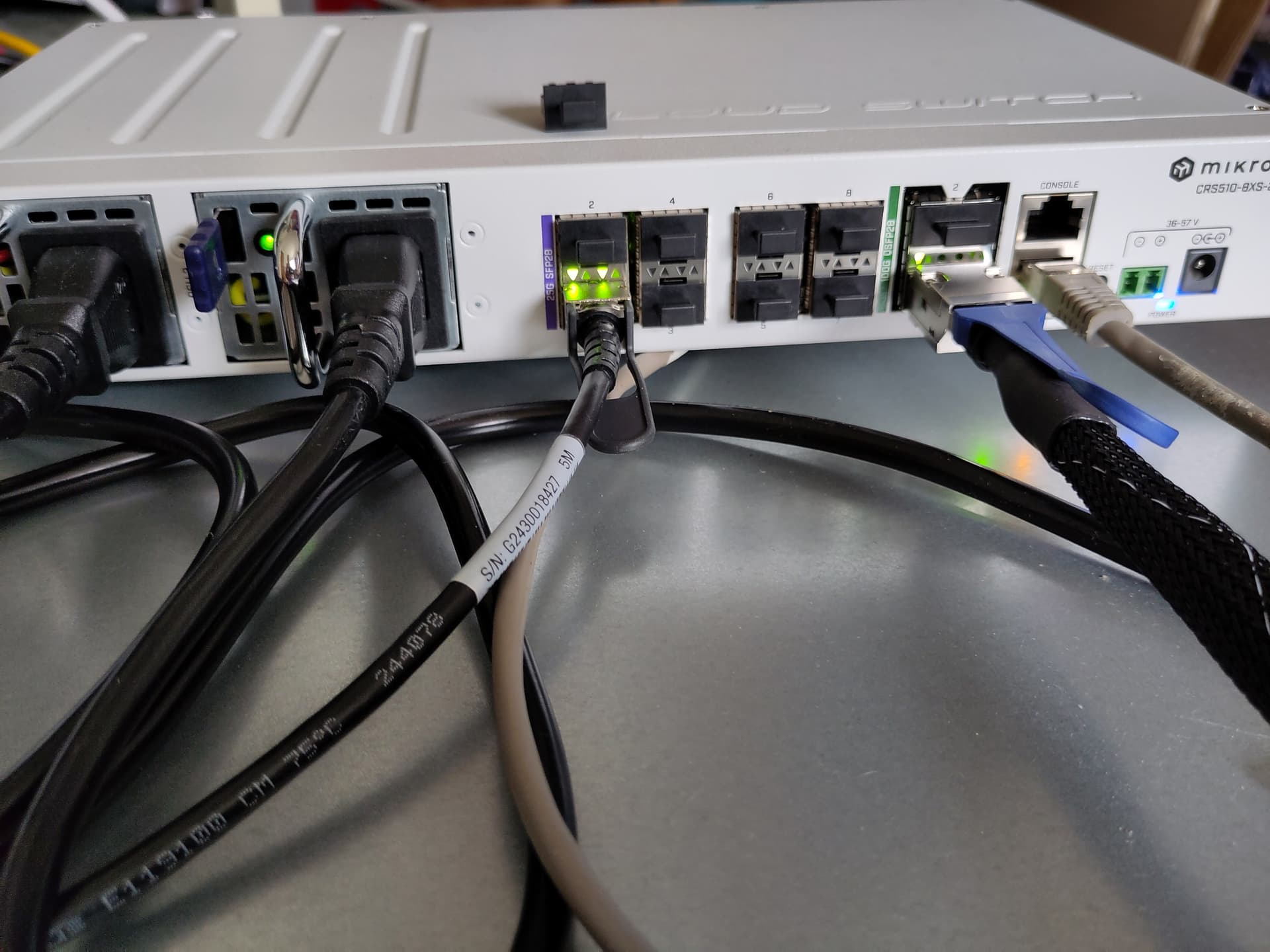
Cleaning up my “workbench mode” after I dealt with the fans and then getting everything to their place (no rack or cabinet yet).
I’m actually planning to move all my /home directories to the cluster. RBD performance is compelling enough to run stuff via the network. I haven’t figured out that client-side persistent write cache yet that Ceph offers. That one writes to local SSDs (also supports PMEM) as write cache before flushing to the cluster. Very interesting stuff for client desktops or Proxmox (all VMs run on RBD). Sounds like free write IOPS at local NVMe latency.
At least if I can make it work
With ZFS and HDDs, IOPS via zvol just weren’t reliably good enough (sometimes you just hit hit a cache hole with a directory of 10k files, byebye IOPS) for me to make that move. But I was gaming a bit yesterday and it felt good tbh. And directory/filebrowsing and metadata operations just feel good in general, good responsiveness from a user perspective.
Would affect 2 Desktops and a laptop. Laptop is mobile and /home via Wireguard tunnel probably isn’t the best of ideas, we’ll see about that.
fun fact: That grey cable in the MGMT port is one of the first twisted pair cables I ever owned. This thing was plugged into a 10Mbit switch hub “back in the days”. I ran out of cables and I found that one in the basement in a dusty old box with cables, turns out an old Cat5 cable never gets too old.
4 Likes
I also bought the Switch.
It’s still bearable with only two active links, but if at least three or four links are active, it gets loud.
Zero Touch RoCE should work, but I haven’t tested it yet.
Zero Touch RoCE
Zero touch RoCE enables RoCE to operate on fabrics where no PFC nor ECN are configured. This makes RoCE configuration a breeze while still maintaining its superior high performance.Zero touch RoCE enables:
- Packet loss minimization by:
- Developing a congestion handling mechanism which is better adjusted to a lossy environment
- Moving more of the congestion handling mechanism to the hardware and to the dedicated microcode
- Moderating traffic bursts by tuning of transmission window and slow restart of transmission
- Protocol packet loss handling improvement by:
- ConnectX-4: Repeating transmission from a lost segment of a IB retransmission protocol
- ConnectX-5 and above: Improving the response to the packet loss by using hardware re-transmission
- ConnectX-6 Dx: Using a proprietary selective repeat protocol
1 Like
High five, my switch brother! 
Good to know! I plan on adding 2xSFP+ links next month (retiring my old 1-10GBase-T Netgear switch and getting a CRS326) and the third node will also run on bonded SFP28. So the stuff will eventually get populated, although it still looks rather empty atm (couldn’t say no to that cheap and power-efficient 100G breakout). Good to hear that the RPMs will eventually get higher (the info, not the RPMs ), even more reason to swap the fans.
I don’t actually have any use for it for the foreseeable future. But we’re all tinkerers at the end of the day…might as well dig down another rabbit hole at some point
I was just hitting the RDMA thing during my research and dismissed it for myself, but I know others maybe have this as a requirement, that’s why I mentioned it.
Let me know if it works with the Noctuas, if not I’ll probably cool the Switch with two 80mm fans, simply sawing two holes in the top cover and connecting them to an external power supply.
I did the same with my 10G Switch, he displays a warning that the fans have failed, but it works fine.
1 Like
Livin’ the cluster life…just sharing some observations and nerdy things today, blog-style.

Yeah, Ceph is a girl who doesn’t like you being too late for the date. 50ms latency spike and ? No healthy state for you! I may need to setup my own NTP server to get this stuff more synchronous, because being 50ms late is a thing now.
I narrowed down the bottleneck in maximum random write IOPS on my 5900x (fio stuff 5 posts above). It’s probably the memory bandwidth…server is running 4x32GB DDR4@2667MT/s, that’s why my 7900 with 2x32GB@5200MT/s performs so much better while having less than half the utilization. I could maybe overclock it to 3200MT/s for testing and ignore the mcelog flood on memory controller errors and see if that’s really the case.
And I pulled a drive out of the cluster. Well, not physically, but marked it as “out” to see how recovery time works in a cluster and how it relates to ZFS resilver.
Setting limits to “client traffic isn’t important now, do recovery quicker pls”, tweaking some parameters to get faster recovery (default is more a background job to ensure it doesn’t interfere with client performance)
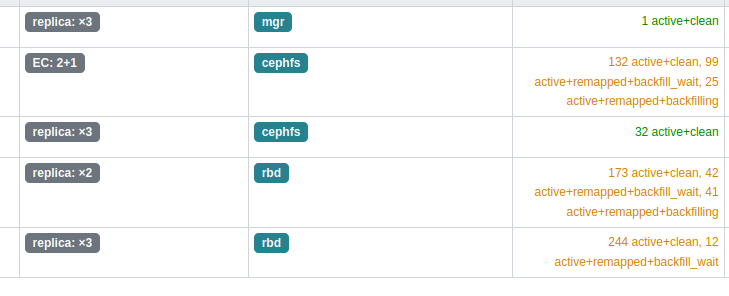
 data:
    volumes: 1/1 healthy
    pools:   5 pools, 801 pgs
    objects: 741.67k objects, 2.6 TiB
    usage:   3.9 TiB used, 4.9 TiB / 8.7 TiB avail
    pgs:     146026/1646062 objects misplaced (8.871%)
             633 active+clean
             108 active+remapped+backfill_wait
             60  active+remapped+backfilling

  io:
    client:   1.6 KiB/s rd, 3 op/s rd, 0 op/s wr
    recovery: 2.5 GiB/s, 703 objects/s
took ~11min for 2.6TiB of data for Ceph to rebalance the cluster and replicate the missing copies to other drives. Seems to be 4M sequential writes are used (judging from drive IOPS and throughput checked in iostat), which is the default Ceph object size underneath. That’s fast and probably translates well to HDDs.
Actual resilver is way slower with ~600Mib/s, was ~30min getting that drive back from 0% to 40% of capacity. Looks like reshuffling and deleting of now over-redundant data keeps everyone busy. But everyone sends stuff to the new kid on the block, so this is a team effort.
With Ceph, it’s more like “spare capacity” than a dedicated spare disk that is used to replace data of lost drives. I can lose any amount of drives as long as there is capacity left on the drives and two nodes have a drive available (2-way replication/mirror).
So drive failures…I just need to check the % of capacity left before going on vacation. Cluster is back and healthy in <10-30min if sth happens. Very convenient. And peace of mind. A thing I appreciate a lot with Ceph.
They stole my build :

Silverstone RM23-502 2U case (they have the inverted “mini” variant)
EPYC4000D4U board
4x U.2
ConnectX 25Gbit NIC
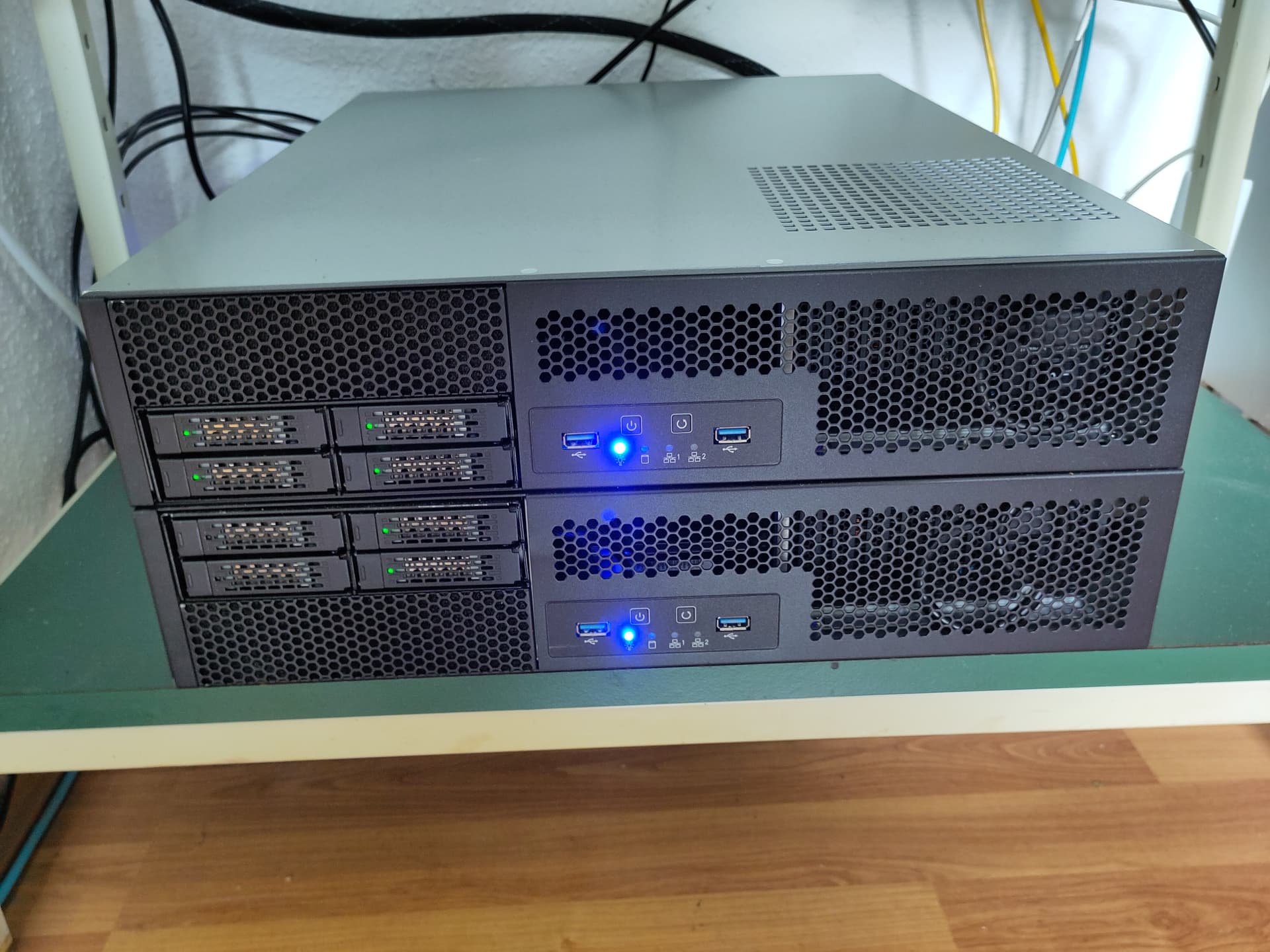
Main difference being redundant PSU, beefer CPU and sponsored Kioxia drives. I pay for my drives and otherwise more low-power focus on my side. But good to see I’m not totally wrong on my ideas (and that I’m not THAT bad at internal 2U cable management)
4 Likes