Well I decised to tip from raid 1 to raid 6. After like 5-6 years. So. 22 TB now on raid 6.
Created with raid 6 and meta data raid1r3. 6 drives.
Well I decised to tip from raid 1 to raid 6. After like 5-6 years. So. 22 TB now on raid 6.
Created with raid 6 and meta data raid1r3. 6 drives.
Being a case reviewed I can still add 2 more drives. Time will tell.
I thought it still wasn’t safe to use parity raid levels on btrfs?
Fuck it im running it on my 22 TB… Give me 4 -10 years :)… Im old school
Best of luck 
Just make sure you have a frequently updated, working backup system in place 

afaik it was just about write hole problem that basically every raid6/5 solution has except for the implementation in ZFS.
Yeah all the other software parity raid schemes still have the write hole issue, but the good hardware based parity raid cards have solved it with super capacitors.
I think all the following still applies to btrfs:
Outside of legacy RAID, I don’t see any software not being able to this. BTRFS has made huge improvements in that department as it was a design decision back then to favor performance over integrity. And there apparently was some work to rewrite a bunch of stuff regarding this.
still wouldn’t trust it with parity RAID configs…but I only use BTRFS for single disk, stripes and mirrors anyway. It’s my Workstation FS of choice atm.
Ceph or BeeGFS with Erasure Coding also have no problems in that regard. It’s the magic of the “atomic CoW” that also allows ZFS to do this. transaction-based storage → best storage. With distributed filesystems having a natural advantage because they’re built for the failure of entire racks worth of servers.
Well I start with 4 drives and added 2 more drives after copying data to the original 4 drives now 6 x 12 TB drives running BTRFS raid 6. Gunna add 2 more drives if I ever get that much porn.
I believe in you.

This topic will close 9 months after the last reply.
So if no problems or I forget to update in 9 months … No will know 
Well it fine so far with a few power outages and well it reporting 21.5 TB avalable 72TB Total and I can add 2 more 12 TB drives still… I may die before I fill it now. Its not high use, more media storage for the end of the world so. I guess I dont tax it much… I have upgraded the fedora base 2 times now no problems with storage or the 2 VM’s always running.
Still working … the scrub wow talk about fast.
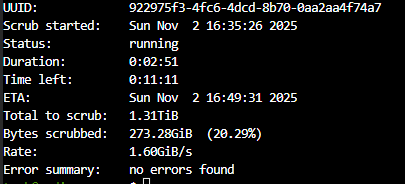
Still going strong and a Claude coded some monitoring. Its abit shit on the document generation  but hey. Wait a year or 2
\
Automated health monitoring for a Fedora mediaserver with BTRFS RAID6 storage and CyberPower UPS.
Immediate email (live-check, every 2h):
Weekly report (Sunday 08:00):
/home/tank/btrfs_checkup/
├── collect-stats.sh       # daily collector
├── live-check.sh          # 2h/8h live checker
├── check-anomalies.sh     # daily anomaly diff
├── weekly-report.sh       # HTML weekly report
├── btrfs-notify           # email sender
├── mediaserver.conf       # threshold config (installed to /etc/)
├── install.sh             # installer
├── systemd/               # unit + timer files
└── docs/                  # build session logs
sudo bash install.sh
sudo collect-stats          # seed first day's data
Edit /etc/mediaserver.conf to adjust thresholds. All scripts source this file at runtime — no script edits needed.
| What | Where |
|---|---|
| Scripts | /usr/local/bin/ |
| Systemd units | /etc/systemd/system/ |
| Config | /etc/mediaserver.conf |
| Daily JSON logs | /var/log/mediaserver-stats/YYYY-MM-DD.json |
| Live state | /var/lib/mediaserver-stats/live-state.json |
sudo collect-stats          # collect now (runs daily at 07:00)
sudo weekly-report          # send weekly report now
sudo live-check quick       # run 2h check now
sudo live-check smart       # run 8h check now
That was totally fake … latest scrubs are way slower.
Scrub on raid56 is retarded, its logic is not per stripe but per drive and runs on all drives at the same time. Its bottleneck city.
Afaik its faster if you do it manually defining one drive of the array at a time, see
How do you propose RAID5/RAID6 actually validate data without using all drives at the same time?
Also, if you’re flogging one drive with a scrub in a RAID5/RAID6 disk set, given that disk is required to read or write the stripes, performance is doing to be fucked anyway.
All you’re really doing by doing one drive at a time (checksums on individual blocks on the drive?) is prolonging the scrub really.
The more I hear/read about Btrfs, the more it is clear they thought they could do a better job than ZFS without actually understanding the problem.
How about you read the linked source? Launching a scrub on a single drive still means it has to read from the others too because its a stripe.
The current scrub logic does not handle stripes differently from mirrors. It scrubs all drives at the same time, so its multiplying the reads on all drives to validate the stripe in each drive, all at the same time. You know mechanical drives suck balls at doing a lot of concurrent actions at the same time? This is optimized to run as badly as possible
The striped redundancy profiles RAID5 and RAID6 present a challenge. Normally
btrfs scrubchecks each device in parallel, but with striped profiles, scrub has to read from all members of the stripe to verify each data block. This means that several concurrent reads on each device would happen with normal scrub, which is really bad for performance.
No you are reducing the concurrent reads each drive has to do at the same time, and actually doing a scrub the way zfs also does it, where it validates a stripe at a time and not one stripe per drive at the same time.
Raid56 on btrfs is not usable on production, the tools warn you that its experimental and that its not usable in production, when you create the raid56 array
Did I not abandon it before your advice
You prolly cant help me but new raid BTRFS not raid 1 and losing half the space on an arrary. Was my reason to make this raid 6 abomination.