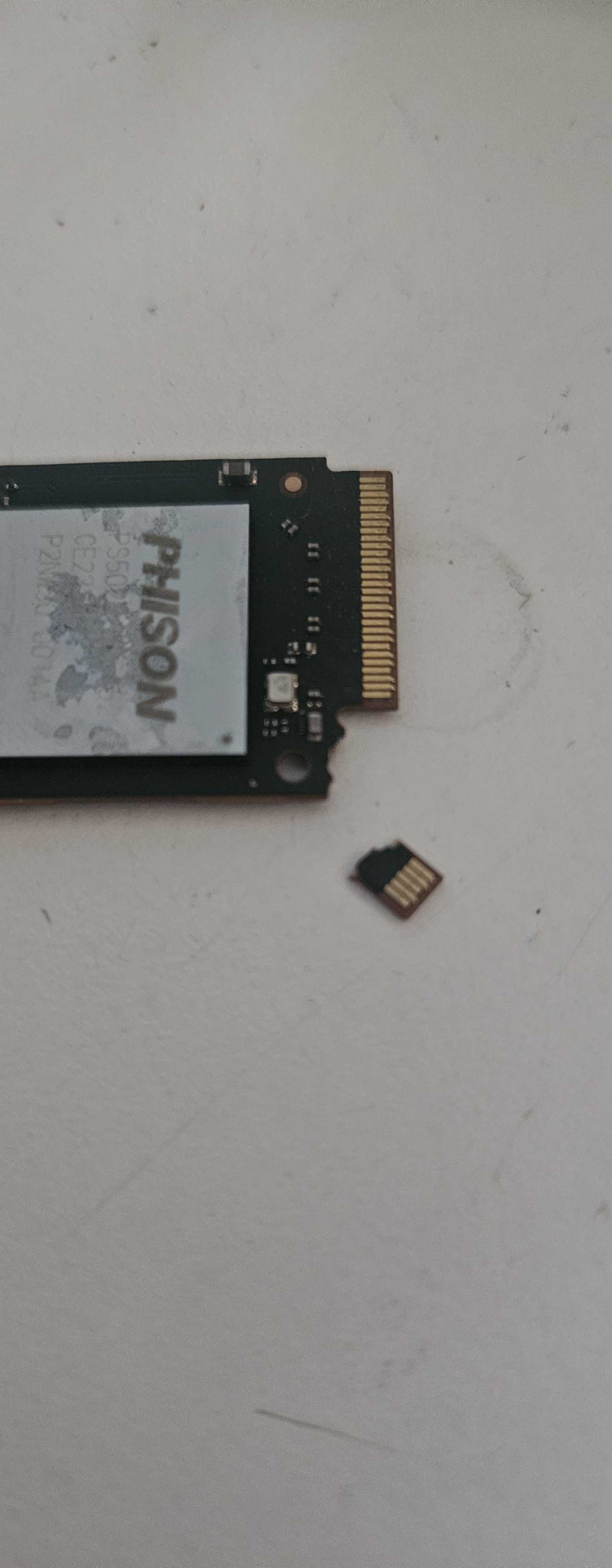
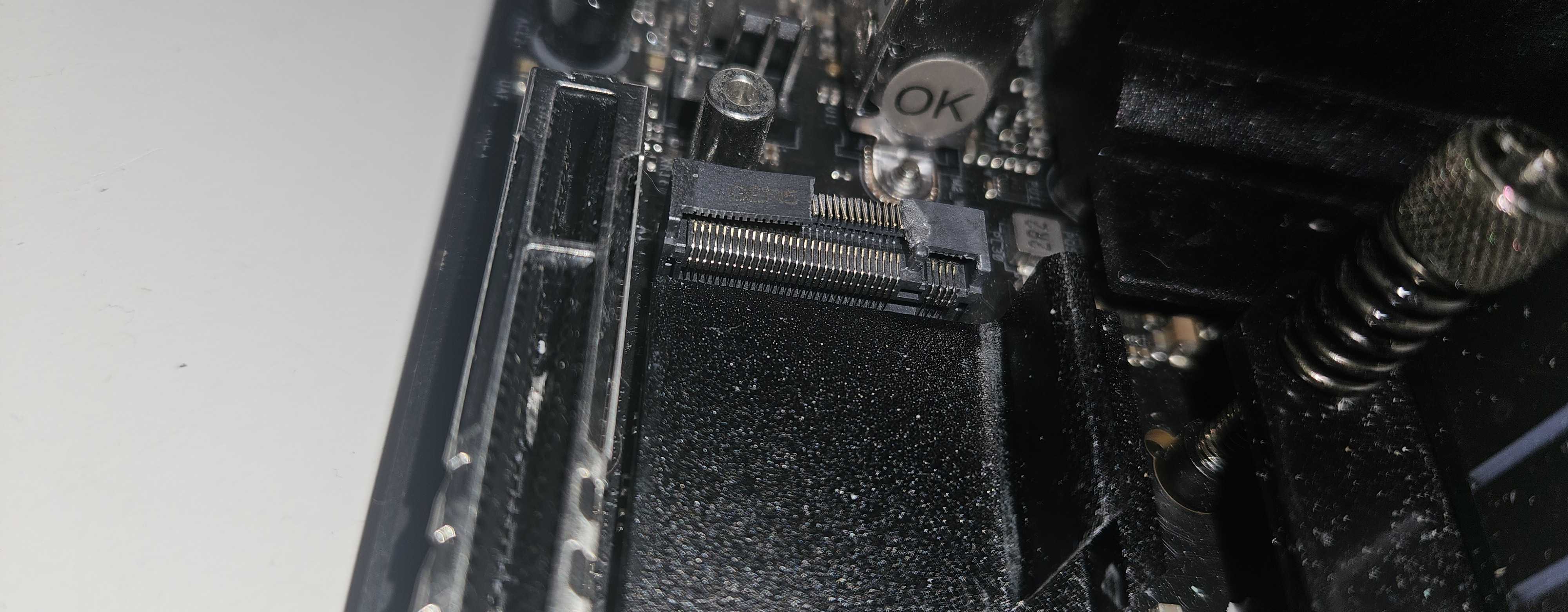
So in short, when taking out my cpu cooler I dropped it and it snagged the NVME heatsink, leading to the connector breaking. Obviously the expensive parts should be fine, so I’m wondering if there’s anyone who knows where I could get this fixed?
Ouch! 
Repairing: not a chance. Data recovery: probably possible. Cost: significant. So, basically the question is: how much is the data on that drive worth to you? (to me, it’s worthless so I’m not the right person to make that call  )
)
1 Like
It does not look good for the NVME drive as the PCB is broken. Data recovery is possible, but difficult and expensive. The damage to the slot on the MOBO looks fixable from the photo. As long as all the pins are intact (The ones I can see seem fine) and you have the piece that broke off. If that piece will sit flush you could tape it down with a small piece of gaffers tape plug in a drive and test. I would not test it if any of the pins are touching each other or bent out of shape. If it works I have a few ideas to make a more permanent fix.
1 Like
In theory a pcb should be cheap, it’s the chips that are the majority of the cost. My question is more if there are any places that can do a swap to the pcb or if im SOL
Should be fixable with donor pcb but not sure who does that as a business
Six of those pins are 3.3v and ground pins. Not sure what the other 2 pins are for. But you could probably get one of those people that fix videocards and motherboards to solder it to an m.2 extension or something. And then pull the data off of it.
Also an M-key NVMe SSD mostly use pins 1-58. So Pins 67 to 75 might not even be used. So at your own risk… You could try just plugging it into a working m.2 slot and see if it works. I would probably tape that missing part off if any traces are visible.
2 Likes
You’ll be shocked. It’s a multi-layer affair with some quite narrow traces on intermediate layers with exact lengths due to PCIe communication requirements. Yes, they’re made by the 1000’s but not available for consumer replacement. Your only chance is finding a broken unit where the chip(s) have failed, but those are sturdy enough to survive errors that would destroy those delicate traces.
IIRC those are for power. This does open the door to soldering it to a pcie riser or some such, bringing it back as a franken-ssd. Those pins are small, you have to know where they connect to upstream… possible but tricky. Idk if I would bother personally but it all depends.
They are normally reserved for additional power. But could be in use depending on how the manufacturer chose to wire it up.
If it was me i would just plug it in and see what happens. Unless the data is really important.
I’m not sure just plugging it in as suggested by others is a good idea.
Looking at the pinout, M.2 (NGFF) connector pinout signals @ PinoutGuide.com
From the notch position that seems like a M key M.2 connector as most common on nvmes so:
You have lost some of the 3.3v and ground power lines, which are also on the other end. While that could theoretically still work, the current capacity of the remaining traces may not be enough to supply enough power without burning up.
You have also lost pcie lane 3 rx and tx pins, so that’s down to only three functional pcie lanes, I don’t know how does PCIe handle a missing lane in between working lanes so it’s either working at x3 or going down to x2 lanes.
You have lost the first pin which is defined as CONFIG_3 and is used together with other config pins to identify what interface should be exposed in the M.2 slot (as most slots have at least pcie or sata or other modes). Looking at the table in the pinout page, it seems that missing pin should be connected to ground to request pcie mode for the slot (which is what a nvme drive requires). In case it’s not connected the host would see the pins as if the device is requesting “WWAN – PCIe, USB3.1 Gen1 (Port Configuration 1)”. Which I don’t think is possible for a M.2 slot type M (as it has no SIM or USB lines defined) so that pin’s status may or may not be ignored on a normal motherboard M.2 type M slot. Who knows.
Manufacturing, yes (relatively speaking). Designing from scratch or reverse engineering it is the biggest cost by far for short production runs (less than thousands), the chips on that pcb have a ton of contacts so there are a lot of traces to wire around to connect the controller to the flash chips and possibly to the RAM chip if it had it. It’s not a simple thing, it’s a lot of layers and it’s high speed interfaces.
Your best bet for a pcb swap is finding a dead ssd of same brand and model on ebay. Or possibly a SSD that has bad blocks, is locked up or some other issue that is not related to power components or pcb damage. They often use the same pcb for different storage sizes, but they may or may not in this case, you need to look at it and try to verify it’s looking the same. Then the job is called “BGA rework” where the technician is reballing a bunch of BGA parts (flash, controller and RAM) plus some SMD parts for the power (if any) from the current one to the other which is something of high tier board level repair shop that works on laptops or GPUs or more expensive complex boards. This is stuff I’ve seen some repair shop youtubers do. So that’s the only things I can tell you.
Like Louis Rossman replacing the RAM or flash chips on macbooks (in his older videos, now it’s mostly done by his employees), or Nortwestrepair with full GPU transplants of core and RAM, he recently added DIMM/SoDIMM repairs and does have a contact form to ask for a repair if you are in the US anyway. There is also Black Horse Repairs, again he has a youtube channel and a site to sell his services.
Both the NAND and controller have to be transferred to the new pcb. Doable but difficult.
Since there are no pcbs to get, buying a low capacity donor is the only option.
At this point, that is probably gona set you back like 100$.
Then come the costs of labor for swapping everything and making sure the donor pcbs passives match.
I don’t know of any available stencils for the Phison controller or those specific NAND chips.
I had to have some custom made for myself.
If who ever is doing the job has to reball by hand, that will instantly exceed what a new drive will cost.
Do you have an insurance that you can get this covered by?
Before you toss the drive, i’d be interested in it.
1 Like
Check with Rossmann: