Best of the budget Epyc 7003 motherboards?

It’s me again! I finally have some disposable cash, or well, I may unless something else goes catastrophically wrong again. But hey!

Last thread I looked at Threadripper motherboards, but now I’ve been eyeing up Epyc ones as prices have gone down on the Milan CPUs. There’s a few I’ve found:

TYAN S8030 GM2NE (Single socket, 8 dimms)

Gigabyte MZ01-CE1 (single socket, 8 dimms)

TTY T1DEEP E-ATX (dual socket, 2x8 dimms)

Tomcat SX S8036GM2NE (single socket, 16 dimms)

The Tomcat is the most interesting because damn 4TB of DDR4 would be awesome, but that would also be enough of an investment to fix my hairline, overhaul my house, go on trips around Europe, and have some cash left over for a takeaway.

But yeah, ideally I’d get a motherboard with a solid VRM because I’ll be doing AVX2 workloads that use all the threads at 100% most of the time, so I need it to not burn and melt. The gigabyte has a higher operating temperature threshold of 40C vs the others which have 35C (even new Supermicro boards want a max ambient temp of 35C). Which might mean it is better built?

The other worry is vendor lock in, afaik the Chinese boards don’t blow the CPU’s fuse but Gigabyte might?

1 Like

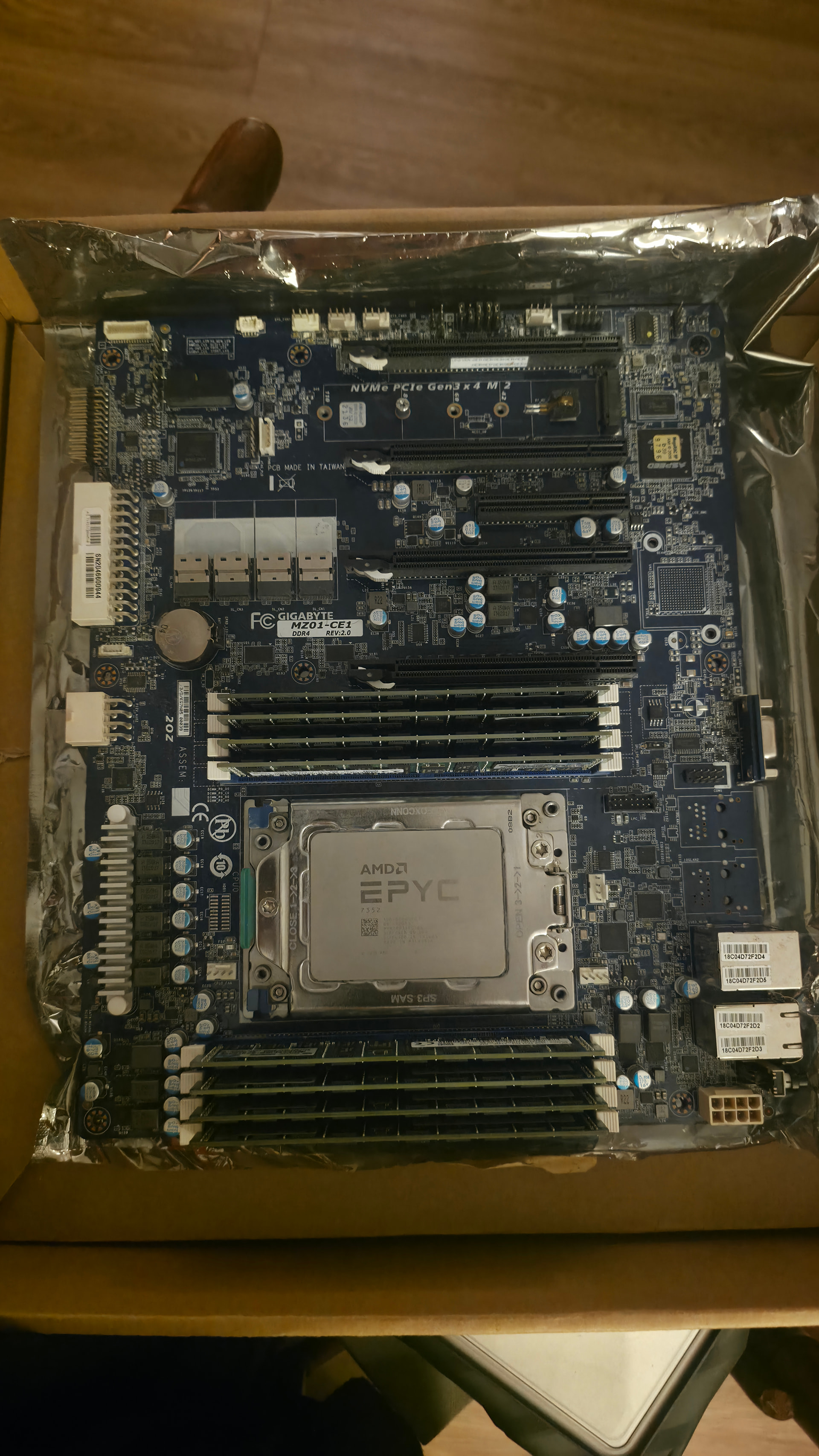
I have the Gigabyte board you mentioned. It’s in the box still with a 7352 in it. Got it a while back and never ended up using it, but if you’re interested in any benchmarks, or you wanna buy/trade some mixture of the two, let me know. I was considering posting my accumulated hoard of x99, x299, x399, this, and my other ASRock Rack Epyc board here for a reasonable price since everyone is getting scalped for this stuff everywhere else atm.

2 Likes

Don’t tempt me, Frodo!

1 Like

Ooh that looks really cool. If it had at least 1TB of DDR4 I might actually take you up on the offer. What I’m interested in is how the core scaling works out with these Ryzens in Gaea 1 (not Gaea 2 as it’s an unusable mess and Gaea 3 can’t even export anything). I saw build times almsot halve when going from 4c/8t to 8c/8t after setting the affinity in Task manager.

Unfortunately…Quadspinner took down all sales of Gaea 1. So unless you have a license already, there’s only one way to get the software as it’s now abandonware.

Anyhow, if you’re interested, here is my Gaea remake of WoW’s Barrens zone. At 4k making the heightmap in the first graph takes around 6 and a half minutes on a 5800X3D. Assigned to only half the cores & threads it was around 11 or 12 minutes. Building the heightmap & 3 channel splatmap & vertex color map at 8k takes my CPU over an hour!

Barrens3.zip (115.9 KB)

Is there any way you can change your work flow to not use such resource heavy software? I’m not sure what else there is that can give you similar results with less need for memory & compute power, but that would probably be the cheapest solution. Is this something you are creating as a hobby side project, or are you making money on it? If it’s a mod for a popular game maybe you can monitize it with a Patreon?

I would caution against server hardware being used as a workstation/ desktop as there are several issues that may or may not cause you headaches. First is the board and system design around extreme airflow fans with plastic shrouds to direct airflow over tiny VRM heatsinks, RAM, CPU, network chips and other components. Next is it outright missing a ton of “basic” IO like headphone & microphone jack or any audio chips of any kind, extremely limited motherboard connectors for front panel ports, extremely sparse back panel port selection and usually no option for an IO shield that fits a readily available desktop case. No reinforced PCIe slots so modern large GPUs can damage the motherboard if the GPU isn’t physically supported well in a normal desktop case.

Then performance issues with Epyc, it doesn’t have “good” per core or multi core performance in comparison to moderately high end older desktop setups like AM4’s 5950x, or a 3rd+ generation Threadripper CPU. If your software will take advantage of as many cores as possible and hammer them, I am pretty confident it would do significantly worse on one Epyc rig rather than a decent spec TR or consumer setup.

If you absolutely need a ton of RAM, a Threadripper TRX40 motherboards & something like a 32core 3970x will give you a theoretical max of 256GB 4 channel DDR4 (desktop or ECC RAM). AM4 and a 5950x a max of 2 channel 128GB desktop DDR4 RAM. But a WRX80 motherboard and a 32 core 3975WX would get you 8 channels of DDR4 with a max of 1TB of ram (it will be UDIMM, RDIMM, LRDIMM, not desktop memory).

Availability of an older motherboard plus an “unlocked” CPU will be kinda an issue getting what you want, but the price of DDR4 desktop memory is kinda high, double so for ECC or some variant of Server DDR4 memory. I got a used 256GB 8x32GB kit of 2666 ECC memory for $352 in ‘24 and the same used kit from the same seller is about $3,000 now… there are other kits a lot cheaper, but especially with servers & high end systems you almost always have to ensure the RAM is actually on the RAM QVL for the motherboard or it won’t work maybe at all, or at best probably be unstable. No QVL = No Buy for RAM.

Do you have the budget for 128GB-1TB $1,500-8,000+ in ECC memory? Plus the $1,500-3,000+ in the used motherboard + CPU, plus $400-900 for a good high wattage PSU, $200-ish for a UPS & ESPECIALLY a good 4.0 x4 NVME drive? GPUS are kinda nuts right now as well and your current drive would likely hold back system performance.

I can try to test your file on my Threadripper rig later today, if I can get & figure out the software. Are there any benchmarks relevant to that software that will give a relative measure of performance?
1 Like

Unfortunately making heightmaps and splatmaps is inherently resource heavy as they’re processed as fp32 during runtime. An 8kx8k greyscale heightmap alone is about 256MB in raw data, then there’s everything the software is doing on top. When making a splatmap at that res, I have to shut everything off on my PC and not touch it otherwise it will run out of memory. And that’s with 64GB of DDR4! I’m wanting to make terrains at 16k (so they’d need >256GB of RAM) and higher, so those RAM requirements get scary real quick.

Gaea 1 is unmatched with how detailed you can make the terrain vs equivalents (World Machine 2, Gaea 2, World Creator, etc). Unfortunately it’s slow, but it scales well with core count.

I have thought about making it a main driver by getting a pcie card for USB and buying those copper heatsinks then sticking them on with thermal putty. That way I could sell my PC to gain some funds and put that toward buying RAM :sob: I have found a good price for some specific DDR4 but yeah, it’s still pricey.
But yeah, it’s something that started as a hobby, and after a couple years I got good enough at it that I made my own skillset that I want to monetize. But the build times are killing me, so I want to cut them down as much as possible.

If you want to benchmark it, all you need to do is open the project in the zip file, and it will automatically start building the all the nodes up to the HeightLakes one in the first graph. Make sure it’s at 4k in the viewport at the very top too, as it’s the highest resolution that is supported in the preview.

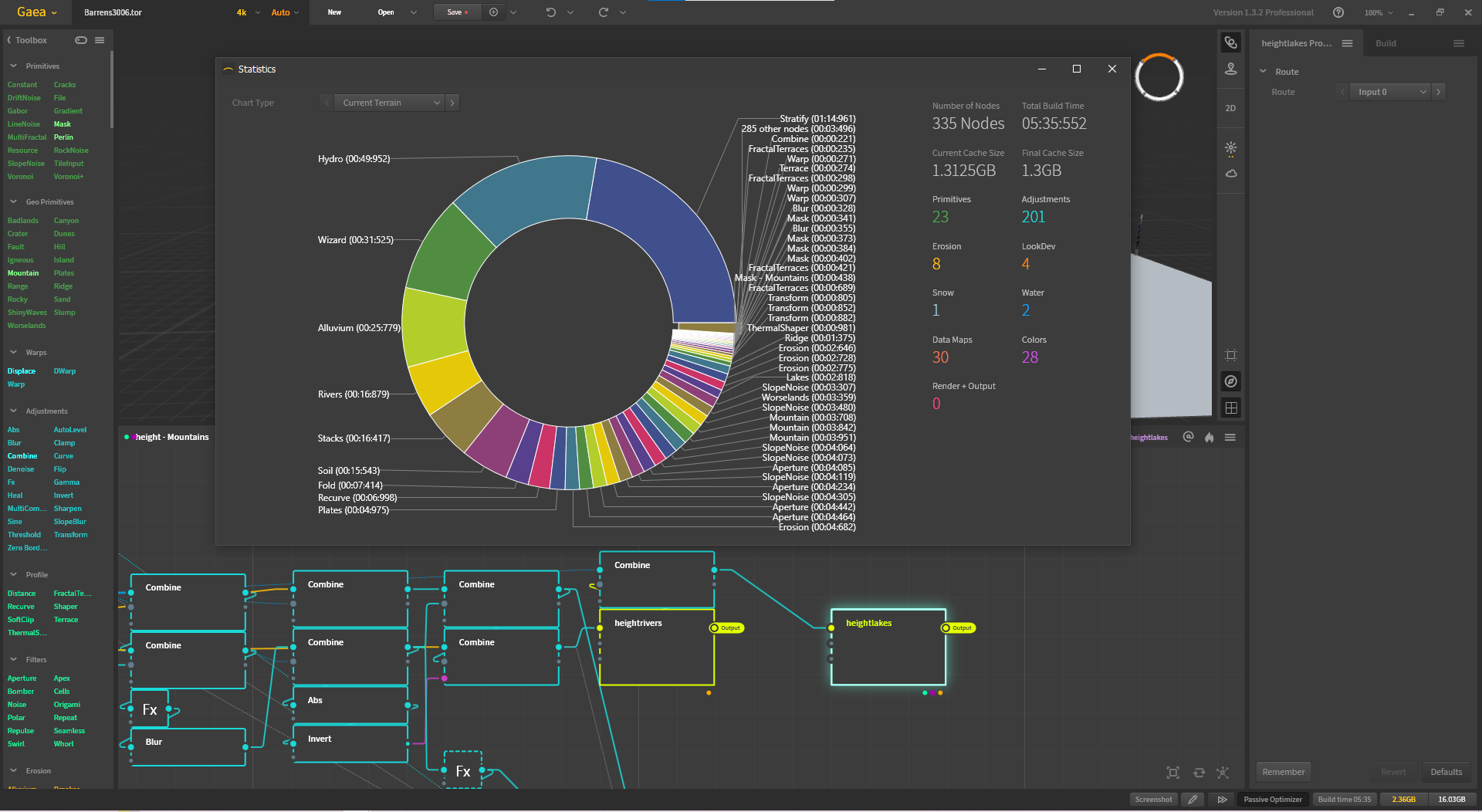
At the bottom right there is a Build time: tab that will tell you how long the process took and which nodes took the most time. Using this it’s a proper real-world benchmark vs anything synthetic, I’m running it now and I’ll let you know the exact time it took.

Edit: And yes I have a modding project too that I want to monetize, but I also can’t afford the time investment with these ungodly build times while also having a crappy low end job.

Here’s how long the 4kx4k heightmap took to make, 5 and a half minutes on my 5800x3D. Ignore the number of nodes that it says has been processed, it includes the ones that haven’t actually run yet in the other graphs.

Quadspinner had a version history page with a 1.3.1.9 that faulted out at [055 of 335] then completely stopped and a bunch of nodes showed Error. Reddit had a linked version 1.3.2.7 that seemed to work.

On the 1.3.2.7 opening run has a total build time of 2:57:198 and it utilized a lot of my 32 core 9970x Threadripper on and off (4.77-5.15Ghz for the most part and usage spikes to 80-99% then utilization dropping low as it processed other nodes). I don’t know if it’s a useful metric because the viewport has just some white squiggly little cliff islands, but that’s the time to open the files/ load the nodes.

The rig: 9970x 32 core Threadripper, ASUS Pro Ws Sage Wifi A motherboard, 128gb Kingston Fury DDR5-5600 ECC, WD Black 4TB SN850x 4.0 SSD, 4x R9700 (it only seemed to utilize 40% or so of one GPU)

I just opened it in the 1.3.2.7 version on my gaming rig as well and got a Build Time of 3:20:155 this is a 14900k CPU, Aorus Master X Z790, 192GB Crucial DDR5-5600, same WD Black NVME SSD, a 5090 GPU that it used 20% or so of.

1 Like

Those cliffy things is one of the water masks! In the other graphs they’re used to avoid placing textures and vertex colours in the lake beds. If you select one of the other cooler nodes like Erosion and tap F on it, it’ll lock that one to the viewport instead of the lake mask node.

That’s cool you had an improvement! Out of curiosity, what happens if you run it on 16 cores? Gaea 1 only uses the GPU for rendering the viewport, it has no GPU acceleration. Gaea 2 has it for some nodes but you need a lot of VRAM and, well, Gaea 2 is just not stable enough for production.

I wonder how much of a difference the VCache of the 5800X3D made, considering that your threadripper was only twice as fast. Thanks for running the project!

I couldn’t figure out how, or if I’m even able to disable CPU cores on my particular Threadripper motherboard. The 5800x3d is an 8 core 16 thread chip, not 16 core.

I was able to test it on my ITX AI rig using a Minisforum BD790i motherboard that has a mobile AMD 7945HX (16 core 32 thread) with 128GB laptop DDR5 RAM, Build Time 4:06:449 though their cooler is a pretty poor design so thermals are probably holding back performance some. Weirdly I saw it using the iGPU and the 5060Ti GPU when the program was open, with only a monitor on the iGPU.

I’m waiting on some ebay parts to come in for project build using an older Gigabyte Trx40 motherboard and a 3970X Threadripper build with 256GB DDR4 I haven’t been using. I can test that on the weekend or early next week assuming everything comes in. I’m kinda curious how different it will be since it’s several generations old. I might be able to test a windows install on my Epyc Rome 8 core server with 2666 DDR4 and see how that does.

I think part of the problem is program optimization, especially on software that was last updated in 2022? Just because I see it hitting 99% CPU utilization doesn’t mean it’s taking good advantage of it. I would imagine Gaea 2 or soon 3 would have a bigger gap between CPUs, but the file type from 1 doesn’t seem to be compatible.

1 Like

You can use Task Manager and set the process affinity to use fewer cores. I was curious about the scaling, since mine is 8 cores but it had a build time of about 5 and a half minutes while your 32 cores had just shy of 3. Would the 16 cores be close to 6 minutes, or would it be faster?

Basically the core scaling is what I’m curious about now, since there is that extra L3 cache with the 5800X3D. I did compare against someone with a 16 core desktop zen 4 (non-3D) and they only had a 30% speedup compared to my 5800x3D.

And yeah there’s no backwards compatibility between Gaea 1, 2, and 3. They are redesigns, and while the later ones are faster, they’re crap. I’ve genuinely not been able to finish a project with Gaea 2 before it corrupts and breaks everything. There was a huge backlash when they announced Gaea 3, and the company has been made well aware basically since they did early access for Gaea 2 that it’s a mess.

They chose to make up an excuse to shut down the discord to bury everything, and now have a sanitized forum. They made a total cowboy clownshow of Gaea 2 and 3.

I wonder how much of it is CPU cache, and how much of it is simply that high core count consumer AMD platforms are limited by RAM bandwidth in many applications.

As you add those 8 additional cores, in many workloads those cores are sitting idle in many cases waiting for data to process from RAM, or waiting for data to finish writing to RAM.

The good thing about EPYC is that instead of the 2x of the consumer platforms, it has 8x RAM channels, which gives you a lot more RAM bandwidth to work with, hopefully enough to truly scale your workload.

1 Like

Threadripper 9970X set to use 0-31, so 16 cores 32 threads confirmed with task manager when building, and it took 3:06:466 to build Vs the 2:57:198 It took with all cores on the same CPU.

The several generations old 3970X 32 core Threadripper I just put together from ebay & bits I pulled out of other systems did a build in 4:31:898. It does have 2x 128GB gskill 3600 DDR4 kits and it only runs at 2666 speeds due to the memory controller from my understanding, but it is 256GB of DDR4 which was my goal for the build.

As tested so far:

5:35:552 5800X3D 8 cores (OP)

4:31:898 3970X 32 cores

4:06:449 7945HX 16 cores

3:20:155 14900K 24 cores

3:06:446 9970X 16 cores

2:57:118 9970X all 32 cores

1 Like

Dude you’re a king for getting those results. It’s interesting about the scaling with the 9970X, it only has quad channel memory though DDR5 is meant to be 128 bit vs 64 bit (DDR4 and older) per channel iirc.

I’m really curious about that 3970X. Does it only have a marginal difference when using 16 cores? And I wonder what these scores are like when SMT is turned off so the threads are assigned to physical cores. Benchmarking this stuff must have been a total chore!

How many RAM sticks does your 9970x have actually? Is it also only using 2?

1 Like

I just took out 1 kit of ram, so it is now running 128GB @ 3600 DDR4 on the 3970X. That’s 4 channels with 1 stick per channel.

4:23:889 3970X 32 core 128GB 3600

4:26:643 3970X 16 core 128GB 3600

4:51:699 3970X 32 core SMT OFF 128GB 3600

5:46:685 3970X 16 core SMT OFF 128GB 3600

9970X build has a 128GB 4 stick 5600 DDR5 kit occupying all 4 slots on the motherboard and using all 4 memory channels. Only the “TR Pro” CPUs with 7000 & 9000 series have 8 channel support if you use an 8 channel WRX motherboard. My 14900K build is using 192GB of dual channel DDR5, 4 sticks.

I think it’s just not well optimized software, especially since the last update for 1 was years ago now. Plus the build process works through each node with pauses and such between nodes, no parallel processing nodes that I saw.

1 Like

These results are wild at first, but they make sense for the Zen 2 CPU after reading up a bit. They have 4 core CCDs, so there’s a lot more wasted performance communicating between cores. Plus the older infinity fabric tech so it’s not as fast as Zen 3. So SMT makes a big boost by adding more threads to the same CCDs?

And yeah there’s no parallel processing of nodes which is really crap. Gaea 2 doesn’t do that properly either. It’s a shame that the software is slow because it’s the best heightmapping software out of them all and it actually feels nice to use. Or, well, Gaea 1 does. Gaea 2 is a mess.

Those intel results are insane tbh, I’d probably go for that platform if it wasn’t using DDR5, the cost savings on that CPU are wiped out by the absurd memory prices.