background
As Windows 10 will be deprecated soon, I wanted to migrate my CD extraction software as well.
picking my software
On windows I currently use Exact Audio copy
I wanted to find software that would get a exact rip like EAC, so I went and read reddit.
the top replies had these results:
- abcde
- Asunder
- whipper
- cdparanoia
while researching on the web, I also came across this forum post which recommended RubyRipper
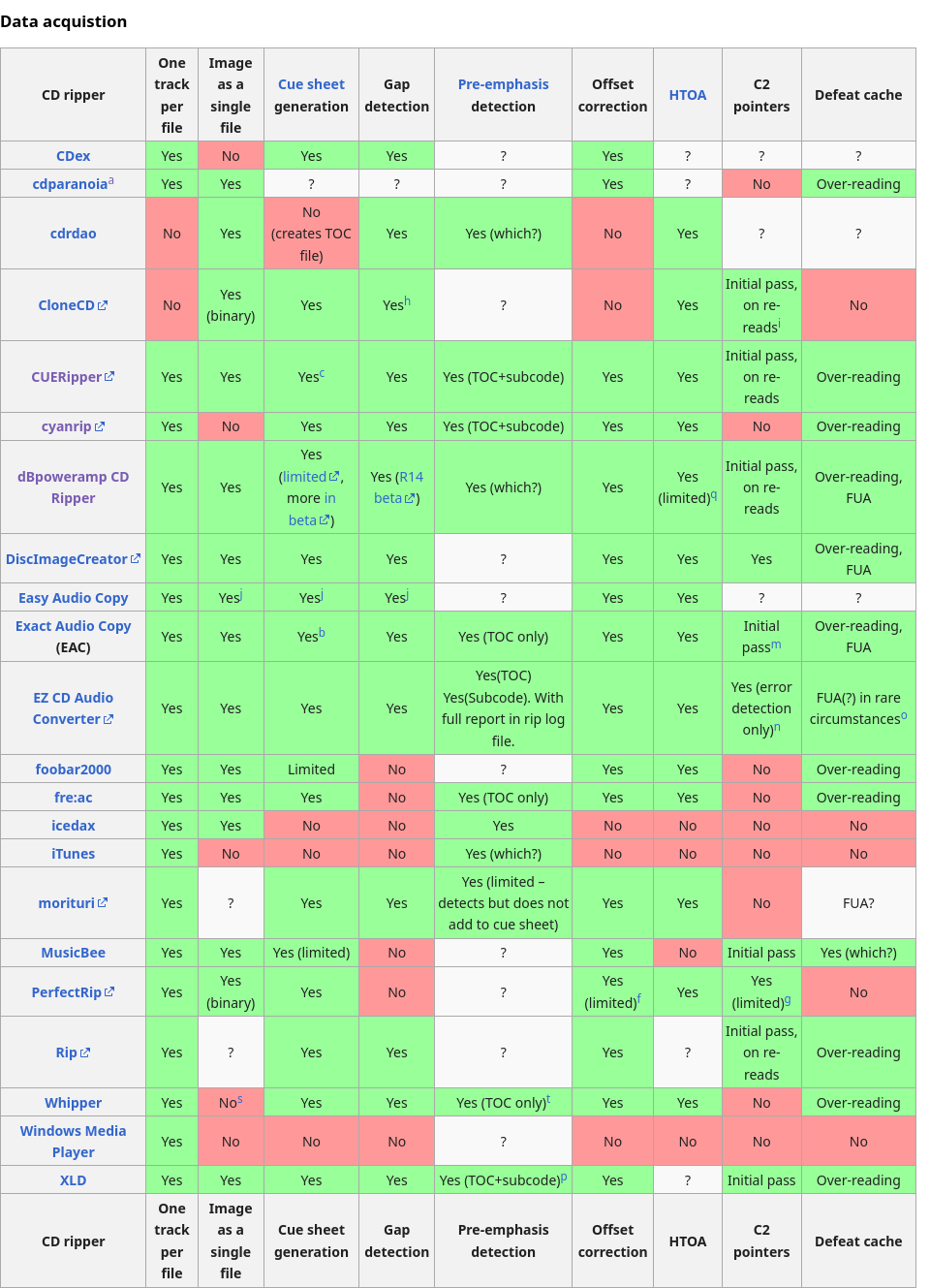
I also came across this table from hydrogen audio
During my research, I also came across this reply which linked to the music hoarders wiki
In the linux section, the wiki’s instructions used whipper.
Ultimately I decided to use whipper because I was already familiar with python, and should I need to extend/modify it, it should be easier with chatgpt.
getting started with whipper
After adding whipper to my nix config, I ran the suggested commands from the musichoarders wiki.
whipper drive analyze
/nix/store/5rwqw11kchps3kplgjzpa2law7akxskw-whipper-0.10.0/lib/python3.13/site-packages/whipper/__init__.py:5: UserWarning: pkg_resources is deprecated as an API. See https://setuptools.pypa.io/en/latest/pkg_resources.html. The pkg_resources package is slated for removal as early as 2025-11-30. Refrain from using this package or pin to Setuptools<81.
  from pkg_resources import (get_distribution,
CRITICAL:whipper.command.drive:cannot analyze the drive: is there a CD in it?
The music hoarders wiki did not mention needing a cd in the drive before the analysis, which caused the above bug
I decided to follow the instructions from the whipper project page
“1. Pick a relatively popular CD that has a good chance of being in the AccurateRip database”
I decided to pick Weezer the blue album because it showed up here
“2. Analyze the drive’s caching behavior”
I reran the whipper drive analyze with the weezer disk in the drive
 whipper drive analyze
/nix/store/5rwqw11kchps3kplgjzpa2law7akxskw-whipper-0.10.0/lib/python3.13/site-packages/whipper/__init__.py:5: UserWarning: pkg_resources is deprecated as an API. See https://setuptools.pypa.io/en/latest/pkg_resources.html. The pkg_resources package is slated for removal as early as 2025-11-30. Refrain from using this package or pin to Setuptools<81.
  from pkg_resources import (get_distribution,
INFO:whipper.command.drive:cdparanoia can defeat the audio cache on this drive
INFO:whipper.command.drive:adding drive cache behaviour to configuration file
“3. Find the drive’s offset.”
I ran the command
whipper drive list
drive: /dev/cdrom, vendor: HL-DT-ST, model: BD-RE  WH16NS40 , release: 1.05
WARNING:whipper.command.drive:no read offset found. Run 'whipper offset find'
       Can defeat audio cache: True
then I looked for WH16NS40 on the accurip page
I have copied the table for myself. the numeric-value-here value is the offset number, which is 6
| CD Drive | Correction Offset | Submitted By | Percentage Agree |
|---|---|---|---|
| LG Electronics - BD-RE WH16NS40 | +6 | 1199 | 100% |
| I then ran the command |
whipper offset find -o 6
INFO:whipper.command.offset:checking device /dev/sr0
Track 1 finished, found 61 Q sub-channels with CRC errors
Track 2 finished, found 55 Q sub-channels with CRC errors
Track 3 finished, found 81 Q sub-channels with CRC errors
Track 4 finished, found 26 Q sub-channels with CRC errors
Track 5 finished, found 19 Q sub-channels with CRC errors
Track 6 finished, found 66 Q sub-channels with CRC errors
Track 7 finished, found 36 Q sub-channels with CRC errors
Track 8 finished, found 47 Q sub-channels with CRC errors
Track 9 finished, found 40 Q sub-channels with CRC errors
Track 10 finished, found 94 Q sub-channels with CRC errors
INFO:whipper.command.offset:trying read offset 6...
INFO:whipper.command.offset:offset of device is likely 6, confirming...

Read offset of device is: 6.
I wanted to inspect what the conf file looks like, so chatgpt suggested
echo (set -q XDG_CONFIG_HOME; and echo $XDG_CONFIG_HOME; or echo ~/.config)/whipper/whipper.conf
/home/bedhedd/.config/whipper/whipper.conf
which returned the following the path above, running cat of that file returned this.
[drive:HL-DT-ST%3ABD-RE%20%20WH16NS40%20%3A1.05]
vendor = HL-DT-ST
model = BD-RE  WH16NS40
release = 1.05
defeats_cache = True
read_offset = 6
At some point, I’ll need to add a dot file for this conf, but for now I just want to use whipper
“4. Rip the disc by running whipper cd rip”
I ran this command in a folder called whipper-test in my Music folder with a new cd in the drive
whipper cd rip
INFO:whipper.command.cd:using configured read offset 6
INFO:whipper.command.cd:checking device /dev/sr0
CDDB disc id: 790a050a
MusicBrainz disc id f3rdXVfl7uWfKZtNGB6HZgz_970-
MusicBrainz lookup URL https://musicbrainz.org/cdtoc/attach?toc=1+10+192536+150+20978+36448+53220+69898+85053+102563+127835+150657+165917&tracks=10&id=f3rdXVfl7uWfKZtNGB6HZgz_970-
Disc duration: 00:42:45.146, 10 audio tracks

Matching releases:

Artist  : 大貫妙子
Title   : Mignonne
Duration: 00:42:45.102
URL     : https://musicbrainz.org/release/16e7bdd6-fd6e-49e0-ba4c-853044bed618
Release : 16e7bdd6-fd6e-49e0-ba4c-853044bed618
Type    : Album
Barcode : 4560427464381
Country : Japan
Cat no  : MHCL-10148

Track 1 finished, found 2 Q sub-channels with CRC errors
Track 2 finished, found 4 Q sub-channels with CRC errors
Track 3 finished, found 3 Q sub-channels with CRC errors
Track 4 finished, found 4 Q sub-channels with CRC errors
Track 5 finished, found 3 Q sub-channels with CRC errors
Track 6 finished, found 4 Q sub-channels with CRC errors
Track 7 finished, found 8 Q sub-channels with CRC errors
Track 8 finished, found 4 Q sub-channels with CRC errors
Track 9 finished, found 7 Q sub-channels with CRC errors
Track 10 finished, found 7 Q sub-channels with CRC errors
INFO:whipper.program.cdrdao:creating output directory /home/bedhedd/Music/Flac/whipper-test/album/大貫妙子 - Mignonne
INFO:whipper.command.cd:ripping track 1 of 10: 01. 大貫妙子 - じゃじゃ馬娘.flac
INFO:whipper.program.cdparanoia:checksums match, e1b0502d
INFO:whipper.command.cd:CRCs match for track 1
Peak level: 1.000000
Rip quality: 100.00%
INFO:whipper.command.cd:ripping track 2 of 10: 02. 大貫妙子 - 横顔.flac
INFO:whipper.program.cdparanoia:checksums match, 214e2877
INFO:whipper.command.cd:CRCs match for track 2
Peak level: 1.000000
Rip quality: 100.00%
INFO:whipper.command.cd:ripping track 3 of 10: 03. 大貫妙子 - 黄昏れ.flac
INFO:whipper.program.cdparanoia:checksums match, 38d4e92a
INFO:whipper.command.cd:CRCs match for track 3
Peak level: 0.999969
Rip quality: 100.00%
INFO:whipper.command.cd:ripping track 4 of 10: 04. 大貫妙子 - 空をとべたら.flac
INFO:whipper.program.cdparanoia:checksums match, 995aad25
INFO:whipper.command.cd:CRCs match for track 4
Peak level: 1.000000
Rip quality: 100.00%
INFO:whipper.command.cd:ripping track 5 of 10: 05. 大貫妙子 - 風のオルガン.flac
INFO:whipper.program.cdparanoia:checksums match, e08dd497
INFO:whipper.command.cd:CRCs match for track 5
Peak level: 0.999969
Rip quality: 100.00%
INFO:whipper.command.cd:ripping track 6 of 10: 06. 大貫妙子 - 言い出せなくて.flac
INFO:whipper.program.cdparanoia:checksums match, 53b0bd63
INFO:whipper.command.cd:CRCs match for track 6
Peak level: 0.963684
Rip quality: 100.00%
INFO:whipper.command.cd:ripping track 7 of 10: 07. 大貫妙子 - 4:00 A.M..flac
INFO:whipper.program.cdparanoia:checksums match, 9f21e7f3
INFO:whipper.command.cd:CRCs match for track 7
Peak level: 1.000000
Rip quality: 100.00%
INFO:whipper.command.cd:ripping track 8 of 10: 08. 大貫妙子 - 突然の贈りもの.flac
INFO:whipper.program.cdparanoia:checksums match, 145fe3af
INFO:whipper.command.cd:CRCs match for track 8
Peak level: 0.999969
Rip quality: 100.00%
INFO:whipper.command.cd:ripping track 9 of 10: 09. 大貫妙子 - 海と少年.flac
INFO:whipper.program.cdparanoia:checksums match, 71e23d9e
INFO:whipper.command.cd:CRCs match for track 9
Peak level: 0.999969
Rip quality: 100.00%
INFO:whipper.command.cd:ripping track 10 of 10: 10. 大貫妙子 - あこがれ.flac
INFO:whipper.program.cdparanoia:checksums match, 1649cad1
INFO:whipper.command.cd:CRCs match for track 10
Peak level: 0.969757
Rip quality: 100.00%
INFO:whipper.image.cue:parsing .cue file 'album/大貫妙子 - Mignonne/大貫妙子 - Mignonne.cue'
INFO:whipper.common.program:1 AccurateRip response(s) found
track  1: rip accurate     (max confidence     24) v1 [3a8a0455], v2 [8a44604f], DB [8a44604f]
track  2: rip accurate     (max confidence     24) v1 [9abe895b], v2 [0d0009d1], DB [0d0009d1]
track  3: rip accurate     (max confidence     24) v1 [37b84132], v2 [5c1c9176], DB [5c1c9176]
track  4: rip accurate     (max confidence     24) v1 [c6649d64], v2 [182d2bc7], DB [182d2bc7]
track  5: rip accurate     (max confidence     24) v1 [5bde8b90], v2 [2e57ffbf], DB [2e57ffbf]
track  6: rip accurate     (max confidence     24) v1 [4143a391], v2 [8da1835c], DB [8da1835c]
track  7: rip accurate     (max confidence     24) v1 [9defa932], v2 [352b09d4], DB [352b09d4]
track  8: rip accurate     (max confidence     23) v1 [6ffd6a70], v2 [cd74a32f], DB [cd74a32f]
track  9: rip accurate     (max confidence     24) v1 [11540426], v2 [1eca9c07], DB [1eca9c07]
track 10: rip accurate     (max confidence     24) v1 [c97dd0c1], v2 [60848591], DB [60848591]
It is nice to be able to run whipper cd rip, from a directory that will dump all my music to.

