I am finally ready to pull the trigger on a GPU upgrade, for to run larger models.
I am stuck between the decision of the Intel B70, or the Radeon R9700. Both having 32GB of VRAM.
The main difference as I understand is the B70 is a bit cheaper, and the R9700 is a bit faster. I don’t mind paying the bit extra for the R9700 so I am currently leaning towards that.
However, where I am struggling with my calculus is due to the B70 being cheaper I am temped to go for 2 of them for a total of 64GB.
One more thing to consider is that I do some occasional gaming on my current RX 6750 XT (with only a measly 12GB). But I don’t think I have room for all 3 cards in my case at once, (assuming I used the RX 6750 for gaming, and B70 pair for LLM’s). If I did go for the B70 pair, I think I would have to physically swap out cards just to game, which I don’t really want to do. This wouldn’t be an issue with a single R9700.
If you have any thoughts on training your own model then get the r9700. As it stands, the b70 already is trying to catch up on its software stack just for running models. Training is a next year question.
That said, training on r9700s is not ideal either, but is farther along by a wide margin.
The gold contacts on PCI-e cards are limited to about 200 cycles. After that the reliability of the card is not guaranteed
When running LLM’s which don’t fit into the memory of a single card, you will need to consider the fact that bandwidth between cards can be a limiting factor in certain scenario’s.
Intel’s software stack for inference is so far behind the curve that you are going to have to put in a lot of effort to make it work for anything that is not specifically made to run on intel hardware. It’s not impossible, but the AMD experience is a lot easier in comparison.
First hard lesson everyone gets when setting up their own LLM system is how many PCIe lanes your CPU/MB can actually give.
The Ryzen 5900X has 24 PCIe 4.0 lanes total. 16 go to PCIE1, 4 go to M2_1, and 4 go to the chipset uplink. So those 3 PCIe 4.0 x16 Slots are physically x16-sized connectors, but electrically they’re x16 / x4 / x2.
Additionally, the middle and bottom slots are connected to the chipset, and the X570 chipset connects to the CPU through a single PCIe 4.0 x4 uplink ( giving roughly 8 GB/s in each direction). So PCIE4 and PCIE6 don’t just have fewer lanes individually, they’re sharing that x4 bottleneck with each other, M2_2, SATA, USB, and networking.
You’ll be fine with one card. Two may be usable, the third is gonna be struggling to breath… Not saying you can’t start with that setup, but if you want to get a 2nd card you’ll want to look at a MB that can do true 8x/8x Gen4. GIGABYTE X570 Aorus Pro being one example for an AM4 MB.
The decision on what GPU you should get isn’t solely on cost, but what do you want to DO with it?
If you want to just use a local LLM in your workflow and don’t want to have to spend days getting it to work or go broke getting 32GB of vRAM? Get the R9700.
If you are happy fiddling with files and spending hours on GIT repos trying to unlock features and really want to save a few hundred? The b70s could use some talented people helping give intel feedback to improve the stack.
If you have money to burn and want everything to be as fast as possible and not have to spend any time setting anything up? RTX 5090.
Hmm. My plan is to leave the RX 6750 in for gaming, and add the R9700 as a second card for LLMs.
I think based on everything here, the dual B70 is option is out. Not doing 3 cards then. So just the two cards.
Will I still run into this limitation with the 2 cards: 1 x RX6750 & 1 x R9700? Should I still upgrade the mobo for this configuration?
Unless the R9700 is “good enough” for gaming then I would sell the 6750. I know its not a gaming card but would likely be fine?
5090 is sorta outside of my budget, and also not interested in dealing with nvidia drivers.
If I were to adjust my budget to consider the 5090, then I would actually be more tempted to go for a Ryzen AI Max+ 395 as a separate dedicated system for just AI stuff instead. As its has 128GB RAM, I believe it can allocate 96GB for the GPU.
This would allow for even larger models, and wouldn’t have to be concerned with multi-GPU complications.
Max 395 path is a bit more than I want to spend, but it is tempting…
The R9700 is just a 9070XT with double RAM. I tested it side by side with my 9070 and it was ~5% slower so still plenty for gaming. Make sure you get an ASrock card though, as Alpha cool is working on a water block and that blower fan will drive you nuts if you use it for gaming.
That opens up a whole new can of worms, and still doesn’t address the real question:
What are you trying to solve for? Do you know what you’re going to do with a local LLM? Do you have a use case? Have you used LLMs before or are you just wanting to dive in and know that you need a lot of Vram?
Ok. In that case I’ll probably sell the RX6750 if I get the R9700. No need to swap the mobo or anything else.
Yes I already run local models with ollama + open webUI. Problem with the only 12GB of current Vram is I find it is slow to run models larger than ~12-14b. 32b+ models are terribly slow, and 70-120b is out of the question.
Main use case is programming assistance. eg: Building functions or giving it errors and stack traces so it can tell me what is wrong, etc…
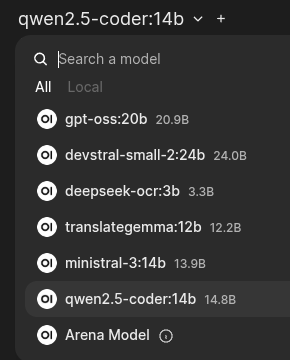
These some of the current models I am playing with:
These all run on my 16GB card, most under 10GB in use, but I have 64k context limits on coding and subagents and such are all sequenced to avoid OOM. Qwen with claude code training accomplishes almost every task given, very similar to claudes flow.
r9700 if you want it local and running one box. You’ll either be able to run your current models with a lot of extra context, or run things like Qwen3 Coder Next.
In windows the R9700 is very usable, but in Linux it’s MUCH faster. The b70 in windows has MASSIVE overhead, and in Linux still gets spanked by the R9700 by a large margin due to the young software stack (Once you get it running).
The 395 max can run much larger models but the memory bandwidth comes into play. It’s less than half of the R9700. That doesn’t mean it’s useless, but it does mean that while it’s a great $/VRAM option like the spark, you will feel it start to chug in some cases.
Coming into this late, but…for what it’s worth, I have a pair of R9700s. I was initially running them with one in the x16 slot, one in a physically-x16-but-electrically-x4 slot hanging off the chipset; the result was a 30-40% performance penalty on that card. This was nothing to do with the bandwidth (there was no communication between the cards, I was using Vulkan with llama.cpp), and everything to do with the extra hop through the chipset. The only practical solution was to get a motherboard with x8/x8 split on the x16 slots.
Also, for what it’s worth, you should really ditch Ollama and move to llama.cpp - it has much better performance and it has router mode now, which gives you everything Ollama does (including the web UI) except for the interactive downloads of models. Even when you take into account the tweakery you’ll inevitably dive into, it’s still less hassle than vLLM (IMO).
That isn’t what it is doing. Yes, those models are larger, but they are all, afaik, MoE models, with the active parameters fitting into your current GPU setup.
For example, the Qwen models with A3B in the name are telling you they use 3B active parameter expert, and the rest of the model can be run from your CPU for relatively decent speeds*.
You can try that out now to see how fast you can go. The llama.cpp options would be llama-server –moe-cpu to put the other experts on the cpu.
Now, you can finetune this, the more experts you can fit on your GPU the better, but that is the strategy it is recommending.
*What you consider decent and the test may be different, of coarse.
Sorry for thread hijack. Can I just ask, I’m intending to fit a blower/Sapphire R9700 card in a rack mount case, in a rack with a door that I sit next to. I don’t mind a bit of noise, I presume it won’t be too loud in that scenario?
Maybe I should get an ASRock and consider water cooling.