AV1 (My Personal Journey) and build guide

I have been compressing my media since 2017. First starting with x265/h265. In 2021 I began with AV1. The gist is AV1 provides better compression and efficiency. Basically allowing for better video quality at the same given size as to h265. Having similar quality while shrinking storage is helpful for me as well as others trying to reduce bandwidth with streaming over the internet. It also shrinks used disk space.

I have traditionally used handbrake prior to my usage of av1. AV1 in the past been extremely slow going without tools such as av1an and vapoursynth. Av1an splits a video file into chucks and thus makes the traditional single threaded task of encoding av1 a multi threaded task. For most people doing this, you would want to compile the binaries from source. Setting the march to native and thus squeezing out every bit of performance you could. Even with thread utilization at 100%, av1 encoding still was not ideal for most people. My 5950x saw 7fps on a slow to medium preset where as h.265 on medium saw 50+ fps.

I have been encoding using av1an since 2021.

Ideally, it will improve as progress is made with development.

Anyways. With libaom (aomenc) and libopus (audio encoder) I would see huge gains on compression while not seeing too much loss. But with everything there will be loss in quality. I would shrink with a crf setting between 16-23 (depending on my content) and preset of 3 (smaller number means better compression but slower at doing so). A newer bluray file such as Doom Patrol (2019) would have a end result with crf of 16 and preset 3 of less than 1.2GB/episode. The source file for compression was between 7 and 10GB.

I recently moved to Intel’s software encoder (svt-av1). It utilizes threads much better and has similar end results compared to libaom.

With all this said is it worth it? For most people it is not. Most streaming devices still do not support av1 and h.265 is much easier to use for the simple fact that it is and has been wildly adopted. h.266 is still being actively developed. However, if you want bleeding edge and to support foss and royalty free codecs. AV1 and OPUS are your ideal candidates.

I will post my below steps for setting up a computer with av1. As well as my script for actual batch file compression.

3 Likes

Handbrake is straight forward and supports svt-av1.
FFmpeg does as well.

However I like encoding with the native svt-av1 app.

So my steps will be posted below for compiling from source for best end results in performance…

The below app you will be compiling from source requires the below dependencies. It will be compiled using the native micro architecture of your cpu for the best optimizations.

Dependencies required for building SVT-AV1 binary (2025):

nasm cmake
SVT-AV1 Build Guide
# clones the latest svt-av1 source code for compiling 
$ git clone https://gitlab.com/AOMediaCodec/SVT-AV1

# moves into SVT directory and makes a build directory for cmake
$ cd SVT-AV1
$ mkdir svt_build && cd svt_build

# The below command will set the compilation parameters to ideal ones for linux.
$ cmake .. -DBUILD_SHARED_LIBS=0 -DCMAKE_BUILD_TYPE=Release -DCMAKE_CXX_FLAGS="-flto -O3 -march=native" -DCMAKE_C_FLAGS="-flto -O3 -march=native" -DCMAKE_C_FLAGS_INIT="-flto=16 -static" -Wno-dev

# The below command actually compiles svt-av1 binary and libs required
$ make -j 32

# The below will install the app you just compiled
$ sudo make install

Libaom (aomenc)

Dependencies required for building libaom binary (2025):

nasm cmake
libaom Build Guide
# clones the latest svt-av1 source code for compiling 
$ git clone https://aomedia.googlesource.com/aom/

# moves into SVT directory and makes a build directory for cmake
$ cd aom
$ mkdir aom_build && cd aom_build

# The below command will set the compilation parameters to ideal ones for linux.
$ cmake .. -DBUILD_SHARED_LIBS=0 -DCMAKE_BUILD_TYPE=Release -DCMAKE_CXX_FLAGS="-flto -O3 -march=native" -DCMAKE_C_FLAGS="-flto -O3 -march=native" -DCMAKE_C_FLAGS_INIT="-flto=16 -static"

# The below command actually compiles svt-av1 binary and libs required
$ make -j 32

# The below will install the app you just compiled
$ sudo make install

(highly recommended to speed up encodes for aomenc)

av1an, vapoursynth, ffmpeg, l-smash-works, ffms2, bestsource, mkvtoolnix-cli

vapoursynth (primary dependency of av1an) build guide can be found @

av1an build guide dependencies

rust, clang, ffmpeg, vapoursynth
Av1an Build Guide
# getting rust and setting as source in bashrc
$ curl --proto '=https' --tlsv1.2 -sSf https://sh.rustup.rs | sh
$ source ~/.cargo/env

# install without building for march (might not be latest build)
$ cargo install av1an --verbose

# build from latest source and for your march.
$ git clone https://github.com/master-of-zen/Av1an
$ cd Av1an

# optional (add mor optimizations)
# edit Cargo.toml, find [profile.release] change lto = "thin" to 
# lto = "fat" 
# You can also add under lto = "fat" opt-level = 3
# With Cargo.toml edited you can proceed with compiling.

# Compiles using rust flags march of native
$ RUSTFLAGS="-C target-cpu=native" cargo build --release

Vapoursynth Plugins (Used for Chunking in av1an.) You only need one, but BestSource is the best imo that does not have issues in linux.

BestSource

L-SMASH-WORKS

FFMS2

Notes: VC-1 has issues in linux specifically. Does not in windows. On linux you often have to convert to lossless first with ffmpeg. VC-1 also does not like best source chunking method with av1an. Is extremely slow. So converting to lossless is helpful with that as well.

2 Likes

I have a specific script I use when batch encoding. It requires manual work for selecting specific shows and movies but other than that it is pretty straight forward.

You will need ffmpeg, mkvtoolnix-cli, and svt-av1 for this.

av1.sh
#!/bin/bash
cd /mnt/media1n/99-work/godzilla/input/

for i in *.mkv; do

# Used with Av1an to fix audio sync
#ffmpeg -i "$i" -map 0 -c:v libx264 -preset veryslow \
#       -crf 0 -c:a copy -c:s copy -map_chapters 0 "../lossless/$i"

# New encoder (svt vs aomenc)
ffmpeg -i "$i" -pix_fmt yuv420p10le -strict -2 -f yuv4mpegpipe - | SvtAv1EncApp -i stdin -b "../av1/$i" \
        --preset 4 --crf 20 --mbr 6500k --progress 2 --input-depth 10 --scd 1 --scm 0 \
        --tune 0 --film-grain 4 --keyint 240 --film-grain-denoise 0 --sharpness 2 \
        --enable-overlays 1 --lp 6


# Used for aomenc, not used now that I made the switch to svt-av1
#av1an -i "$i" -e aom -v " --cq-level=28 --end-usage=q \
#       --enable-fwd-kf=1 --aq-mode=1 --lag-in-frames=48 --kf-max-dist=240 \
#       --kf-min-dist=12 --enable-qm=1 --sb-size=64 --enable-keyframe-filtering=-2 \
#       --arnr-strength=1 --arnr-maxframes=3 --deltaq-mode=0 --sharpness=1 \
#       --enable-dnl-denoising=0 --tile-columns=1 --cpu-used=4 \
#       --bit-depth=10 -w 1920 -h 1080 --threads=64 " -m bestsource \
#       --pix-format yuv420p10le -c mkvmerge --photon-noise 15 \
#       --set-thread-affinity 6 -w 4 --verbose --resume \
#       --sc-downscale-height 720 -o "../av1/$i"

# Compresses audio
ffmpeg -i "$i" -i "../av1/$i" -map 0:a:0 -map 0:s -map 1:v -map_chapters 0 -mapping_family 1 -ac 6 -c:a libopus -b:a 256k -metadata:s:a:0 title='Opus' -metadata:s:a:0 language='eng' -c:s copy -c:v:0 copy "../audio/$i"

# Extracts timestamps from source file
mkvextract "$i" timestamps_v2 "0:$i.dat"

# merges timestamps and compressed video + audio and correct metadata
mkvmerge --output "../final/$i" "../audio/$i" --timestamps "0:$i.dat"

# move source to done directory and removes extracted timestamps
mv "./$i" "./done/$i"
rm "./$i.dat"

done

@PhaseLockedLoop

2 Likes

I compared source to compressed file. My settings are crf 20, preset 4 (medium) and max bitrate of 6500kb/s.

The VMAF score: 95.953326

SSIM2 Score:

Video Score for 62929 frames
Mean: 79.10869418
Median: 79.58926103
Std Dev: 5.56881577
5th Percentile: 70.04095210
95th Percentile: 85.59810237

It is really hard to get above 95-96 on vmaf and ssim2 scoring/methodology is a bit different than vmaf. There is also psnr and ssim1.

SSIM2 70-90 is high and anything above 90 is super high quality. I aim for 80 for the majority of my files. I am not sure how much more quality I can get without increasing the compression ratio. I have anywhere between 400MB to 1.9GB file size depending on the era of show and codec the source file starts out with. mpeg2 on bluray is the worst and vc-1 is terrible for compression. You usually lose the most with those source codecs vs avc(h264).

Documentation for comparing end result to source file.

Here is a good graphic for comparing codecs and presets of codecs.

Source of graph.

https://www.reddit.com/r/handbrake/comments/1bz21z4/full_comparison_between_h264_h265_and_av1/

2 Likes

Awesome post! Hopefully it looks like AV1 is coming into full swing here soon, much of the youtube, netflix amazon content is available as AV1. Many of the flagship phones and devices have had hardware decoders and now we can see even the mid range devices like the 4k firestick (newer one) has av1 hardware decoding.

Have you ever looked into tdarr to automate your encoding setup?! If you have a large library and just in general like to tinker it’s worth a gander!

With a 7950x and 7940hs I see much higher rates of speed vs a year ago.

Preset 4 (slow), crf 20, max bit rate 6500kb/s I see ~35fps for 7950x and ~26fps for 7940hs. Both zen 4 and 16 cores.

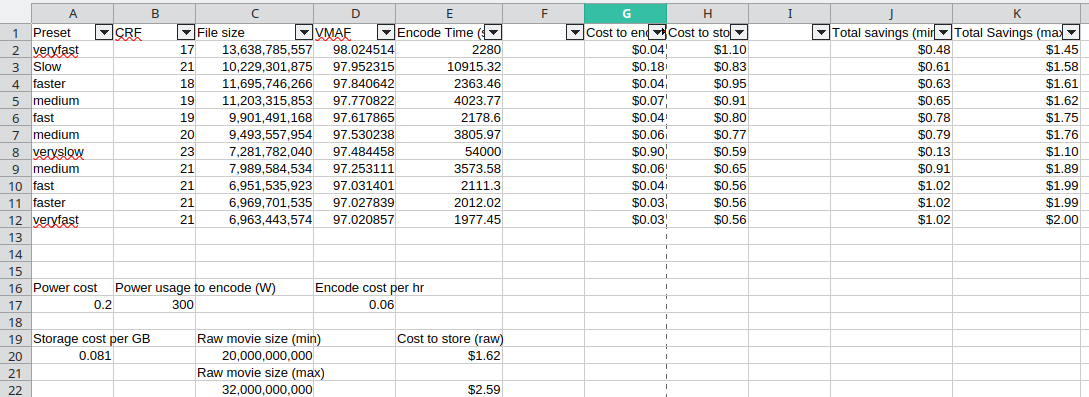
I made a simple spreadsheet when I was doing my encode testing (I skipped AV1 because it was just too slow and even on high settings, never looked as good as h265; both using CPU encode). I did ‘cost of storage’ vs ‘cost of power’.

I did my encode tests on a full length movie.

My cost for storage is so high because I keep everything on SSD. Why? Because I don’t have a massive collection, and I hate waiting for HDDs to spin up (my HDDs get used so little I have them set to spin down, they spend about 95% of the day spun down).

I have a Kill-a-watt and the power usage during encode number comes from that. It’s basically total system power at the wall during an encode.

E19/E22 show the cost to store a movie based on whether it’s a 20GB or 32GB raw file. The min/max savings columns basically say “When you combine the power usage with the resulting encode size, here is how much you save bothering to encode the movie at all”

What I haven’t gotten around to doing is pixel peeping the encodes to really see the qualify differences (if any) between the various encode levels. VMAF and quickly looking at specific scenes I know well, I can’t really spot a difference. On the surface, it looks like trying to get higher quality ends up costing me 40 cents per movie because the file size doubles, and the encode time goes up 5x, but the actual visual quality change is minimal, at best.

I know none of this is AV1 itself, but I share the method in the hopes that it might help others wondering if AV1 is ‘worth it’. It’s a way to break down ‘cost’ into actual data.

1 Like

SVT has really sped up over a two year period. Preset Slow, CRF 20 I am seeing 46fps with my 7950x. I saw 50-60fps with x265 5 years ago with a 5950x. AV1 is the future and I care more about preservation of quality while having 20-30% better compression than h265.

Your spreadsheet is good information.

Hey Kingdud! What version VMAF models are you using and are they tuned towards the content that you are measuring? As for the encoding bit what gop size are you setting for your encodes?

Oh I was literally thinking about re-encoding my media, and this is perfect!!

ffmpeg -i “$file” -i “raw_clip.mkv” -filter_complex libvmaf=n_threads=16 -f null - > “vmaf_${fname}”

So…whatever is built into ffmpeg circa Jan 2025. I was using the FFMPEG available in arch’s main repo.

It is 100% possible I did not do the VMAF scores correctly, but the main thing I was going for with them was a quick and dirty ‘does this encode work, or is it complete ass’. It was more of a smoke check than a deep metric. The final test is for me to screenshot specific scenes in both the uncompressed source and all the encodes, and compare them via pixel peeping. VMAF is just a…quick filter?

Atleast in my dive into av1, I found the majority of people do not use vmaf or use multiple qulaity test metrics. SSIM, SSIM2, PSNR, VMAF. They have a discord and the majority recommend SSIM2. But it takes well below real time (60minute) to run the test for a single episode of a show.

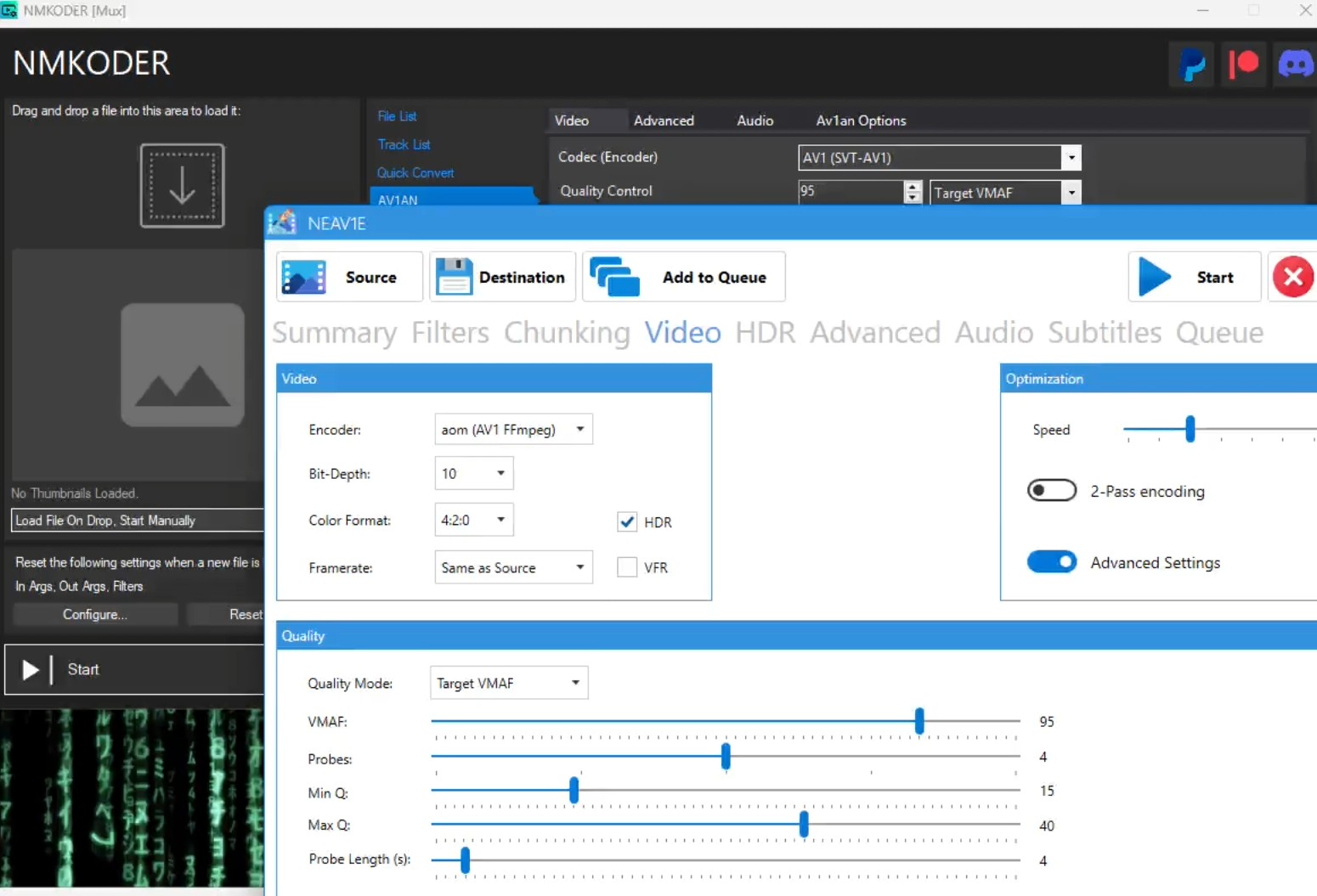
Hey Argone, for NMkoder and NEAV1E they have made it super easy to parallel target VMAF!

1 Like

VMAF is a trained subjective model, so it could do terribly on a objective like peak brightness matches test (one metric used in SSIM) but still look great to us. It also takes into account that our central vision is terrible at resolving detail on fast moving objects, so moving scene might look good but then you it pause and wonder what the blurry mess on your screen is supposed to be. There is a ton of wizardy that goes into the vmaf score, though you can cheat it with making your change scene trigger more sensitive (adds a key frame to reference) For a ball park figure as long as the resolutions for the VMAF library match the media they are good enough for a quick check!

I attempted to run svt-av1-psy and my performance was halved or more than halved. Non forked svt I am getting 55fps on this one file. Same file with same parameters I was getting 23fps with psy. Even less (16) with psy specific parameters. Other people I asked could not produce the same results. I do not know what the issue is. I thought maybe presets are not working correctly on one or the other. So I tested preset 2 on non forked and got 16fps, and with psy I got 7fps. So that indicated the presets are actually doing something. SSIM2 and VMAF produce similar results. So I am at a loss. Unless PSY is not using SVT 3.0 and is on a forked version of pre 3.0. Maybe PSY does not use avx512?

I’m sorry if this is a bit of a necro post. The guidelines says within 6 months of the last post should be fine. Someone posted this in a server I’m in.

Have you tried using VSHIP? Its multiple gpu accelerated metrics in including SSIMU2 which at least on my 5070 can run at 300+ fps for 1080p footage.

It should solve your slow times to compute scores for it.