I’m running a pfsense machine on version: 2.8.0-release (community). I just upgraded my modem (connected to Xfinity) to the ARRIS S34 which supports a 2.5 Gps Ethernet connection (I also understand that I’m only paying for 1 Gbps. Xfinity says I should average about 1.3 Gbps). Running on one of the motherboard NICs, I get about 950 Mbps down (what I think I should get with 1 Gbps Ethernet) and about 250 Mbps up when doing a speed test.
I added (a supposedly new card from E-bay) an Intel X550-T2 card (according to the sticker, made in “10/2022”) to my system, I get a maximum of 350 Mbps down and about 250 Mbps up. With this issue, the vender sent me another card, but it acts in the same fashion. So, now I have 2 cards.
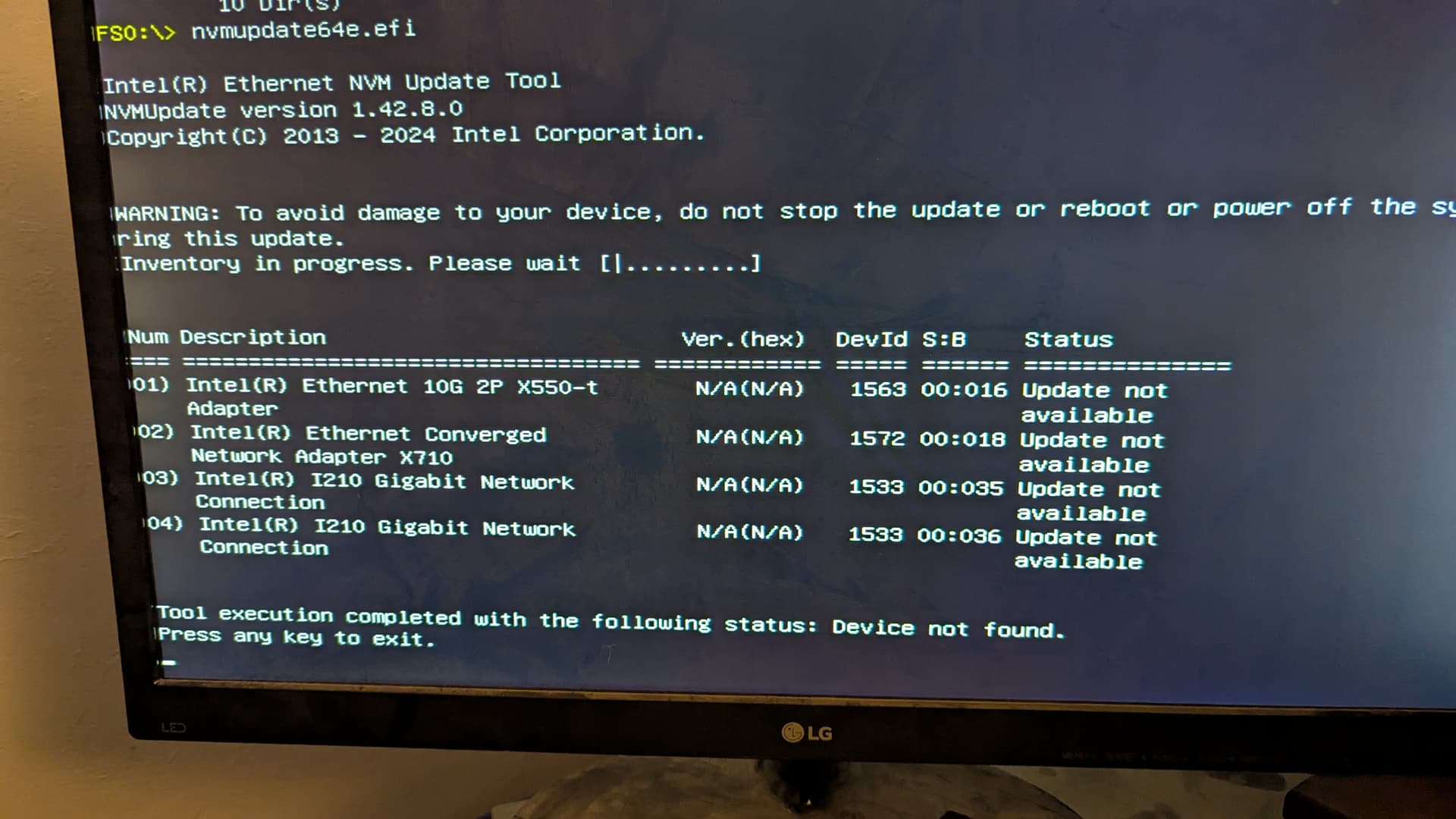
I suspected that the card/cards needed a firmware update, but the Intel NVM updater program fails to update the card I attempted to work with first (the program “sees it” along with the other Intel 710 add on and I20 cards on the mother board). I’ve tried updating the firmware using my other Linux desktop and in an EFI shell on the pfSense machine itself with no joy.
I’m “new” to this level of hardware debug (and the FreeBSD pfSense uses), yet I understand that the Intel NVM software won’t work on other OEMs cards. The e-bay vendor listed the cards as “intel” and new (Yes, They can say anything and all the stickers could be forged!), but how tell if I actually have an “Intel retail” or OEM card? How should I proceed (seeing that I don’t have the OEM machine the card may go in)?
The solution was to switch to 2.5G protocol in the firewall actually. I run OPNsense but Interfaces > WAN > Speed and Duplex dropdown has a 2500Base-T option. After selecting it I went from yea like 955MB/s down to nearly 2.5G.
Regarding the The "BradyID Lables:
This card is reported to be created in 2022. There is only 1 2D bar-code on the front (value: “B4969122864C0040618ADJ12925003” it’s not a valid “BradyID” but matches the numbers on the sticker) and (2) 1D bar-codes (values: “940128” and “X550T2”. Not sure when "BradyID"s were started to be installed. My 2 cards don’t seem to have any IDs except what is posted above.
Regarding the system:
it’s a self built system with an ASrock “X470D4U” motherboard, and an AMD processor.
Regarding “lspci -vv” output:
I do remember that the card was using 1 pcie X3 lane in the socket that I had it loaded into. Did not research why only 1 as the 1 lane should give me 2.5Gbps. I didn’t save any of the info I saw while the card was installed.
Currently that info isn’t available for a bit (I’ve removed the card from the router and am using the existing motherboard NIC). I need to reinstall the card into the router and then execute the requested command. I’ll have to do so via SSH just to be able to save the output. I won’t be able to do so for a couple of weeks due to a scheduled trip starting this weekend.
Thank you again for the response. I will get the lspci info once I return (I presume that filtering it for just the card in question is proper (i.e. the entire list could get rather long and I presume most of the info is irrelevant).
Hello @maker,
I did have the WAN interface set specifically for 2.5Gbps in pfSense. I have read that there are issues sometimes auto negotiating to 2.5 and 5 Gbps with this card. pfSense was reporting a 2.5 Gbps link. I wanted to make sure that specific problem was the cause of only getting 350 Mbps.
Hello @thetazman ,
The issue i am having is that with the x550t2 card (at 2.5Gbps link) can transfer only at a rate of ~350Mbps down. Using my built in NIC (at 1.0Gbps link) using the same CAT6a STP cable, I get about 940Mbps down.
I understand that Xfinity does not offer symmetrical throughput. According to Xfinity, I should be able to get, on average, 1.3Gbps down and about 60Mbps up.
I always wondered about this. The cards may not be real intel branded cards, right, but they still have the same Intel networking chip on them, right? Otherwise it kind of wouldn’t work.
As an aside, I have upgraded the firmware on many things in my time, motherboards, hard drives, SSD’s RAID cards and HBA’s, but I never even considered checking the firmware on my Ethernet cards.
Worthwhile if you intend to use features like SR-IOV… it’s not the most well-implemented feature (doesn’t work at all on the x550-t2 + FreeBSD). I recently upgraded an x710-T2L to the latest and can confirm that SR-IOV virtual functions work like a champ with that card on FreeBSD.
I have occasionally considered playing with SR-IOV. My Proxmox all-in-one server currently uses an old 40Gig dual port Intel XL710 NIC which reportedly has good SR-IOV support.
I understand using SR-IOV with forwarded interfaces to the VM’s can buy me some networking efficiency gains over using the default implementation using Linux bridging, but honestly, most of my guests are LXC containers, and I’m not sure if it helps much there.
There isn’t any direct IO forwarding with containers, but if I were to enable SR-IOV, I guess I could symlink ethernet devices in the /dev folder on the host to the /dev folder in the containers and use them that way, but I wonder how much that would actually help me over the default configuration.
Another downside is that I would have to configure VLAN tagging settings inside each of the guests instead of enforcing them on the host. In cases where you have VM guests you don’t quite trust, where someone else has root access, this could be problematic, unless there is a way to resolve this I am unaware of.
Currently I know of two ways to enforce VLAN tagging outside of the local machine they apply to, either directly on the switch for the port the machine is connected to OR (for VM’s and containers) on the hypervisor host.
If I were to enforce VLAN tagging settings on the port on the switch - however - it would apply to the entire QSFP+ interface, not on a per guest basis.
This is why - despite the fact that I have been pretty interested in SR-IOV, I’ve never actually taken the plunge. it seems like I would throw the entire networking config of my “home production system” into disarray for only potentially very marginal gains.
I am similarly frustrated that vlan tagging for VFs is set within the guest when using Intel-based NICs (can’t say about other brands, I haven’t looked). I wish, for example, that I could declare vlan:[num] inside my jail.conf file, rather than having to modify rc.conf inside the jail. In my case none of my jails accept user logins - they only provide services. The one VM I have that accepts user logins uses one of the 1Gb motherboard NIC ports in PCI passthru connected to a tag-free switch port. For more complicated setups I think current implementations of SR-IOV would be insufficient without explicit vlan assignment outside the containers/jails/whatever. For me, it works well, and I like the simplicity of providing direct hardware access to the NIC for my service jails. vnet bridging works fine, but it’s less elegant to configure, and I’m prone to typos. Simpler-looking configs are better… that’s why I went the SR-IOV route.
Have you found much of an efficiency or performance difference between using SR-IOV and using vnet bridging? How about CPU use difference? I am curious what I am missing out on.
TBD… setup is still ongoing, and the jails I’ve deployed so far are lightly loaded. Once I get my jellyfin jail up I’ll do a vnet bridge vs SR-IOV VF comparison and report back. I guess I could contrive some artificial test… atm I’m keeping busy pulling new Ethernet thru the house, which is way more project than I’d anticipated.