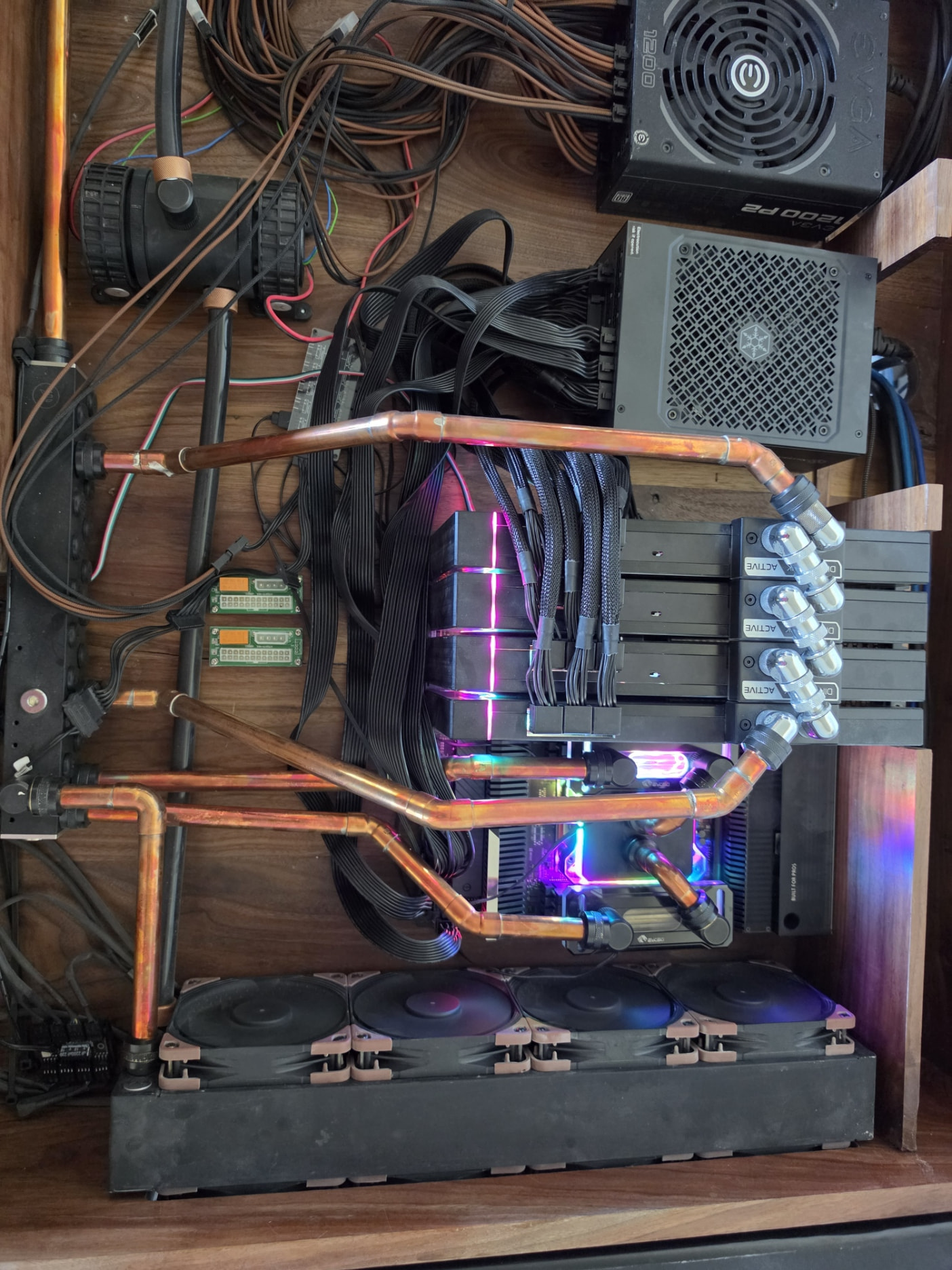
I have had this system for a couple years and could never get it to run reliably. I have another thread about NUMA issues, BIOS issues, and such, but after the 1801 update, I was able to persist bios settings so that I could troubleshoot why my system locks with 0d on the QLED and needing a manual reboot to come back alive.
System:
ASUS Pro WS WRX80E-SAGE SE WIFI II
Threadripper 5995wx
1TB RAM
4x EVGA 3090 FTW3 GPUs
Here is the report (AI Generated) from my troubleshooting
WRX80 4x RTX 3090 instability report
Date range tested: 2026-05-14 to 2026-05-15 UTC
Short version
I am troubleshooting a 4x RTX 3090 workstation/server that hard-locks under large GPU load. The system is an ASUS Pro WS WRX80E-SAGE SE WIFI II with 4x EVGA RTX 3090 FTW3 Ultra cards. The issue originally looked like power or a bad GPU, but the strongest evidence now points to PCIe Gen4 signal integrity/redriver behavior, especially around the slot mapped in Linux as GPU0 / 0000:01:00.0 / motherboard PCIEX16_7.
After updating BIOS from 1602 to 1801, PCIe Gen3 settings finally persisted correctly. After tuning the PCIe redriver settings for slot 7, the system is no longer immediately freezing in the current test set. It can run all four GPUs at Gen4 through synthetic CUDA load and Kubernetes workloads. However, all-four-GPU workloads still generate corrected PCIe AER events, usually BadTLP/BadDLLP, so I do not yet consider it fully proven stable for long training runs.
Current best profile:
BIOS: ASUS Pro WS WRX80E-SAGE SE WIFI II BIOS 1801

PCIe mode: all four GPU slots at Gen4

Problem path: Linux GPU0, 0000:01:00.0, motherboard PCIEX16_7

SLOT7 TX EQ: 2.1_3.3_4.8_8.5

SLOT7 RX EQ: 2.1_3.3_4.8_8.5

SLOT7 TX/RX flat gain: 1

SLOT7 TX/RX swing: 1200

BMC: disabled for current tests

Wi-Fi/Bluetooth/audio: disabled

IOMMU/ACS: enabled during Kubernetes tests

Global C-state: disabled
Hardware
Motherboard: ASUS Pro WS WRX80E-SAGE SE WIFI II

BIOS: 1801, upgraded from 1602

CPU platform: Threadripper Pro / WRX80

GPUs: 4x EVGA RTX 3090 FTW3 Ultra

GPU VBIOS: 94.02.42.80.27 on all four cards

PSU history: originally 2x EVGA 1600W P2 + 1x EVGA 1200W P2, later replaced with Silverstone 2500W on 240V

OS: Ubuntu 24.04.4 LTS

Kernel: 6.8.0-111-generic

NVIDIA driver: 580.142

Kubernetes: v1.33.11

Container runtime: containerd 2.2.1
Current nvidia-smi identity:
GPU0: 00000000:01:00.0, RTX 3090, max Gen4 x16, motherboard PCIEX16_7

GPU1: 00000000:2B:00.0, RTX 3090, max Gen4 x16, motherboard PCIEX16_3

GPU2: 00000000:41:00.0, RTX 3090, max Gen4 x16, motherboard PCIEX16_1

GPU3: 00000000:61:00.0, RTX 3090, max Gen4 x16, motherboard PCIEX16_5
The Linux-to-motherboard slot mapping was determined by changing individual BIOS PCIe slot generation settings and checking nvidia-smi pcie.link.gen.max.
Original symptom
Under large GPU load the machine would stop responding and require manual intervention. It did not behave like a clean Linux panic or normal thermal shutdown. The motherboard QLED often showed 0d when the system stopped responding during GPU tests. Other observed QLED states during the troubleshooting process included 02, 98, 10, and C5, depending on the exact boot/failure state.
The important point is that the main failure mode was a hard system hang under GPU load, not a clean CUDA application failure.
Things already ruled down
Power is less likely to be the root cause:
-
Power limits of 250W, 275W, and 300W did not produce a clean stability boundary.
-
Replacing the multi-PSU setup with a single Silverstone 2500W PSU on 240V did not eliminate the issue by itself.
-
The system can now complete all-four-GPU full-load CUDA tests under the tuned PCIe settings, even though corrected PCIe errors remain.
VRAM is less likely to be the root cause:
-
GPU CUDA compute tests complete with zero compute errors in
gpu_burn. -
There are no NVIDIA Xid errors in the captured kernel deltas from the successful tuned tests.
-
Failures/errors correlate much more strongly with PCIe AER events than with CUDA memory or compute errors.
The evidence currently points more toward PCIe link/signal integrity/redriver/timing than toward GPU core, VRAM, or PSU capacity.
Test methodology
I used repeated before/after kernel log snapshots around each test:
dmesg --time-format iso > test.dmesg.before

# run GPU test

dmesg --time-format iso > test.dmesg.after

tail -n +$((before_line_count + 1)) test.dmesg.after > test.dmesg.delta
Each delta was checked for:
Hardware Error

AER

Timeout

NonFatalErr

BadTLP

BadDLLP

Xid

NVRM

MCE

EDAC

panic
GPU load tools used:
Bare metal: gpu-burn from /home/theskaz/gpu-burn/gpu_burn

Cross-GPU tools: /home/theskaz/gpu-tests/crossgpu

Kubernetes smoke: nvidia/cuda nvidia-smi pod requesting 4 GPUs

Kubernetes CUDA load: host-root chroot into gpu-burn from a privileged test job

Kubernetes real inference: speaches STT service with a real WAV file

Kubernetes training-style workload: PyTorch 2.5.1 CUDA 12.4, 4 GPUs, DataParallel/NCCL
PCIe/redriver tuning results
Counts below are kernel delta counts for each test. HW means lines containing Hardware Error. AER means lines containing AER. These are corrected PCIe errors unless otherwise noted.
| Test | Result | HW | AER | Timeout | BadTLP | BadDLLP | Xid/NVRM/panic |
|—|—:|—:|—:|—:|—:|—:|—
| All 4 Gen4 baseline, 420W, 90s | CUDA OK but noisy | 793 | 137 | 68 | 0 | 0 | 0 |
| GPU0 Gen3 only | clean | 0 | 0 | 0 | 0 | 0 | 0 |
| GPUs1-3 Gen4, GPU0 excluded | clean | 0 | 0 | 0 | 0 | 0 | 0 |
| Mixed: GPU0 Gen3, GPUs1-3 Gen4 | much cleaner | 26 | 4 | 2 | 0 | 0 | 0 |
| GPU0 Gen4 baseline | CUDA OK but very noisy | 1458 | 268 | 102 | 31 | 0 | 0 |
| SLOT7 RX set to 3.0_4.2_5.8_9.4 | not improved | 1475 | 267 | 60 | 73 | 0 | 0 |
| SLOT7 RX set to 2.1_3.3_4.8_8.5 | improved | 805 | 138 | 52 | 17 | 0 | 0 |
| SLOT7 TX/RX set to 2.1_3.3_4.8_8.5 | better | 396 | 84 | 32 | 10 | 0 | 0 |
| SLOT7 TX/RX EQ 2.1, gain 1, swing 1100, GPU0 only | much better | 129 | 20 | 6 | 4 | 0 | 0 |
| SLOT7 TX/RX EQ 2.1, gain 1, swing 1100, all 4 | CUDA OK | 153 | 24 | 10 | 2 | 0 | 0 |
| SLOT7 TX/RX EQ 2.1, gain 1, swing 1200, GPU0 only | best GPU0 result | 26 | 4 | 0 | 2 | 0 | 0 |
| SLOT7 TX/RX EQ 2.1, gain 1, swing 1200, all 4 | best all-4 bare-metal result | 90 | 14 | 6 | 1 | 0 | 0 |
Bad profiles:
SLOT7 RX = 1.8_2.7_3.9_7.0

Result: rejected even before real load, boot-only AER burst and AER recovery buffer overflow.

SLOT7 RX = 2.1_3.3_4.8_8.5, TX = 1.8_2.7_3.9_7.0

Result: rejected boot-only; corrected hardware errors and NonFatalErr.

SLOT7 TX/RX = 0.2_1.1_2.6_6.2

Result: rejected boot-only; corrected hardware errors and NonFatalErr.
Current best setting is still not perfect, but it changed the system from hard-lock-prone/noisy to completing all current tests with corrected errors only.
Kubernetes reintegration
The node is back in the Kubernetes cluster as gpu2:
Node: gpu2

IP: 192.168.104.56

Status: Ready

Kubernetes: v1.33.11

OS: Ubuntu 24.04.4 LTS

Kernel: 6.8.0-111-generic

Allocatable GPUs: 4
I intentionally left it isolated with a testing taint:
taints:

- key: skazpro.com/gpu2-testing

value: "true"

effect: NoSchedule
Workloads must explicitly opt into the node:
tolerations:

- key: skazpro.com/gpu2-testing

operator: Equal

value: "true"

effect: NoSchedule
Labels applied:
gpu=true

nvidia.com/gpu.present=true

skazpro.com/hardware-validation=pcie-gen4-slot7-redriver
The NVIDIA device plugin and DCGM exporter are running on the node.
Kubernetes test results
1. Kubernetes 4-GPU smoke
Job:
gpu2-k8s-smoke-20260515042629
Result:
Completed successfully.

All four RTX 3090s visible inside the pod.

All four GPUs reported Gen4 x16 max link.
2. Kubernetes gpu-burn, first attempt
Job:
k8s-gpuburn-all4-20260514222819
Result:
Failed before GPU load.

Cause: host-compiled gpu_burn binary required GLIBC_2.38, but the CUDA 22.04 container had an older glibc.

This was not a GPU failure.
Error:
./gpu_burn: /lib/x86_64-linux-gnu/libc.so.6: version 'GLIBC_2.38' not found
3. Kubernetes gpu-burn through host root
Job:
k8s-gpuburn-hostroot-all4-20260514223427
Method:
Privileged Ubuntu 24.04 pod

Mounted host / at /host

chroot /host

Ran /home/theskaz/gpu-burn/gpu_burn for 90 seconds

Requested all 4 GPUs
Result:
CUDA completed successfully on all 4 GPUs.

0 compute errors.

No Xid, NVRM, MCE, EDAC, or panic lines.
Kernel delta:
| Metric | Count |
|—|—
| Hardware Error | 64 |
| AER | 10 |
| Timeout | 4 |
| BadTLP | 1 |
| BadDLLP | 0 |
| Xid/NVRM/panic | 0 |
The remaining corrected errors were still on the PCIe path involving the tuned/problem slot.
4. Real model inference test: STT on Kubernetes
Deployment:
automation-stt-gpu2-api

image: ghcr.io/speaches-ai/speaches:latest-cuda

model used: Systran/faster-whisper-base.en
I temporarily scaled the gpu2 STT deployment to one replica, sent a real WAV file through the service, and then scaled it back to zero.
Result:
Service became Ready.

Health check returned OK.

/v1/models showed Systran/faster-whisper-base.en installed.

Real audio transcription request returned: {"text":"Zero."}
Kernel delta for the STT workload:
| Metric | Count |
|—|—
| New kernel lines | 0 |
| Hardware Error | 0 |
| AER | 0 |
| Timeout | 0 |
| Xid/NVRM/panic | 0 |
This single-GPU real inference test was clean.
5. PyTorch 4-GPU training-style test, default Kubernetes /dev/shm
Job:
gpu2-pytorch-train4-20260515052226

image: pytorch/pytorch:2.5.1-cuda12.4-cudnn9-runtime

requested GPUs: 4
Result:
Pod started.

All 4 GPUs were visible.

PyTorch saw 4 CUDA devices.

The job failed during DataParallel/NCCL parameter broadcast.

No kernel/AER/Xid errors were generated.
Error:
RuntimeError: NCCL Error 2: unhandled system error
Kernel delta:
| Metric | Count |
|—|—
| New kernel lines | 0 |
| Hardware Error | 0 |
| AER | 0 |
| Xid/NVRM/panic | 0 |
Conclusion: this specific failure was Kubernetes/container configuration, not the original hardware hang. The default pod /dev/shm is too small for this kind of multi-GPU PyTorch/NCCL workload.
6. PyTorch 4-GPU training-style test with 32 GiB /dev/shm
Job:
gpu2-pytorch-train4-shm-20260515055418

image: pytorch/pytorch:2.5.1-cuda12.4-cudnn9-runtime

requested GPUs: 4

/dev/shm: 32 GiB memory emptyDir

NCCL_IB_DISABLE=1
Result:
Completed successfully.

PyTorch 2.5.1+cu124 saw all 4 GPUs.

NCCL initialized across all 4 GPUs.

Training loop completed 80 steps.

No Xid, NVRM, MCE, EDAC, or panic lines.
Relevant output:
torch 2.5.1+cu124 cuda 12.4

visible_gpus 4

completed steps=80 elapsed=23.6s
End-of-job GPU state showed Gen4 current link during load:
GPU0 00000000:01:00.0 Gen4, about 156W

GPU1 00000000:2B:00.0 Gen4, about 134W

GPU2 00000000:41:00.0 Gen4, about 149W

GPU3 00000000:61:00.0 Gen4, about 153W
Kernel delta:
| Metric | Count |
|—|—
| New kernel lines | 110 |
| Hardware Error | 86 |
| AER | 16 |
| Timeout | 0 |
| BadTLP | 7 |
| BadDLLP | 1 |
| Xid/NVRM/panic | 0 |
This is an important result. The real training-style workload succeeded, but it still generated corrected PCIe errors. Unlike earlier tests, the corrected BadTLP/BadDLLP messages were not only on 0000:00:03.1; this run also included root ports 0000:40:01.1 and 0000:60:01.1.
Kubernetes manifest note for training workloads
For multi-GPU PyTorch/NCCL workloads, I would not run with the default container /dev/shm. Use something like:
volumes:

- name: dshm

emptyDir:

medium: Memory

sizeLimit: 32Gi

containers:

- name: train

volumeMounts:

- name: dshm

mountPath: /dev/shm

env:

- name: NCCL_IB_DISABLE

value: "1"
Without the larger /dev/shm, PyTorch/NCCL failed even though the host did not log any hardware error.
Current working theory
The highest-confidence theory is PCIe signal integrity / redriver tuning / slot topology, not PSU or VRAM.
Why:
-
GPU0 at Gen4 was dramatically noisier than GPU0 at Gen3.
-
Running GPUs1-3 at Gen4 while excluding GPU0 was clean.
-
Capping GPU0/slot7 to Gen3 mostly cleaned up all-four operation.
-
Redriver EQ/gain/swing changes on slot7 had a large measurable effect on AER volume.
-
The best slot7 tuning reduced GPU0-only Gen4 from 1458 Hardware Error lines and 268 AER lines down to 26 Hardware Error lines and 4 AER lines.
-
Successful current tests show no NVIDIA Xid, no NVRM, no MCE, no EDAC, and no panic lines.
-
PSU replacement did not by itself remove the pattern.
The uncomfortable part:
-
The current best Gen4 profile still produces corrected PCIe errors under all-four load.
-
The successful all-four PyTorch training-style job generated corrected BadTLP/BadDLLP on multiple root ports.
-
Corrected AER is better than hard lockup, but for long-running training it is still a warning sign.
Current operational recommendation
For Kubernetes:
Keep gpu2 in the cluster but tainted.

Only schedule explicit test/large-model workloads there with a matching toleration.

Use larger /dev/shm for multi-GPU PyTorch/NCCL jobs.

Do not let general workloads randomly land on it yet.

Monitor dmesg, DCGM, and pod logs during long tests.
For workload placement:
Single-GPU inference on non-GPU0 cards looks safest.

All-four workloads now run, but still produce corrected PCIe errors.

If long training is the goal, run a longer PyTorch/NCCL test before trusting it unattended.

If the goal is inference bursts, the current profile may be good enough, provided monitoring stays enabled.
For BIOS/PCIe:
Best current Gen4 setting is SLOT7 TX/RX EQ 2.1_3.3_4.8_8.5, flat gain 1, swing 1200.

All-Gen3 remains the conservative fallback.

Mixed GPU0 Gen3 + GPUs1-3 Gen4 is a practical fallback if corrected AER at all-Gen4 is unacceptable.
Open questions for Level1Techs
-
Has anyone run 4x RTX 3090 or similar high-power GPUs on the ASUS Pro WS WRX80E-SAGE SE WIFI II at Gen4 x16 across slots 1/3/5/7 without corrected AER?
-
Are corrected BadTLP/BadDLLP AER events under all-GPU load considered tolerable on this platform, or should the goal be zero corrected AER?
-
Are there known-good PCIe redriver EQ/gain/swing values for this board, especially for
PCIEX16_7? -
Is
PCIEX16_7known to be marginal on this board with some add-in cards or riser-free multi-GPU setups? -
Does enabling IOMMU/ACS on this WRX80 platform commonly disable or degrade GPU P2P enough that NCCL falls back to SHM?
-
Would others recommend forcing slot7 to Gen3 while leaving the other three slots Gen4, or continuing to tune redriver values at Gen4?
Current cluster state after testing
gpu2: Ready

gpu2 taint: skazpro.com/gpu2-testing=true:NoSchedule

automation-stt-gpu2-api: scaled back to 0 replicas

automation-stt-gpu2-api: patched to tolerate the gpu2 testing taint for future explicit tests

gpu-testing namespace: contains completed/failed test jobs for evidence
The failed jobs currently present are not hardware failures:
k8s-gpuburn-all4-20260514222819 failed because of a glibc mismatch in the container.

gpu2-pytorch-train4-20260515052226 failed because default pod /dev/shm was too small for NCCL/PyTorch.
The meaningful successful jobs:
k8s-gpuburn-hostroot-all4-20260514223427

gpu2-pytorch-train4-shm-20260515055418
Bottom line
The server is usable enough to keep testing in Kubernetes, but I would not call it fully solved. The current BIOS/redriver profile changed the behavior from hard-lock-prone to workload-completing with corrected PCIe errors. For inference bursts, this may be acceptable with monitoring. For long training jobs, I would keep it isolated, use proper Kubernetes multi-GPU settings, and run longer tests before trusting it.