Hello everyone,
I don’t know much about lane sharing. But recently running out of Disk drive and thought about getting one of those fency PCIe5.0 M2s in excange to my old 980 Pros.
I have the Pro WS TRX50-SAGE WIFI Mainboard.
I heard that on recent Asus boards there is a lane sharing between GPU and M2s limiting the M2 speed?
Is this true with my Board? Or would I benefit/get the full speed of the M2 on this board?
1 Like
From the 2024/05/31 Manual:
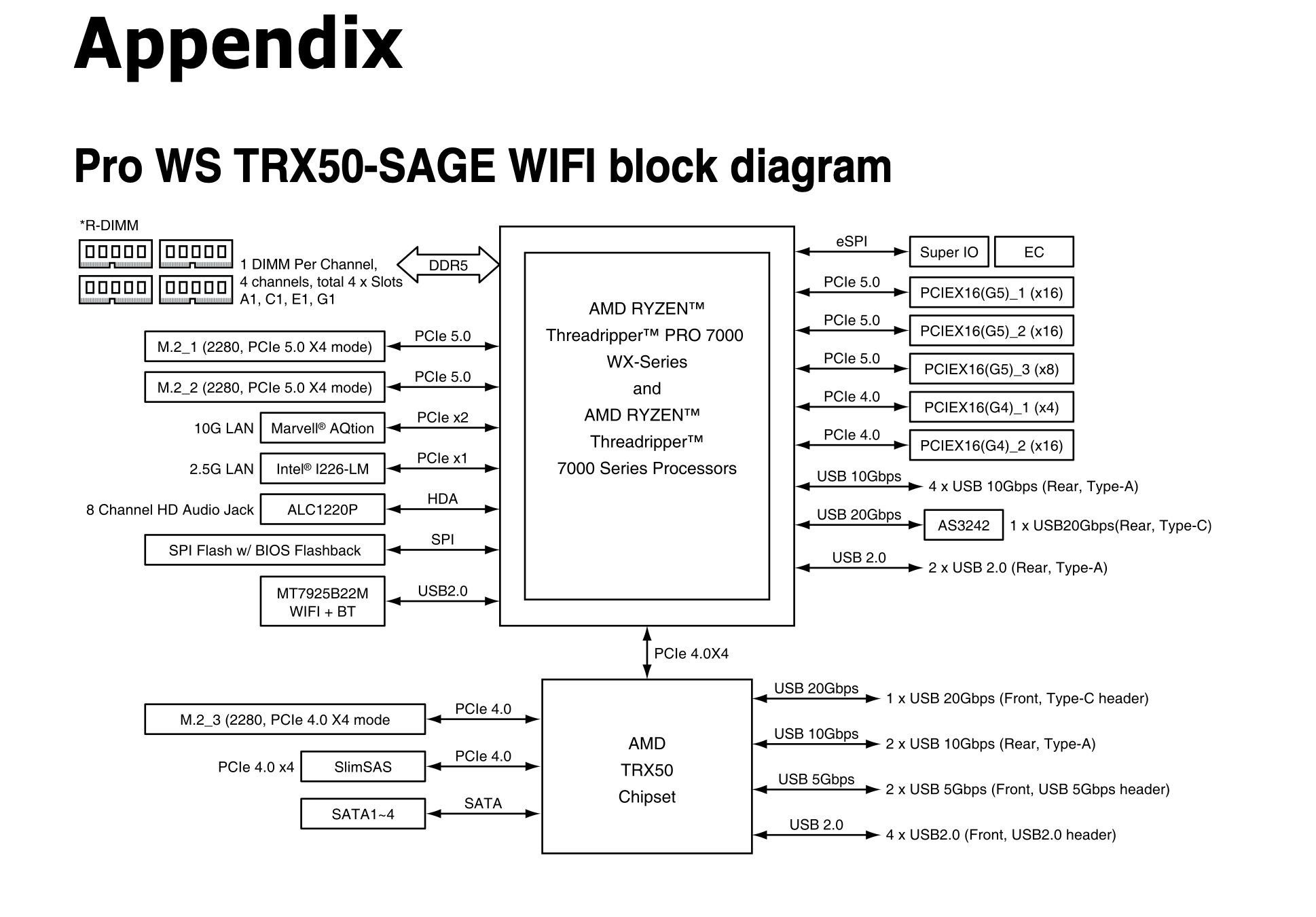
So according to this, the M.2_1 and M.2_2 are independent x4 PCIe 5.0, while your M.2_3 is shared with a bunch of other devices on a single PCIe 4 x4 lane.
That’s how I’m reading the document.
Cheers
Simon
2 Likes
Yep. That is correct.
(I thought that that connection to the chipset was supposed to be a 5.0 x 4 lane that broke out into 4.0 lanes on the chipset, but yeah, the manual consistently says that it is a 4.0 x 4 lane that breaks out into 4.0 lanes on the chipset.)