Hi! Wasn’t sure if I should post in the general bifurcation thread, but I thought for a specific problem creating a separate thread might be ok.
I have been on a bit of local AI craze, and ended up with 4x R9700. (3 ASRock, 1 XFX)
The motherboard I am using is Asus ProArt X870-E (BIOS 2503 / AGESA 1.3.0.1d), CPU is Ryzen 9950X.
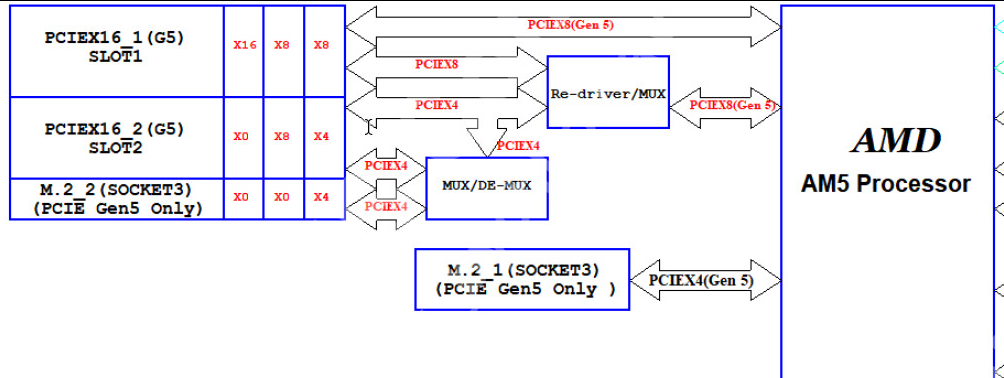
Unfortunately my current platform is AM5 based, so getting even 4x4 CPU-connected gen5 lanes is a bit of a hassle. I already had a 3 GPU setup, with one GPU connected via M.2_2 slot, using ADT-Link adapter, and that has worked fine.
Using ADT-LINK R34 PCIe→4xM.2 card and a couple of K43 adapters, the setup I have been testing now looks like this:
Ryzen root complex
│
├─ 00:01.1 ── PCIEX16(G5)_1
│              LnkCap: x8
│              actual downstream link: x4
│                │ │
│                │ └─ R34 port 1 → R9700
│                │                 BDF 03:00.0
│                └─ R34 port 2 → R9700 (NOT DETECTED)
├─ 00:01.2 ── M.2_1
│                 └─ Samsung 9100 PRO
│
├─ 00:01.3 ── PCIEX16(G5)_2
│              LnkCap: x4
│                 └─ R9700
│                    BDF 07:00.0
│
└─ 00:01.4 ── M.2_2
               LnkCap: x4
                  └─ K43 → R9700
                           BDF 0a:00.0

RESULT:
    3 × R9700 detected

DESIRED PEG CONFIGURATION:
x4 + x4  |  x4  |  x4
   ↑         ↑      ↑
PCIEX16_1   SLOT2   M.2_2
But with AUTO mode the second card on the R34A does not get detected.
Conversely, when I change the SLOT1 settings to “RAID”, only the GPU on the first R34A slot is detected, and I lose the other 2. This seems like the RAID mode does not really respect the fact that I have devices on the other slots and makes the first slot x4x4x4x4.
AUTO:
00:01.1 -> PCIEX16(G5)_1, LnkCap x8
00:01.3 -> PCIEX16(G5)_2, LnkCap x4
00:01.4 -> M.2_2,         LnkCap x4

RAID:
00:01.1 -> LnkCap x4
00:01.3 -> disappears
00:01.4 -> disappears
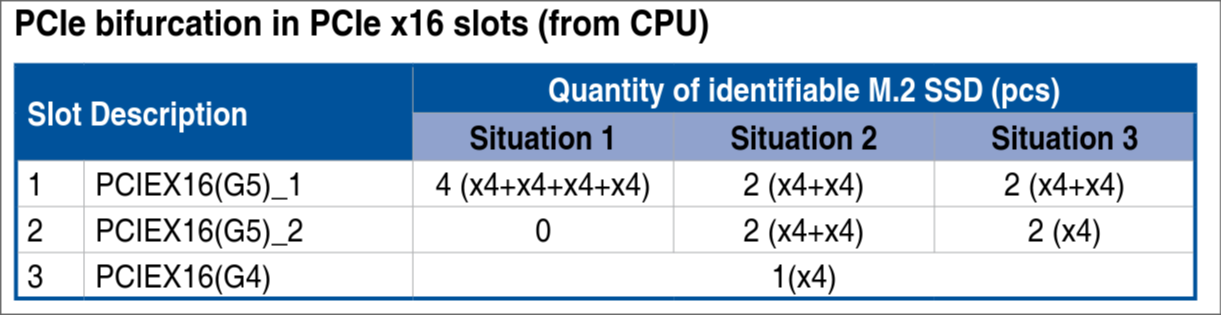
This confused me a bit, as according to the Asus docs the following situations should be supported (albeit more specifically in case of SSD adapter bifurcation):
Official ProArt X870E-CREATOR WIFI manual:

                       Situation 1     Situation 2     Situation 3
PCIEX16(G5)_1          4 × x4          2 × x4          2 × x4
PCIEX16(G5)_2          0               2 × x4          "2 (x4)"*
PCIEX16(G4)            1 × x4          1 × x4          1 × x4

* table wording in ASUS manual as published
(Maybe using M.2_2 is complicating thing here?)
I tried different combinations of settings but I could not get all of the GPUs working. The obfuscated naming of the options in the BIOS does not help either.
I was wondering if anyone here would have some insight or tips on what I could look into. The fact that even in RAID mode which “consumes” all of the lanes I could still see only one of the GPUs is a bit concerning. EDIT: In RAID mode I do see the two GPUs now, must have been some cabling issue.
Maybe this motherboard simply does not support such bifurcation? I guess I could try relocating one of the adapters to another slot just to see, perhaps the physical allocation of lanes in this scenario (x8 → x4x4) would be split differently (not slot 1 and 2, but eg. slot 1 and 3), alas I have not had much experience with this topic so I might be talking nonsense.
A potential workaround I might test is removing the SSD from slot M.2_1 and connecting the GPU there, although if possible I would rather avoid that.
I also know that a lot of people here have had much better luck with using switches, but with my current setup I would consider that a last resort due to extra cost and overall “ergonomics” of the setup, though I am aware that even if I made this topology work I would still have the problem of quite limited bandwidth between the cards.
Regardless, I would really appreciate your input and responses.
I have been at it for hours and it is almost 3am now so I forgive me the sloppiness if I forgot to include some relevant info. I am more than happy to provide more diagnostics and test out your ideas.