Asus Pro WS WRX90E-SAGE SE, Threadripper 9975wx Build Issues

Aloha folks

I’m replacing a failed motherboard as in my previous post with:

Mobo: Asus Pro WS WRX90E-SAGE SE

CPU: Threadripper 9975wx

PSU: Silverstone HELA 1200R Platinum Cybenetics Platinum 1200W

Memory: TEAMGROUP CTCMD5256G6000HC30FOC01 (on the hcl)

GPU: ROG Astral NVIDIA GeForce RTX 5080

Retaining several old bits including the case (fractal define 7 xl,) cooler (silverstone xe360-tr5,) and some other bits.

The first power supply failed within a day (per psu tester,) and the motherboard wouldn’t post with my older psu (corsair 1200w unit.) Found out the motherboard was a used unit bought as new from newegg. Bought replacements for both, but now having other issues booting.

Initially, the motherboard was illuminating the plug_8pin_pwr led, but I found recommendations to connect a 4th cpu cable to socket cpu_12v(2)_1, in addition to the other three that were listed in the manual. After connecting that power output from the psu, the plug_8pin_pwr led no longer is illuminated, and the power and reset buttons are, but the system will not boot.

Current state: Cpu mounted, one dimm in slot a1, 24pin, both pci 8 pins bracketing it, and both cpu_12v(1)_1 and cpu_12v(2)_1 power connected. Front panel led, power switch, and reset button connected, cooler mounted to the cpu, pump connected to w_pump, cooler fans connected to cpu_fan, case fans connected to cpu_opt.

Turning on the power supply, eventually I can connect to the bmc at 10.10.10.10, but when I try to turn on the power by any means, the case power button, the mobo power button, the bmc interface power, or even hitting reset, I get no response. The fans on the cooler don’t fire up, the mobo fans over any of the bits, etc. Nothing.

I tried mounting the gpu, as well as an esata hba, but same behavior.

I had previously tested the psu with my tester for the 24 pin and all of the 8 pin outputs, and it looked good.

Any hints or thoughts? I’m going to contact asus support, but I know the brain trust here is very experienced and knowledgeable, and given asus support didn’t say anything about the 4th 8pin psu connection, I have my doubts about them.

Mahalos

Joel
Did you mount the CPU using the torque driver provided by AMD and following the order specified on the mounting bracket? It is easy to get this wrong - the CPUs are large and require pressure applied evenly to make sure every pin makes contact with the CPU.

Do you see any of the status LEDs under the Q-Code display light up? If not, I would be even more inclined to think the CPU was not mounted correctly.

From your description, I am pretty sure you have connected all of the required power connectors hooked up. You also have the BMC booting up, so you at least know power is running at a basic level.

Sorry to hear you are having problems. I do know that some people are now moving to 2000W + power supplies. Also, you might consider moving up to a 240v outlet like those used by washing machines and dryers.

There are some questions about running a machine this big.

For example, what kind of UPS can you use? Should it be just enough to shutdown the system or do you need a Tesla Powerwall or other home power backup / generator?

One question I have is about the Threadripper PRO base CPU speed. On the 64 core the base frequence is 3.2 gig. on the 96 core it is 2.5 gig. How does the base frequency affect the power draw and overall performance? Does this make the 64 core system faster on some workloads? Do all the cores hit maximum speed under full load?

Anybody know?

I did follow the CPU mounting order with the torque wrench. I am not seeing anything on the q-code display though.

I decided to check the power output from the psu again, and found that it doesn’t seem to be pushing power. All of the power to the board has been disconnected, and I connected the 24 pin output and one of the 8 pin outputs to my power supply tester, but got no output other than the briefest blip.

I pulled the psu completely from the case and connected a different 24pin and different 8pin, and still see no power. The same behavior from the first psu (same type.)

The kit is well under the maximum power this supply can provide, so what the heck is going on?? I guess I’ll return this second psu for a refund as well, and buy a seasonic instead. I’ll keep this thread informed.

Thanks!

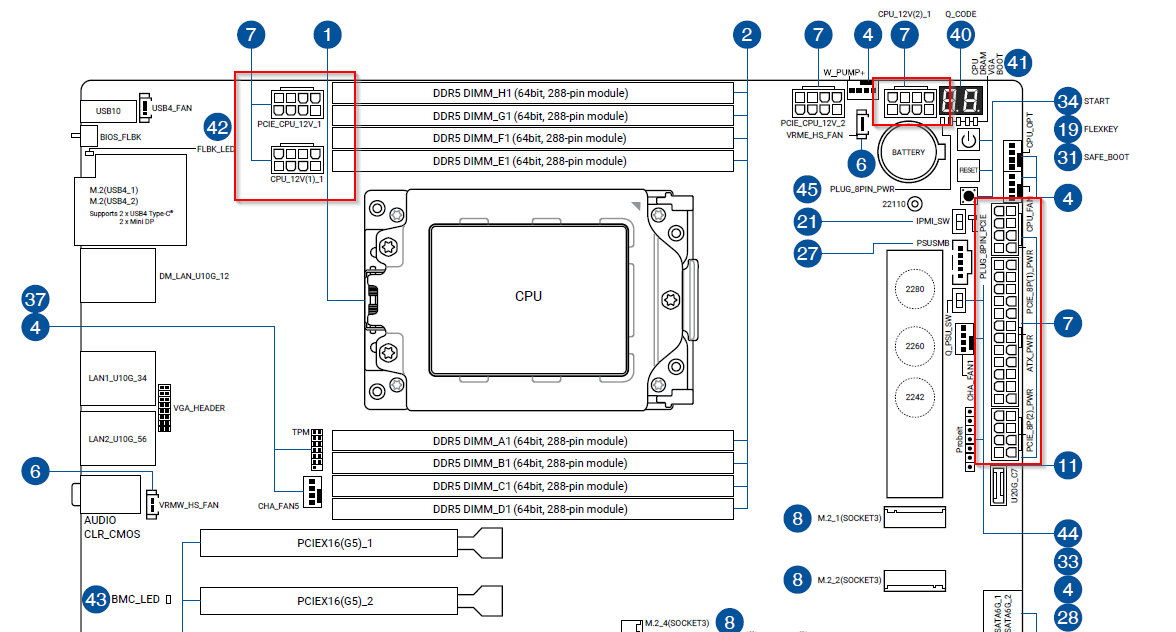
If I understand you correctly, you’re missing additional PCI power connections.

You need PCIE_CPU_12V_1 also, not only the 2 PCI power next to the 24 pin. This is a common point of confusion with wrx90 (it got me, and there’s another thread mentioning it)

Both of the 8 pin on the top left of the board should be connected.

Wow, so 5 total 8 pin connections from the psu in addition to the 24 pin (square highlight:)

These 5 8 pin, plus the 24 pin

This correct?

Joel

When using a single PSU, you have ATX, CPU 12V (1+2), and the PCIE_8P (1+2) next to the ATX plug. (Although the manual seems to indicate the PCIE_8P connectors are optional, but I have always used them so I can’t vouch for that myself.)

You only use the PCIE_CPU_12V connectors when you are connecting two PSUs.

Aloha folks

An update. After securing a Seasonic Vertex PX-1200, the system has booted, I’ve installed Windows, etc. Lingering hw issues such as a spinny disk that should be showing up but isn’t.

I powered the two CPU 8 pin power (cpu_12v(1)_1 and cpu_12v(2)_1) as well as the two pci 8 pin ports bracketing the 24pin. Performs well thus far, but I have myriad little hardware issues to deal with, like why is my rear exhaust fan not spinning, and why is one of four of my spinny disks not reporting??

Thanks everyone, you’ve been super helpful

Joel

1 Like

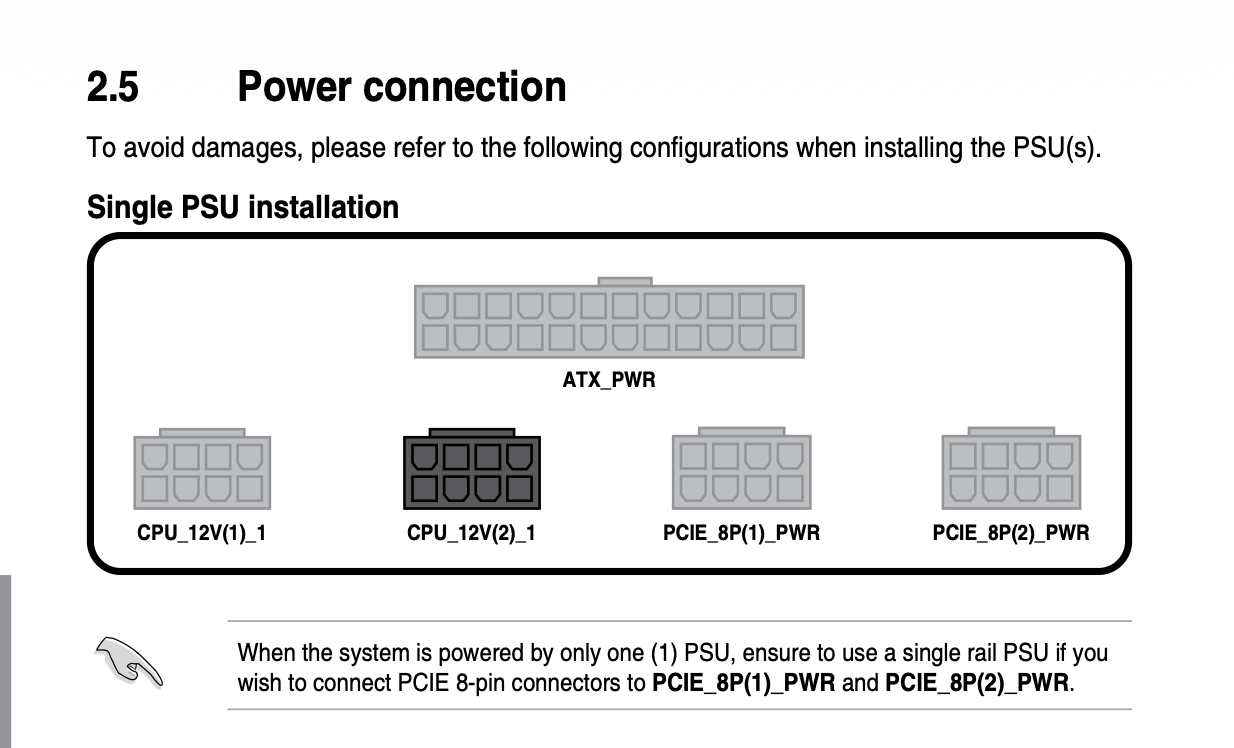
For the record, that page in the manual is the devil.

If I recall, someone on these forums (on another thread where someone had a WRX90 SAGE power up issue!) said that newer releases “fixed” that page in the manual (or, were supposedly going to, or maybe just the digital manual was to be changed?) but both of mine (including the one bought less than a year ago) still have the shaded in CPU connector in that picture.

Maybe I’m just exceptionally dim, but I still don’t understand why they colored that CPU connector black in the picture.

:man_shrugging:

Yeah the graphic design language they used doesn’t make it clear at all what builders should do. Basing on that graphic, I initially only plugged in the 24 port, the two 8 pins that bracket it, and the 8 pin in the upper left of the board. It was a different user in a different thread that pointed out others had needed to plug in cpu_12v(2)_1 as well. I went with that configuration (24 port plus 4x 8 pins for cpu and pcie) and it seems to be working well at the moment.