Before posting on this forum, I chatted with Asus support, who also found no choices, and escalated the question to their next level.
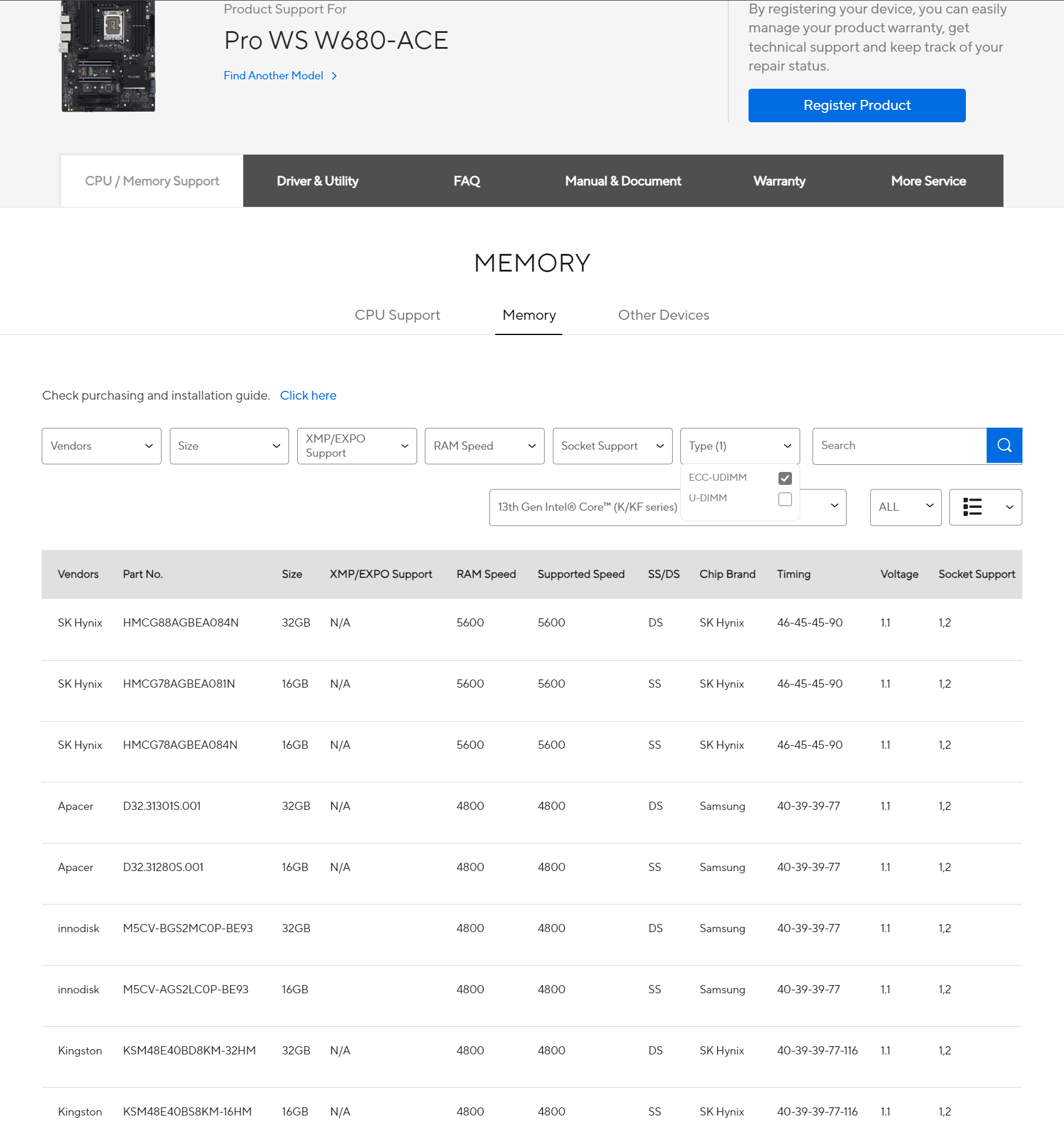
Apparently it’s necessary to select “13th gen (K/KF)” or “12th gen (K/KF)” to see the choices – which is strange because Intel shows the i7-12700 as supporting ECC, and the W680 motherboard user manual doesn’t require K or KF (at least I didn’t find it).
Also weird is that the user manual claims ECC support on the specs page, but later in the manual says: “You may install 8GB, 16GB, and 32GB and unbuffered non-ECC DDR5 DIMMs into the DIMM sockets”.
In any case, thanks for showing how to display the list.
I’ll contact Asus to see if K/KF is really a requirement.
I’m putting together a virtualization box based on the WS W680 (SR-IOV works great on the 14900K’s iGPU and is perfect for what I need it for: light-ish OpenGL CAD & EDA) and ECC seems like a weak link here.
I plugged in some unbuffered ECC UDIMMs (192GB total, Nemix), turned on ECC in the Bios, aaaand fat lot of nothing:
I’ve had the same experience with the ASRockRack W680D4U-2L2T/G5: EDAC is not recognized and thus there are no memory devices etc… Single bit correction still is a plus, but that’s what all DDR5 sticks have (on-die ECC).
However: I did get Correctable Error Occurrences in the IPMI Log when there were some, but unfortunately it’s not supported by any edac utility and I remember reading somewhere, that they do not aim to support it since it’s supposed to be made for real server boards with ECC . The core reason is, that W680 is not supported properly from what I found (perhaps someone can prove me wrong).
Thanks! If you got the errors in IPMI that’s great, it means it’s working.
I think the EDAC excuse is BS though. The LattePanda SBC’s EDAC is supported by kernel 6.8 and that is basically a toy compared to the W680 boards.
But I think you’re wrong about it being equivalent to on-die (in a good way). On-die is lame. It’s not end-to-end, & limited to correcting 1-bit errors on the DIMM. The W680 ECC with unbuffered RAM will correct 1 bit errors and detect 2 bits, and it also applies to data in transit. And you’re also getting notifications, even if only in IPMI. It’s the same as actual honest-to-god ECC with some nuance differences that are beyond the scope of error handling effectiveness.
Oh, I apologize for the misunderstanding. I definitely know the difference between on-die and e2e error correction differences and never suggested the former would be anywhere near as effective.
What we all want when we pay premium for ECC memory, is multibit error correction or at least proper error display. Sadly I’ve had issues displaying ECC errors - even in Memtest86 v11 Pro, yet the IPMI log did contain them.
So TL;DR: I think it was a misunderstanding and you’re definitely right.
Do you think this motherboard will support Non ECC 64GB UDIMMs? And therefore somewhere down the line 64GB ECC UDIMMs(for up to 256GB total)?
Or do you think it’ll most likely need a BIOS update to work, and thereforein ASUS probably won’t bother, because it only supports Intel 12-14th Gen, an ‘older’ platform?
I ask because i currently have an Gigabyte W680 Motherboard that supports DDR4, so 128GB is the max, and i was thinking if i could upgrade to this motherboard and have the potential to put 256GB, doubling my RAM, it would be a nice upgrade without spending too much money(especially once DDR5 prices come down)
Also alot of the W880 motherboard with the Intel arrow lake cpus are pretty eh, so it’s not worth a full cpu+motherboard+ram upgrade
Edit:
They do support 64GB Udimms!, i just found this ASUS press release
So I’m assuming ECC udimms will be supported whenever they come out
 . The core reason is, that W680 is not supported properly from what I found (perhaps someone can prove me wrong).