I found this relatively new motherboard for AM5 and would like you recommendations for a potential “budget” dual GPU setup and not spending thousands on threadripper and trx boards
Its the cheapest PCIE 5 dual X16 with bifurication motherboard i can find, and it honestly looks pretty solid, enough cooling on the backside and front, 10gbe + 5gbe ethernet
8 Layer PCB + 2oz
8000mhz ram support
i like the design
Wifi 7
ALC 4082
4 Slot spacing, so even large GPUs fit
etc, very nice features overall, they all list it on their website
I could get it for 320€, which seems like a very good deal
What do you think about this board (maybe you didnt even had it in mind and now have ) or are there better options for around the same price
This looks to be a nice board. It really addresses a lot of the issues I have had with AM5 boards.10Gbe + 5Gbe should be pretty much standard except on the lowest tier boards. Wifi 7. Slot spacing and lane usage is pretty good (although different needs may prefer different this is good for multi GPU.
However, its pretty expensive for what it is.
Its natural competitor is probably Asus ProArt Creator
Yeah, ofcourse it will be x8/x8 on am5, for rendering/simulation and gaming on one card it should be fine to have that kind of layout, without running into a bottleneck
Apart from the cables i wont put anything down there, this should be fine right, or are the cable “mounts” too large if there is a larger GPU like a 3 slot design?
Side point as the thread’s getting confused: any AM4 or AM5 board where it’s not crippled out of the BIOS settings supports x8/x8 PEG bifurcation. What’s being referred to here is x8+x8 switching of PEG onto two x8(16) slots, which avoids needing a breakout card or riser by using multiplexers-demultiplexers to physically route half of PEG’s lanes to two slots (in this case probably PS7101s like X870E Taichi) in conjunction with bifurcation.
Depends on the cables and the GPU’s cooler and shroud design. In general, yeah, there can be trouble but usually it’s not too big of an issue to plan around it if it’s not an MSI board with PCIE_PWR1. Don’t forget about also arranging the case for the lower GPU’s air intake.
I am doing dual GPU on the asrock livemixer b850, but their x870 is the same price now. That gives the lower GPU 4x4 speeds, which is OK for what it does.
Also consider the gigabyte b850 AI TOP, which IIRC has x8 x8 slots and dual 10GbE. It’s one of the very few AM5 consumer boards maybe intended for dual gpu, however I think Puget Systems doesn’t use it, for what that info is worth
I think if you’re doing twin gpus, the x8 x8 may be important, but for me one is AMD, the other nvidia and I don’t have any software to use two at once, so I was OK with one being less connected.
I do have this particular board on my radar as well for a while.
One of the usps of this particular board is the dual nic´s and also,
the x8/x8 pci-e capability which is really unique for a X870 board.
the only real downside i have with this particular board is the sata port configuration.
Basically because this board is only single chip set its pretty much loaded.
And they had to use as media controllers for all the sata ports, which in most cases won´t be that much of a big deal.
However in certain circumstances it could be a thing.
But other than that for it´s price it´s really a great deal i would say.
Curious how this board is going to work out for you.
Given Puget’s parts picks it is tempting to see that as an endorsement. Gigabyte’s chronic reliability problems wouldn’t be my first choice. But Asus might be worse and MSI doesn’t offer creator boards. So Taichi’s maybe the best bet. If its 10+5 GbE is reliable that’s better than Asus has been doing with 10+10. Haven’t seen anything on the AI Tops but, well, it wouldn’t be my default expectation Gigabyte didn’t underengineer the thermals. There does seem to be some effort towards being less bad lately, though.
x8+x8 muxing with two slots spaced for dGPUs is fairly common on AM5 boards starting around the Taichi Creator’s price point, pretty standard the next tier up. B850 AI Top’s unusual more for being a high end B850. Asus did x8+x8 on B650 ProArt but removed it on the successor B850 that apparently was so bad it got killed before shipping. The stub page for the B850 Creator Neo that may eventually be a replacement doesn’t say.
Downgrade to chipset 3x4(16) slots instead of 4x4(16)s, though maybe it’s worth it if you have enough USB4 use cases that are actually 40 Gb.
The Gigabyte b850 AI Top, seems also like a nice option, but its 70€ more expensive here, dual 10gbe is nice but not needed, also the higher memory is nice but not a topic for me as i use a dual ranked RAM anyway, and even if amd improves their IMC next gen, i can manually tweak it, IF i get a zen6 processor
But it has a worse chipest, nothing dealbreaking, but its more expensive
Also regarding the upcomming B850 Creator Neo “lemma” mentioned, knowing asus, it will probably be as expensive or even more than the asrock or even the gigabyte one with around the same features, i think all three are good looking at the specs
Or would you say one of those has one massive dealbreaker?
Yeah, the way I would actually USE either the b850 or x870 would switch bandwidth away from the TB4 ports if I remember correctly.
I was reminded last night that if you’re doing inference, e.g. just running an LLM server for code completion or chat bots, you don’t need a ton of bandwidth on a card (if you can tollerate the one time cost of loading the model into GPU memory on starting the server) because the outbound-from-the-card bandwidth for inference is minimal.
On the other hand I think if you’re doing more AI research like fine tuning across two GPUs, you’d want bandwidth between them and that’s where the x8 and x8 slots of the Gigabyte AI top would come in, assuming your cards’ coolers fit.
X870 and X870E typically dedicate an x4 CPU PHY to the ASM4242. The exceptions are a few MSI boards that x0+x4/x2+x2/x4+x0 mux it with an NVMe.
It’s IMO odd AMD doesn’t compete with Intel by doing 40 Gb off the CPU. Perhaps Olympic Ridge will license the ASM4242 block onto the IO die.
PCIe is full duplex, though, so likely this particular aspect doesn’t matter much. Seems to me the difficulty’s more that there’s little data on where the bottlenecks are in training and inferencing. It’s something I’d like to bench but right now I don’t have a suitable workload.
Older parts of the torch documentation indicate the threading model in Python could be a significant limitation. But it’s unclear how applicable that currently is. I’ve also been able to find some 6-8 year old benches showing that, at least back then, epoch times were a weak function of lane count.
There are difference ways to do inferencing, and some of those are more dependant on PCIe than others. But training, everything needs to go back to the CPU. This is a key bottle neck in terms of data centres and their power supplies, as every GPU fires up and starts pushing data back as fast as it can. While in inferencing loads can be high, there is still memory speed bottle necking things.
People do inferencing on x1 PCIe 2.0 bit coin mining setups. You transfer the model to the Gpu, and then you are just moving a few tokens around generally.
The only issue is price, but 4.0 ones are between 200 and 400USD on aliexpress. 5.0 ones are way more expensive.
I.e. this is one example with 5 GPUs on the same switch, on AM5 (X670E Aorus Master) with the P2P driver.
pancho@fedora:$ nvidia-smi topo -m
        GPU0    GPU1    GPU2    GPU3    GPU4    GPU5    GPU6    NIC0    CPU Affinity    NUMA Affinity   GPU NUMA ID
GPU0     X      PHB     PHB     PHB     PHB     PHB     PHB     PHB     0-23    0               N/A
GPU1    PHB      X      PIX     PIX     PIX     PIX     PHB     PHB     0-23    0               N/A
GPU2    PHB     PIX      X      PIX     PIX     PIX     PHB     PHB     0-23    0               N/A
GPU3    PHB     PIX     PIX      X      PIX     PIX     PHB     PHB     0-23    0               N/A
GPU4    PHB     PIX     PIX     PIX      X      PIX     PHB     PHB     0-23    0               N/A
GPU5    PHB     PIX     PIX     PIX     PIX      X      PHB     PHB     0-23    0               N/A
GPU6    PHB     PHB     PHB     PHB     PHB     PHB      X      PHB     0-23    0               N/A
NIC0    PHB     PHB     PHB     PHB     PHB     PHB     PHB      X

Legend:

  X    = Self
  SYS  = Connection traversing PCIe as well as the SMP interconnect between NUMA nodes (e.g., QPI/UPI)
  NODE = Connection traversing PCIe as well as the interconnect between PCIe Host Bridges within a NUMA node
  PHB  = Connection traversing PCIe as well as a PCIe Host Bridge (typically the CPU)
  PXB  = Connection traversing multiple PCIe bridges (without traversing the PCIe Host Bridge)
  PIX  = Connection traversing at most a single PCIe bridge
  NV#  = Connection traversing a bonded set of # NVLinks

NIC Legend:

  NIC0: mlx4_0
GPU 0 and GPU 6 are 5090s at X8/X8 bifurcated from the CPU lanes, so there even with the P2P driver you have to traspass the PHB.
P2P bidirectional still works though and latency is greatly improved:
pancho@fedora:~/cuda-samples/build/Samples/5_Domain_Specific/p2pBandwidthLatencyTest$ ./p2pBandwidthLatencyTest

[P2P (Peer-to-Peer) GPU Bandwidth Latency Test]

Device: 0, NVIDIA GeForce RTX 5090, pciBusID: 1, pciDeviceID: 0, pciDomainID:0

Device: 1, NVIDIA GeForce RTX 5090, pciBusID: c, pciDeviceID: 0, pciDomainID:0

Device=0 CAN Access Peer Device=1

Device=1 CAN Access Peer Device=0


***NOTE: In case a device doesn't have P2P access to other one, it falls back to normal memcopy procedure.

So you can see lesser Bandwidth (GB/s) and unstable Latency (us) in those cases.


P2P Connectivity Matrix

     D\D     0     1

     0       1     1

     1       1     1

Unidirectional P2P=Disabled Bandwidth Matrix (GB/s)

   D\D     0      1

     0 1755.62  24.86

     1  24.89 1565.63

Unidirectional P2P=Enabled Bandwidth (P2P Writes) Matrix (GB/s)

   D\D     0      1

     0 1743.80  28.67

     1  28.67 1547.03

Bidirectional P2P=Disabled Bandwidth Matrix (GB/s)

   D\D     0      1

     0 1761.46  30.34

     1  30.31 1541.64

Bidirectional P2P=Enabled Bandwidth Matrix (GB/s)

   D\D     0      1

     0 1761.49  56.25

     1  56.26 1541.62

P2P=Disabled Latency Matrix (us)

   GPU     0      1

     0   2.07  14.19

     1  14.17   2.07


   CPU     0      1

     0   1.56   4.14

     1   4.00   1.53

P2P=Enabled Latency (P2P Writes) Matrix (us)

   GPU     0      1

     0   2.07   0.43

     1   0.36   2.07


   CPU     0      1

     0   1.55   1.06

     1   1.07   1.53
I will install a Gen 5 switch next week for the 5090s (so they can train at X16/X16 5.0 locally on the switch), but I’m waiting for a MCIO Retimer.
All the torch code I can think of does gradients and loss on the dGPU if one’s in use. ¯\_(ツ)_/¯
Can’t think of any time I’ve seen a tensor cast back to the CPU, actually. Keeping the gradients means training requires more GDDR and thus’ll spill sooner than inference, sure, but the lack of GDDR consumption data available seems to me just another illustration of how bottlenecks aren’t well known.
The Asrock X870 Taichi Creator for it´s price point is a really strong deal.
The only board that comes near that is the Asus Pro Art X870E Creator,
which at least up here is currently priced at €399,-
But it´s kinda debatable is that price difference is actually worth it for your use case.
The only benefit for the Asus board is of course it being an X870E board.
Which makes it that all seven usb type A ports at the back are 10gbit ports,
on which the Asrock board only has two 10gbit type A ports.
However the Asrock board on the other hand has more type A ports at the back overall.
So yeah it´s just a matter of personal needs really.
Well, yes but also no. Promontory 21 has a 20 Gb USB port and all the rest of the USB 3 ports on Promontory 21 and Raphael-Granite Ridge IO die are 10 Gb. But AMD doesn’t mandate their availability or speed.
So what controls the number of 10 Gb ports is primarily how many redrivers the mobo manufacturer puts on the board and, secondarily, whether a 10 Gb hub is included. Since X870E’s branded to a higher price tier there’s potentially more BoM spend assignable to redrivers. But it’s not like there’s anything stopping pricing up B850 or X870 a bit to put more redrivers. Or cost down in X870E like Taichi and Edge Ti exposing only one 20 Gb port.
Godlike’s the only board I know offhand that puts enough redrivers to fully expose all the 10 Gb. Maybe there’s also something in ROG.
I always wonder if people who say they want X870E for the USB are actually doing anything with the second Promontory 21’s worth of ports or if it’s just FOMO.
 ) or are there better options for around the same price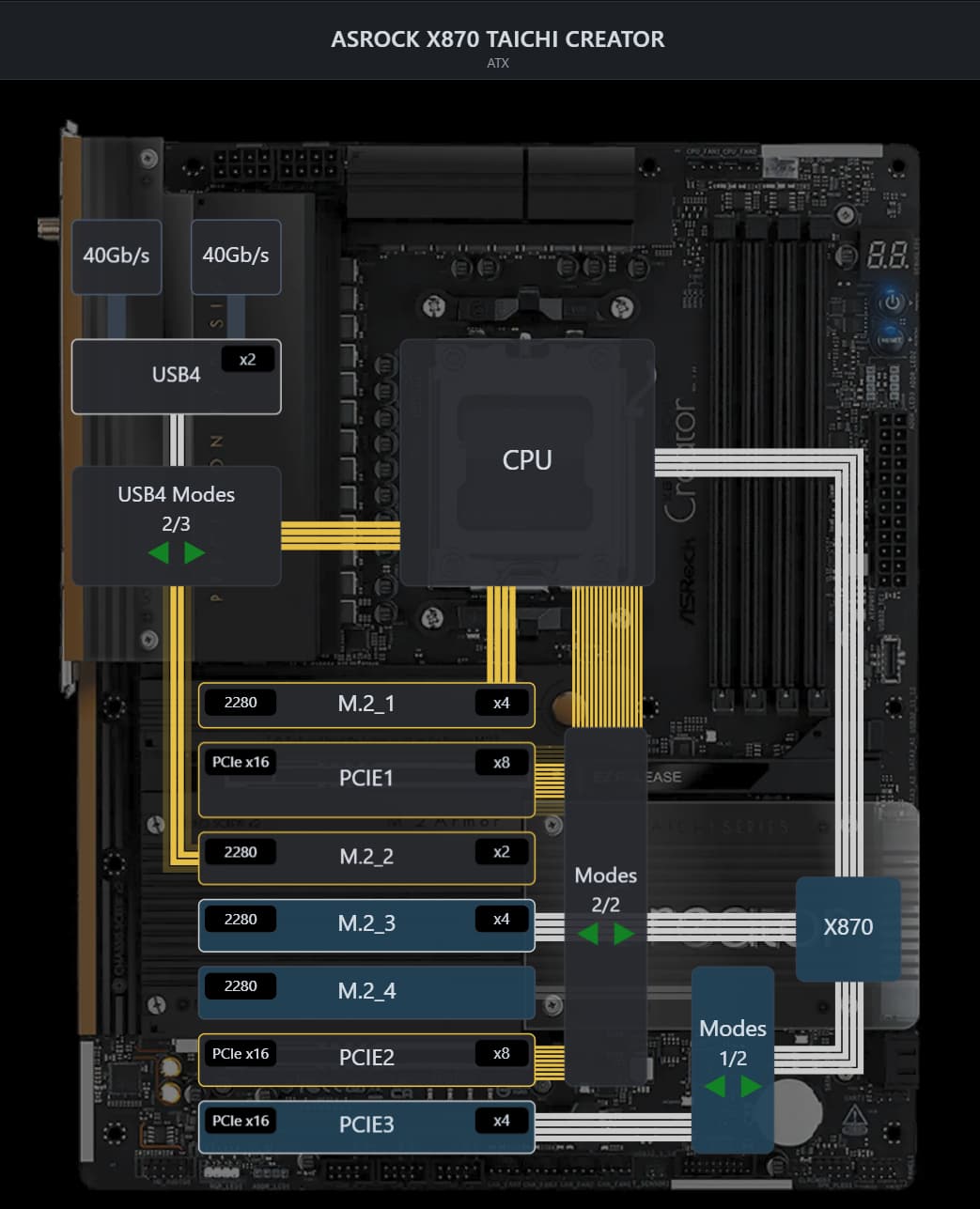

 Gigabyte’s chronic reliability problems wouldn’t be my first choice. But Asus might be worse and MSI doesn’t offer creator boards. So Taichi’s maybe the best bet. If its 10+5 GbE is reliable that’s better than Asus has been doing with 10+10. Haven’t seen anything on the AI Tops but, well, it wouldn’t be my default expectation Gigabyte didn’t underengineer the thermals. There does seem to be some effort towards being less bad lately, though.