Asrock X570d4u, x570d4u-2L2T discussion thread

New member here, specifically for this thread!

I picked up a X570D4U last Friday to replace a Asrock B450M Pro4-F that’s been running my core network ESXi server for three nearly flawless years.

Maybe I’m doing something wrong, but it’s been utterly terrible. I just cannot get the board to not hard lock minutes after booting an OS (Win10 for quick and dirty testing, ESXi 8.03 for use).

I’ve been building PC and servers since Intel Xeons were slotted and bigger than modern mini PCs so this is not remotely my first rodeo. Still, entirely possible I’m missing something here.

Reused components

  • AMD Ryzen7 5700G
  • Noctua 120mm tower cooler
  • 2x Corsair CMK64GXM42E3200C16 2x 64Gb kits (128Gb total)
  • Samsung PM991a 1TB NVMe SSD. Runs very hot, disappears from devices after some (literally minutes) usage.
  • IBM/LSI(Avago/Broadcom?) ServeRAID-BR10il card flashed to plain SAS2004-IT, FW v20.00.07.00
  • Mellanox Connect-X4 dual 25GbE card CX4121A, FW updated to whatever was current mid 2024

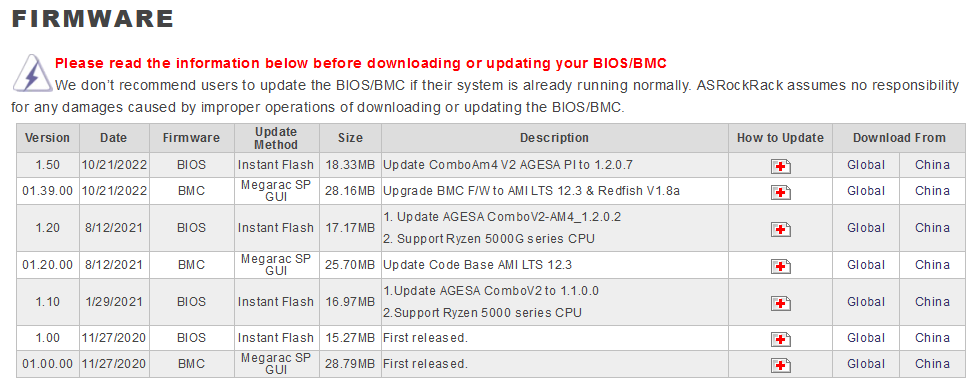
OG BIOS (1.10) was too old to POST the chip so I updated it to latest beta (1.57) from the website, along with latest beta BMC FW (2.07).

I’m getting random reboots and freezes during installs. When Windows installs, it’s plagued with random hard freeze lockups. The Samsung PM991a SSD simply disappears from the BIOS and the heatsink is roasting hot.

Replacing that with a Samsung 970 EVO Plus 1Tb sorts both the heat and disappearing issues. Doesn’t stop the system hard locks and reboots. ESXi or Windows doesn’t seem to matter, although ESXi reliably locks up 1-3 minutes after booting just sitting there idle.

I’ve halved the Corsair ram kits, swapped it out for 2x Crucial CT16G4DFRA32A.M16FR, played with voltages to the ram (the Corsair wants 1.35v which upsets the BMC logs very much).

  • Pull the SAS2004-IT card - no fix
  • Pull the Mellanox CX4 card - no fix
  • Flash back to BIOS v1.50 - no fix
  • BMC firmware back to 1.39 - no fix

I’m kinda at the end of my road here so looking for hail Mary suggestions as to the secret BIOS setting that says “don’t crash in minutes”.

AsrockRack tech support is 48 hours deep since I reached out and got the automated reply so there’s not much to go on there…

Planning to wipe my Proxmox PVE server clean and start from scratch in the next week or so.
Just wondering if many people here have used the Beta 1.78 BIOS for the X570D4U-2L2T?
I’m currently on 1.70 with BMC 1.35 which is what it was delivered with, but there are security fixes in 1.78 so updating seems like the wise thing to do. Bonus points if it fixes the sensor graphs not updating.

@Aetherone you’ve tried all the obvious things I would. Doesn’t sound good.

Just throwing some ideas out there.
Have you tried running the system for a while from a live iso on a USB? Just to cut storage out of the equation completely.
Also has all your testing been done using the integrated GPU on the 5700G? Have you tried not plugging in any displays and just testing it remotely via the IPMI/KVM? Or maybe adding a GPU if you have a spare laying around trying with that?

Yeah, if it posts it’ll Passmark Memtest for the four full loops.
Windows USB boot is hit or miss, mostly hit.
Not using the integrated GPU, only the aspeed VGA output or IPMI/KVM. As part of the testing I’ve disabled the iGPU entirely.

No point adding a GPU, I don’t have the slots to host it when the machine is doing it’s thing. Hence iGPU equipped CPU for the OG desktop board and IPMI equipped server board.

Hello,
have you a fan at the heatsink of the chipset at the right bottom of the Mainboard. You have many Cards and the chipset heatsink can be very hot.

Can you test without any Card, only one ram, CPU and NVMe (at the SLLOT1 CPU, SLOT2 is Chipset). When this fails then without NVMe.

Yes, I’d read that the chipset runs quite hot and is expecting a rack case worth of airflow so I printed up a mount for a 4020 Noctua fan right over it’s heatsink. It runs cool to the touch.

Have tried removing all my cards and only the boot drive in NVMe #2 as that’s boot, performance sensitive data (AKA all of the VM’s) will go in NVMe #1 if this thing ever works.

Have not come down to one stick, but subbed in 2x Crucial CT16G4DFRA32A.M16FR for the 4x Corsair. Not ideal as 128Gb is the sweet spot.

Please test in NVMe 1 fiirst. I also have this Board (the one without 10GBE) and Have trouble with NVMe in Slot 2 as Boot device (also an 970 EVO Plus 1TB). Then i Switches NVMe 1 to boot and NVMe 2 as VM´s and now since years (02/2021)i have no Problem anymore.

Don’t quite under these version numbers. Per ASRock Rack website, the posted latest ones are BIOS 1.70 (or 1.78 if you at the “Beta Zone”), BMC 01.35.00.

@ZeeGee As per here:

AsrockRack X570D4U vanilla, not the -2L2T

After much fiddling (and ZERO response from either AsrockRack or Newegg’s tech support - seriously I was looking at my CC providers chargeback rules), I do believe I’ve located the “do not hard lock when idling the OS” button.

Different NVMe slot, different ram, diff PSU, empty slots, every BIOS version from 1.20 upwards (1.20 was the first to support my 5700G). C states disabled or not, AMD PBO disabled or auto or tuned to minimal boost, CPB disabled or not, more ram volts, less ram volts None of it made any real difference. Windows or ESXi simply hard locked after a couple of minutes sitting on the desktop.

Then I finally twigged to the commonality of the failure mode - it’s always sitting idle on the desktop. Pass mark memtest, fine for hours and hours and hours. AIDA stress test, also fine for 12+ hours as long as I got it running before it locks up.

Sitting idle is the cause of lockups.

So it turns out that if I head into the manual overclocking and simply lock the chip at 4.4Ghz (leaving PBO & CPB disabled), it stops crashing after a couple of minutes. It sits idle for hours in both Windows and ESXi without further issue.

I’m still bench testing and evaluating but it’s looking remotely solid for now.

I also seem to have gotten the Samsung PM991a to work with disabling both "PCIe Redriver"entries in the BIOS. Unsure of how/what/when they’re supposed to apply (long PCIe cables for rack chassis maybe?)?

I’m assuming the BIOS is just bugged to hell and considering the batpoop insane layout and many many duplications of settings that don’t respond to their doppelgangers, I don’t feel unjustified in thinking this way.

Will really really be trying to never buy AsrockRack again ever.

1 Like

Hello,

Got a second hand X570D4U-2L2T. The physical keyboard does not work until the OS (PVE) is loaded. There is no way to enter BIOS, choose boot drive nor choose grub entry. Seems like the keyboard receives no power (i.e. caps lock/num lock leds do not turn on on keypress). Neither the USB ports in the back nor those connected to the internal USB header work.

I can’t use the IPMI because it’s IP isn’t set (ipmitool reports “IP Address Source : Unspecified”). I’ve tried a few things now using ipmitool to set the IPMI to the dedicated interface and to set it to DHCP.

Anyone knows how to enable the USB ports and set the IPMI ip to DHCP?

Many thanks in advance

BIOS reset pads not doing the trick?

If you can get it into windows, can you use that to get into bios with a command line “shutdown.exe /r /fw”?

Did not mention in my previous post: I managed to get to BIOS from PVE using systemctl reboot --firmware-setup. Still, the keyboard did not work in the BIOS. I removed the battery and touched the CMOS reset pads for a while, but still could not use the keyboard.

Surprisingly, it works now! On friday, I left the board unpowered and without the CMOS battery. Just tried a while ago and now the keyboard works properly, can get in BIOS and set IPMI network configuration. I’ve even been able to upgrade BIOS and BMC firmware.

The IPMI configuration refers to two network channels as “eth0” and “eth1”. Seems “eth0” refers to the dedicated IPMI ethernet port, but which is “eth1”?

1 Like

Hoping someone can help me here or just point me in the right direction.

I have logged this issue with Asrock support as well but I have no idea if they will even respond to me.

I picked up an X570D4U from ebay as an upgrade to my TrueNAS as I had a spare 3900x and a really nice cooler.

It also gives my further expansion options down the line.

I just did a motherboard swap and reconfigured the networking. Everything came up as expected.

While poking around in the IPMI / BMC web page I got cut off. I pinged the IP and it was down. A minute later it comes back. Log in again and the problem reoccurs in a few minutes.

I have made sure I am using the dedicated port and its IP is not shared with the other ports on the motherboard.

Debug logs show the following.

<130>  2025-03-09T21:21:09.751429+00:00 AMID05099E4F2E3 vnc_ami: vnc_ami - -  [1201 : 1201 CRITICAL][common.c:368]Error in accessing /var/cmdpipe - 
<130>  2025-03-09T21:21:16.517838+00:00 AMID05099E4F2E3 vnc_ami: vnc_ami - -  [1267 : 1267 CRITICAL][common.c:368]Error in accessing /var/cmdpipe - 
<130>  2025-03-09T21:25:44.364388+00:00 AMID05099E4F2E3 spx_restservice: spx_restservice - -  [830 : 830 CRITICAL][libipmi_AMIOEM.c:4212]Error in Get Service Configuration in raw IPMI command layer::403 - 
<130>  2025-03-09T21:25:44.364732+00:00 AMID05099E4F2E3 spx_restservice: spx_restservice - -  [830 : 830 CRITICAL][libipmi_AMIOEM.c:4300]Error While Getting service configuration 403 - 

I have disabled the VNC service. No difference.

I checked if Watchdog could be resetting it but I don’t think so.

Watchdog Timer Use:     SMS/OS (0x04)
Watchdog Timer Is:      Stopped
Watchdog Timer Logging: On
Watchdog Timer Action:  No action (0x00)
Pre-timeout interrupt:  None
Pre-timeout interval:   0 seconds
Timer Expiration Flags: None (0x00)
Initial Countdown:      300.0 sec
Present Countdown:      0.0 sec

What I do notice is when the network connection fails the fans slow down. The fans are not going full tilt or anything and the temp sensors show green for all components. When the connection comes back the fans return to their normal speed.

The OS is Truenas Scale ElectricEel-24.10.2 (not that should make any difference here). Its running a 3900x with 32Gb of 2666Mhz ECC RAM.

The BMC firmware and BIOS firmware versions are fully up to date.

EDIT

I guess the last owner must have made some weird changes. I did a factory reset on the BMC and then just turned off the shared NIC and assigned a new static IP to the dedicated NIC. Seems stable now.

Let this be a lesson to me when buying motherboards off eBay

Looks like ASRock finally remembered this board. Just noticed they recently released a new BMC firmware v03.07.00 update in the BETA FIRMWARE section. Anyone got a chance to update it already ?

2 Likes

CVE-2024-54085:

AMI’s SPx contains a vulnerability in the BMC where an Attacker may bypass authentication remotely through the Redfish Host Interface. A successful exploitation of this vulnerability may lead to a loss of confidentiality, integrity, and/or availability.

Lovely lmao. Who’s going to make us home labbers an openbmc compatible bmc :smiling_face_with_tear:

Asrock. The x570d4u is in the Git.

1 Like

Oh wow that’s exciting. Last time I looked there wasn’t much going on for openbmc on these boards. Thanks!

So has anyone here installed it?

Just did. Works okay, defaults will reset password to default and force a password change. It will take the previous password FWIW.

2 Likes

Did you by any chance find out what was triggering the BMC reboot? I have the same issue since I have the board. As the BMC only reboots every ~7 mins, it’s still somewhat usable, but still annoying. Resetting indeed fixed it, at least I had it running smooth for ~1,5h, then I replayed my settings and the issue came back. I’ve resetted again, now its >3h, but I didn’t touch any settings yet. Will try to replay my changes one by one, waiting some hours inbetween to see what triggers this.

After all, the BMC is not hard resetting or similar, it appears to perform a graceful reboot. God knows why. Where do you get those logs from? I got the hint with the graceful reboot from the SSH console, which spits out the “system rebooting now” broadcast before it “dies”.

Will change to OpenBMC this summer, just grotta order some flash for that.

Did you have to manually compile/enable power management features, or is that now working OOB? Texted a lot with the guy who ported it ~a year ago. Last time I heard from him there was some extra step involved for the power management to get that to work, as the board has some special quirks around that.

Looking forward to install it as well. Just waiting for a fresh (and larger) NAND chip to arrive. Gotta look up on how to flash it as well, though it might work via Raspberry or similar.

Looks like OpwnBMC released V2.18.0 for the x570d4u

do you think it’ll work on the 2L2T version ?