Aspiring Comics/Manga Creator and My AI Comic Project (VERY, VERY, MILDLY NSFW IMAGES ATTACHED) - R9700 Giveaway Submission

My Current AI Project

I fell into the creative AI on my home space sort-of by accident (learn AI or maybe be out of a job). During this journey, I discovered the wonders of ComfyUI, Krita AI, OneTrainer for consistent(ish) characters, and my own creativity supported by AI tools.

The reason I turned to AI is because I’m a very VERY average illustrator, but have gotten some positive feedback and comments for my written work (which is my bread and butter).

By combining my writing skills with AI, I was able to put together a proof of concept on what I’ve always wanted to do solo: make a comic book/manga.

That proof of concept is here on the Stable Diffusion subreddit under the title “Proof of concept for making comics with Krita AI and other AI tools”.

WARNING: it’s got some “fanservice” / a sexy lead character, so if very, very mildly NSFW (like Megan Fox first Transformers level of fanservice) might get you in trouble, you’ve been WARNED).

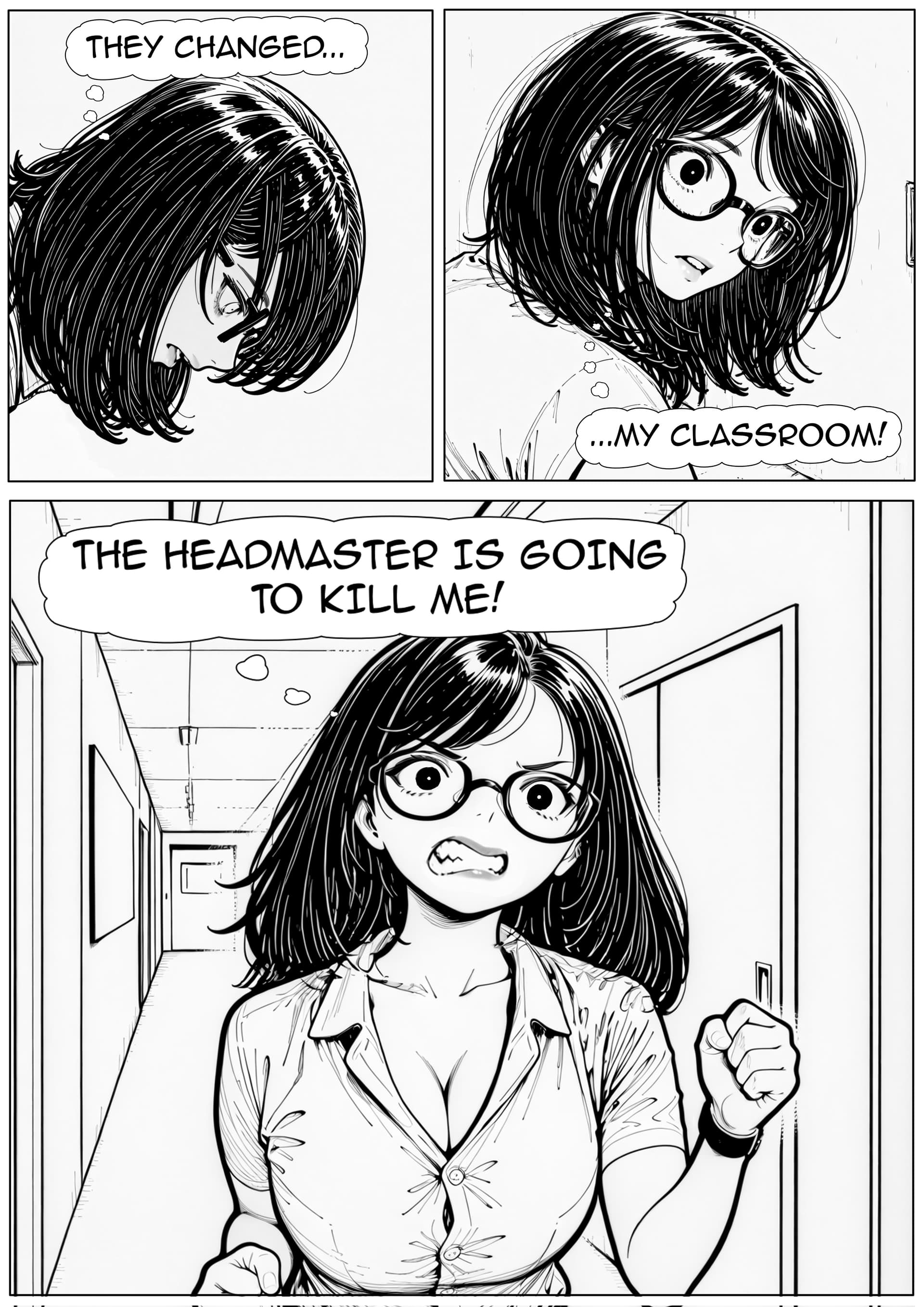
And just in case anyone thinks I’m stealing anyone else’s work, I have attached an upcoming page/preview shot I haven’t released yet below (Mods obviously feel free to delete this attached images if required, I just wanted to show proof that this is my work).
Naturally I’ve got all the .krita files as well, which I can post screenshots of, just in case they’re needed to help me lock down that sweet, sweet 9700 :file_folder:

Why do I want a 9700?

My current workflow is very iterative, which means making an intitial sketch in Krita AI, running it through AI models at different strengths, making changes to the sketch/prompt, seeing what the changes are like, and then making further adjustments until I’m happy with the final image for the comic panels on each page.

I train LORAs for my characters for the comic above, and plan to train some for upcoming projects, but would love a juicer GPU to get this done quicker.

Overall, these two previous steps can be quite time consuming on my current setup.

Also, I’m currently limited to older models due to a combination of my hardware and work process, as I need to get as much speed out of image generation as possible to not be spending significant amounts of time waiting.

I would love a 9700 to let me work faster, use more advanced image generation models than SDXL/Illustrious, try and leverage some of the open source image editing AI tools that are out there, and maybe even dabble in some short video content.

1 Like

As someone who appreciates amateur writing, though I have yet to put pen to paper myself, I appreciate you giving art to your writing. I think that it is an excellent use of AI generation especially considering you are using it to further you writing abilities.

Can you give an example how how you guide the AI to create the artwork. Do you provide your writing and it takes the work from there, or are you recommending what you want the scenes to involve?

Hey, so I actually rely on my sketches, prompts, and fine AI iteration to get a final image. And when I mean image, I just mean the drawing itself, such as the background and character.

Unfortunately, prompting alone isn’t good enough with older AI image models, and often gives the whole “lifeless AI” feel or often doesn’t know what to do with the prompt.

To give you a better idea of what I mean, here’s a quick breakdown on what goes into the two images I attached.

First Example Breakdown

In the first image, I created sketches for each panel on the page using thumbnails. I then took each sketch into a 1024x1024 page (I sometimes use higher res for splash images on some of the other pages) in Krita AI, added a prompt, and then started refining it. By “refining” I mean that rather applying the model at 100% strength, I get it to do anywhere between 40-60% strength.

This helps me by:

  1. Helping me improve my sketches in case there’s weird lines that the AI can’t understand, such as say, hair intersecting with an arm and confusing it for some reason.
  2. Potentially giving me “happy accidents” that I can work from further.

Once I got to a “final” sketch that’s a combination of my own drawings and AI improvements that I’m happy with, I used this as the base sketch for AI ControlNet plugins that are available in Krita AI (and ComfyUI, but I much prefer Krita as my default interface).

Controlnets are different tools that can help you achieve things like poses or entire scenes using things like sketches, depth maps, or OpenPose models.

I used the Skribble Controlnet, which can take a sketch and turn it into a more detailed picture. I also used the Lineart Controlnet, which relies much more heavily on the provided sketch for guidance. I tested these out until I get a picture I’m happy with.

Once I got my images, I then did manual edits using my drawing tablet on my PC.

AI models still have problems with lifeless eyes and nailing expressions, so I go in an manually update these myself (you’ll notice the eyes between the first panel and the second panel are different because I haven’t yet changed the eyes in the first panel.

AI also has problems keeping perspective consistent, so I’ll go in manually and fix things like backgrounds or objects.

Then there’s things like speech bubbles and dialogue, which I also add manually. (Older image generation models can’t handle text at all, but I prefer doing it manually anyway so I can place text exactly where I want it).

So while AI does help me with the illustration aspects of these comics pages, there’s still a lot of work that goes into getting them into a state I’m happy with. If I had a R9700, I could save time on generation which could go into getting these edits done :wink:

Second Example Breakdown

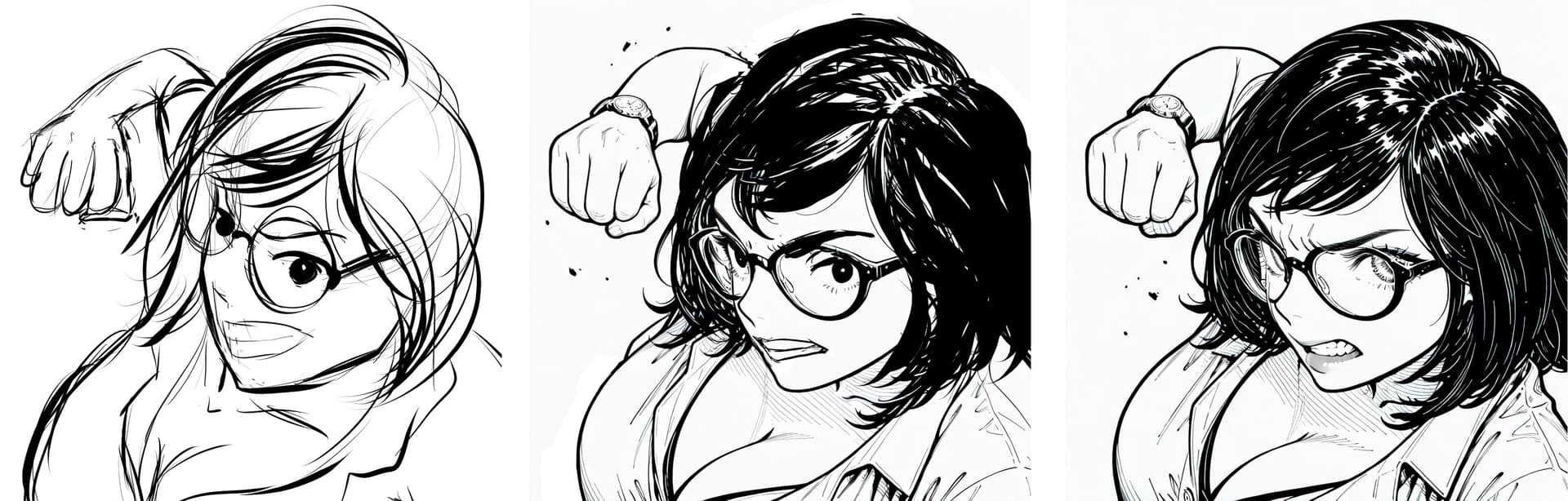
In the second image I attached of my character throwing a punch, I tested to see what I could get out of the AI model just by prompting it using the prompt tool in Krita AI.

It’s an older SDXL/Illustrious model, and I came up a prompt something along the lines of:

“[Trigger prompt for character], dramatic close up, extreme close up, throwing punch towards viewer, angry expression”.

It didn’t know what to do with it. It just kept on giving me portrait images of mid shots and close ups of my character standing around.

So like with my previous comic panels, I did a basic sketch (seen above), did a 40-60% AI run over the sketch, made updates, and then used that to create the final image (which, as you might have noticed, still needs fixes, such as the eye moving behind the frame of her glasses, which kills some of the impact of the picture).

In terms of writing, I do all of that myself. I’m a very confident writer and enjoy the process of creating. I’m just a slow and very mediocre illustrator which is what has always held me back from working on my own comic projects :weary:

1 Like