Anyone here using an Arrow Lake system? How has your experience been?
I built a system about a year ago and my experience has been basically flawless.
No weird issues like:
No DDR5 training taking too long, no need to mess with settings
No “you need to disable ASPM for the system to not crash or have weird behaviour”
No “you need to disable the Wi-Fi controller or the system may crash/stutter”
Or any other weird things I’ve seen people troubleshooting across the forum…
Just enable XMP and you’re set.
I also tried enabling 200S Boost and it seemed stable, but I didn’t use/test it extensively and I’m undecided on whether I want to use it.
Issues I have seen:
On one of the early firmware versions, after I played around with the iGPU/dGPU selection settings, it got stuck and I had no display output. I think I fixed that by resetting the BIOS settings. I think this was fixed in a firmware update a couple months post launch.
Not Arrow Lake platform related, but my board’s USB-C fast charger wouldn’t work reliably. This was resolved with a USB-C PD firmware update.
Other slight annoyances:
sensors doesn’t display system fan speeds on Linux, which would be nice to have. But I suppose this is not Arrow Lake specific.
It would have been cool to hit HSI-2 but I guess this is not common for DIY motherboards to support this? Unlocked manufacturing mode is also a bit odd, not sure if this is common for DIY boards. I’ve seen that some people prefer it as they want to flash custom/open source firmware like Coreboot?
Using this with a Blackwell GPU on Linux daily and the experience is great.
I dual boot into W11 for high end gaming to dodge the usual Linux gaming edge cases and it works great there, too.
Curious who else is running Arrow Lake and what your experience has been like. In my opinion, this platform is really underrated, especially if you want an efficient, low-drama and reliable system.
So the Arrow Lake Refresh reviews are out, and it’s nice to see pretty positive coverage this time around.
Binary Optimization Tool looks pretty interesting, though unfortunately it’s only available for the ARL Refresh models. Intel says they’re looking into backporting support for it to ARL but won’t make promises.
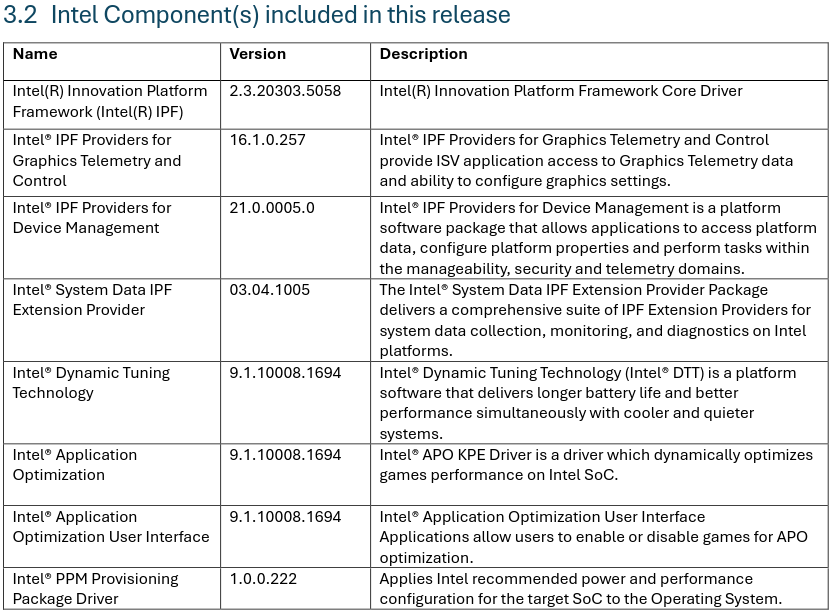
But a nice change that will benefit everyone is that all the enablement drivers have been consolidated into one installer package called Intel Platform Performance Package. Before this, you had to hunt down a bunch of different installers from your motherboard’s or PC maker’s support page, assuming they even provided updated versions…
Running a 265k on a Z890 ACE SE with 4 dimms at 4800. It’s stable, though I did have to disable ASPM at some point due to issues with my 7900XTX drivers crashing.
IMO ARL is pretty much perfect for running light VMs while you’re gaming. The multicore perf overall is pretty impressive.
Finally got up and running with a 270k Plus in a Gigabyte AORUS Z890 Elite Wifi 7. For anyone having weird power/boost problems on linux with theirs like I did, I fixed it (brute force) by disabling “Intel Innovation Platform” thermal management in the bios.
For me at least, my chip wouldn’t push past a combined draw of about 17 watts and I was going through all sorts of stuff to try and get it to work: disabling/limiting c states, changing the driver to acpi instead of intel_pstate, etc. but nothing did it. I also made sure the microcode and bios was up to date as well. Maybe this is a common thing to do with arrow lake on the linux side of things. I haven’t been on team blue since the 4790k and I didn’t find anything with some quick googling so please forgive my ignorance if that’s the case.
As a side note, I do want to get the more efficient power management going on the machine but for now I just needed it to run lol.
(Finally made an account just to post this I hope someone finds it useful )
It’s definitely NOT something that is normally done. It’s either a firmware bug (more likely, as it just launched) or a hardware defect (less likely.)
Intel IPF provides an interface between the CPU/firmware and the OS. It’s generally required for power/performance optimization, and on Windows, even higher level optimizations like APO. Probably Thread Director as well? Not sure what the impact on Linux is but it’s probably not good.
I would open a support ticket with Gigabyte and Intel.
Hopefully someone else has a 270K with a Gigabyte board on Linux and can comment if they face a similar issue or not.
I have a 265K in an ASUS Pro WS880 ACE SE motherboard (with an Intel B580 for fun) running TrueNAS and so far, I had some odd issues getting started with getting the board bios current and then TrueNAS booting in at the start had install issues, but no actual issues so far. Memtest had no complains and so on.
I had a not-dissimilar issue with my 265K on the Elite Ice, where it was sticking at 500mhz… Precisely when I went to F19. Dropped back to F18, which at least allegedly supports the 270K, and no such issue. May be worth a look.
Quite happy with Arrow Lake honestly. I got a 265K and Asrock Z890 RS Pro from Microcenter last year. At the time, it was all the gaming performance that I needed but 20 cores instead of 8 which is what I would have gotten for a comparable Ryzen 9700x system. Yes X3D is technically better but that’s mostly for people who run 5090s at 1080P IMO. I think the gaming community over rates them.
As for issues, I noticed that sometimes it felt like the windows login screen would lag for some reason before letting me put my pin in, but I recently went through all the latest bios and firmware updates and that seemed to fix it. No random occasional memory training issues like my AM5 system in the living room so it boots like it’s waking up from sleep.
I actually want to get another microcenter bundle with a 270K and retire this 265K into my homelab so it can be on a modern platform with much more power and expandability. Currently that is all running on a 4790K and a 4690K running TrueNAS and Proxmox respectively. That project is going to involve a very fun case swap so I’ll be tearing down my desktop and homelab so that the homelab can have my Define R5 with it’s 8 HDD bays. Wish me luck >_<
I have a conspiracy that the 270K was a paper launch though. I saw 3 bundles at Microcenter and they haven’t restocked. Newegg is out of stock and says 500+ sold recently. What’s that a few thousand chips in the US for all the Microcenters plus Newegg? Meh. I’m sure they just want to get to Nova Lake ASAP.
So Thermal Innovation Platform, which is apparently the same thing as DPTF (Dynamic Platform and Thermal Framework), is itself a component of RAPL.
Now looking at the RAPL sysfs entries on my system under /sys/devices/virtual/powercap/intel-rapl/intel-rapl:0, I can see that constraint_1_time_window_us is set to 2440 and constraint_1_max_power_uw is set to 0. According to the kernel docs this means that every 2,440 microseconds the CPU is given a max power budget of zero microwatts. Seeing as the instantaneous power limit is essentially for some reason set to 0, that’s probably what’s causing my issue.
Unfortunately even though the docs label constraint_X_power_limit_uw as writable, I don’t seem to be able to on my system even as root. Later I may see what’s detected and shown in there under an older bios version like F18.
You may be right, even with the brute force temporary fix i did by disabling DPTF, there was still some other things going on. After I flashed F18 earlier like @RotaryJunkie suggested, not only did the cpu perform as expected when compared to third party tests, but my gpu also started to pull power again like it’s supposed to (only recently noticed that issue). *It seemed like it was hanging on interrupts to the gpu but I’m not completely sure.
What I can say though, confidently, is do not use the F19 BIOS for Gigabyte’s Z890 Elite boards with these new processors. Hopefully they fix this in later revisions but based on how they reacted to my support ticket I’m not going to be updating this board for a while.

 )
