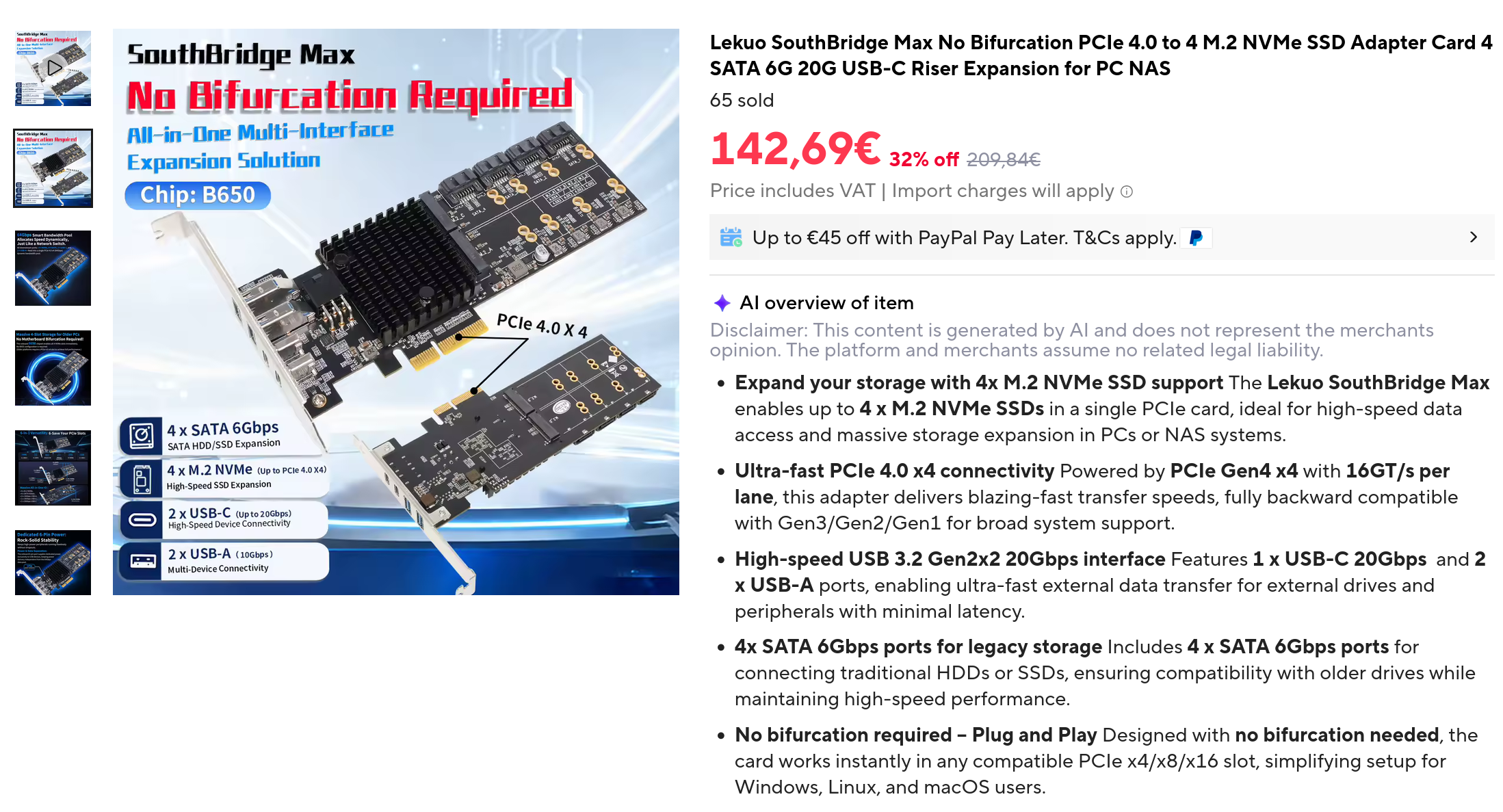
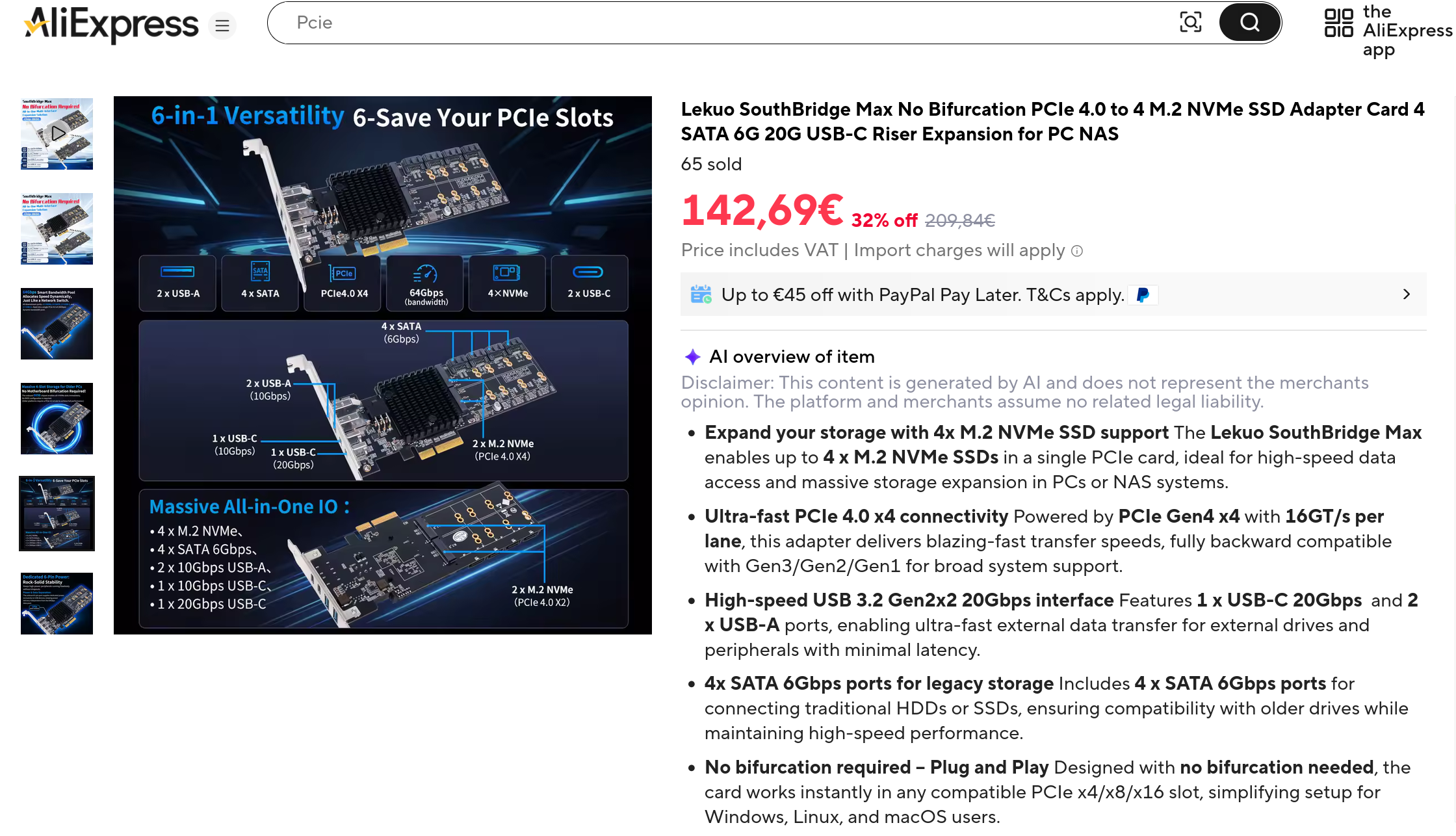
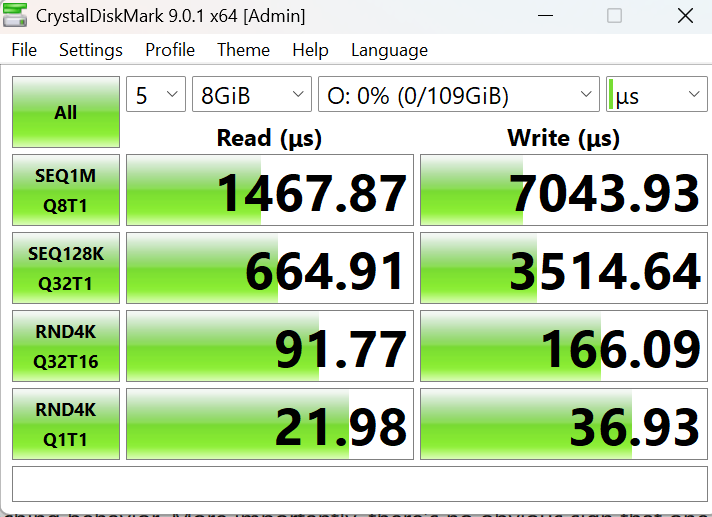
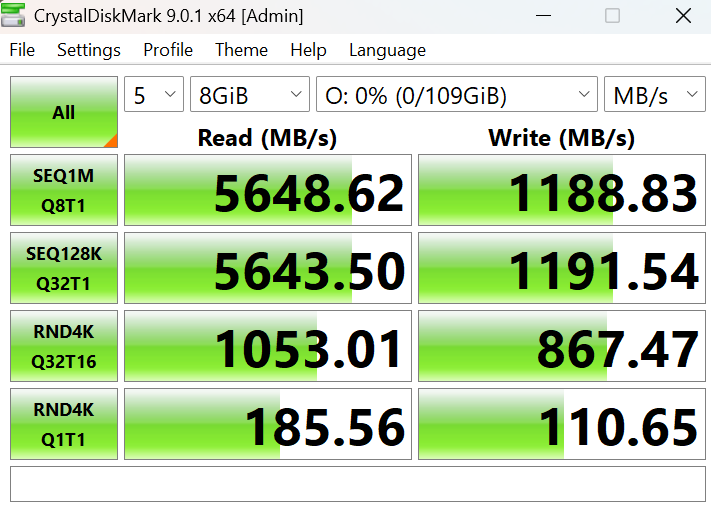
So, the thing arrived and after some quick testing to verify it was not going to blow up I installed it in my “dodgy stuff testing rig” aka a cheap chinese x79 board with a Xeon CPU.
The aux power connector seems to feed the 12v into the same power lines that the card also takes from the pcie slot, there are a couple diodes to prevent backfeeding into the pcie slot. So it’s actually powering the whole card, not just the usb ports as stated in the description. This is good I think.
IOMMU groups look good on the x79 board. Everything is split up, the onboard Sata controller running the 4 ports, the USB controller, and the m.2 slots. In this test there are 4 nvme drives installed on the card, the “Sandisk Corp WD PC SN810” you see in this output. Each one has its “pcie switch downstream port” in its iommu group.
Used this script to collect and paginate the information in a more readable format
#!/bin/bash
for d in $(find /sys/kernel/iommu_groups/ -type l | sort -n -k5 -t/); do
    n=${d#*/iommu_groups/*}; n=${n%%/*}
    printf 'IOMMU Group %s ' "$n"
    lspci -nns "${d##*/}"
done;
Here is the relevant output
IOMMU Group 25 03:00.0 PCI bridge [0604]: Advanced Micro Devices, Inc. [AMD] 600 Series Chipset PCIe Switch Upstream Port [1022:43f4] (rev 01)
IOMMU Group 26 04:00.0 PCI bridge [0604]: Advanced Micro Devices, Inc. [AMD] 600 Series Chipset PCIe Switch Downstream Port [1022:43f5] (rev 01)
IOMMU Group 26 05:00.0 Non-Volatile memory controller [0108]: Sandisk Corp WD PC SN810 / Black SN850 NVMe SSD [15b7:5011] (rev 01)
IOMMU Group 27 04:02.0 PCI bridge [0604]: Advanced Micro Devices, Inc. [AMD] 600 Series Chipset PCIe Switch Downstream Port [1022:43f5] (rev 01)
IOMMU Group 27 06:00.0 Non-Volatile memory controller [0108]: Sandisk Corp WD PC SN810 / Black SN850 NVMe SSD [15b7:5011] (rev 01)
IOMMU Group 28 04:04.0 PCI bridge [0604]: Advanced Micro Devices, Inc. [AMD] 600 Series Chipset PCIe Switch Downstream Port [1022:43f5] (rev 01)
IOMMU Group 29 04:05.0 PCI bridge [0604]: Advanced Micro Devices, Inc. [AMD] 600 Series Chipset PCIe Switch Downstream Port [1022:43f5] (rev 01)
IOMMU Group 30 04:06.0 PCI bridge [0604]: Advanced Micro Devices, Inc. [AMD] 600 Series Chipset PCIe Switch Downstream Port [1022:43f5] (rev 01)
IOMMU Group 31 04:07.0 PCI bridge [0604]: Advanced Micro Devices, Inc. [AMD] 600 Series Chipset PCIe Switch Downstream Port [1022:43f5] (rev 01)
IOMMU Group 32 04:08.0 PCI bridge [0604]: Advanced Micro Devices, Inc. [AMD] 600 Series Chipset PCIe Switch Downstream Port [1022:43f5] (rev 01)
IOMMU Group 32 0b:00.0 Non-Volatile memory controller [0108]: Sandisk Corp WD PC SN810 / Black SN850 NVMe SSD [15b7:5011] (rev 01)
IOMMU Group 33 04:0a.0 PCI bridge [0604]: Advanced Micro Devices, Inc. [AMD] 600 Series Chipset PCIe Switch Downstream Port [1022:43f5] (rev 01)
IOMMU Group 33 0c:00.0 Non-Volatile memory controller [0108]: Sandisk Corp WD PC SN810 / Black SN850 NVMe SSD [15b7:5011] (rev 01)
IOMMU Group 34 04:0c.0 PCI bridge [0604]: Advanced Micro Devices, Inc. [AMD] 600 Series Chipset PCIe Switch Downstream Port [1022:43f5] (rev 01)
IOMMU Group 34 0d:00.0 USB controller [0c03]: Advanced Micro Devices, Inc. [AMD] 600 Series Chipset USB 3.2 Controller [1022:43f7] (rev 01)
IOMMU Group 35 04:0d.0 PCI bridge [0604]: Advanced Micro Devices, Inc. [AMD] 600 Series Chipset PCIe Switch Downstream Port [1022:43f5] (rev 01)
IOMMU Group 35 0e:00.0 SATA controller [0106]: Advanced Micro Devices, Inc. [AMD] 600 Series Chipset SATA Controller [1022:43f6] (rev 01)
The usb controller also appears with lsusb. The usb 3.whatever gen whatever aka the 20gbit controller is detected as “20000M/x2” so it’s correct.
In this output I have connected a 10gbit usb hub (the "ID 2109:0822 VIA Labs, Inc. ") and it’s negotiated at the right speed, the “10000M”, and there is a usb 3.0 card reader plugged into it just to show it’s detected.
It does not seem to be “plug and play” for some reason. To get it to see what I connect I have to send a
lsusb -vv, which is odd behaviour for USB.
/:  Bus 003.Port 001: Dev 001, Class=root_hub, Driver=xhci_hcd/12p, 480M
    ID 1d6b:0002 Linux Foundation 2.0 root hub
    /sys/bus/usb/devices/usb3  /dev/bus/usb/003/001
    |__ Port 004: Dev 002, If 0, Class=Hub, Driver=hub/5p, 480M
        ID 2109:2822 VIA Labs, Inc.
        /sys/bus/usb/devices/3-4  /dev/bus/usb/003/002
        |__ Port 005: Dev 003, If 0, Class=Billboard, Driver=[none], 480M
            ID 2109:8822 VIA Labs, Inc.
            /sys/bus/usb/devices/3-4.5  /dev/bus/usb/003/003
/:  Bus 004.Port 001: Dev 001, Class=root_hub, Driver=xhci_hcd/5p, 20000M/x2
    ID 1d6b:0003 Linux Foundation 3.0 root hub
    /sys/bus/usb/devices/usb4  /dev/bus/usb/004/001
    |__ Port 004: Dev 002, If 0, Class=Hub, Driver=hub/4p, 10000M
        ID 2109:0822 VIA Labs, Inc.
        /sys/bus/usb/devices/4-4  /dev/bus/usb/004/002
        |__ Port 004: Dev 003, If 0, Class=Mass Storage, Driver=usb-storage, 5000M
            ID 0bda:0316 Realtek Semiconductor Corp. Card Reader
            /sys/bus/usb/devices/4-4.4  /dev/bus/usb/004/003
I don’t have a 20gbit usb device to test.
The generous size heatsink does get hot, a small fan or some airflow is better.
I don’t know how to read sensor information from this thing to check temperature, but “sensors” command does pick up the 4 ssd thermal sensors (note the name, it’s the pcie address of the ssds above)
nvme-pci-0500
Adapter: PCI adapter
Composite:    +43.9°C  (low  =  -5.2°C, high = +83.8°C)
                       (crit = +87.8°C)

nvme-pci-0c00
Adapter: PCI adapter
Composite:    +55.9°C  (low  =  -5.2°C, high = +83.8°C)
                       (crit = +87.8°C)

nvme-pci-0b00
Adapter: PCI adapter
Composite:    +42.9°C  (low  =  -5.2°C, high = +83.8°C)
                       (crit = +87.8°C)

nvme-pci-0600
Adapter: PCI adapter
Composite:    +49.9°C  (low  =  -5.2°C, high = +83.8°C)
                       (crit = +87.8°C)
Testing this again on a Ryzen 5 PRO 5650G shows a different situation though. All the stuff on the card is now in the same iommu group because screw you I guess. It’s the same OS drive as on the “test rig” above so the only difference is the hardware and possibly BIOS settings (different motherboard/CPU obviously). What is this horseshit AMD? Are you softlocking IOMMU groups on the chipsets on purpose now?
Tried changing various BIOS settings and even reset defaults (and then enable IOMMU again), no changes, always everything in the same IOMMU group.
IOMMU Group 0 00:01.0 Host bridge [0600]: Advanced Micro Devices, Inc. [AMD] Renoir PCIe Dummy Host Bridge [1022:1632]
IOMMU Group 0 00:01.1 PCI bridge [0604]: Advanced Micro Devices, Inc. [AMD] Renoir PCIe GPP Bridge [1022:1633]
IOMMU Group 0 01:00.0 PCI bridge [0604]: Advanced Micro Devices, Inc. [AMD] 600 Series Chipset PCIe Switch Upstream Port [1022:43f4] (rev 01)
IOMMU Group 0 02:00.0 PCI bridge [0604]: Advanced Micro Devices, Inc. [AMD] 600 Series Chipset PCIe Switch Downstream Port [1022:43f5] (rev 01)
IOMMU Group 0 02:02.0 PCI bridge [0604]: Advanced Micro Devices, Inc. [AMD] 600 Series Chipset PCIe Switch Downstream Port [1022:43f5] (rev 01)
IOMMU Group 0 02:04.0 PCI bridge [0604]: Advanced Micro Devices, Inc. [AMD] 600 Series Chipset PCIe Switch Downstream Port [1022:43f5] (rev 01)
IOMMU Group 0 02:05.0 PCI bridge [0604]: Advanced Micro Devices, Inc. [AMD] 600 Series Chipset PCIe Switch Downstream Port [1022:43f5] (rev 01)
IOMMU Group 0 02:06.0 PCI bridge [0604]: Advanced Micro Devices, Inc. [AMD] 600 Series Chipset PCIe Switch Downstream Port [1022:43f5] (rev 01)
IOMMU Group 0 02:07.0 PCI bridge [0604]: Advanced Micro Devices, Inc. [AMD] 600 Series Chipset PCIe Switch Downstream Port [1022:43f5] (rev 01)
IOMMU Group 0 02:08.0 PCI bridge [0604]: Advanced Micro Devices, Inc. [AMD] 600 Series Chipset PCIe Switch Downstream Port [1022:43f5] (rev 01)
IOMMU Group 0 02:0a.0 PCI bridge [0604]: Advanced Micro Devices, Inc. [AMD] 600 Series Chipset PCIe Switch Downstream Port [1022:43f5] (rev 01)
IOMMU Group 0 02:0c.0 PCI bridge [0604]: Advanced Micro Devices, Inc. [AMD] 600 Series Chipset PCIe Switch Downstream Port [1022:43f5] (rev 01)
IOMMU Group 0 02:0d.0 PCI bridge [0604]: Advanced Micro Devices, Inc. [AMD] 600 Series Chipset PCIe Switch Downstream Port [1022:43f5] (rev 01)
IOMMU Group 0 03:00.0 Non-Volatile memory controller [0108]: Sandisk Corp WD PC SN810 / Black SN850 NVMe SSD [15b7:5011] (rev 01)
IOMMU Group 0 04:00.0 Non-Volatile memory controller [0108]: Sandisk Corp WD PC SN810 / Black SN850 NVMe SSD [15b7:5011] (rev 01)
IOMMU Group 0 09:00.0 Non-Volatile memory controller [0108]: Sandisk Corp WD PC SN810 / Black SN850 NVMe SSD [15b7:5011] (rev 01)
IOMMU Group 0 0a:00.0 Non-Volatile memory controller [0108]: Sandisk Corp WD PC SN810 / Black SN850 NVMe SSD [15b7:5011] (rev 01)
IOMMU Group 0 0b:00.0 USB controller [0c03]: Advanced Micro Devices, Inc. [AMD] 600 Series Chipset USB 3.2 Controller [1022:43f7] (rev 01)
IOMMU Group 0 0c:00.0 SATA controller [0106]: Advanced Micro Devices, Inc. [AMD] 600 Series Chipset SATA Controller [1022:43f6] (rev 01)
Testing this again, on my gaming rig with an asus motherboard and a non-APU CPU, a Ryzen 7 3700X, shows the IOMMU groups split correctly, like on the x79 motherboard at the start. So it seems this is yet another way the APUs on AM4 socket are gimped, pcie 3.0, no 4x4x4x4 bifurcation and also this bullshit limitations on IOMMU groups. Tomorrow I’ll try swapping the CPU on the board that has the Ryzen 5 PRO 5650G to confirm if this is a CPU thing or a motherboard thing. I also have a Gigabyte AM4 motherboard in my “main” PC that I can try out.
Thankfully I personally don’t need IOMMU for passing through stuff so this is not a deal breaker to use with an APU for my usecase (I just needed more m.2 slots for activities and the USB ports)
IOMMU Group 14 01:00.0 PCI bridge [0604]: Advanced Micro Devices, Inc. [AMD] 600 Series Chipset PCIe Switch Upstream Port [1022:43f4] (rev 01)
IOMMU Group 15 02:00.0 PCI bridge [0604]: Advanced Micro Devices, Inc. [AMD] 600 Series Chipset PCIe Switch Downstream Port [1022:43f5] (rev 01)
IOMMU Group 15 03:00.0 Non-Volatile memory controller [0108]: Sandisk Corp WD PC SN810 / Black SN850 NVMe SSD [15b7:5011] (rev 01)
IOMMU Group 16 02:02.0 PCI bridge [0604]: Advanced Micro Devices, Inc. [AMD] 600 Series Chipset PCIe Switch Downstream Port [1022:43f5] (rev 01)
IOMMU Group 16 04:00.0 Non-Volatile memory controller [0108]: Sandisk Corp WD PC SN810 / Black SN850 NVMe SSD [15b7:5011] (rev 01)
IOMMU Group 17 02:04.0 PCI bridge [0604]: Advanced Micro Devices, Inc. [AMD] 600 Series Chipset PCIe Switch Downstream Port [1022:43f5] (rev 01)
IOMMU Group 18 02:05.0 PCI bridge [0604]: Advanced Micro Devices, Inc. [AMD] 600 Series Chipset PCIe Switch Downstream Port [1022:43f5] (rev 01)
IOMMU Group 19 02:06.0 PCI bridge [0604]: Advanced Micro Devices, Inc. [AMD] 600 Series Chipset PCIe Switch Downstream Port [1022:43f5] (rev 01)
IOMMU Group 20 02:07.0 PCI bridge [0604]: Advanced Micro Devices, Inc. [AMD] 600 Series Chipset PCIe Switch Downstream Port [1022:43f5] (rev 01)
IOMMU Group 21 02:08.0 PCI bridge [0604]: Advanced Micro Devices, Inc. [AMD] 600 Series Chipset PCIe Switch Downstream Port [1022:43f5] (rev 01)
IOMMU Group 21 09:00.0 Non-Volatile memory controller [0108]: Sandisk Corp WD PC SN810 / Black SN850 NVMe SSD [15b7:5011] (rev 01)
IOMMU Group 22 02:0a.0 PCI bridge [0604]: Advanced Micro Devices, Inc. [AMD] 600 Series Chipset PCIe Switch Downstream Port [1022:43f5] (rev 01)
IOMMU Group 22 0a:00.0 Non-Volatile memory controller [0108]: Sandisk Corp WD PC SN810 / Black SN850 NVMe SSD [15b7:5011] (rev 01)
IOMMU Group 23 02:0c.0 PCI bridge [0604]: Advanced Micro Devices, Inc. [AMD] 600 Series Chipset PCIe Switch Downstream Port [1022:43f5] (rev 01)
IOMMU Group 23 0b:00.0 USB controller [0c03]: Advanced Micro Devices, Inc. [AMD] 600 Series Chipset USB 3.2 Controller [1022:43f7] (rev 01)
IOMMU Group 24 02:0d.0 PCI bridge [0604]: Advanced Micro Devices, Inc. [AMD] 600 Series Chipset PCIe Switch Downstream Port [1022:43f5] (rev 01)
IOMMU Group 24 0c:00.0 SATA controller [0106]: Advanced Micro Devices, Inc. [AMD] 600 Series Chipset SATA Controller [1022:43f6] (rev 01)
the usb behaviour as described at the start is unchanged on either other systems, the 10gbit usb hub and other USB devices are detected and negotiates at the right speed but only after I launch a lsusb -vv. Very weird, but even if I can’t find a workaround I can live with that, I had no luck finding other usb controllers that negotiate at 10gbit at all on Linux besides onboard Intel/AMD, there is a bug open in kernel but nobody seems to care about looking into it.
I’ll do some more tests in a few days.