Hey guys… I need help… the problem is that the drivers on my HD7870 are constantly crashing while web browsing… A little backstory:
Everything was Ok until I updated to Windows 10 (Just wanted to look around, see if I might like it…) and after the Win 10 update I was asked to update my video drivers for Windows 10… And then whenever I played a youtube and had several tabs open in google chrome it would randomly crash… Then I jumped back to Windows 7 hoping this would fix the issue (went back from the recovery or backup or whatever it is called) got back my older drivers (don’t remember the version I think it was Crimson 16.1 Hotfix never had problem with the hotfix…) but the crashing continued…
I tried to stress test the GPU to see if it is dying but everything seems fine…
Then checked my RAM with memtest… 12 hours and no problem..
Then checked my HDD, and everything seemed fine again…
So I decided to clean install Windows 7 again with older GPU drivers… Omega 14.12 and the crashing continued…
Im pretty much desperate now… I think I should replace the GPU but Im not sure if this is the problem…
Almost forgot, when Im gaming everything seems to be fine… No crashes… Only when Im browsing the web and having something playing in youtube…
What about using a different browser ? Does it still crash ?
Did you recently overclock or flash a bios on the GPU itself?
Curious do you have another PCI-E slot on your motherboard. Perhaps the current one may have a lose contact on one of the contacts.
If you do. Try putting it in the other slot.
Well I don’t really like the other browsers but crashes in steam too when Im downloading games and this morning when I tried to play Team Fortress 2 the whole PC just froze with both screens going black…
The bios - no I tried to overclock but didn’t keep the OC but everything was stable…
PS: Haven’t tried the other slot yet…
GPU OC’s are done at the desktop, was curious if a bios was applied then that could indicate some obscene amount of voltage or even lack of voltage was applied to the GPU with out any desktop software.
If it’s just that PCI-E slot, good news it’s just that slot. Bad news is, you are down one slot and most likely what ever you install in there may act faulty.
I overclocked with MSI Afterburner but didn’t touch the voltage… only the power limit a little bit, but the later that day I returned back to stock… Today I was wondering if my PSU isn’t causing the issue… Thermaltake SmartSE 630W because I’ve read that Thermaltake PSUs are good but don’t last long… Actually I’ve read that yeasterday… and now I’m feeling a little paranoid about the PSU if it is not the GPU…
OK, so far so good… changed the PCI-E slot and then when the PC started installed Windows automatically installed drivers… don’t know why I had GPU drivers already installed but.. yeah… Then started Team Fortress 2 played a little bit… did not crash… then opened Google Chrome, started 2 videos simultaneously at 1080 on both screens opened up several more tabs and started scrolling… yesterday the PC would’ve crashed 1 minute after I started the 2 videos, but now it didn’t crash… started scrolling crazy up and down… did not crash… started steam (leaving the chrome mess) started searching there… everything is fine… Still haven’t crashed…
And now to see that everything it took was just to switch the PCI-E slot… and fix everything… Im feeling like a idiot because I didn’t think of that 
No worries, glad it’s working! Perhaps the motherboard doesn’t have the greatest strength and the slight sag over time caused it to come lose. Just to be safe I would put something under the GPU to make sure it’s supported and level. There is manufactured PCI-E brackets to support the GPU or you can use a block of wood cut to length. PVC pipe as well. If you are lucky you got some laying around the house and hopefully pipe cutters or a hand saw. Spray paint it black or close that best fits your case and put it under the GPU.
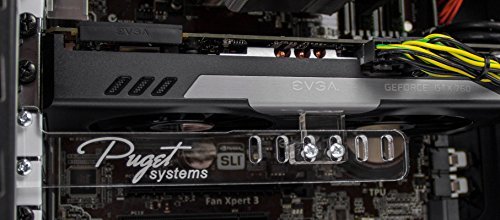
I also remembered just now, but I made a few loops with zip ties and used that to support my buddies GPU.
Or just a simple black string or ribbon too. I’ve even seen action figures used as a brace even to decorate a window paneled pc case.
Not a bad idea either. I just love zip ties is all.