CPU: R9 7900X
GPU RX 7800X 16GB
HOST OS: Arch Linux
Guest OS: Windows 11
AMD drivers: Latest
VirtManager XML:
<domain type="kvm">
  <name>win11t</name>
  <uuid>2da2f126-149e-4755-8ea6-0e7a17854161</uuid>
  <metadata>
    <libosinfo:libosinfo xmlns:libosinfo="http://libosinfo.org/xmlns/libvirt/domain/1.0">
      <libosinfo:os id="http://microsoft.com/win/11"/>
    </libosinfo:libosinfo>
  </metadata>
  <memory unit="KiB">16777216</memory>
  <currentMemory unit="KiB">16777216</currentMemory>
  <vcpu placement="static">16</vcpu>
  <os firmware="efi">
    <type arch="x86_64" machine="pc-q35-8.2">hvm</type>
    <firmware>
      <feature enabled="no" name="enrolled-keys"/>
      <feature enabled="no" name="secure-boot"/>
    </firmware>
    <loader readonly="yes" type="pflash">/usr/share/edk2/x64/OVMF_CODE.fd</loader>
    <nvram template="/usr/share/edk2/x64/OVMF_VARS.fd">/var/lib/libvirt/qemu/nvram/win11t_VARS.fd</nvram>
    <boot dev="hd"/>
  </os>
  <features>
    <acpi/>
    <apic/>
    <hyperv mode="custom">
      <relaxed state="on"/>
      <vapic state="on"/>
      <spinlocks state="on" retries="8191"/>
      <vendor_id state="on" value="12345"/>
    </hyperv>
    <kvm>
      <hidden state="on"/>
    </kvm>
    <vmport state="off"/>
  </features>
  <cpu mode="host-passthrough" check="none" migratable="on"/>
  <clock offset="localtime">
    <timer name="rtc" tickpolicy="catchup"/>
    <timer name="pit" tickpolicy="delay"/>
    <timer name="hpet" present="no"/>
    <timer name="hypervclock" present="yes"/>
  </clock>
  <on_poweroff>destroy</on_poweroff>
  <on_reboot>restart</on_reboot>
  <on_crash>destroy</on_crash>
  <pm>
    <suspend-to-mem enabled="no"/>
    <suspend-to-disk enabled="no"/>
  </pm>
  <devices>
    <emulator>/usr/bin/qemu-system-x86_64</emulator>
    <disk type="block" device="disk">
      <driver name="qemu" type="raw" cache="none" io="native" discard="unmap"/>
      <source dev="/dev/disk/by-id/nvme-CT500P3SSD8_2320E6D59648"/>
      <target dev="sda" bus="sata"/>
      <address type="drive" controller="0" bus="0" target="0" unit="0"/>
    </disk>
    <controller type="usb" index="0" model="qemu-xhci" ports="15">
      <address type="pci" domain="0x0000" bus="0x02" slot="0x00" function="0x0"/>
    </controller>
    <controller type="pci" index="0" model="pcie-root"/>
    <controller type="pci" index="1" model="pcie-root-port">
      <model name="pcie-root-port"/>
      <target chassis="1" port="0x10"/>
      <address type="pci" domain="0x0000" bus="0x00" slot="0x02" function="0x0" multifunction="on"/>
    </controller>
    <controller type="pci" index="2" model="pcie-root-port">
      <model name="pcie-root-port"/>
      <target chassis="2" port="0x11"/>
      <address type="pci" domain="0x0000" bus="0x00" slot="0x02" function="0x1"/>
    </controller>
    <controller type="pci" index="3" model="pcie-root-port">
      <model name="pcie-root-port"/>
      <target chassis="3" port="0x12"/>
      <address type="pci" domain="0x0000" bus="0x00" slot="0x02" function="0x2"/>
    </controller>
    <controller type="pci" index="4" model="pcie-root-port">
      <model name="pcie-root-port"/>
      <target chassis="4" port="0x13"/>
      <address type="pci" domain="0x0000" bus="0x00" slot="0x02" function="0x3"/>
    </controller>
    <controller type="pci" index="5" model="pcie-root-port">
      <model name="pcie-root-port"/>
      <target chassis="5" port="0x14"/>
      <address type="pci" domain="0x0000" bus="0x00" slot="0x02" function="0x4"/>
    </controller>
    <controller type="pci" index="6" model="pcie-root-port">
      <model name="pcie-root-port"/>
      <target chassis="6" port="0x15"/>
      <address type="pci" domain="0x0000" bus="0x00" slot="0x02" function="0x5"/>
    </controller>
    <controller type="pci" index="7" model="pcie-root-port">
      <model name="pcie-root-port"/>
      <target chassis="7" port="0x16"/>
      <address type="pci" domain="0x0000" bus="0x00" slot="0x02" function="0x6"/>
    </controller>
    <controller type="pci" index="8" model="pcie-root-port">
      <model name="pcie-root-port"/>
      <target chassis="8" port="0x17"/>
      <address type="pci" domain="0x0000" bus="0x00" slot="0x02" function="0x7"/>
    </controller>
    <controller type="pci" index="9" model="pcie-root-port">
      <model name="pcie-root-port"/>
      <target chassis="9" port="0x18"/>
      <address type="pci" domain="0x0000" bus="0x00" slot="0x03" function="0x0" multifunction="on"/>
    </controller>
    <controller type="pci" index="10" model="pcie-root-port">
      <model name="pcie-root-port"/>
      <target chassis="10" port="0x19"/>
      <address type="pci" domain="0x0000" bus="0x00" slot="0x03" function="0x1"/>
    </controller>
    <controller type="pci" index="11" model="pcie-root-port">
      <model name="pcie-root-port"/>
      <target chassis="11" port="0x1a"/>
      <address type="pci" domain="0x0000" bus="0x00" slot="0x03" function="0x2"/>
    </controller>
    <controller type="pci" index="12" model="pcie-root-port">
      <model name="pcie-root-port"/>
      <target chassis="12" port="0x1b"/>
      <address type="pci" domain="0x0000" bus="0x00" slot="0x03" function="0x3"/>
    </controller>
    <controller type="pci" index="13" model="pcie-root-port">
      <model name="pcie-root-port"/>
      <target chassis="13" port="0x1c"/>
      <address type="pci" domain="0x0000" bus="0x00" slot="0x03" function="0x4"/>
    </controller>
    <controller type="pci" index="14" model="pcie-root-port">
      <model name="pcie-root-port"/>
      <target chassis="14" port="0x1d"/>
      <address type="pci" domain="0x0000" bus="0x00" slot="0x03" function="0x5"/>
    </controller>
    <controller type="sata" index="0">
      <address type="pci" domain="0x0000" bus="0x00" slot="0x1f" function="0x2"/>
    </controller>
    <interface type="network">
      <mac address="52:54:00:88:93:a6"/>
      <source network="default"/>
      <model type="e1000e"/>
      <address type="pci" domain="0x0000" bus="0x01" slot="0x00" function="0x0"/>
    </interface>
    <serial type="pty">
      <target type="isa-serial" port="0">
        <model name="isa-serial"/>
      </target>
    </serial>
    <console type="pty">
      <target type="serial" port="0"/>
    </console>
    <input type="tablet" bus="usb">
      <address type="usb" bus="0" port="1"/>
    </input>
    <input type="mouse" bus="ps2"/>
    <input type="keyboard" bus="ps2"/>
    <graphics type="vnc" port="5900" autoport="no" listen="0.0.0.0">
      <listen type="address" address="0.0.0.0"/>
    </graphics>
    <sound model="ich9">
      <address type="pci" domain="0x0000" bus="0x00" slot="0x1b" function="0x0"/>
    </sound>
    <audio id="1" type="none"/>
    <video>
      <model type="virtio" heads="1" primary="yes"/>
      <address type="pci" domain="0x0000" bus="0x00" slot="0x01" function="0x0"/>
    </video>
    <hostdev mode="subsystem" type="usb" managed="yes">
      <source>
        <vendor id="0x046d"/>
        <product id="0xc33a"/>
      </source>
      <address type="usb" bus="0" port="2"/>
    </hostdev>
    <hostdev mode="subsystem" type="usb" managed="yes">
      <source>
        <vendor id="0x046d"/>
        <product id="0xc53f"/>
      </source>
      <address type="usb" bus="0" port="3"/>
    </hostdev>
    <hostdev mode="subsystem" type="usb" managed="yes">
      <source>
        <vendor id="0x0b05"/>
        <product id="0x19af"/>
      </source>
      <address type="usb" bus="0" port="4"/>
    </hostdev>
    <hostdev mode="subsystem" type="pci" managed="yes">
      <driver name="vfio"/>
      <source>
        <address domain="0x0000" bus="0x03" slot="0x00" function="0x0"/>
      </source>
      <rom bar="off" file="/usr/share/vgabios/GPU.rom"/>
      <address type="pci" domain="0x0000" bus="0x04" slot="0x00" function="0x0"/>
    </hostdev>
    <hostdev mode="subsystem" type="pci" managed="yes">
      <driver name="vfio"/>
      <source>
        <address domain="0x0000" bus="0x03" slot="0x00" function="0x1"/>
      </source>
      <rom bar="off"/>
      <address type="pci" domain="0x0000" bus="0x05" slot="0x00" function="0x0"/>
    </hostdev>
    <watchdog model="itco" action="reset"/>
    <memballoon model="virtio">
      <address type="pci" domain="0x0000" bus="0x03" slot="0x00" function="0x0"/>
    </memballoon>
  </devices>
</domain>
I’m doing a single gpu passthrough using this guide GitHub - mike11207/single-gpu-passthrough-amd-gpu: This is a guide for passing an AMD/NVIDIA GPU to a Windows 10 Guest VM on Linux
Trying out the start.sh in ssh using my laptop, no errors are given the GPU seems to get detached without any errors.
I’m using a VNC server to troubleshoot (I know it’s not required).
Tried disabling 4G encoding, and BAR resize but no luck.
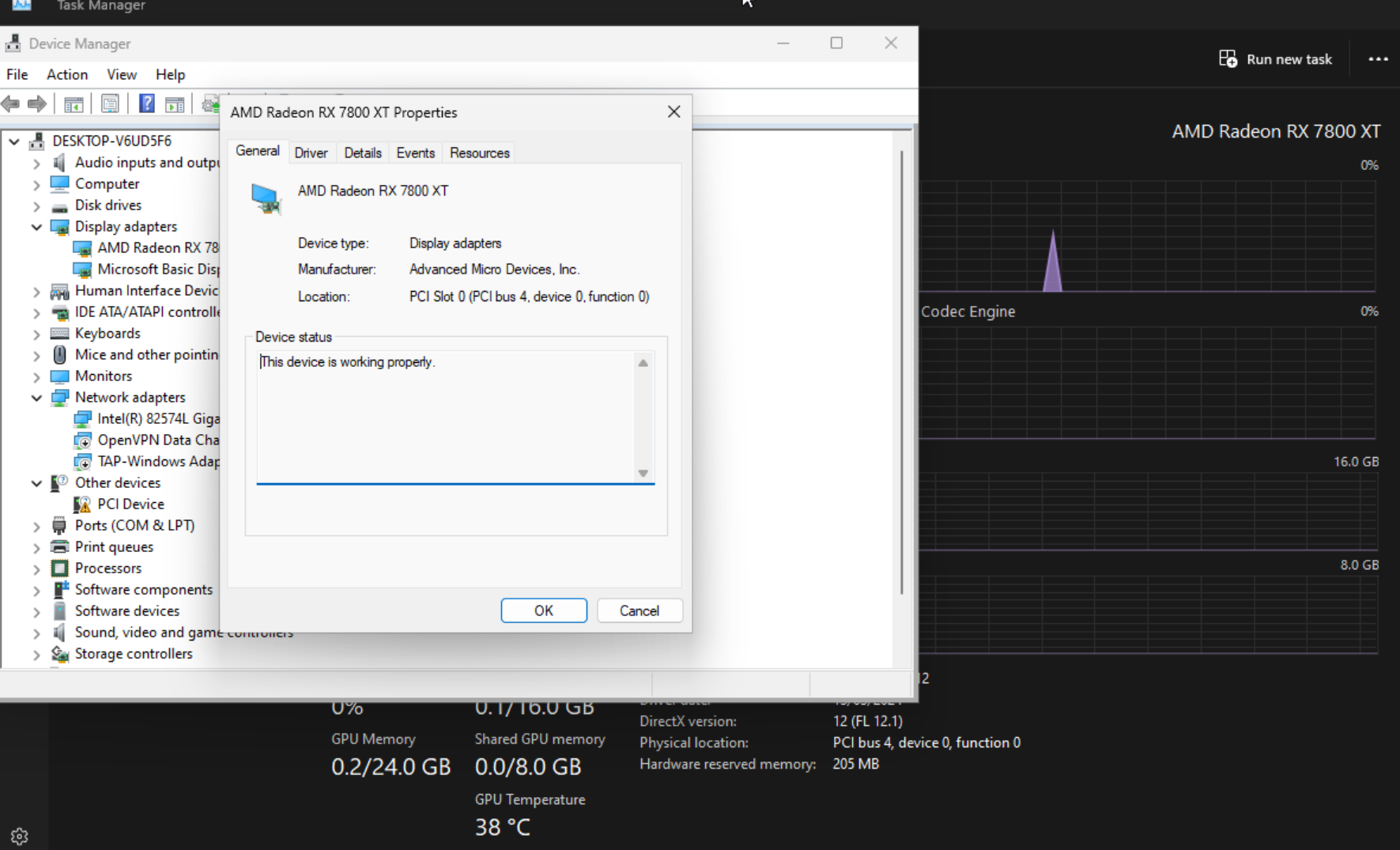
GPU appears in device manager and it’s working properly but I have no display signal.
Thanks, any help is appreciated.