I’m looking for a motherboard that has
PCIe 5.0 x16 , off the cpu
PCIe 5.0 x8, off the cpu
PCIe 4.0 x4, off the chipset.
I don’t want the first two slots to bifurcate. The cpu provides 24 PCIE 5.0 lanes so this should be possible.
I’m looking for a motherboard that has
PCIe 5.0 x16 , off the cpu
PCIe 5.0 x8, off the cpu
PCIe 4.0 x4, off the chipset.
I don’t want the first two slots to bifurcate. The cpu provides 24 PCIE 5.0 lanes so this should be possible.
don’t forget the chipset that’ll gobble a few lanes.
Most have a M.2 slot eating 4 lanes before the first x16 slot grabs the rest.
There may be a top end gaming or enterprise board with the new EPYC on AM5, but that’ll be a chore to find.
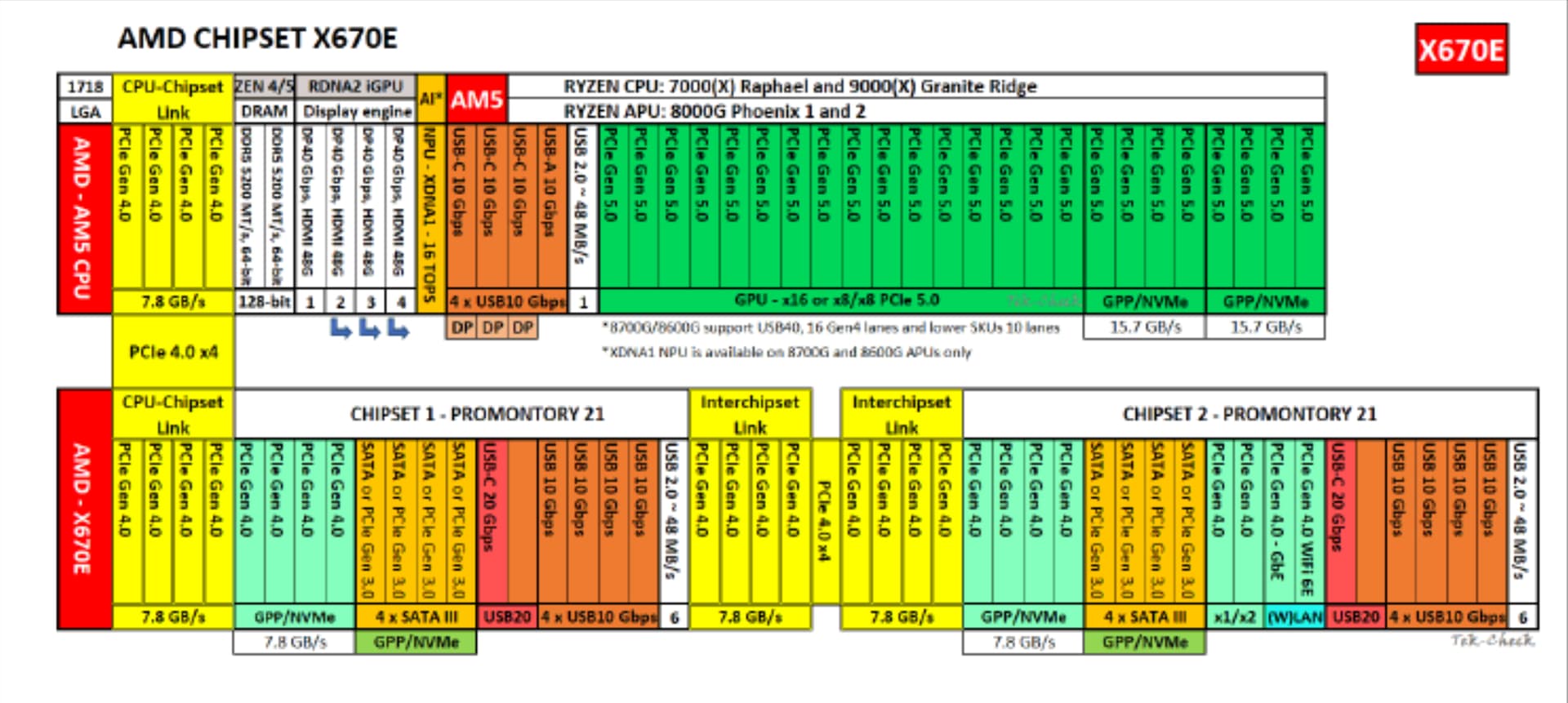
i posted a diagram, the cpu provides 4x pcie 4.0 lanes for the chipset
AM5 has 28 total lanes, of which 4 go to the chipset. The rest go to to wherever. AMD Ryzen 9 7900X Review: Powerhouse or Overpriced?
Unless some hyperscaler requests a board with this kind of configuration, I don’t think that its going to be a thing. Anyone who needs gen 5 lanes is either going to want it for the m.2 (since no GPU is going to use anywhere close to that speed) or they are an enterprise customer with needs for higher speed connectivity, more leaning towards server than workstation.
I was hopeful to find something like what you are looking for, but after checking the offerings of supermicro, asrock rack, and gigabyte, I think I have exhausted all of the ones I think may have an offering like this. If anyone finds a board like this, I would love to know as well. It would be pretty damn nice and useful even if it is only gen 4.
It is possible, but no one will design board like that no Gen 5 M.2.
The best PCIE layout on AM5 so far is MSI x670e ACE and GodLike. The x16 could be bifurcated into 2 x8 slots. Plus a PCIE Gen5 x4 slot.
With x870e, the situation is worse, because USB4 controller will use 4 PCIE lines. The first thing to cut is the PCIE slot.
unfortunate 
2nd crazier idea. can i merge 2 cpu connected m.2s into an x8 slot? i feel like this might require either motherboard support or some kind of pcie router chip to work. does anyone know if this exists?
It does exist, the MSI X670E CARBON WIFI is one such board. I think there’s a second one but I remembered MSI had one. https://www.msi.com/Motherboard/MPG-X670E-CARBON-WIFI/Specification
PCI_E1 Gen PCIe 5.0 supports up to x16 (From CPU)
PCI_E2 Gen PCIe 5.0 supports up to x8 (From CPU)
PCI_E3 Gen PCIe 4.0 supports up to x4 (From Chipset)
PCI_E1 and PCI_E2 share the same x16 PCIe lanes on that motherboard, so you can only get PCIe 5.0 x8 on either slot if both are used.
Hmm, you’re right I had to dig into the manual to find it. It isn’t disclosed elsewhere which is pretty shitty.
Its pretty expected in all of these boards that if you see 2 x16 slots near the top then both are gonna share lanes when you put something in the second one. As soon as they have an m.2 slot or other x4 slot connected to the CPU, it all falls apart.
Agreed. Not just no gen 5 m.2, but no cpu connected m.2 at all.
It did not realize that until you mentioned it. This was not the case with x670e boards with USB4, at least on the x670e proart compared to the x870e proart. On the latter the second gen 5 m.2 shares bandwidth with the x16 slot; on the x670e you can use both gen 5 m.2 slots, x16 (or x8/x8) slot, and USB4 simultaneously.
So on x670e (at least this board) USB4 hangs off the chipset, but on x870e it seems to hang off the cpu directly…
Sorry for overlooking it, didnt see this at first. You CAN do this, but I don’t think that there exists a solution that supports gen 5 speeds, and it is definitely going to be pretty iffy even at gen 4 speeds as well depending on what you use… Unless you have 2 cpu connected slots at gen 5, which would allow you to use 2 4x adapters at gen 5 with redrivers or retimers out to a slot. Good luck finding that haha. Also, don’t mix cpu and chipset lanes in the same slot, you will have a bad time.
If you are okay with gen 4 speeds (probably reliably), then this would most likely work at g4 speeds with both 2 m.2 slots or 1 m.2 slot and 1 x4 slot, if you can find a good adapter for the slot one.
Gen 5 slot adapter to try to get the best signal integrity, courtesy of c-payne:
Any run of the mill short (as short as reasonable) gen 5 certified cables would work that do MCIO x4 (2x) to MCIO x8 (1x) would work, but supermicro are absolutely a seller to trust:
The adapters are going to be a problem. This is where this all falls apart. Even gen 4 m.2 adapters are iffy. It’s basically a requirement to have redrivers even at gen 4 if you use an m.2 adapter. There is only one that I found with redrivers that supports gen4 and has mcio, and its currently out of stock:
Here’s one that will probably do slot gen 5x4 though:
You can probably do this with other configs if you want to avoid waiting for the m.2 adapter to get back in stock, like slimsas or oculink, but honestly its probably not worth it either way lol. As a thought experiment this is fun, but it’s basically impossible to do at gen 5 and makes no sense to chase it right now. Hopefully a motherboard with built in support for x16 and x8 direct from cpu comes out but I wouldn’t hold your breath.
Forgot to mention, for anyone trying this, it will likely not work the way you think it will with these adapters. The m.2 and another x4 slot will see each other as separate and will not handle as if it were an x8 slot, it will work like an x4x4 slot. My bad for not mentioning this, but I saw another post that was similar to this one here and thought I might revisit this.
Put x16 devices on x8 slot. Put x8 devices on x4 slot. Depending on the devices, the trade off might not be that big like it sounds.
For someone expecting to gain an x8 slot out of this rather than just a simple x4 slot, knowing what they are getting exactly matters. If they wanted an x4 slot they would just convert as an x4 slot. If someone wanted to create an x8 slot from 2 slots that functions as an x8 slot would be expected to, they need to be made aware that this is not that.
There is now an m.2 to mcio adapter WITH REDRIVERS! It’s from microsatacables, whom I have heard good things about on the forums. I don’t think this was available when I last checked. Pretty expensive (156$), but considering it has a gen 5 driver from a known company, it ain’t that bad tbh.
I’d wait for m.2 adapters to be available with pcie retimers; redrivers were supposed to be kind of a stop gap solution for PCIe 4.0, with retimers taking over from then on.
Combining a pair of those with a pair of PCIe gen5 MCIO Switch 52-Lane - Mircochip Switchtec PM50052 and MCIO PCIe gen5 Device Adapter x8/x16 can also be an option to attach Gen 4 × 8 or Gen 3 × 16 add-in cards to those otherwise useless Gen 5 × 4 M.2 slots. 
If you want to repurpose both M.2 slots, you’re going to be hooking the pair of slots to a pair of those C-Payne switches, because I don’t think those quartets of CPU lanes can be combined for use by one device.
I also searched high and low, and there are very few AM5 boards that give you less than 2 Gen 5 M.2 slots to give you back an extra CPU PCIe slot. You’ll end up with some other unsavory combination of motherboard features just to have as many CPU lanes routed to vanilla PCIe slots as possible.
This is the way:
With regards to PCIe connectivity, there is no winning with consumer boards. I played it, and I lost lots.
I was curious if such a thing exists. And well, what do you know? 
OCuLink M.2 Retimer Host Bus Adapter
Converts an M.2 slot into 1 OCuLink port; retimer for wider compatibilityBoxed with QSG
part #: 7641-1901-13 $159 Call 1-360-816-1800 or email us for ordering information for this item
It’s most likely for just Gen 3 though, which makes it far less interesting. The Gen 4 retimer solutions have bulky heat sinks on rather large PCBs, and the Gen 5 one has a fan.