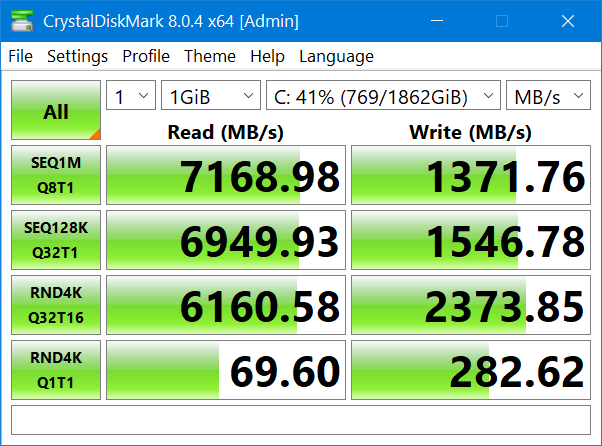
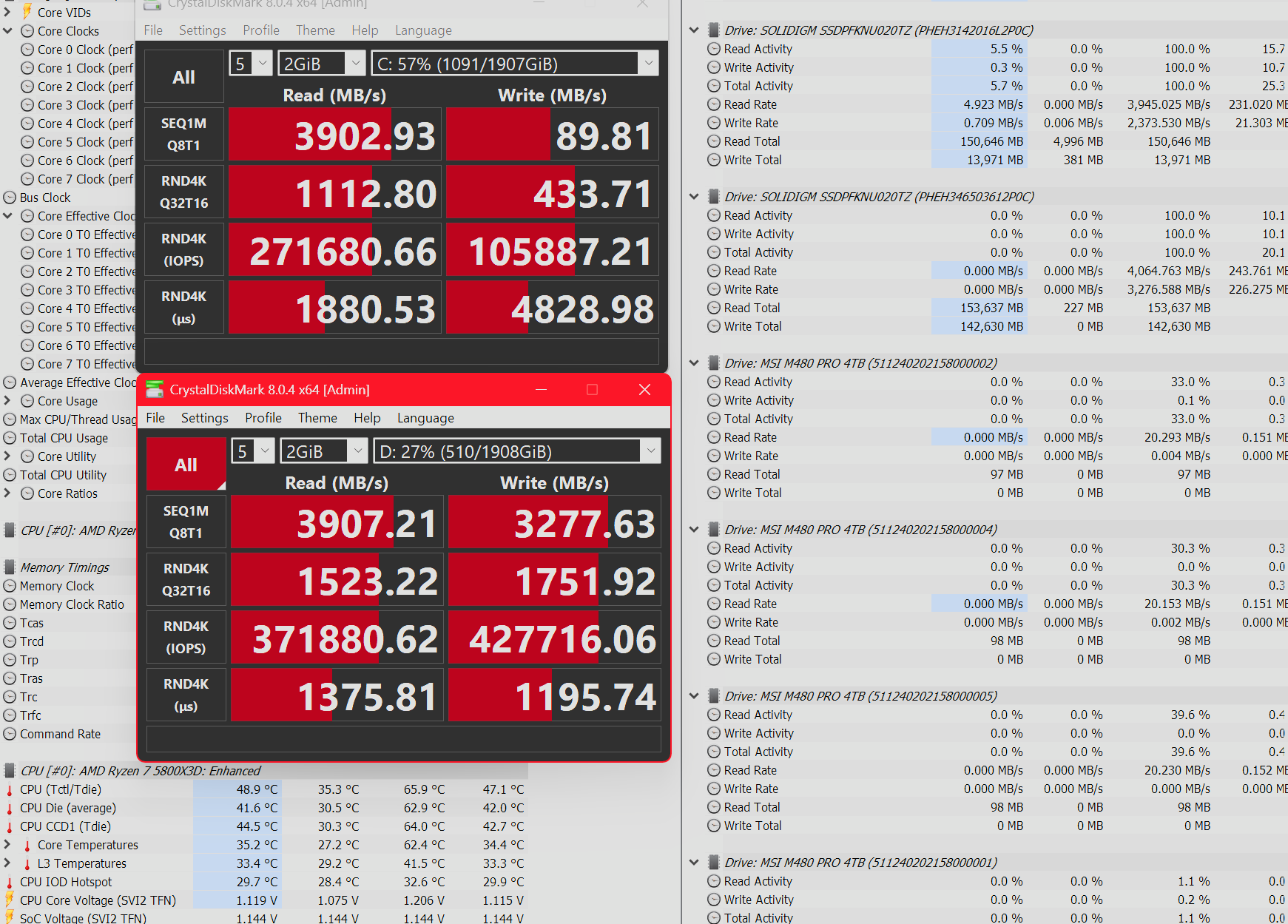
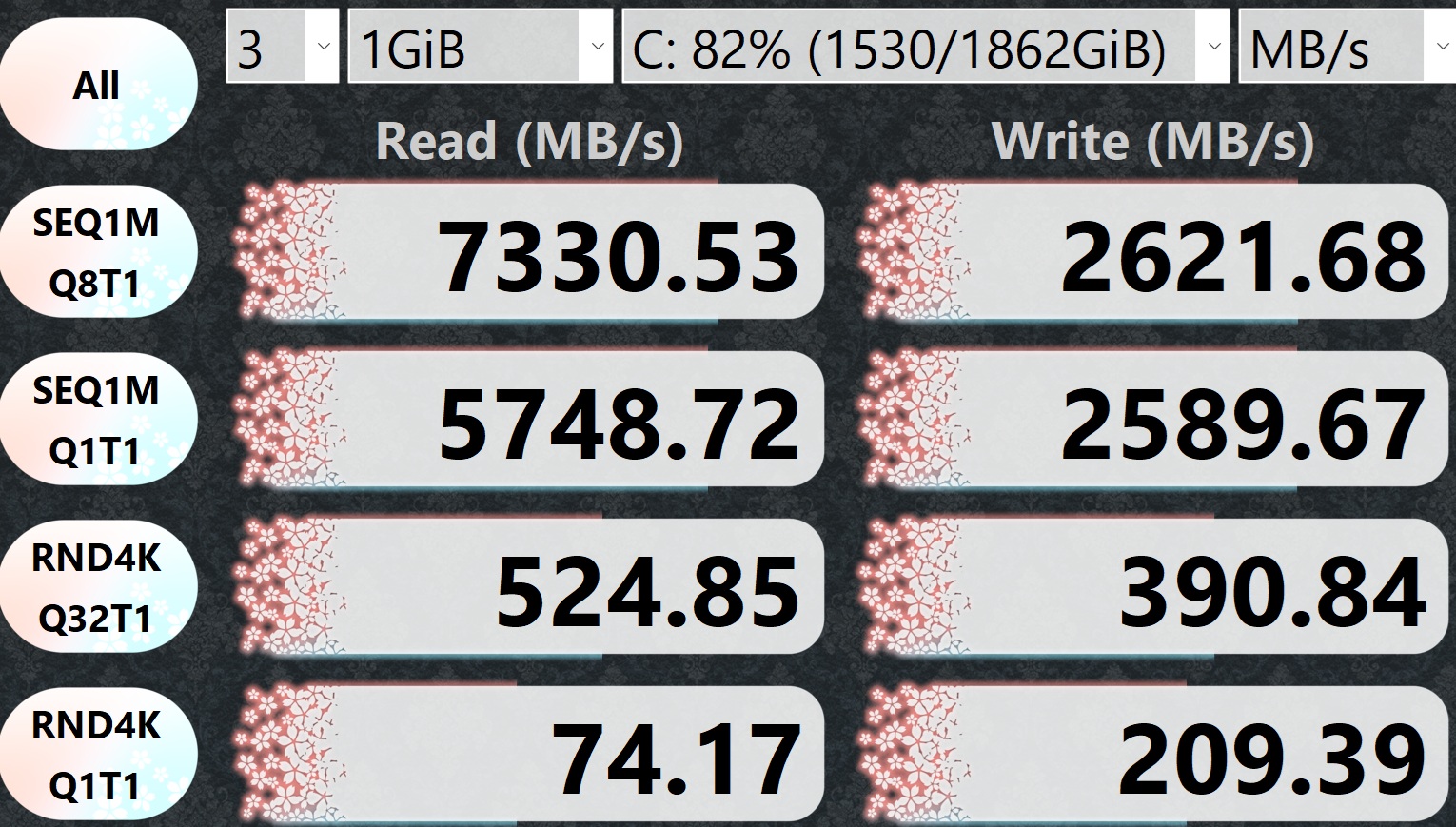
So I just saw the news SK Hynix launched the Platinum P51, was thinking it was about time the platinum standard in SSDs got an update! Then I saw the top comment in the reddit thread which mentioned a known performance degradation issue I hadn’t heard of it before, and sure enough my own P41 was affected. I found numerous posts scattered across online forums and reddit on the issue… apparently the fast-write cache on SK Hynix P41 & Solidigm P44 Pro drives bugs out and will cease clearing, permanently dropping write performance down to the bare metal TLC-NAND write speeds.
Nothing but a secure erase seems to resolve it, but the drives will quickly redevelop the issue. People have RMA’d affected drives, but the models received back have the same firmware and exhibit the same problem within weeks to months. SK Hynix has not issued a single firmware update in the lifespan of the Platinum P41 drive, affected users can expect write performance to stay around 1,500-2,500 MB/s when it should be 6,000 MB/s.
The good news is the P41 is a three year old product with a five year warranty. The bad news is replacement units exhibit the same defect. Some owners were able to secure refunds during the RMA and I was curious if anyone here has been able to do so.
Interesting i wonder if SK is working on a fix. Or a replacement. However unless you are using it in a NAS or a server. How much does it really effect you? Most of the time your interent connection is going to be the bottleneck. But SK should be fixing the issue or discontinuing the model.
There are reddit threads on this issue dating back to 2023, so SK Hynix has known about this problem for over a year.
As you say it’s not the end of the world, I noticed writes were capping at 2-3GB/s and didn’t really think anything of it at the time. But if I had wanted this level of performance I could’ve saved some real money by buying the cheaper P31 Gold instead. Incidentally SK Hynix did issue firmware updates for the P31 Gold to address bugs, which makes the lack of any firmware update on the P41 all the more unusual.
As SK Hynix continues to sell the P41 Platinum and Solidigm P44 Pro, its very disingenuous on their part to continue selling known defective products, when these concerns were raised with them in 2023.
@ozlay : while that significantly reduced write speed is not an issue with downloads from the internet, it can be one whenever really fast saves are wanted, be it editing videos, gaming or (hot right now) running AI models. I don’t have this particular SSD from SK Hynix, but when I pay good money for the promise of good performance, I expect that the manufacturer holds up their end of the deal. That SK Hynix hasn’t issued any firmware fix for this performance degradation for three years is a disgrace. IMHO, if they can’t fix it, they really should offer an exchange for a newer version or a refund. I had a high opinion of their SSDs, and was unaware of this issue, so now it’s definitely “had”, and no longer “have”.
Strangely, both my p41s experienced the same issue. After wiping both of them, they both seem to be working as expected now. I setup an rma and everything and they just decided to snap out of it. The more weird thing was they both would act up at random times from each other. One would act up, then the other would, then the other would be fine. I finally had enough after deciding I spent way too much on these to deal with such an issue. At first my computer was having all kinds of issues and I couldnt seem to figure out why. Come to find out all my issues were my two main drives. Like I said I wiped them and started over. That some how fixed it. Never in my life have I seen anything like this. This is supposed to be a really sought after drive. What is going on with technology these days?
I am not really sure what to think other then maybe the cache/Driver? is doing its promised voodoo. Both of these are attached to the X570S chipset. iirc they like 300 GB available for cache, and microsoft maybe made their driver redundant but I have no idea how that really works anyways other then it allowed more space in RAM to be used.
Wish the drivers did the same things as what I been reading ARC does, or maybe it does in a way. I’ve been almost content, aside from them not being 4TB. Did a lot of reading recently, fastest PCIE4 nvme controller with built in ddr4 cache are phison E18, then the most recent following is the phison E21, and whatever Samsung has going on.
SK Hynix has finally released a firmware update to resolve this issue. It took them several years, and I had already uninstalled my P41 for RMA so I can’t post test results here… but reportedly this update resolves the fast-write cache breaking.
There’s a direct link to the firmware at the bottom of this page. Users will need to install the Drive Manager utility (above the firmware lnik) to install the update. https://ssd.skhynix.com/
For those of you who have flashed the latest firmware, how is your P41 performing after the update? Are you still getting full speeds or has the write speed degraded again since you flashed it?
Found this thread via web search and created an account in order to reply…
NO, not getting full speeds on my P41 2TB anymore, even with the firmware update. Just ran CrystalDiskMark and Write is showing 3400 MB/s. I bought mine Jan 2023 and back then was getting 6600 MB/s.
That’s unfortunate. I wonder if the firmware fix is a bit “incomplete” in that it may prevent the drive from getting stuck in this condition, but doesn’t resolve the condition if it already hit it. Though people on Reddit seem to indicate that the firmware update restored the performance without needing a wipe.
In your case, I would still try secure erasing it after the firmware update, use it normally, and check again some time later if the issue reoccurs.
I am not sure if the issue is the same but mt 1TB P41 slows down to 2 GB/s write speeds unless I run the trim command daily. I have been using this drive for more than a year but, despite checking several times in the past, this is the first time I am experiencing this.
I updated the firmware hoping to solve this issue but it didn’t change anything.
The drive is being used as a Windows OS drive, with under 5 GB per day of writes on most days (I babysit the drive: fast startup disabled, web browser caches, downloads and temp files redirected to a mechanical HDD).
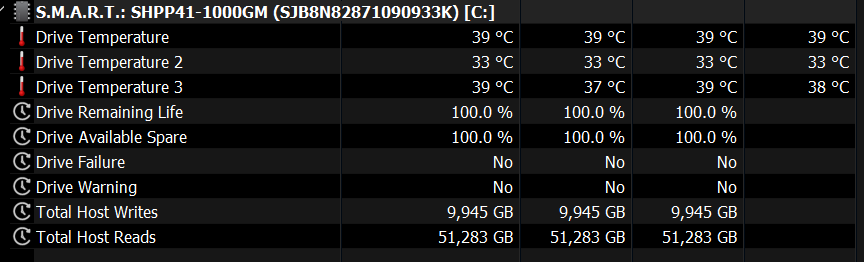
Currently the drive is 60-65% full and according to S.M.A.R.T. it has 100% life left:
Not sure what’s going on with your drive, but on my 2TB P41 that’s almost 80% full, I get 6 GB/s writes. I haven’t touched the trim on it either. It did have the slow write speed problem but that went away after the firmware update. Could be hardware revisions.
I’ve been testing mine since I noticed under Linux it likes to freeze and time out under the Disks benchmark. Earlier it tested fine in windows. But now I’m seeing capped 1.6GB/s write AND READ out of this thing. I know i got it cheap back when it was cheap but this is still an unacceptable situation especially now that it’s impossible to get a replacement at a reasonable price.
At this point I wouldn’t advise anyone buying SK Hynix products, My 1TB P41 is failing and their support is 1-takes days to reply. 2-Rejected replacement, only offered 75$ after I RMA to them which is not worth even walking to the Post office and bothering with it given Newer drives of this level of performance and capacity are 250$ nowadays.