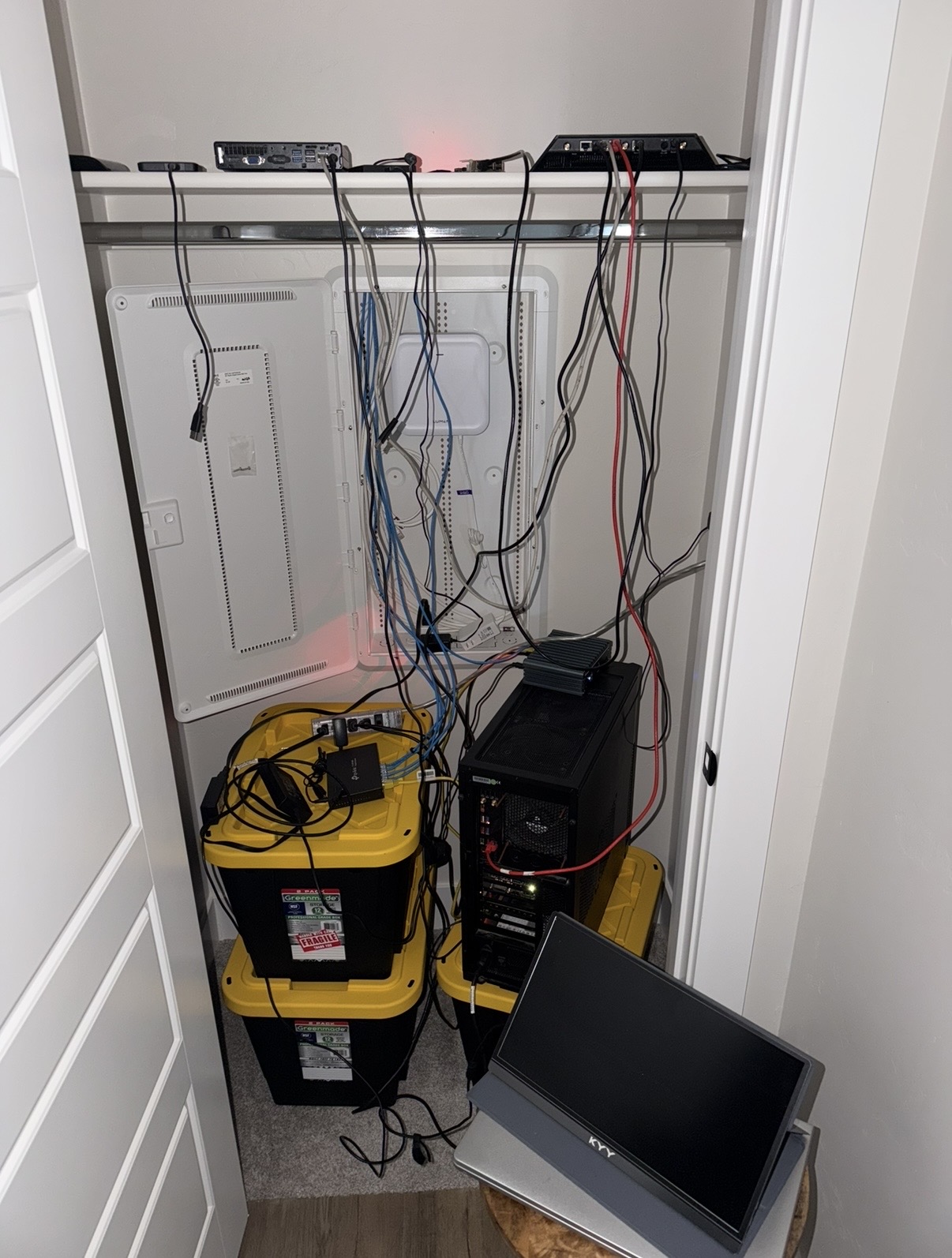
Hey All! I’ve been going down the rabbit hole of homelabbing and would appreciate some advice on hardware recommendations.
Use case:
NAS
Security Camera NVR
Media playback (jellyfin)
DNS Sinkhole (offloading this from my pfSense router)
Tailscale Exit Node
Bluray re-encoding
Local AI (Frigate, Paperless, Whisper etc)
Photo backups
Home Assistant
Basically a little bit of everything. I’d love to start replacing subscription services for family and friends with self-hosted alternatives. I’m finally on a symmetrical gigabit fiber connection!!
Hardware:
Intel Core Ultra 270K Plus - heaps of cores for virtualization (Im also interested in the challenge of P/E core scheduling)
Noctua 360mm AIO - keeps the 270K+ under control (could also harvest a NHD15 from an old rig)
4x16gb DDR5 non-ECC UDIMMs - got them from micro center bundles, 4 matching G.Skill binned sticks. Ideally replaced with ECC UDIMMs down the road
3060 12gb (starter GPU for lightweight local AI models, might consider a 3090)
ASUS Pro WS W880-ACE SE - good amount of connectivity, can bifurcate top gen5x16 to x8/x8, supports ECC UDIMMs, native slimSAS port for hokking up a used U.2 SSD, native IPMI
2x 1TB NVME SSDs - mirrored boot/VM drives
2x 16/18TB HDDs - starter drives for bulk storage (used enterprise sata HDDs)
miniSAS HBA - breakout cables to sata for tons of HDD storage (long term 10-12 HDDS)
Fractal Meshify 2 XL - tons of HDD sleds, roomy and can fit all the above
PSU - undecided, I’ll pick one out once I finalize my hardware/know how much power the PC will draw
Sooo that’s what I’ve come up with so far. I’m looking for about 8-10 years of functional life out of this server and the hardware list I drew up I think accommodates that. PCIE gen5x8 bifurcation on 2 physical x16 slots, DDR5 ECC UDIMM support, Fractal Meshify 2 XL provides ample expansion paths going forward.
How does this hardware match with my use case? I’m leaning towards consumer hardware for the power draw/noise advantages (will undervolt/tune whatever I can in the system). The lack of PCIE lanes is tolerable, even running 16 HDDs off the miniSAS HBA card sits reasonably comfortable running off chipset lanes. If I need to get creative I can always run something off of an NVME slot → adapter. The extra headroom afforded by the 270K+ really lets me stretch my legs and set up some Rube Goldberg machine of VMs/Containers + the all core grunt is great for Bluray re-encoding.
As for OS choices, I’m leaning towards Proxmox but am open to alternatives and setting up bulk storage, maybe an Unraid VM? With HDD prices as they are, adding 1 or 2 drives (of whatever is lowest $/TB) at a time is way more convenient than buying ~4-6 at a time for ZFS pools.
I don’t know that anyone has been truly successful at this beyond their own household.
You might find this more difficult to buy than you expect. One of things I’ve noticed with GPUs is you either buy them when they’re in production or you miss out.
Mirroring is for data integrity, which is largely not a problem for OS drives. Use 1x SSD and spend the remaining money elsewhere.
Consider also the Define 7 XL and the Phanteks Enthoo Pro 2 Server V2.
I think my goal for this homelab build is equal parts learning and function. Deploying services like immich/paperless etc are kinda like a guide post for where to start. That’s also what informed the hardware choices I’m thinking of getting; a bit of an initial hurdle for platform features that allow for greater flexibility/expansion in the long term.
For GPU choice ie the 12gb 3060/ 3090, I figured going in to this that GPU prices were gonna demand a pound of flesh from me. I’m just thankful I’ve been spared on RAM prices for my build. It is what it is, I’m comfortable buying used off EBAY and from everything I’ve looked into 30 series Nvidia GPUs strike a great balance of hardware acceleration/VRAM bandwidth and quantity.
Not mirroring the boot drive sounds good! Wasn’t too sure how write intensive VMs could get on consumer M.2 SSDs, but it sounds like its not too big of a problem. I think its going to be a lot of fun figuring out how performant I can make my HDD bulk storage with NAND Flash!
Case reccs are appreciated, thank you! I’ll check out the one’s you mentioned.
re the bulk drives, if youre going used enterprise anyway id compare $/tb across 14/16/18/20tb instead of locking in 16/18, the bigger ones can end up cheaper per tb and you save bays and power long term. also check power-on hours in the listing and whether the seller gives any warranty, some refurb sellers do 1-2 yrs. are you mirroring those two or running them single with backups elsewhere?
I certainly know folks that have done this, its a noble and excellent goal for current times. I myself have no subscriptions outside VPN for tunnel exits and protonmail, and via the power of selfhosting VPNs, setups like tailscale and Unifi Site magic have been awesome and allowed the rest of my extended family (2 separate households, 200+ mi away) to ditch all subscriptions as well. That said, it’s dependant on your users. Mine fortunately trust me with decisions like this and were all willing to forego certain conveniences for the sake of network security. If your target users aren’t willing to make certain sacrifices that can be harder. Some of my friends however have intentionally not been added to the intranet because of decisions I deem insecure or unsafe. Also worth considering for OP: be sure you want to be in charge of everyone’s data and entertainment 24/7 before offering that.
Ive been going back and forth between using Unraid/ZFS, but I think I’m convincing myself ZFS is the way to go. I spent a few hours looking around serverpartdeals and I saw a couple interesting offers. There were some 12TB Toshiba SAS drives with ~40k hours on them. The other was SATA WD Ultrastar 18TB Manufacturer Recert’d. To get the first vdev up and going, I’d get 3 HHDs for a raidz1. Down the road I think it’d be pretty cool to mirror a couple of gen3 U.2 SSDs on an add-in card on the second x8 slot on my mobo to accelerate indexing/caching with a special vdev.
As far as redundancy goes for my usecase, raidz1 should be fine right? With 12 HDD sleds in the front of the fractal meshify 2 xl, I could expand out to 4 3HDD raidz1s in the long run. That’d give me ~100TB (whatever Tib equivalent) of useable storage). What about ECC UDIMMs? The ram config im going with is not optimal by a long shot 4x16gb SR non-ECC DIMMs on arrow lake = slow as dirt JEDEC speeds so the memory controller doesnt implode. But 64gb of ram is 64gb of ram in these trying times you know? In the long run I could swap those out for high density 2x48/2x64 ECC UDIMMs.
A few of my buddies have IT/Software Dev backgrounds. They could onboard with little friction. As for extended family.. part of the challenge (fun) is making sure the services work like they have bumper lanes lol.
I was thinking setting up a reverse proxy so that even TVs can access Jellyfin via a URL would be prudent. I dont have a lot of faith extended family would take easily to connecting to a VPN tunnel to access local network services.
Being in charge of family/friends data will be a gradual thing. Hopefully I’ll be a bit less green when I’m ready to take on those challenges
Ive read that proxmox loves to write to log files constantly. I imagine thats easy enough to pass off to a larger capacity/more durable drive then? That leaves the OS drive to largely sit there predominantly reading files ie not wearing out the flash mem?
For the 4x16gb of ram, I’m more worried about errors popping up due to the stress the mem controller will be under/how fickle the signal integrity is on daisy chain topology with DDR5. Im no stranger to tuning memory so Im sure I could get things stable, but the config stability is gonna be a bit of a tight rope walk. 4xSR sticks of DDR5 seem quite a bit more difficult to get stable than 4xSR sticks of DDR4.
You don’t need to OC RAM for a homelab server LOL. You’re thinking in gaming PC terms, which isn’t necessarily a good fit for your use case. Most RAM works just fine at its default speed.
Coming at this from someone running repurposed NVRs as homelab boxes: the thing I’d think hardest about isn’t the hardware, it’s that the cameras, DNS, the exit node and the family’s photos all go down together. Every kernel update, every “let me try this” reboot, the cameras stop recording and the house loses DNS. I’d at least keep DNS on the pfSense box or a cheap second device, so one bad night on the server doesn’t take the internet down for everyone.
On the reverse proxy for family: I’d be careful putting Jellyfin straight on the internet. It’s had its share of auth issues. If TVs are the sticking point, put Tailscale on a cheap streaming stick for the family TVs and they never see a VPN prompt, or at least put the proxy behind something like Authelia and only expose Jellyfin.
And since you’re planning to hold other people’s photos: raidz1 keeps you up when a drive dies, but it isn’t a backup. Get a second copy off that box, even just old drives you rotate, before you take on anyone else’s data.
Personal take: I tried Proxmox and ended up on plain Ubuntu Server with Docker because it was simpler for what I run. With your list Proxmox makes sense, but try both before you commit.
I agree. The only thing my Debian server does in realtime for the entire house is DNS, for exactly this reason.
It might be best for OP to offer backup as opposed to primary self-hosted storage. Cloud services have MUCH higher availability, redundancy, date integrity, and bandwidth than any home user. In the extremely unlikely event they lose a friend’s data, that friend can then take advantage of the backup. OTOH if you’re primary cloud storage that’s a lot of responsibility and if you lose folks’ memories that might be the end of that relationship.
Same lesson here. I run primary AdGuard on my main box and a secondary on a separate little machine, so a reboot never takes the house offline. I don’t think I would’ve survived disrupting one more episode of The Buccaneers…
And yeah, being the backup instead of the primary is the smarter way to start. Lower stakes while you’re still learning, and you can move up to primary once you trust your setup, if that’s your goal. Personally, I only host my own photos, and I still back them up.
You bring up some good points, thank you! For DNS, a bit more info on my existing infra topology: I’ve been running pfSense on an intel n5105/16gb ram mini pc with 4x2.5 gigabit nics for years at this point. Very stable and performant for home network volumes of traffic. I’ve been chaffing at pfblockerNG’s limited format handling for domain feeds for a little while now. Some of the more robust/well maintained lists just flat out dont work because the domains are formatted with appended * or |. Adguard or pihole would let me try out some different lists and see what I like.
I have an old raspi 3b 1gb ram and office mini pc with an AMD Pro A10-8770E R7 running on the network right now serving as tailscale exit nodes. The raspi leverages DNS over TLS for external tunneled devices and the mini PC is a torrent box who’s traffic routes out of a Nord VPN gateway on my router, the exit node piggy backs off this so remote traffic also routes over Nord infra.
With the server built and running, these services would be moved into VMs freeing up either the raspi or mini pc to act as a high availability DNS server.
NVR does seem trickier, I’d have to think on how I’d keep the cameras up while tinkering/rebooting constantly. The reverse proxy is a classic issue of security vs convenience 100%. Would running jellyfin in an unprivileged container make any meaningful difference or is a shared kernel just a big no-no? I’ll look into Authelia.
On the photo backups, I here you. My sibling lives on the other side of town from me and it wouldnt be too much trouble to get a cheap NAS up and running at their place for redundant backup. The uptime issues are a separate concern. You’re suggestion to ease into taking on that responsibility gradually is a good idea.
It seems like high availability was a blind spot in my planning. I’ll definitely have a good think on how to improve uptime for core services
Same. Hosted on my PC, synced across my machines using Resilio Sync, backed up using Restic and Time Machine, and offsite backups using Duplicati with client-side encryption.
This will be a great build and carry you through many years. Or should! Reminds me of my build that I completed in 2022, although yours is newer
Two things I would caution you over,:
Installing a hypervisor if you don’t need one. Although Proxmox is great and kind of a “do it all OS” for homelabbers, if you don’t need to run a VM. Don’t run a hypervisor. I’d very very strongly suggest OMV, TrueNAS scale, or just raw Debian. Unraid is ok but costs money, and you sacrifice some things with the way they do RAID and even if you run ZFS on it.
miniSAS HBA - I’d swap that out for a proper Megaraid 9300/9400-16i. You’ll thank yourself later! Needs a PCIe 3X8 slot, gives you crazy performance and allows you to have more drives down the line.
I run 60+ containers on an older system than yours, having replaced every VM I ever ran, using less resources & overhead, and more performant than when I ran them in VM’s. Nested virtualisation is also just a PITA.
Your article was a great read! We’re definitely on a similar wavelength specc’ing out hardware
The hypervisor question is a good one. Im expanding from a humble (rats nest) homelab and most of my services have run on dedicated hardware up to this point. Behold it in all of its glory haha
As far as virtualization goes, I dont have a good measure on what needs to be in a VM rather than containers. I’d imagine most things could run in containers, but there’s the sliding scale of security/convenience to contend with. What’s nice about being at the beginning is im not locked in to any given path yet so there’s definitely room for experimenting with different OS’s!
Good rec on the HBA, I haven’t ordered one yet and the 9300-16i looks like a good buy!