Hello new here, and would like to get into AI and run on my local PC. I don’t need top of the line, but need something that is usable. I have no experience in the AI area and what is needed to run on my local machine. I know the larger VRAM buffer the better. I don’t want to use Nvidia. I have currently 2 9070xt and one 9070 in my gaming PC rigs. I have a 9950X3d and 9800x3d in those rigs. I run CachyOS on my Linux box. I have Windows 11 Pro on my other rig. I have 64GB of RAM in each rig. I have the MSI x670e and MSI x870e motherboards. Do I need to buy a B70/B60 cards? Would they be better than the 9070xt cards? What about the 9700? Do I need to get a Threadripper or Xeon setup? Will the 9950x3d be enough? What about the PCI-E 5 x8 per GPU setup, how much performance will I lose vs running at PCI-E 5 x16? So many questions and not enough information on how this hardware would run or if it’s even viable. Thanks!
Dual 9070xt is a very practical setup. You don’t loose much with pcie 5 x8 comparing to x16.
The R9700 is a much, much better card than anything Intel have on offer, and it’s properly supported too. Intel’s gaming cards compete well in the budget-gaming bracket, but that’s about it.
The trouble is, AI boxes tend to be quite noisy - especially with blower fans. Generally speaking, it’s preferable to keep them networked and in another room if you can; you can quiet them down with some tuning, but not so much that it’s comfortable having them in the same room.
You don’t tend to need a particularly fast CPU in a GPU-focused AI rig, but you do need plenty of PCIE lanes (if you’re going multi-GPU) and plenty of RAM if you want to run MoE models bigger than the available VRAM.
The real question, though, is…what exactly do you want to do with it, which models are you looking at, and how much money do you want to spend? That’ll give you all your answers.
OP might want to run the model on 1 GPU and some other items on the other so as not to be bottlenecked.
There’s a reason workstation motherboards exist 
Install Comfy UI, LMStudio, ollama, vllm or whatever else and see what you find useful. You can run quite a bit on single 16GB GPUs that are modern, not everything fits across multiple GPUs or can take good advantage of such a setup, some LLMS can fit partially on GPU & part on RAM and still get decent performance (MOE models, normal models that offload to RAM run slow at 2-10 tokens per second)
Image, audio/ song & video generation mostly just works on one GPU so a single fast high VRAM card is ideal, 16-32GB and it generally does better with an Nvidia GPU, with AMD lagging behind and Intel after that.
Text chat bot/ coding assistant and similar LLM usage generally can split across multiple GPUs to pool total VRAM and let you run larger models, ideally you use all the same brand and model of GPU, odd issues come up otherwise. Generally performance is determined by how new the generation of GPU it is and then if comparing to similar generation GPUs the VRAM bandwidth will be a big determining factor in token generation speed, so an old P100 accelerator card will lose out to a pretty basic and way lower bandwidth 5060Ti just because the P100 is missing the ability to run certian instruction sets native plus missing featuresets.
2x 16GB modern cards with 5.0 x8 x8 will be pretty great to start with, 32GB total VRAM let’s you run decent sized LLMs and a 9070 or 9070XT will let you do some decent image & audio generation on one GPU, peer to peer communication between the 2 cards should be usable enough at 5.0 x8. Intel is getting better support as time goes on, but I’m not sure there is enough user base for the community support to be good enough long term, the R9700 is a very popular card and there is a lot of development around it plus it’s a pretty decent card overall (really close to a 9070XT, but the blower cooler isn’t exactly great if you really hammer the R9700 in high settings gaming or rendering)
If you want to run 3-4 GPUs then moving to a modern Threadripper setup could make sense, but it’s a very steep buy in right now to get more PCIe lanes. Just shift some parts around now and maybe buy a new higher wattage PSU to power your main rig.
For what it’s worth…the blower cooler is actually extremely effective - even staying below 65% or so fan speed, it can keep the GPU comfortably below 70C even under an hour or two of sustained AI loads of 100% GPU usage with fully-loaded RAM and constant chatter over the PCIE bus.
Or did you mean noise-wise?
I believe it depends on the manufacturers. With my gigabyte r9700, the hot spot is pegged at 110C at 100% load.
That seems too hot. My (4) asrock r9700 cards don’t go over 69/70c at 100% (running radiance) and they are cramped. I try to keep them running as much as I can with queued work. They run at about 300w at peak (two PSUs across two circuits) and blow like a wide hairdryer.
I agree r9700 cards are the sleeper hit at least for the moment.
I have three from three different manufacturers - Asrock, Gigabyte, and Powercolor. They all have different fan defaults, but when they’re all set to the same curve with LACT, they behave identically. And the hot spot never gets anywhere near 110C, I’ve never seen it above 75C after being configured correctly, and even before that I’ve only seen ~85C.
Try undervolting it by about 40-50mV.
Noise wise for sure, especially under heavy sustained load, pretty sure rendering or GPU benchmarking are a lot heavier loads than local AI, though local AI hits the memory pretty hard and the passive backplate sandwiched between other cards doesn’t do any favors. Especially compared to a 9070/ 9070XT like the OP has that is designed for gaming with a likely oversized multi fan cooler.
The blower design is nice that it removes a lot of the heat from the case, but there kinda isn’t enough air intake space between cards when stacked which doesn’t help noise or cooling performance.
Would be great to have an option to buy a pre-watercooled 1 slot R9700 GPU, especially with the sorta common idea of dense compute, or a flow through cooler with a 4 pin fan header. But those will remain pipedreams.
What makes you think that?
When my cards are running local AI loads, they’re pegged at 100% and 330W (I raised the power limit 10%). That’s as heavy as it gets for these cards, and they can be doing that for hours at a time. The key is to properly set the fan curves up, because almost all of the manufacturers set them to “quiet” from the factory, which assumes intermittent loads and gets really hot really quickly.
When running the cards right up against each other, you tend to only get variance of a few degrees and they’re all boosting to the same clocks.
Genuine question: have you actually run a bunch of these cards together, or are you speaking hypothetically? If you have, then how did you have the cards set up with respect to clocks, power limits, voltage and fan curve?
I had my Threadripper 9970x with 2 Asrock R9700 GPUs but returned them for poor assembly and really bad fan noise at 50%+ fan speed, got 3 Gigabyte R9700 GPUs, I tried to set fan curves, but had constant driver crashes in windows and it would reset custom fan settings on recovery from the crash (crashes not related to fan curve)
I rebuilt it in a new Antec 900 case more recently with 4 total Gigabyte R9700 one Silverstone 2500Rz PSU and have been ironing out the gremlins. For my build the constant driver crash hasn’t come back since leaving a monitor plugged into one GPU and dummy EDID dongles in the other 3 GPUs. That has been stable enough that I will probably soon play around with fan curve settings and maybe dropping core voltage some.
I guess I picked the wrong variant of R9700 because the Alphacool blocks aren’t compatible, so I have a custom loop for just the CPU (420mm front, 280mm top, 140mm rear radiators). I would love to have the GPUs under water and have an external radiator, the blowers are annoying to be in the same room as.
For your reference, in the middle of prompt processing with QWEN 3.8 27B.
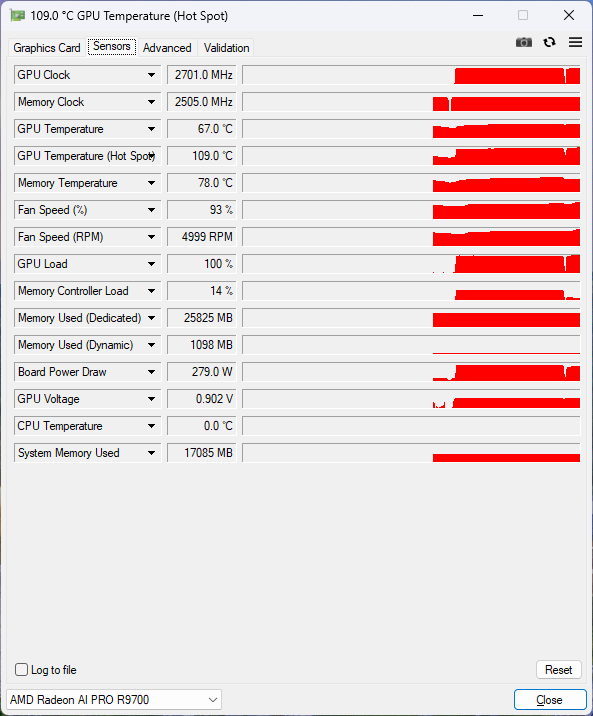
The case is Meshify 2 XL. Fully loaded with 2 GPU, 5 HDDs. Maybe it plays some role.
Some food for thought on what I’ve been doing and my plans to upgrade to give more power to my setup.
I run a host os hypervisor and with vllm being given my 3090, I’ve had some success with the 30B models, but context length and some volatility of the quantizations lean it to be a slow but still pretty useful model provider.
Now my laptop and any of the clients I use have Hermes harness connect to my locally hosted vllm with tailscale. I need more gpu and more lanes. Xeon or threadripper was what I was thinking but Epyc even starts to come into consideration here. But for my poor ahh, I’m sticking with am4 and my 5950x with a sli bridge whenever I can snag both another 3090 and the bridge (ebay has some items)
42C hotspot delta is not good; I’ve never seen it this high on my (only, n=1) XFX version of that card for any workload.
There are reports of the R9700 actually drawing up to 400W under some conditions , but even that does not explain away the hotspot delta and the thermal throttling.
Is this a common thing on Gigabyte version of the card?
Now, it reminds me the vapor chamber issue when 7900 xtx was released. I still can return the card as it is still in the return period. The bad news is the price has risen by $100 this week. Shall I seek a same-model replacement instead of refund?
I don’t see why not if vendor still offers replacement. It might (hopefully) well be a one-off.
I have a sample size of one, but…it’s not a problem on mine.