Add QDirStat and WinDirStat for Linux and Windows respectively.
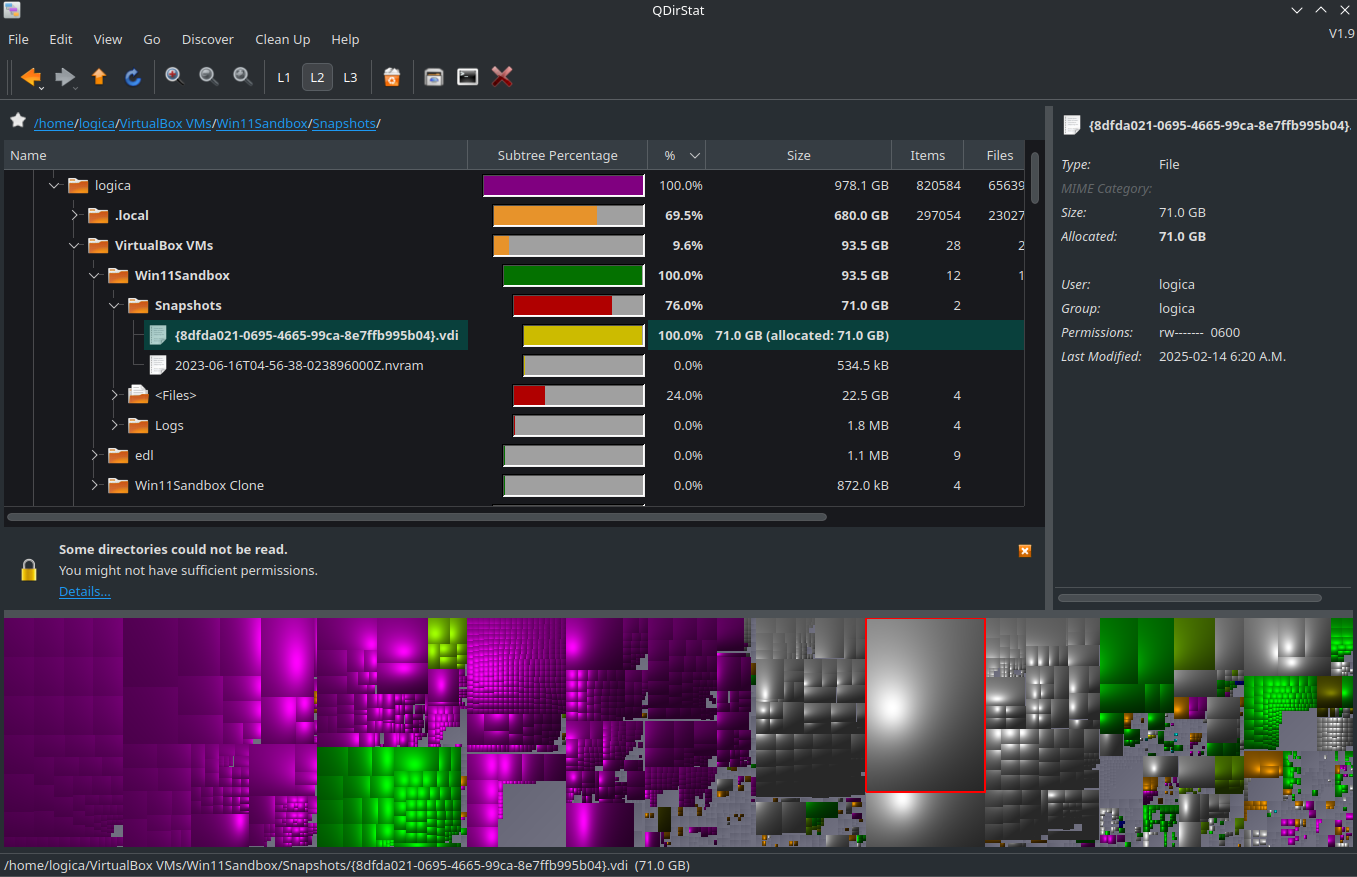
One of the most useful utilities for finding where the largest files are on your disk, visually by volume. In this example my vm snapshots seem to be consuming the most space:
I had been putting off looking at video editors for a while. I’ve seen a bunch of them but never had enough motivation to seriously dive in to any of them. I saw an update on YouTube from someone that said they use Shotcut for their videos and it recently had an update. A quick check in Linux Mint showed the repository version is older, but the Flatpak is up to date. They have an AppImage, Snap and more for those interested.
I invested a few hours and already made more progress than I would have expected, even if I don’t have much to show for it yet. It works well with what I tried, plenty of tutorials around, and a much more pleasant experience than I was expecting.
If you have an Android phone and like to have a bit more control over your camera settings, try Open Camera (free app), or try it again if you haven’t in a while. One thing I personally appreciate about it is that it lets me adjust parameters in video recording like the average bit rate. The camera apps that came with my Android phones (none of them new “flagships”) didn’t give me a choice when it came to average bit rate, so I used Open Camera and played with it. So now, instead of UHD in h.265 at 30 fps @40 Mbit/s in the stock camera app, I was able to record UHD 30 fps in h.265 at 70 Mbit/s. And maybe it’s me being subjective, but I believe the result is better. Basic thought is that it’s usually better and easier to throw information out than to try to reconstruct data with Topaz or something like it because they weren’t acquired to begin with.
Three things: 1. Your mileage will vary depending on your smartphone and 2. Before you set up your photo and/or video parameters in Open Camera and then rely on them to work, do yourself the favor and test things out ahead of time. For example, I started with UHD at 30fps in h.265 on my older Xiaomi at 90 Mbit/s, and that caused occasional freezes/crashes. Easing off stepwise I arrived at a stable 70 Mbit/s, and recording UHD at 30fps is now rock solid. And IMHO noticeably better than the stock app that can’t or won’t record above 40 Mbits (same codec, frame rate and resolution). On my daily driver (LG V60), I was able to use Log Gamma for greater dynamic range at the same settings, again 30 Mbit/s higher than the camera app the phone came with.
3. Having established stable settings (for video) and satisfactory settings for stills, take a few short videos and a couple of pictures with Open Camera at the settings you’d like to use, and then with the phone’s default camera app. Compare the results head to head. Use different lighting conditions and use cases. Sometimes, the manufacturer’s camera app can give you better results, but at least you checked it out . And, have fun doing so!
UTM is a quite capable oss alternative to parallels. I had to run windows for something on my mac. Parallels wasnt feasable as I dont need windows regularly enough. Its too expensive for that.
Another alternative would be vmware fusion. Supposedly its free for personal use. But I have found UTM plenty good enough and it does not have any restrictions.
 . And, have fun doing so!