I found a problem with EVGA 980ti Classified's ! It seems they do not support x16/x16 PCI-E bandwidth on the EVGA X-99 Classified motherboard even though the board is suppose to support x16/x16. This is a problem with both the 5930K and the 5960X which both have 40 PCI-E lanes. I have not been able to test it on any other motherboards. Below is my original post on the EVGA forums and here is a link to the thread http://forums.evga.com/980ti-Classified-2way-SLi-PCIE-lane-issues-X99-Classified-MB-NO-x16x16-m2399449.aspx I am hoping somebody here can help figure this out !?! Check the thread there is a lot of useful info, pictures, and it is not a long thread.o
System info : EVGA X99 Classified E-ATX motherboard Intel 5930k custom water loop 16gb G. Skill 2666 DDR4 RAM EVGA SuperNova P2 1000w power supply 2x EVGA 980ti Classified
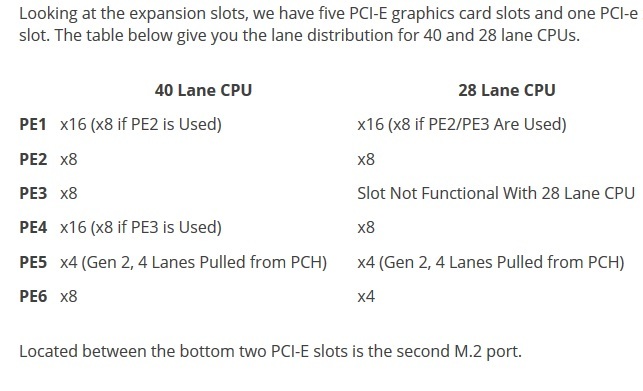
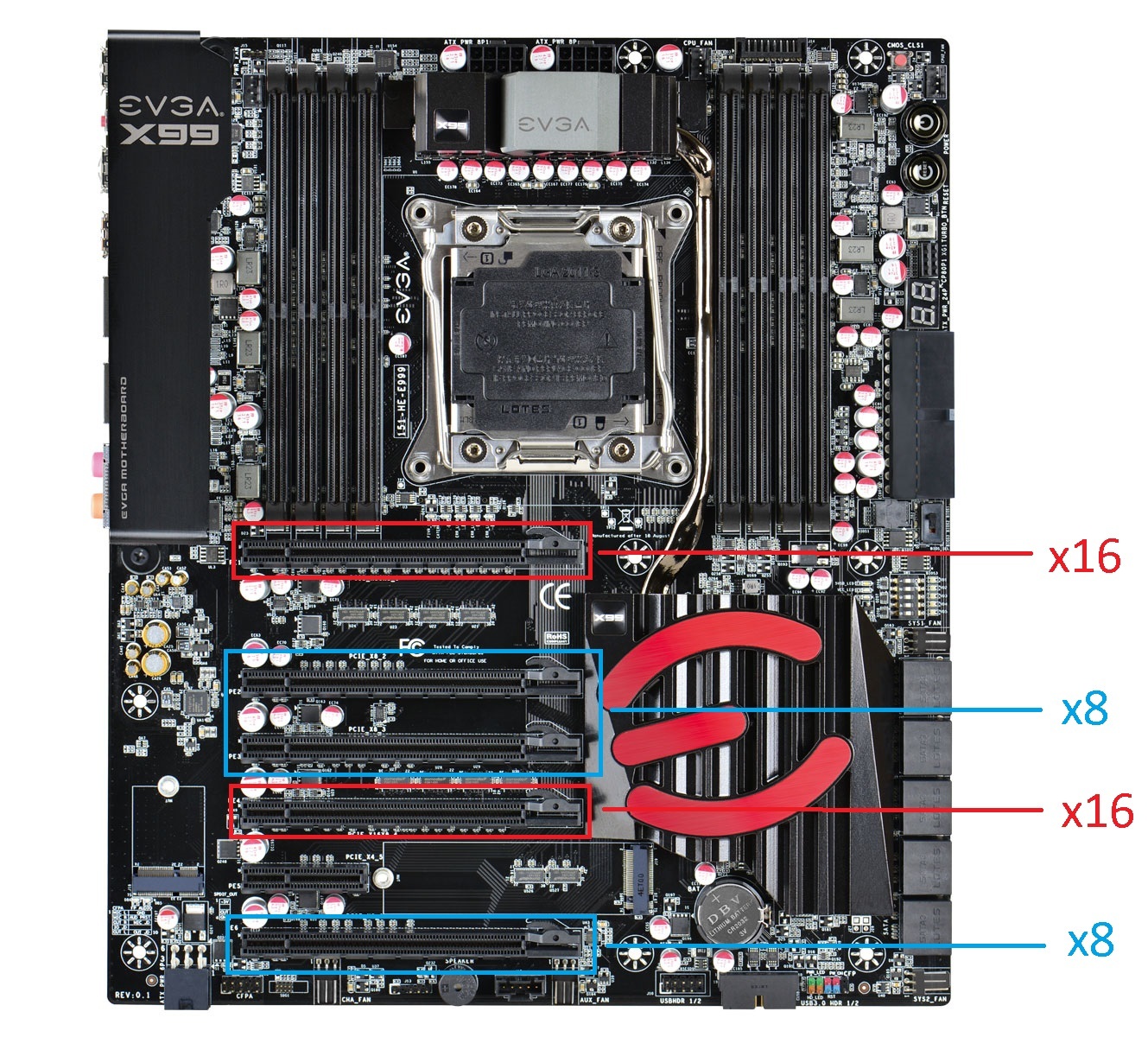
I installed 2x EVGA 980ti Classified GPU's a few weeks ago. They are installed in slots 1 and 4 EVGA's product manual says these are the proper slots for 2way SLI on this board and they should be x16/x16 with the 40 PCI-E lanes from the 5930K. I have the extra 6 pin power plugged into the motherboard for the PCI-E slots. For some reason slot 1 is reading 3.0 x16 but slot 4 is reading 3.0 x8. Why is slot 4 x8 and not x16 like it is suppose to be?? Is it that the GPU just can't use the bandwidth ? I tried pushing the cards with Heaven benchmark, 3d Mark, Furmark and it stayed at x8. I have tried disabling the other PCI-E slots. I have both the m.2 slots disabled. I have no other hardware in any other PCI-E slots. I also noticed that in the Nvidia LED configurator that the card in slot 4 is reconized as card 1. I am not sure if thats normal or just a bug in the software. When I had my 780ti's in they always read x16 on both slots. I just can't wrap my head around this. I know there is no real performance gains from x8 to x16, but I bought the 5930k specifically because it had 40 PCI-E lanes. I would like to be able to use the lanes and hardware as stated in the product specifications. If anyone else can confirm this with a similar set up please do so. Any help or input would be appreciated!!! I can post any pictures or info needed.
I know the performance increase is negligible. I had 2 780ti's and they ran at x16/x16, but for some reason the 980ti's will only run x16/x8... I really only care because it's a issue EVGA is not responding to. As an enthusiast I paid for certain performance specs when I bought EVGA's parts. Between the motherboard and GPU's we are talking $2000 I expect to get what I paid for and what they list as the specs. At this point we don't know if it's the board or gpu's causing the error. I just want EVGA to give me the technical reason why their hardware is not performing to the specs the advertise ? Figured maybe Tek Syndicate or some of their audience might be able to help.
well you can simply do a test. just take the gpu out of the first slot, and put the other gpu in that. And then see if the otherone also runs at 16X. If so then the issue is with the motherboard.
If I run either card just in slot 1 each card runs at x16. So I know both cards are good in slot 1. If I run either card in slot 4 with no card in slot 1 they run at x8. Below is a copy of my post on the EVGA forums where I ran a bunch of configurations on the board.
I did some trouble shooting with the cards. Both cards read x16 when by themselves in slot 1. 1 card slot 1 is x16, 1 card slot 4 is x8 !?! 2 cards sli slot 1 and slot 2 is x8/x8, 2 cards sli slot 1 and slot 3 is x16/x8, 2 cards sli slot 1 and slot 4 x16/x8. I did not bother with slots 5 and 6. I ran bench marks in each configuration with 3Dmark FireStrike with my 5930K at 4.5ghz. They all bench marked pretty much the same regardless of configuration. Slot 1 and 2 scored 26065, Slots 1 and 3 scored 25823, slot 1 and 4 scored 26526. I hope someone comes through with an explanation. I really hope someone with a similar setup sees this and can shed some light. I am tempted to order a new X99 board to see if it has the same issue.
according to the image i have posted, slot 4 should run at 16X mode if the third slot is not in use. i asume you have also set the pci-e dipswitches correctly.
Its a bit strange that it runs at 8x, since the slot is physicaly an 16X slot. Maybe you could try a bios update, if you not allready done that. Also check the bios for pci-e link speed configuration.
I have nothing in slot 3 the dipswitches are all off except slots 1 and 4. I have M.2 slots disabled though I have tried it both ways. The bios is update, I even rolled it back and tried other versions and still runs at x8. I have manually switched the PCI-E lanes to Gen 3 in the bios still runs x8. It has to be a EVGA driver or bios issue. We just can't figure out which one. EVGA refuses to comment on it even on their own forum.
does the second card allways stays on 8x? Or does it change wenn you put the sli setup under load wenn gaming for example?
Of course as soon as your gpu is on idle, the pci-e links speeds goes down this is power saving. But as soon as you start to game, or run a benchmark or whatever load you put on the gpu´s, then the link speed should ramp up to 16x.
If you just put a single card in slot 4 and you start to game, then the link speed of slot 4 should ramp up to 16X as soon as you start to game or whatever load you put on that gpu, if not then i can only think of a mobo issue.
Second card always stays at x8 no matter how mush load I put on it. If I put just 1 card in slot 4 it stays at x8 even underload. I think its a problem with the EVGA 980ti Classified because the EVGA 780ti's will run at x16/x16, but as soon as you switch to the 980ti's it goes x16/x8.