I just jumped into Windows and it shows performance of 26x Watts, and the standard performance of a 6900XT in Furmark 2.
However in Linux, I open a game in 1080p on steam (Sky Children of Light, not an intensive game at all) even on the lowest settings and my computer CHUGS badly.
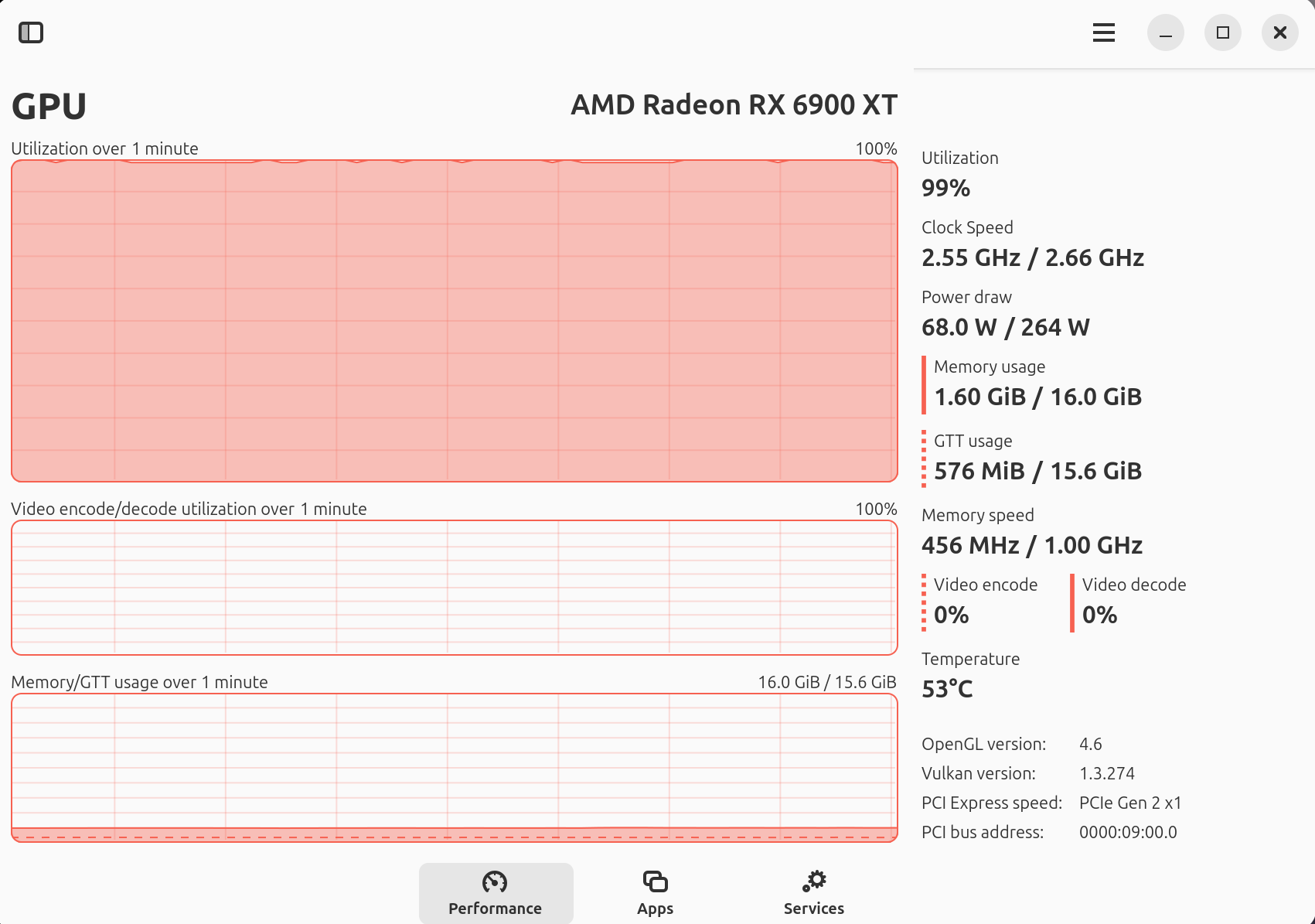
Mission Centre shows 100% GPU utilisation. But it shows 75W of power and PCIE Gen 2x1 lanes? Which is odd.
Anyone have any idea what might be happening. Thanks.
I have a headless server with a 7600XT that does show a 100W utilization when I have nothing running, when I want it to stop, I have to run the command sudo radeontop and it seems to fix the issue, this is corroborated by the command sensors where it show my card at only 2W afterward.
What does your sudo lspci -vvv show for your videocard?
Shows that you’re running at full PCIE 4.0 at X16, must be a reporting bug that it shows Gen2 X1. It might also be that it downclock while not in use for 3D application, try running a 3D test and see if it goes to Gen4 X16 while under load.
Have you tried the command sensors before and after running sudo radeontop and see if that calmed down your GFX?
@xValkyrie93, you didn’t mention which Linux distro you are using. If your distro is based on Debian or Ubuntu, the kernel 6.8.0-49-generic is the latest one.
Do you mean to use like another Linux Distro on a Live USB or something Skunk? I’m still relatively new to Linux.
Ok I did think it was still being at PCIE 4x16 as when I loaded Windows, it was running at PCIE 4x16 with full power draw.
So in normal use, there is no issue. However, when I open up a game and it swaps to 3D, it completely lags my computer down. I’m testing another game as I don’t really play many games currently on PC. I’ll try Palia but got to patch. I’ll try those commands soon.
I’m using Linux Mint which I think is Ubuntu based.
I just restarted my PC, immediately opened Steam, then Sky Children of Light. When its in Full Screen, the gameplay is fine, most likely 60fps. However if I tab out of the game and open a tab for youtube, youtube plays about 10-20fps, and its extremely stuttery. Like 30fps, then 10fps, then 30fps again. If I change the game to Windowed mode, then it completely slows down everything including the game which goes to maybe 20fps.
Not sure if any of this information can help, I’ll try do some testing now that I’m home from work.
Ok it might have something to do with how this certain title actually runs. As I don’t play many games on PC outside of this, I didnt even think to check any other games.
Palia running on max settings at 4k according to Mission Centre pushes the GPU usage to 85% and the computer is perfectly stable even if i tab off the game. Not sure whats causing Sky to just lag my computer down.
I don’t think it use to do this. The main thing I have changed since is this GPU is in the lower slot and I have another GPU in the top slot for GPU passthrough for my Windows VM. Ah well.
There’s too many considerations here for me to dig in… You’ve got pcie passthrough, and a gpu in a second slot - are there enough lanes? Which gpu are you using in windows? You’ve got one kinda strange issue with one particular game running, but not others - did proton version change or anything? Do you have a windows VM running on this machine at the same time??
If you’ve got two GPUs, why not just have two systems?
Ok so I have Dual Boot currently but I recently installed Windows moreso as a thing to test. I purely want this system to only be Linux in the long run.
My pc has an Nvidia 1060 in the top slot purely because GPU Passthrough to my Windows VM was a nightmare. It wouldnt work with using the bottom slot. I have this GPU barred from my Linux system. Its purely for any games that only work in Windows, so its there so I can run any games in my Windows VM.
The bottom slot I have my 6900XT. It does have enough lanes. The mobo is an x470.
Proton hasnt changed. In saying that Ill look more into it when I have time. I don’t have a huge amount of time after work until the weekend to fully diagnose. And no, I don’t have the Windows VM running at the same time.
I don’t really want 2 systems. Currently the way I want to do things is my main GPU for 4k gaming on Linux, and the secondary GPU for 1080p gaming on Windows VM. And currently this works fine. Until now anyway XD
I was going to use it for League, but cant get that to work. Sigh Sadge.
Solo Leveling Arise is what I use it for currently. I saw some people managed to get it to work on Steam but the Steam release hasnt officially released yet so once that happens I’ll move over. But basically for situations like this. Probably won’t happen much in the future but eh. Fun exercise to learn.
Any game that uses anti-cheat will eventually ban that person’s account when he uses a Windows VM. I have read somewhere; I forget where some forums claim they have figured out how to keep anti-cheat software from knowing a game is running in a Windows VM, but I put such information down as faults news.