6+2/8pin PCIE Power connector to 4x 15pin SATA power?

Hi L1Techs forum, my first post here.

I have a Intel NUC 9 Pro Kit NUC9VXQNX Xeon™ E-2286M, (Quartz Canyon).
I purchased a LSI SAS 9302-16e, 16-Port 12Gb/s PCIe 3.0 HBA, to fit into the PCIe 3.0 x16 slot on my NUC. Thinking I was gonna use it for a TrueNAS setup.

For the JBOD enclosure I have bought 2x ICY DOCK ExpressCage MB038SP-B, which is a 8x 2.5 Inch SATA/SAS HDD/SSD Hot Swap Mobile Rack in 5.25 Inch Bay.
The connectivity on each Bay consists of:
Host Interface:8 x SATA 7pin
Power Input:2 x 15 pin SATA power connector

I was thinking of populating it with at minimum:
2x Samsung 870 EVO 4TB SATA 3 2.5" SSDs
2x Samsung 870 QVO 8TB SATA 3 2.5" SSDs
And at maximum:
8x Samsung 870 EVO 4TB SATA 3 2.5" SSDs
8x Samsung 870 QVO 8TB SATA 3 2.5" SSDs

I have also purchased 4x HD Mini SAS 36 Pin SFF-8644 to 4x SATA Cable (1 Meter) for the data connectivity between HBA and the JBOD.

But I was thinking if it was an option to use either of the 6+2pin or 8pin from the NUC PSU to power on these 2 Disk Bays? From my understanding the 6+2/8pin can deliver 75/150 watts, so it should be capable of handling the load right?

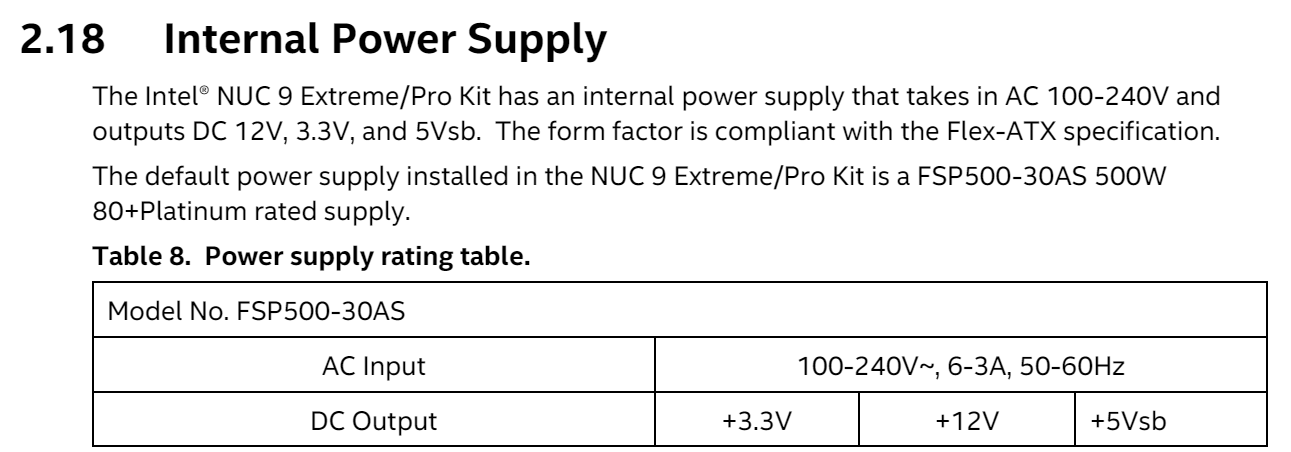
The documentation diagram says:
Model No. FSP500-30AS
AC Input | 100-240V~, 6-3A, 50-60Hz |
DC Output | +3.3V | +12V | +5Vsb |
| 14.0A | 40.41A | 3.0A |
| 485W Max | 15W |
Total output continuous shall not exceed 500W

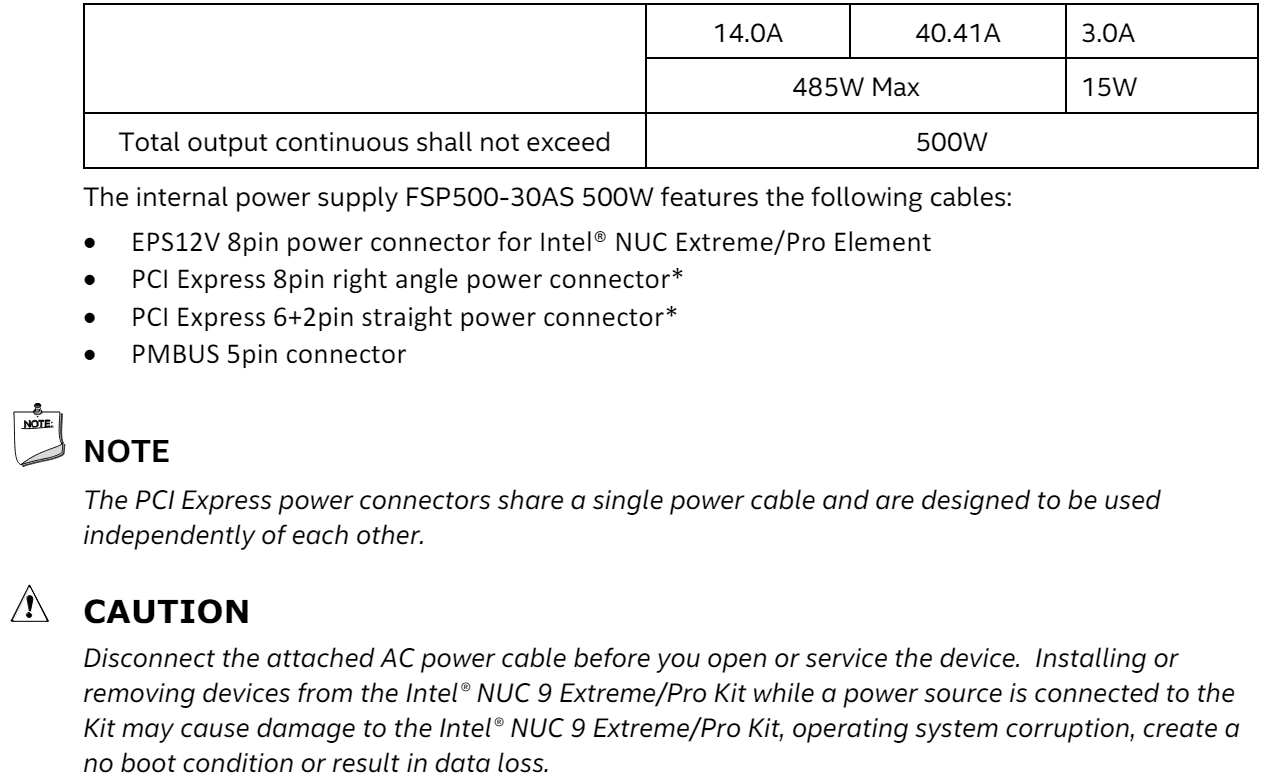
The internal power supply FSP500-30AS 500W features the following cables:
• EPS12V 8pin power connector for Intel® NUC Extreme/Pro Element
• PCI Express 8pin right angle power connector*
• PCI Express 6+2pin straight power connector*
• PMBUS 5pin connector

NOTE
The PCI Express power connectors share a single power cable and are designed to be used independently of each other

Is there any cable to convert the PCI Express power connectors to the SATA power connectors or does it require a daughterboard or something else entirely? - I have no idea about power and voltage and such, in my mind I just figured it was possible if the power connectors could deliver 12 volts and up to 150 watts that it should be possible to convert it to a power source for ICY DOCK Bay with SSDs.

I think I got everything but the power delivery for the JBOD figured out, other options or suggestions are appreciated. :smile:

Best regards,
Skorbis

1 Like

I am not an electronics expert but the PCIe cables are black and yellow when color coded, so it appears that they have 12V and ground lines only, while an SATA connector has red (5V) and orange (3.3V) wires as well so with a PCIe connector you would be missing these voltages entirely and without them the drives won’t turn on.

4 Likes

That’s right. SATA power cables need at least 5V to function - most 2.5" drives are fine with 5V only - and typically both 12V and 5V - IIRC nearly all 3.5" drives need the 12V rail as well. 3.3V is oftentimes missing from the cable, e.g. my 2.5" HP backplane only takes and provides 5V and 12V. You can also commonly find 4-pin Molex to SATA adapters that, by their nature, only have the 12V and 5V lines available.

Anyway, it’s impossible to passively convert 12V only PCIe power cable (6 or 6+2 or 8 or 12V-2x6-HPWR-or-whatever-it’s-called-now) to typical SATA cable. You can add a DC-DC power converter to step down 12V to 5V, but it’s typically more hassle than it’s worth.

2 Likes

Thanks for the replies, I feel a bit closer to my goal now.

So a direct connection with the PCIe power cables is not possible, because of physical restraints on the base current right?

I’m still gonna move forward with using the NUC for my NAS, but the SATA power delivery is still unsolved.

Is there any solutions where I can convert the 6+2/8pin PCIe power to correct voltages for the Samsung SSDs?

Any alternative suggestions are also very much welcome

You could get something like CORSAIR +5V Load Balancer — 100W Capacity

It’s cheap and readily available. You might get away by depinning and converting the 8 pin PCIE into EPS one or just pick up cheap adapter from computer shop.

3 Likes

Thank you this is looking a very solid option, will very likely proceed with this.

I read bit about it on the Corsair forums: forums/topic/172592-introducing-the-corsair-5v-psu-load-balancer/
And from what I could tell, if you already have a Corsair PSU, you can just directly plugin a 8pin PCIe power cable into it?
And if your PSU is from another manufacturer a EPS12V power cable to the input?

My hardware knowledge is very basic, so pardon me if I get all these connectors wrong. I have no idea what they are tbh.

In my case I would need an adapter from my 8pin PCIe to the EPS12V correct? - Can you show me one for reference?
How many SSDs would it likely be capable to handle? - Need minimum 4 and maximum of 16.
How many can each of the 3 SATA/PATA power ports handle? - Each SATA power connector on the ICY DOCK bay handles 4 drive trays I assume.
Can I also use the 6+2pin with an adapter to EPS12V in case I need more than 1 unit?

I think I managed to upload pictures of the PSU in my NUC.


No, it has standard EPS 8-pin input, so any power supply from any make that has extra EPS12V (f.e. Corsair power supplies usually have 2 or 3 depending on how high the wattage is) output would work. You’ll need an adapter, as your compute unit is going eat that only EPS12V output.

Adapters are available on Amazon and most shops, for example https://www.amazon.co.uk/COMeap-Detachable-EPS-12V-Converter-13-3-inch/dp/B08M5F7K5J/

Yes, you could buy and use use multiple units. If you’re only running those SATA SSDs, they’re usually rated at somewhere around 1 A at 5 V, so 100 W unit could run 16 disks easily (100 watts at 5 volts is 20 amperes so 20 disks at 1 A would be theoretical max, however I’d just run two at that point)

1 Like

here’s what the inside of the corsair 5v load balancer units look like:

2 Likes

Yeah, this is where I saw this device first! I completely forgot where, but had saved in my tiny mind the vendor and product, remembering it was some RGB jank :smiley:

2 Likes

Thank you both, I will proceed on this route.

@twin_savage I couldn’t find anything about what is included in the box with the Corsair 5v load balancer, can you confirm if there are cables included or will I have to shop for those as well?

Yes there are cables included, one 8-pin EPS to power the unit, two 4-port sata power cables and one 4-port molex power cable.

2 Likes

I thought of a use case for a 12V-only PCIE-to-SATA power adapter: I was considering getting a Nuc 12 Pro X as a small server/desktop machine, but if I wanted to use my two U.2 drives with it, I’d need to supply 12 volts to the SATA power connectors of the M.2-to-U.2 adapters I have.

This topic was automatically closed 273 days after the last reply. New replies are no longer allowed.