tl;dr;
5080 16GB is about 20% faster prompt processing and 10-15% faster token generation than 3090TI FE 24GB for the case where both LLM weights and 8k context can fit entirely in 16 GB VRAM.
5080 16 GB is about 10% faster generating images with stable diffusion than 3090TI FE 24GB.
However, the extra 8GB VRAM on the 3090TI FE 24GB offers flexibility to run larger models, longer context, and larger batch sizes as well as general quality of life for driving a desktop rig running xwindows and a browser etc.
Motivation
I’ve been enjoying the recent GPU review content of the 5060TI 16GB and today’s video on the ASUS 5080 16GB and wondering how these new 16GB cards compare to older cards for common home lab ai workloads like LLM inferencing and Stable Diffusion image generation?
Rambling Background
I don’t have a lot of data points yet beyond Wendell’s Procyon AI Text Generation Benchmark that uses ONNXRUNTIME. This is still useful comparison, but in my understanding, ONNX runtime packages a model in such a way that it can run on a variety of systems e.g. Linux, Windows, CPUs, GPUs, etc. However, that can come at a cost to performance over a more optimized runtime built with optimizations for the target hardware.
Just recently, with Wendell’s hardware support, I was able to release an experimental quantization of Google’s gemma-3-27b-it-qat-GGUF LLM model on huggingface designed to work with ik_llama.cpp fork. These quants are perfect for playing around with the best quality gemma-3 in under 16GB VRAM (CUDA GPUs anyway  ).
).
Unfortunately, these models will NOT run on mainline llama.cpp, ollama, lm studio, koboldcpp, etc. (If you want to run on those engines, check out bartowski/google_gemma-3-27b-it-qat-GGUF. I’ve actually been in touch with bartowski, he’s doing some great stuff to support ai home lab enthusiasts!)
LLM Benchmark
Interestingly, redditor u/Maxious just posted benchmarks running the ubergarm/gemma-3-27b-it-qat-GGUF/gemma-3-27b-it-qat-mix-iq3_k.gguf with 8k context on a Inno3D RTX 5080 X3 OC 16GB! So I ran the exact same command on my 3090TI 24GB and here are the results.
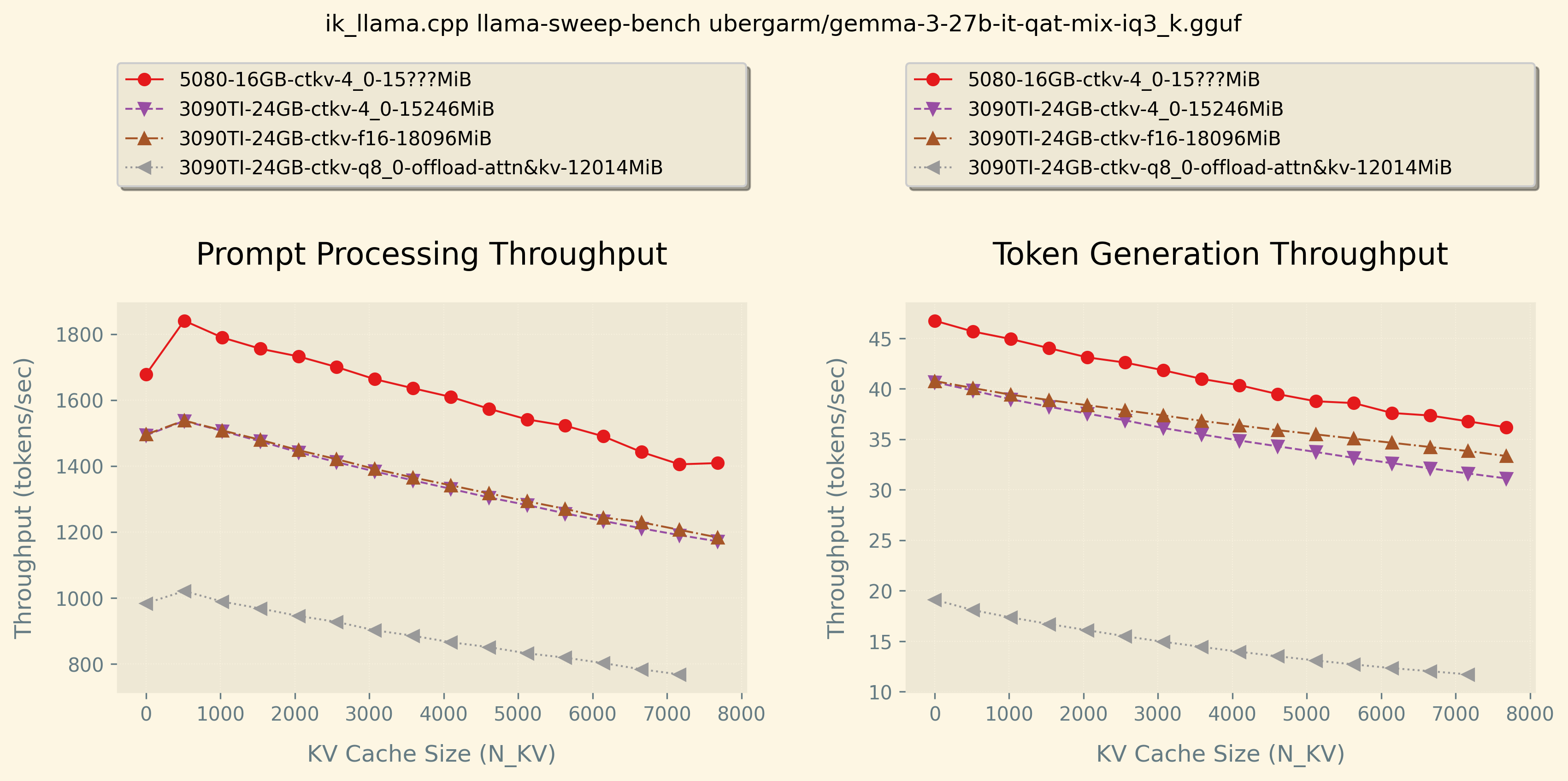
Higher numbers are better for both graphs.
The graph on the left is prompt processing (sometimes called “prefill”) which is sort of how fast the LLM can read what you give it. You can see that the more input you give the model, the slower it is given there are more computations.
The graph on the right is token generation or how fast the LLM can write in reply. Similarly, the more text that it had to process the slower it is given each new word it generates depends on every word that came before it so it slows down for longer generations.
Just for comparison, I ran a couple others configurations on my 3090TI 24GB to show how if you have more than 16GB VRAM you could not compress the kv-cache and leave it at f16 which is slightly faster than q4_0 on GPU inferencing.
I also ran in a configuration that only takes 12GB VRAM by offloading just the attention and kv cache onto CPU RAM and let my 9950X with 96GB DDR5-6400 and overclocked infinity fabric handle those calculations. This allows a person with low VRAM to use a much larger context but at the penalty of slower performance.
Finally, my 3090TI 24GB could fit up to 32k context with this model which would allow processing of longer text, longer code generation etc. So keep that in mind when comparing.
Personally, I’d probably still choose a used 3090TI 24GB over a 5080 16GB if local LLM inferencing is an important part of your daily activities. While it may be about 10% slower for jobs that fit into 8k context, keeping everything in up to 32k context will out perform the 5080 16GB given you would have to offload to CPU RAM… Also having a little extra VRAM to run xwindows display and firefox gives quality of life 
Image Diffusion
The other big home lab use case for GPUs is running ComfyUI for Stable Diffusion image generation. I have run SD1.5, SDXL 1.0, PonyXL, FLUX.1-dev, Illustrious, the newest HiDream, and even Wan2.1-I2V-14B to generate short video clips from a starting image. That whole scene is really impressive with a lot of optimizations allowing complete workflows to fit in under 16GB VRAM. You can find most of those models and workflows on civit.ai and huggingface as well.
I don’t have any direct comparisons myself, but just saw a new open bechmark project pop up today as posted on reddit by u/yachty66.
It runs stable diffusion generations for 5 minutes and measures number of images generated, average temperature, and eventually power. Seems to take fixed 4GB VRAM and kept the utilization pegged near 100% and power maxed out just below 450 watt limit.
==================================================
BENCHMARK RESULTS:
Images Generated: 141
Max GPU Temperature: 79°C
Avg GPU Temperature: 73.9°C
==================================================
Okie, if anyone is interested holler and I can give exact commands if you want to try any of this on your rig to compare! I would love to see how the 5060TI 16GB results stack up!

 ))
))