What’s the Goal?
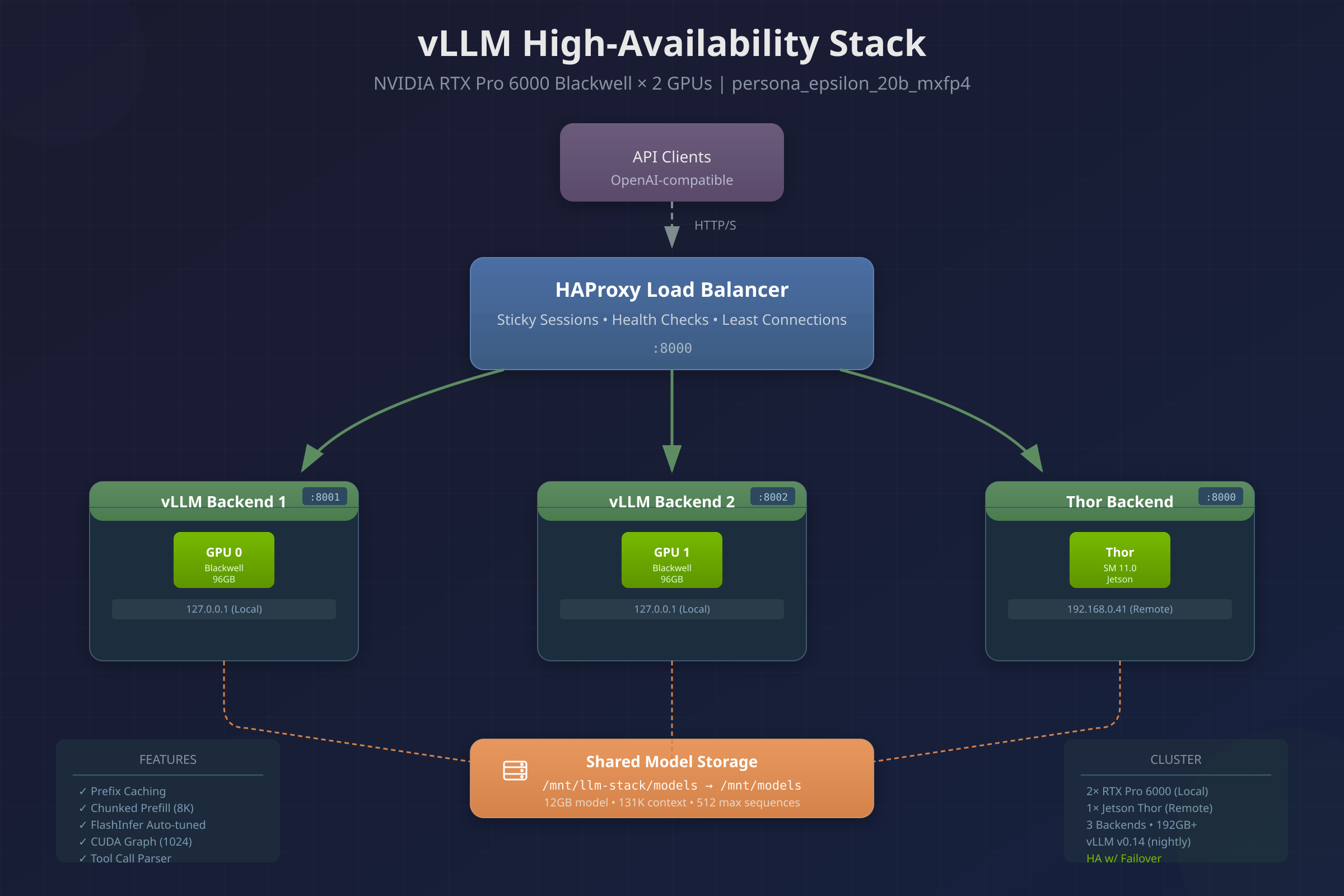
This is a single-command bootstrap for a local OpenAI-compatible LLM inference endpoint that offers redundancy.
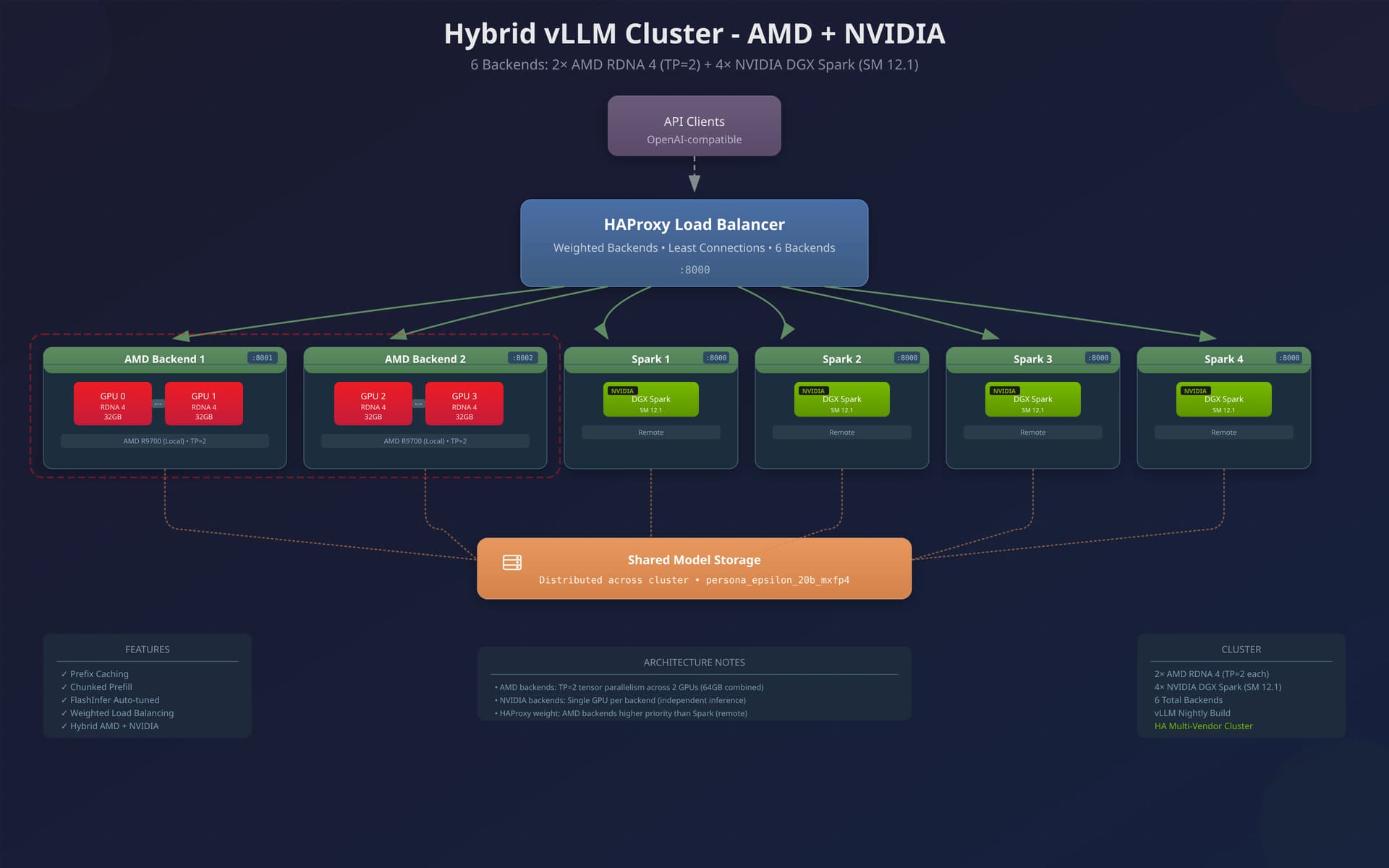
- It spins up multiple vLLM backends (each bound to a subset of GPUs / tensor-parallel groups)
- It puts HAProxy in front as an API-layer load balancer + health checker + failover router
- It includes a bunch of the boring-but-important “production glue”: kernel/sysctl tuning, ulimits, THP disable, CPU governor, GPU power profiles, model download, and optional TLS.
The end result is: clients point at one URL (HAProxy), and you can lose a backend process (or even a GPU group) without your dev team’s “code assist” endpoint falling over.
This script is possible because of the Herculean efforts from @eousphoros and it’s been fun to be along for the ride here.
Script Sections and how they work
1) User-tunable variables
At the top you’ve got sane defaults, but everything important can be overridden via env vars:
STACK_DIR,MODEL_ID,MODEL_DIR- Ports:
LB_PORT,VLLM1_PORT,VLLM2_PORT - Backend GPU splits:
VLLM1_GPUS,VLLM2_GPUS - Isolation method:
GPU_ISOLATION=env|devices - vLLM tuning:
GPU_MEM_UTIL,MAX_MODEL_LEN,MAX_NUM_SEQS, prefix caching, chunked prefill, dtype/kv dtype, etc. - Optional TLS knobs: enable HTTPS + HTTP/2 with a local CA you generate.
(If you’re just skimming this as a quick start, don’t forget to also set your HF_TOKEN
This should help make the script “portable” across boxes and across GPU configs without turning into a fork-per-system mess.
Helper functions = detect hardware, validate, and generate device mappings
This is the “make it robust” section:
- Detect ROCm version / GPU count / ISA (
gfx1201,gfx942, etc.) - Pull a marketing name when possible (rocminfo)
- Estimate VRAM per GPU (useful for context limits / capacity expectations)
- Convert GPU indices into
/dev/dri/renderD*mounts for the “devices mode” isolation.
The script can pick the right container image and it can guide you when the system isn’t what you think it is (“expected 4 GPUs, found 3”).
It has been tested the most on our 4x R9700 system (temporary setup – as I’ve got to give two of those R9700s away!) as well as our RTX Pro 9000 systems.
Real-World Aspects
This is the part most “LLM docker compose guides” totally ignore, and it’s why this script is actually useful for real-world workloads imho:
- Sets GPU power profile to COMPUTE and perf level high, plus a systemd unit to persist it
- Sets CPU governor to performance, plus a systemd unit to persist it
- Applies sysctl tuning for:
- connection-heavy workloads (backlogs, port range)
- keepalive + TIME_WAIT reuse
- bigger TCP buffers (LLM responses can be chunky)
- BBR congestion control
- vm/map count (large models map a lot)
- swappiness low (avoid latency death spirals)
- shared memory limits for RCCL/TP
- Disables Transparent Huge Pages (common latency spike source), persists via systemd
- Raises ulimits for file handles/processes and bumps Docker’s limits
Even on a single host, inference is “server software”, not “a Python script you run once”. This turns the workstation into something closer to an appliance.
Note that if this system is doing double-duty for VMs you might not want to disable THP, or maybe reserve some memory for your VMs up front to lower translation overhead. This was just something we followed from the vLLM tuning guide.
The script creates a venv solely to run HF CLI (imho this is a nice compromise vs polluting system’s python):
- Uses
HF_HOMEcache under the stack dir - Supports
HF_TOKENwithout splatting it all over the compose file - Downloads the model into
MODEL_DIRand skips if already present (checksconfig.json) - Excludes
original/*to save space (pragmatic for vLLM use)
The model directory becomes a stable artifact you can back up, move, or share across setups. Technically I suppose you don’t need HF_TOKEN if you’ve already got the model you want.
GPU auto-detection chooses the best vLLM ROCm image
This is a killer feature:
- Reads GPU ISA and chooses a GPU-specific optimized image where available:
- RDNA4 R9700 →
rocm/vllm-dev:open-r9700-... - MI300 →
rocm/vllm-dev:open-mi300-... - MI350 →
rocm/vllm-dev:open-mi355-... - Falls back to
vllm/vllm:latestfor other cards (i.e. CUDA) - Allows manual override via
GPU_TYPEorVLLM_IMAGE
- RDNA4 R9700 →
I’ve really struggled with rocm + vllm as explained in the video. Often, it seems, new rocm versions drop but they’re primarily for CDNA. So my RDNA setups break until full support comes. At least, with these vllm-dev tags, one gets support for the train they’re on.
HAProxy is doing much more than round-robin:
- Long inference-friendly timeouts (client/server up to 1 hour)
- Compression for JSON/SSE (bandwidth and latency wins)
- Adds
X-Request-IDfor tracing - Adds
X-Real-IP,X-Forwarded-*headers - A
/statsendpoint on:8404for quick visibility - Backend uses:
balance leastconn(good for variable inference times)- sticky cookie (
VLLM_BACKEND) to maximize prefix cache hits /healthchecks, mark-down/mark-up thresholds- retries + redispatch so a dead backend doesn’t strand sticky sessions forever
- slowstart to avoid slamming a backend that just came up
This is the part that makes “old reliable HAProxy” feel like a modern AI gateway. It’s not just spreading load; it’s preserving cache locality and failing over cleanly in case a GPU craps out.
and finally…
Docker Compose to tie Everything Together
deploy:
haproxy:2.9on host networkvllm1on host network, bound toVLLM1_PORTvllm2on host network, bound toVLLM2_PORT
Each vLLM container:
- mounts
/dev/kfdand either:- mounts all
/dev/driand usesHIP_VISIBLE_DEVICES(env mode), or - mounts only the render nodes for the chosen GPUs (devices mode, more deterministic)
- mounts all
- uses
ipc: host+ big shm - uses group_add via numeric GIDs so it works even if the container doesn’t have
video/rendernamed groups - loads the model from
/modelsreadonly - starts OpenAI-compatible server:
python -m vllm.entrypoints.openai.api_server - adds your vLLM performance flags (prefix caching / chunked prefill / template) via a helper builder
- installs
openai+coloramaat startup as a pragmatic band-aid for missing deps in some images
Note if you’re on CUDA or coming from CUDA the mounts and devices inside the container are a little different than you’re used to. That’s okay.
You (should) end up with a LAN-accessible /v1 endpoint that looks like OpenAI to your tools, with redundant GPU-backed backends behind it.
Oh, and this same approach works fine with multiple backend hosts! If one decides that is advisable.
The script finishes like a good appliance installer:
- prints endpoints
- prints quick curl tests
- prints monitoring commands (
docker compose logs -f,rocm-smi) - warns about reboot if ROCm was installed but tools aren’t present yet
- runs GPU validation again
The design goal here is less “here’s a pile of YAML, good luck” and more “here’s the button, here’s how you know it worked, here is the thought process that brought it to life”.
… and also… Good luck!
The Script
#!/usr/bin/env bash
set -euo pipefail

################################################################################
# LLM Inference Stack: vLLM + HAProxy LB (single host) - Ubuntu 24.04
#
# Supported GPUs with GPU-specific optimized images:
#   - AMD Radeon AI PRO R9700 (RDNA 4, gfx1201) - rocm/vllm-dev:open-r9700-08052025
#   - AMD Instinct MI300X/MI325 (CDNA 3, gfx942) - rocm/vllm-dev:open-mi300-08052025
#   - AMD Instinct MI350X (CDNA 3, gfx950) - rocm/vllm-dev:open-mi355-08052025
#
# Also supported with rocm/vllm:latest:
#   - AMD Instinct MI250/MI210/MI100 series (CDNA)
#   - AMD Radeon PRO W7900/W7800 (RDNA 3 - limited support)
#
# This script installs:
#   - ROCm 6.3 (AMD GPU compute stack) - skipped if already installed
#   - amdgpu-dkms kernel driver - skipped if already installed
#   - Docker with ROCm container support
#   - vLLM (ROCm build) with HAProxy load balancer
#   - AITER optimized attention kernels (for R9700/MI300X/MI350X)
#
# Requirements:
#   - Ubuntu 24.04 (fresh or with existing ROCm installation)
#   - AMD GPUs with ROCm support
#   - ~250GB disk for model weights + ~30GB for ROCm/Docker
#   - Internet connectivity for package downloads
#
# VRAM by GPU type (per GPU):
#   - MI300X:           192GB HBM3  → gpt-oss-120b easily
#   - MI350X:           288GB HBM3e → largest models
#   - MI250X:           128GB HBM2e → gpt-oss-120b with TP=2+
#   - Radeon AI PRO R9700: ~32GB GDDR6 → gpt-oss-20b, smaller models
#   - Radeon PRO W7900:    48GB GDDR6 → gpt-oss-20b
#
# Defaults:
#   - HAProxy listens on :8000
#   - vLLM backends on :8001 (GPUs 0,1) and :8002 (GPUs 2,3)
#   - Auto-detects GPU type and selects optimized image
#
# Post-install: Reboot required if ROCm was freshly installed
################################################################################

# -------------------------- User-tunable variables ----------------------------
STACK_DIR="${STACK_DIR:-/opt/llm-stack}"

MODEL_ID="${MODEL_ID:-eousphoros/persona_epsilon_20b_mxfp4}"
# Derive MODEL_DIR from MODEL_ID if not explicitly set (replace / with _)
MODEL_DIR="${MODEL_DIR:-$STACK_DIR/models/${MODEL_ID//\//_}}"

# vLLM image: AMD official ROCm builds
#
# GPU-SPECIFIC IMAGES (recommended for best performance):
#   - rocm/vllm-dev:open-r9700-08052025    # Radeon AI PRO R9700 (RDNA 4, gfx1201)
#   - rocm/vllm-dev:open-mi300-08052025    # MI300X/MI325 series (gfx942)
#   - rocm/vllm-dev:open-mi355-08052025    # MI350X series (gfx950)
#
# General ROCm images (check https://hub.docker.com/r/rocm/vllm/tags):
#   - rocm/vllm:latest                     # Most recent stable
#   - rocm/vllm:rocm7.0.0_vllm_0.11.2_20251210
#   - rocm/vllm:rocm6.3.1_vllm_0.8.5_20250521
#
# IMPORTANT: Do NOT use vllm/vllm-openai - that's CUDA only!
#
# Auto-detection: If GPU_TYPE is set, use the appropriate optimized image
# Valid GPU_TYPE values: r9700, mi300, mi355, auto (default: auto-detect or rocm/vllm:latest)
GPU_TYPE="${GPU_TYPE:-auto}"
VLLM_IMAGE="${VLLM_IMAGE:-}"  # Will be set by auto-detection if empty

# Ports
LB_PORT="${LB_PORT:-8000}"
VLLM1_PORT="${VLLM1_PORT:-8001}"
VLLM2_PORT="${VLLM2_PORT:-8002}"

# GPU assignment per backend (comma-separated GPU indices)
# Default: 2 backends with TP=2 each for 4x GPU systems
# Options for 4 GPUs:
#   - "0,1" / "2,3" : 2 backends × TP=2 (balanced throughput/latency)
#   - "0" / "1" / "2" / "3" : 4 backends × TP=1 (max throughput, smaller context)
#   - "0,1,2,3" : 1 backend × TP=4 (max context length)
VLLM1_GPUS="${VLLM1_GPUS:-0,1}"
VLLM2_GPUS="${VLLM2_GPUS:-2,3}"

# GPU isolation method: "env" or "devices"
#   - "env":     Use HIP_VISIBLE_DEVICES environment variable (simpler, may not work on all GPUs)
#   - "devices": Mount only specific /dev/dri/renderD* devices per container (more reliable)
# If you have issues with one container not seeing GPUs, switch to "devices" mode
GPU_ISOLATION="${GPU_ISOLATION:-env}"


# vLLM tuning knobs
# VRAM per backend (TP=2): MI300X=384GB, MI250X=256GB, MI210=128GB, Radeon AI PRO=60GB
GPU_MEM_UTIL="${GPU_MEM_UTIL:-0.90}"       # 90% GPU memory utilization
MAX_MODEL_LEN="${MAX_MODEL_LEN:-8192}"     # 8K context (safe default; increase based on VRAM)
MAX_NUM_SEQS="${MAX_NUM_SEQS:-128}"        # Conservative; increase for high-VRAM GPUs

# Performance tuning (ROCm-optimized)
ENABLE_PREFIX_CACHING="${ENABLE_PREFIX_CACHING:-1}"    # 20-50% faster for repeated prompts
ENABLE_CHUNKED_PREFILL="${ENABLE_CHUNKED_PREFILL:-1}"  # Better TTFT for long prompts
# NOTE: --num-scheduler-steps is not supported in ROCm vLLM builds
DTYPE="${DTYPE:-auto}"                                  # auto detects best dtype; mxfp4 models require bfloat16
KV_CACHE_DTYPE="${KV_CACHE_DTYPE:-auto}"               # "fp8_e4m3" on MI300X only
MAX_NUM_BATCHED_TOKENS="${MAX_NUM_BATCHED_TOKENS:-}"   # Empty = auto; set to tune latency/throughput

# Chat template configuration
# Path to Jinja2 chat template file (relative to model directory inside container)
# For gpt-oss models, this is typically "chat_template.jinja" or "tokenizer_chat_template.jinja"
# Set to empty string to use model's built-in template from tokenizer_config.json
# Set to a full path for custom templates (e.g., "/models/custom_template.jinja")
CHAT_TEMPLATE="${CHAT_TEMPLATE:-chat_template.jinja}"  # Default: look for chat_template.jinja in model dir

# Compute model basename early (needed for chat template path resolution)
MODEL_BASENAME="$(basename "${MODEL_DIR}")"

# Resolve chat template to full container path
# - Empty string: use model's built-in template (from tokenizer_config.json)
# - Absolute path (starts with /): use as-is
# - Relative path: prepend model directory
if [[ -z "$CHAT_TEMPLATE" ]]; then
  CHAT_TEMPLATE_PATH=""
elif [[ "$CHAT_TEMPLATE" == /* ]]; then
  CHAT_TEMPLATE_PATH="$CHAT_TEMPLATE"
else
  CHAT_TEMPLATE_PATH="/models/${MODEL_BASENAME}/${CHAT_TEMPLATE}"
fi

# AITER (AMD Inference Tensor Engine for ROCm) - optimized kernels for AMD GPUs
# These are automatically enabled for R9700/MI300X when using GPU-specific images
ENABLE_AITER="${ENABLE_AITER:-1}"                      # Enable AITER optimized kernels
# NOTE: --compilation-config with full_cuda_graph is NOT supported in ROCm vLLM builds
# The flag exists in CUDA vLLM but the ROCm version uses different compilation options

# NUMA node binding (for multi-socket systems)
# Set to specific node IDs or leave empty for auto
VLLM1_NUMA_NODE="${VLLM1_NUMA_NODE:-}"
VLLM2_NUMA_NODE="${VLLM2_NUMA_NODE:-}"

# TLS/HTTPS configuration
# Set ENABLE_TLS=1 to generate CA and server certificates, enable HTTPS with HTTP/2
ENABLE_TLS="${ENABLE_TLS:-0}"
TLS_CERT_DAYS="${TLS_CERT_DAYS:-3650}"           # 10 years for CA, server cert validity
TLS_CA_CN="${TLS_CA_CN:-LLM-Stack-CA}"           # CA Common Name
TLS_SERVER_CN="${TLS_SERVER_CN:-llm-server}"     # Server certificate Common Name
TLS_SERVER_SAN="${TLS_SERVER_SAN:-}"             # Additional SANs (comma-separated, e.g., "DNS:api.example.com,IP:10.0.0.1")

# Hugging Face token (optional; gpt-oss is generally accessible, but rate limits may apply)
HF_TOKEN="${HF_TOKEN:-}"

# Minimum ROCm version for MI300X support
# ROCm 6.0+ required for MI300X; 6.3 recommended for best performance
MIN_ROCM_VERSION="${MIN_ROCM_VERSION:-6.0}"
# Expected number of GPUs (set to 0 to skip validation)
EXPECTED_GPU_COUNT="${EXPECTED_GPU_COUNT:-4}"

# ------------------------------ Helpers ---------------------------------------
log()  { echo "[$(date -Is)] $*"; }
die()  { echo "ERROR: $*" >&2; exit 1; }

require_root() {
  if [[ "${EUID}" -ne 0 ]]; then
    die "Run as root (use: sudo bash $0)"
  fi
}

count_csv_items() {
  # counts items in a comma-separated list, ignoring whitespace
  local s="${1//[[:space:]]/}"
  awk -F',' '{print NF}' <<<"$s"
}

gpu_indices_to_render_devices() {
  # Converts GPU indices (e.g., "0,1") to render device paths for docker
  # GPU N → /dev/dri/renderD(128+N)
  # Also includes /dev/dri/cardN if it exists
  # Output: one device mount per line (e.g., "/dev/dri/renderD128:/dev/dri/renderD128")
  local indices="$1"
  local result=""

  IFS=',' read -ra idx_array <<< "${indices//[[:space:]]/}"
  for idx in "${idx_array[@]}"; do
    local render_num=$((128 + idx))
    local render_dev="/dev/dri/renderD${render_num}"
    local card_dev="/dev/dri/card${idx}"

    if [[ -e "$render_dev" ]]; then
      result+="      - ${render_dev}:${render_dev}"$'\n'
    fi
    if [[ -e "$card_dev" ]]; then
      result+="      - ${card_dev}:${card_dev}"$'\n'
    fi
  done

  # Remove trailing newline
  echo -n "$result" | sed '$ { /^$/ d}'
}


get_rocm_version() {
  # Extract ROCm version from rocminfo or package
  # Note: Using sed instead of grep -oP for portability
  if command -v rocminfo >/dev/null 2>&1; then
    rocminfo 2>/dev/null | sed -n 's/.*ROCm Runtime Version:[[:space:]]*\([0-9]*\.[0-9]*\).*/\1/p' | head -1 || echo ""
  elif [[ -f /opt/rocm/.info/version ]]; then
    cut -d'-' -f1 < /opt/rocm/.info/version || echo ""
  else
    echo ""
  fi
}

get_gpu_count() {
  # Count AMD GPUs using rocm-smi
  if command -v rocm-smi >/dev/null 2>&1; then
    # Parse the concise info table - count lines starting with device number
    rocm-smi 2>/dev/null | grep -cE '^[0-9]+\s+[0-9]+\s+' || echo "0"
  else
    # Fallback: count renderD* devices (each GPU typically has one)
    local count
    count=$(ls /dev/dri/renderD* 2>/dev/null | wc -l) || true
    echo "${count:-0}"
  fi
}

get_gpu_device_id() {
  # Get GPU device ID (e.g., 0x7551) from rocm-smi
  # Note: Using grep -oE (extended regex) instead of -oP (Perl) for portability
  rocm-smi 2>/dev/null | grep -oE '0x[0-9a-fA-F]+' | head -1 || echo ""
}

get_gpu_isa() {
  # Get GPU ISA from rocminfo (e.g., gfx1201, gfx90a, gfx942)
  # Note: Using sed instead of grep -oP for portability
  rocminfo 2>/dev/null | sed -n 's/.*amdgcn-amd-amdhsa--\(gfx[0-9a-z]*\).*/\1/p' | head -1 || echo ""
}

get_gpu_marketing_name() {
  # Get marketing name from rocminfo (more reliable than rocm-smi)
  # Note: Using sed instead of grep -oP for portability
  local name
  name=$(rocminfo 2>/dev/null | sed -n 's/.*Marketing Name:[[:space:]]*\(.*\)/\1/p' | head -1) || true
  # Trim whitespace
  echo "$name" | xargs 2>/dev/null || echo ""
}

get_gpu_vram_gb() {
  # Get VRAM from rocminfo pool info (in KB, convert to GB)
  # Note: Using grep -oE instead of -oP for portability
  local vram_kb
  vram_kb=$(rocminfo 2>/dev/null | grep -A1 'GLOBAL.*COARSE' | grep 'Size:' | grep -oE '[0-9]+' | head -1) || true
  if [[ -n "$vram_kb" && "$vram_kb" -gt 0 ]] 2>/dev/null; then
    echo $(( vram_kb / 1024 / 1024 ))
  else
    echo "0"
  fi
}

get_gpu_name() {
  # Get GPU name/model - try multiple methods
  local name=""

  # Method 1: Try rocminfo marketing name (most reliable)
  name=$(get_gpu_marketing_name)

  # Method 2: Try rocm-smi --showproductname
  # Note: Using sed instead of grep -oP for portability
  if [[ -z "$name" ]]; then
    name=$(rocm-smi --showproductname 2>/dev/null | sed -n 's/.*Card series:[[:space:]]*\(.*\)/\1/p' | head -1) || true
  fi

  # Method 3: Identify by ISA (architecture)
  if [[ -z "$name" ]]; then
    local isa
    isa=$(get_gpu_isa)
    case "$isa" in
      gfx1201)       name="AMD Radeon AI PRO (RDNA 4, gfx1201)" ;;
      gfx1200)       name="AMD Radeon (RDNA 4, gfx1200)" ;;
      gfx1100|gfx1101|gfx1102) name="AMD Radeon (RDNA 3, ${isa})" ;;
      gfx942)        name="AMD Instinct MI300 series (gfx942)" ;;
      gfx90a)        name="AMD Instinct MI200 series (gfx90a)" ;;
      gfx908)        name="AMD Instinct MI100 (gfx908)" ;;
      *)             name="AMD GPU (ISA: ${isa:-unknown})" ;;
    esac
  fi

  echo "$name"
}


validate_gpu_setup() {
  if ! command -v rocm-smi >/dev/null 2>&1; then
    log "WARNING: rocm-smi not available yet. GPU validation skipped."
    return 0
  fi

  local rocm_ver gpu_count gpu_name
  rocm_ver="$(get_rocm_version)"
  gpu_count="$(get_gpu_count)"
  gpu_name="$(get_gpu_name)"

  log "Detected: ${gpu_count} AMD GPU(s), ROCm ${rocm_ver:-unknown}, ${gpu_name:-unknown model}"

  # Check ROCm version
  if [[ -n "$rocm_ver" ]]; then
    local major_ver="${rocm_ver%%.*}"
    local minor_ver="${rocm_ver#*.}"
    minor_ver="${minor_ver%%.*}"
    local min_major="${MIN_ROCM_VERSION%%.*}"
    local min_minor="${MIN_ROCM_VERSION#*.}"
    min_minor="${min_minor%%.*}"

    if [[ "$major_ver" -lt "$min_major" ]] || { [[ "$major_ver" -eq "$min_major" ]] && [[ "$minor_ver" -lt "$min_minor" ]]; }; then
      log "WARNING: ROCm version ${rocm_ver} may not fully support MI300X."
      log "         Recommended: ${MIN_ROCM_VERSION}+ for optimal performance."
    fi
  fi

  # Check GPU count
  if [[ "$EXPECTED_GPU_COUNT" -gt 0 ]] && [[ "$gpu_count" -ne "$EXPECTED_GPU_COUNT" ]]; then
    log "WARNING: Expected ${EXPECTED_GPU_COUNT} GPUs but found ${gpu_count}."
    log "         You may need to adjust VLLM1_GPUS and VLLM2_GPUS."
  fi

  # Get ISA and VRAM for detailed info
  local gpu_isa gpu_vram
  gpu_isa=$(get_gpu_isa) || true
  gpu_vram=$(get_gpu_vram_gb) || true
  gpu_vram="${gpu_vram:-0}"

  if [[ "$gpu_vram" -gt 0 ]] 2>/dev/null; then
    log "Per-GPU VRAM: ~${gpu_vram}GB, Total: ~$((gpu_vram * gpu_count))GB"
  fi

  # Check GPU type and provide guidance
  if [[ -n "$gpu_isa" ]]; then
    case "$gpu_isa" in
      gfx942)
        log "AMD Instinct MI300 series (CDNA 3) detected. Optimal for large model inference."
        ;;
      gfx90a)
        log "AMD Instinct MI200 series (CDNA 2) detected. Excellent vLLM support."
        ;;
      gfx908)
        log "AMD Instinct MI100 (CDNA) detected. Good vLLM support."
        ;;
      gfx1201|gfx1200)
        log ""
        log "╔═══════════════════════════════════════════════════════════════════════════════╗"
        log "║  ✓ RDNA 4 GPU DETECTED (${gpu_isa}) - OFFICIALLY SUPPORTED                    "
        log "║                                                                               ║"
        log "║  AMD Radeon AI PRO R9700 detected with official ROCm vLLM support!            ║"
        log "║                                                                               ║"
        log "║  Using optimized image: rocm/vllm-dev:open-r9700-08052025                     ║"
        log "║  AITER kernels: Enabled for maximum performance                               ║"
        log "║  CUDA Graph: Full compilation enabled                                         ║"
        log "║                                                                               ║"
        log "║  Supported models: openai/gpt-oss-120b, openai/gpt-oss-20b                    ║"
        log "╚═══════════════════════════════════════════════════════════════════════════════╝"
        log ""
        ;;
      gfx1100|gfx1101|gfx1102)
        log "RDNA 3 GPU detected (${gpu_isa}). ROCm support available but not optimal for LLM inference."
        ;;
      *)
        log "Unknown GPU architecture: ${gpu_isa}. vLLM compatibility uncertain."
        ;;
    esac
  fi
}


# ------------------------------ Main ------------------------------------------
require_root

if ! grep -q "Ubuntu 24.04" /etc/os-release; then
  log "WARNING: This script was designed for Ubuntu 24.04. Continuing anyway."
fi

log "Creating stack directories under $STACK_DIR ..."
mkdir -p \
  "$STACK_DIR"/{repos,models,hf-cache,config,compose,venv} \
  "$STACK_DIR"/config/haproxy

# Baseline OS packages
log "Installing baseline packages ..."
apt-get update -y
DEBIAN_FRONTEND=noninteractive apt-get install -y --no-install-recommends \
  ca-certificates curl git jq vim htop tmux \
  python3 python3-venv python3-pip \
  build-essential pkg-config \
  pciutils \
  gnupg \
  linux-headers-"$(uname -r)"

# ROCm installation
# ROCm 6.3: AMD's GPU compute stack (required for MI300X support)
# amdgpu-dkms: Kernel driver for AMD GPUs
ROCM_VERSION="${ROCM_VERSION:-6.3}"

install_rocm() {
  log "Installing ROCm ${ROCM_VERSION} and amdgpu driver ..."

  # Add AMD ROCm repository
  # Reference: https://rocm.docs.amd.com/projects/install-on-linux/en/latest/install/install-overview.html
  local rocm_repo_url="https://repo.radeon.com/rocm/apt/${ROCM_VERSION}"
  local amdgpu_repo_url="https://repo.radeon.com/amdgpu/${ROCM_VERSION}/ubuntu"

  # Install prerequisites
  DEBIAN_FRONTEND=noninteractive apt-get install -y \
    wget gnupg2

  # Add AMD GPG key
  mkdir -p /etc/apt/keyrings
  wget -qO - https://repo.radeon.com/rocm/rocm.gpg.key | gpg --dearmor -o /etc/apt/keyrings/rocm.gpg

  # Add AMDGPU repository (for kernel driver)
  cat >/etc/apt/sources.list.d/amdgpu.list <<AMDGPUEOF
deb [arch=amd64 signed-by=/etc/apt/keyrings/rocm.gpg] ${amdgpu_repo_url} jammy main
AMDGPUEOF

  # Add ROCm repository
  cat >/etc/apt/sources.list.d/rocm.list <<ROCMEOF
deb [arch=amd64 signed-by=/etc/apt/keyrings/rocm.gpg] ${rocm_repo_url} jammy main
ROCMEOF

  # Set repository priority (prefer ROCm packages)
  cat >/etc/apt/preferences.d/rocm-pin-600 <<'PINEOF'
Package: *
Pin: release o=repo.radeon.com
Pin-Priority: 600
PINEOF

  apt-get update -y

  # Install amdgpu-dkms (kernel driver) and ROCm meta-package
  DEBIAN_FRONTEND=noninteractive apt-get install -y \
    amdgpu-dkms \
    rocm

  # Add user to render and video groups (for GPU access)
  for grp in render video; do
    if getent group "$grp" >/dev/null; then
      usermod -aG "$grp" root 2>/dev/null || true
    fi
  done

  # Add ROCm to PATH for current session and future logins
  cat >/etc/profile.d/rocm.sh <<'ROCMENVEOF'
export PATH="/opt/rocm/bin${PATH:+:${PATH}}"
export LD_LIBRARY_PATH="/opt/rocm/lib:/opt/rocm/lib64${LD_LIBRARY_PATH:+:${LD_LIBRARY_PATH}}"
# Note: HSA_OVERRIDE_GFX_VERSION is no longer needed with GPU-specific vllm-dev images
# If using rocm/vllm:latest on RDNA 4, you may need: export HSA_OVERRIDE_GFX_VERSION=11.0.0
ROCMENVEOF

  # Source it for current session
  export PATH="/opt/rocm/bin${PATH:+:${PATH}}"
  export LD_LIBRARY_PATH="/opt/rocm/lib:/opt/rocm/lib64${LD_LIBRARY_PATH:+:${LD_LIBRARY_PATH}}"

  log "ROCm ${ROCM_VERSION} and amdgpu driver installed."
  log "NOTE: A reboot is required to load the new kernel modules."
}

if ! command -v rocm-smi >/dev/null 2>&1; then
  install_rocm
else
  log "rocm-smi found; validating GPU setup ..."
  validate_gpu_setup
fi


# Configure AMD GPU power profile for compute workloads
if command -v rocm-smi >/dev/null 2>&1; then
  log "Configuring AMD GPU power profiles for compute ..."

  # Set power profile to COMPUTE for all GPUs (optimized for ML workloads)
  rocm-smi --setprofile COMPUTE 2>/dev/null || log "WARNING: Could not set power profile (may need reboot)"

  # Set performance level to high
  rocm-smi --setperflevel high 2>/dev/null || true

  # Create systemd service to set power profile on boot
  cat >/etc/systemd/system/rocm-compute-profile.service <<'ROCMPROF'
[Unit]
Description=Set AMD GPU Compute Power Profile
After=multi-user.target

[Service]
Type=oneshot
ExecStart=/opt/rocm/bin/rocm-smi --setprofile COMPUTE
ExecStart=/opt/rocm/bin/rocm-smi --setperflevel high
RemainAfterExit=yes

[Install]
WantedBy=multi-user.target
ROCMPROF
  systemctl daemon-reload
  systemctl enable rocm-compute-profile || true
fi

# Set CPU governor to performance (reduces latency jitter)
log "Setting CPU governor to performance mode ..."
if command -v cpupower >/dev/null 2>&1; then
  cpupower frequency-set -g performance || true
elif [[ -d /sys/devices/system/cpu/cpu0/cpufreq ]]; then
  for gov in /sys/devices/system/cpu/cpu*/cpufreq/scaling_governor; do
    echo "performance" > "$gov" 2>/dev/null || true
  done
fi

# Make CPU governor persistent
cat >/etc/systemd/system/cpu-performance.service <<'CPUPERF'
[Unit]
Description=Set CPU Governor to Performance
After=multi-user.target

[Service]
Type=oneshot
ExecStart=/bin/bash -c 'for g in /sys/devices/system/cpu/cpu*/cpufreq/scaling_governor; do echo performance > "$g" 2>/dev/null || true; done'
RemainAfterExit=yes

[Install]
WantedBy=multi-user.target
CPUPERF
systemctl daemon-reload
systemctl enable cpu-performance || true

# Docker install (official convenience script)
if ! command -v docker >/dev/null 2>&1; then
  log "Installing Docker ..."
  curl -fsSL https://get.docker.com | sh
else
  log "Docker already installed; skipping."
fi

systemctl enable --now docker

# ROCm container support configuration
# Unlike NVIDIA, ROCm uses direct device mounts (/dev/dri, /dev/kfd) rather than a container runtime
# Ensure the Docker user has access to the required device groups
log "Configuring Docker for ROCm GPU access ..."

# Add docker group to video and render groups for GPU access
for grp in render video; do
  if getent group "$grp" >/dev/null; then
    # Check if docker daemon runs as root (it does by default)
    log "GPU group '$grp' exists - containers will access via device mounts"
  fi
done

# Verify /dev/kfd and /dev/dri exist (these are required for ROCm)
if [[ ! -c /dev/kfd ]]; then
  log "WARNING: /dev/kfd not found. amdgpu kernel module may not be loaded."
  log "         Try: modprobe amdgpu (or reboot after ROCm installation)"
fi

if [[ ! -d /dev/dri ]]; then
  log "WARNING: /dev/dri not found. Graphics devices not available."
else
  log "Found $(ls /dev/dri/renderD* 2>/dev/null | wc -l) render device(s) in /dev/dri"
fi

# Kernel + networking tuning (inference tends to be connection-heavy and benefits from higher limits)
log "Applying sysctl tuning ..."
cat >/etc/sysctl.d/99-vllm-inference.conf <<'EOF'
# ============================================================================
# Network: Connection handling
# ============================================================================
net.core.somaxconn = 65535
net.core.netdev_max_backlog = 65536
net.ipv4.tcp_max_syn_backlog = 65535

# Wider ephemeral port range for high QPS clients
net.ipv4.ip_local_port_range = 1024 65535

# TCP keepalive (reasonable defaults for long-lived HTTP connections)
net.ipv4.tcp_keepalive_time = 300
net.ipv4.tcp_keepalive_intvl = 30
net.ipv4.tcp_keepalive_probes = 5

# TIME_WAIT optimization
net.ipv4.tcp_tw_reuse = 1
net.ipv4.tcp_fin_timeout = 10
net.ipv4.tcp_max_tw_buckets = 2000000

# ============================================================================
# Network: Buffer sizes (for large payloads like LLM responses)
# ============================================================================
net.core.rmem_default = 1048576
net.core.wmem_default = 1048576
net.core.rmem_max = 134217728
net.core.wmem_max = 134217728
net.ipv4.tcp_rmem = 4096 1048576 134217728
net.ipv4.tcp_wmem = 4096 1048576 134217728
net.ipv4.tcp_mem = 786432 1048576 1572864

# TCP congestion control (BBR is better for variable-size responses)
net.core.default_qdisc = fq
net.ipv4.tcp_congestion_control = bbr

# ============================================================================
# Memory: GPU and large model optimization
# ============================================================================
# Large models create lots of mappings
vm.max_map_count = 1048576

# Avoid swapping under load (prefer OOM over latency death-spiral)
vm.swappiness = 1

# Disable zone reclaim (bad for NUMA, causes latency spikes)
vm.zone_reclaim_mode = 0

# Faster dirty page writeback (reduces memory pressure spikes)
vm.dirty_ratio = 10
vm.dirty_background_ratio = 5
vm.dirty_expire_centisecs = 1000
vm.dirty_writeback_centisecs = 100

# ============================================================================
# File handles and IPC
# ============================================================================
fs.file-max = 4194304
fs.inotify.max_user_watches = 524288
fs.inotify.max_user_instances = 8192

# Shared memory limits (for RCCL tensor parallel communication on AMD GPUs)
kernel.shmmax = 68719476736
kernel.shmall = 16777216

# Message queue limits
kernel.msgmax = 65536
kernel.msgmnb = 65536
EOF
sysctl --system >/dev/null

# Disable Transparent Huge Pages (causes latency spikes during compaction)
log "Disabling Transparent Huge Pages ..."
if [[ -f /sys/kernel/mm/transparent_hugepage/enabled ]]; then
  echo never > /sys/kernel/mm/transparent_hugepage/enabled 2>/dev/null || true
  echo never > /sys/kernel/mm/transparent_hugepage/defrag 2>/dev/null || true
fi

# Make THP disable persistent
cat >/etc/systemd/system/disable-thp.service <<'THPSVC'
[Unit]
Description=Disable Transparent Huge Pages
After=sysinit.target local-fs.target

[Service]
Type=oneshot
ExecStart=/bin/bash -c 'echo never > /sys/kernel/mm/transparent_hugepage/enabled; echo never > /sys/kernel/mm/transparent_hugepage/defrag'
RemainAfterExit=yes

[Install]
WantedBy=multi-user.target
THPSVC
systemctl daemon-reload
systemctl enable disable-thp || true

# Raise ulimits for services and Docker
log "Configuring system limits ..."
cat >/etc/security/limits.d/99-vllm.conf <<'EOF'
* soft nofile 1048576
* hard nofile 1048576
* soft nproc  1048576
* hard nproc  1048576
root soft nofile 1048576
root hard nofile 1048576
EOF

mkdir -p /etc/systemd/system/docker.service.d
cat >/etc/systemd/system/docker.service.d/override.conf <<'EOF'
[Service]
LimitNOFILE=1048576
LimitNPROC=1048576
TasksMax=infinity
EOF

systemctl daemon-reload
systemctl restart docker

# Create "worktree": clone useful repos
log "Cloning repos into $STACK_DIR/repos ..."
if [[ ! -d "$STACK_DIR/repos/gpt-oss" ]]; then
  git clone --depth 1 https://github.com/openai/gpt-oss.git "$STACK_DIR/repos/gpt-oss"
fi
if [[ ! -d "$STACK_DIR/repos/vllm" ]]; then
  git clone --depth 1 https://github.com/vllm-project/vllm.git "$STACK_DIR/repos/vllm"
fi

# Create Python venv for hf CLI downloads
log "Setting up Python venv for Hugging Face CLI ..."
if [[ ! -d "$STACK_DIR/venv" ]]; then
  python3 -m venv "$STACK_DIR/venv"
fi
# shellcheck disable=SC1091
source "$STACK_DIR/venv/bin/activate"
pip install -U pip wheel

log "Installing huggingface-hub CLI ..."
if ! pip install -U "huggingface-hub[cli]" hf-transfer; then
  log "WARNING: Failed to install huggingface-hub. Model download may fail."
fi

export HF_HOME="$STACK_DIR/hf-cache"
export HF_HUB_ENABLE_HF_TRANSFER=1

# Token (optional)
if [[ -n "$HF_TOKEN" ]]; then
  export HF_TOKEN
  export HUGGING_FACE_HUB_TOKEN="$HF_TOKEN"
fi

# Download model locally (exclude original/* to save space; vLLM uses the HF-converted format)
# If you *also* want original weights for reference implementations, remove the --exclude.
mkdir -p "$MODEL_DIR"

# Check if model already exists (config.json is required for all HuggingFace models)
if [[ -f "$MODEL_DIR/config.json" ]]; then
  log "Model already exists at $MODEL_DIR (found config.json), skipping download."
  log "  To force re-download, remove $MODEL_DIR and run again."
else
  log "Downloading model $MODEL_ID to $MODEL_DIR (this can take a long time) ..."

  # Find HF CLI - newer versions use 'hf' instead of 'huggingface-cli'
  HF_CLI_CMD=""
  if [[ -x "$STACK_DIR/venv/bin/hf" ]]; then
    HF_CLI_CMD="$STACK_DIR/venv/bin/hf"
  elif [[ -x "$STACK_DIR/venv/bin/huggingface-cli" ]]; then
    HF_CLI_CMD="$STACK_DIR/venv/bin/huggingface-cli"
  elif "$STACK_DIR/venv/bin/python" -c "from huggingface_hub.commands.huggingface_cli import main" 2>/dev/null; then
    # Use module invocation as fallback
    HF_CLI_CMD="$STACK_DIR/venv/bin/python -m huggingface_hub.commands.huggingface_cli"
  else
    die "huggingface-hub not properly installed. Try: $STACK_DIR/venv/bin/pip install --force-reinstall 'huggingface-hub[cli]'"
  fi

  log "Using HF CLI: $HF_CLI_CMD"
  # Note: --local-dir-use-symlinks was removed in huggingface-hub 0.23+
  # The new default is to copy files (no symlinks) when using --local-dir
  $HF_CLI_CMD download "$MODEL_ID" \
    --local-dir "$MODEL_DIR" \
    --exclude "original/*" || true
fi

deactivate

# ============================================================================
# TLS Certificate Generation (CA + Server Certificate)
# ============================================================================
generate_tls_certificates() {
  local cert_dir="$STACK_DIR/config/haproxy/tls"
  local ca_key="$cert_dir/ca.key"
  local ca_cert="$cert_dir/ca.crt"
  local server_key="$cert_dir/server.key"
  local server_csr="$cert_dir/server.csr"
  local server_cert="$cert_dir/server.crt"
  local server_pem="$STACK_DIR/config/haproxy/server.pem"

  mkdir -p "$cert_dir"
  chmod 700 "$cert_dir"

  # Get hostname and IP for SANs
  local hostname
  hostname="$(hostname -f 2>/dev/null || hostname)"
  local ip_addrs
  ip_addrs="$(hostname -I 2>/dev/null | tr ' ' '\n' | grep -v '^$' | head -5)"

  log "Generating TLS certificates for HAProxy ..."

  # ── Step 1: Generate CA private key ──
  if [[ ! -f "$ca_key" ]]; then
    log "  Creating CA private key ..."
    openssl genrsa -out "$ca_key" 4096
    chmod 600 "$ca_key"
  else
    log "  CA private key already exists, reusing ..."
  fi

  # ── Step 2: Generate CA certificate ──
  if [[ ! -f "$ca_cert" ]]; then
    log "  Creating CA certificate (CN=${TLS_CA_CN}) ..."
    openssl req -x509 -new -nodes \
      -key "$ca_key" \
      -sha256 \
      -days "$TLS_CERT_DAYS" \
      -out "$ca_cert" \
      -subj "/CN=${TLS_CA_CN}/O=LLM-Stack/OU=Infrastructure"
  else
    log "  CA certificate already exists, reusing ..."
  fi

  # ── Step 3: Generate server private key ──
  log "  Creating server private key ..."
  openssl genrsa -out "$server_key" 2048
  chmod 600 "$server_key"

  # ── Step 4: Build SAN extension ──
  local san_entries="DNS:localhost,DNS:${hostname},IP:127.0.0.1"

  # Add all local IPs
  for ip in $ip_addrs; do
    san_entries="${san_entries},IP:${ip}"
  done

  # Add user-specified SANs
  if [[ -n "$TLS_SERVER_SAN" ]]; then
    san_entries="${san_entries},${TLS_SERVER_SAN}"
  fi

  log "  SANs: ${san_entries}"

  # ── Step 5: Create OpenSSL config for server cert ──
  local openssl_conf="$cert_dir/openssl-server.cnf"
  cat > "$openssl_conf" <<SSLCONF
[req]
default_bits = 2048
prompt = no
default_md = sha256
distinguished_name = dn
req_extensions = req_ext

[dn]
CN = ${TLS_SERVER_CN}
O = LLM-Stack
OU = Inference

[req_ext]
subjectAltName = ${san_entries}

[v3_ext]
authorityKeyIdentifier = keyid,issuer
basicConstraints = CA:FALSE
keyUsage = digitalSignature, keyEncipherment
extendedKeyUsage = serverAuth
subjectAltName = ${san_entries}
SSLCONF


  # ── Step 6: Generate CSR ──
  log "  Creating certificate signing request ..."
  openssl req -new \
    -key "$server_key" \
    -out "$server_csr" \
    -config "$openssl_conf"

  # ── Step 7: Sign server certificate with CA ──
  log "  Signing server certificate with CA ..."
  openssl x509 -req \
    -in "$server_csr" \
    -CA "$ca_cert" \
    -CAkey "$ca_key" \
    -CAcreateserial \
    -out "$server_cert" \
    -days "$TLS_CERT_DAYS" \
    -sha256 \
    -extfile "$openssl_conf" \
    -extensions v3_ext

  # ── Step 8: Create combined PEM for HAProxy ──
  # HAProxy expects: server cert + intermediate(s) + private key
  log "  Creating combined PEM for HAProxy ..."
  cat "$server_cert" "$ca_cert" "$server_key" > "$server_pem"
  chmod 600 "$server_pem"

  # ── Step 9: Install CA to system trust store ──
  log "  Installing CA to system trust store ..."
  local system_ca_dir="/usr/local/share/ca-certificates"
  mkdir -p "$system_ca_dir"

  # Copy CA cert with .crt extension (required by update-ca-certificates)
  cp "$ca_cert" "$system_ca_dir/${TLS_CA_CN}.crt"

  # Update system trust store
  if command -v update-ca-certificates >/dev/null 2>&1; then
    update-ca-certificates
    log "  CA installed to system trust store."
  else
    log "  WARNING: update-ca-certificates not found. CA not added to system trust."
    log "           Clients may need to use: curl --cacert $ca_cert"
  fi

  # ── Step 10: Summary ──
  log ""
  log "  TLS certificates generated:"
  log "    CA Certificate:     $ca_cert"
  log "    Server Certificate: $server_cert"
  log "    HAProxy PEM:        $server_pem"
  log ""
  log "  To use on other machines, copy the CA certificate:"
  log "    scp $ca_cert user@client:/usr/local/share/ca-certificates/${TLS_CA_CN}.crt"
  log "    ssh user@client 'sudo update-ca-certificates'"
  log ""

  # Export for HAProxy config
  HAPROXY_TLS_PEM="$server_pem"
}

# Generate TLS certificates if enabled
HAPROXY_TLS_PEM=""
if [[ "$ENABLE_TLS" == "1" ]]; then
  generate_tls_certificates
fi


# ============================================================================
# GPU Auto-Detection and vLLM Image Selection
# ============================================================================
detect_gpu_and_select_image() {
  local gpu_isa
  gpu_isa=$(get_gpu_isa) || true

  # Detect GPU type from ISA
  case "$gpu_isa" in
    gfx1201|gfx1200)
      DETECTED_GPU_TYPE="r9700"
      DETECTED_GPU_NAME="AMD Radeon AI PRO R9700 (RDNA 4)"
      DEFAULT_IMAGE="rocm/vllm-dev:open-r9700-08052025"
      ;;
    gfx942)
      DETECTED_GPU_TYPE="mi300"
      DETECTED_GPU_NAME="AMD Instinct MI300X/MI325 (CDNA 3)"
      DEFAULT_IMAGE="rocm/vllm-dev:open-mi300-08052025"
      ;;
    gfx950)
      DETECTED_GPU_TYPE="mi355"
      DETECTED_GPU_NAME="AMD Instinct MI350X (CDNA 3)"
      DEFAULT_IMAGE="rocm/vllm-dev:open-mi355-08052025"
      ;;
    gfx90a)
      DETECTED_GPU_TYPE="mi200"
      DETECTED_GPU_NAME="AMD Instinct MI200 series (CDNA 2)"
      DEFAULT_IMAGE="rocm/vllm:latest"
      ;;
    gfx908)
      DETECTED_GPU_TYPE="mi100"
      DETECTED_GPU_NAME="AMD Instinct MI100 (CDNA)"
      DEFAULT_IMAGE="rocm/vllm:latest"
      ;;
    gfx1100|gfx1101|gfx1102|gfx1103)
      DETECTED_GPU_TYPE="rdna3"
      DETECTED_GPU_NAME="AMD Radeon RDNA 3"
      DEFAULT_IMAGE="rocm/vllm:latest"
      ;;
    *)
      DETECTED_GPU_TYPE="unknown"
      DETECTED_GPU_NAME="Unknown AMD GPU (ISA: ${gpu_isa:-not detected})"
      DEFAULT_IMAGE="rocm/vllm:latest"
      ;;
  esac

  # Allow manual override via GPU_TYPE
  if [[ "$GPU_TYPE" != "auto" ]]; then
    case "$GPU_TYPE" in
      r9700)
        DETECTED_GPU_TYPE="r9700"
        DEFAULT_IMAGE="rocm/vllm-dev:open-r9700-08052025"
        ;;
      mi300)
        DETECTED_GPU_TYPE="mi300"
        DEFAULT_IMAGE="rocm/vllm-dev:open-mi300-08052025"
        ;;
      mi355)
        DETECTED_GPU_TYPE="mi355"
        DEFAULT_IMAGE="rocm/vllm-dev:open-mi355-08052025"
        ;;
      *)
        log "WARNING: Unknown GPU_TYPE '$GPU_TYPE'. Using auto-detection."
        ;;
    esac
  fi

  # Set VLLM_IMAGE if not explicitly provided
  if [[ -z "$VLLM_IMAGE" ]]; then
    VLLM_IMAGE="$DEFAULT_IMAGE"
  fi

  log ""
  log "╔═══════════════════════════════════════════════════════════════════════════════╗"
  log "║  GPU CONFIGURATION                                                            ║"
  log "╠═══════════════════════════════════════════════════════════════════════════════╣"
  log "║  Detected:  ${DETECTED_GPU_NAME}"
  log "║  ISA:       ${gpu_isa:-not detected}"
  log "║  Image:     ${VLLM_IMAGE}"
  if [[ "$DETECTED_GPU_TYPE" == "r9700" || "$DETECTED_GPU_TYPE" == "mi300" || "$DETECTED_GPU_TYPE" == "mi355" ]]; then
    log "║  AITER:     Enabled (optimized attention kernels)"
  fi
  log "╚═══════════════════════════════════════════════════════════════════════════════╝"
  log ""
}

# Run GPU detection if rocm-smi is available
DETECTED_GPU_TYPE="unknown"
if command -v rocminfo >/dev/null 2>&1; then
  detect_gpu_and_select_image
else
  # Fallback: use provided GPU_TYPE or default image
  if [[ "$GPU_TYPE" != "auto" ]]; then
    case "$GPU_TYPE" in
      r9700)  VLLM_IMAGE="${VLLM_IMAGE:-rocm/vllm-dev:open-r9700-08052025}"; DETECTED_GPU_TYPE="r9700" ;;
      mi300)  VLLM_IMAGE="${VLLM_IMAGE:-rocm/vllm-dev:open-mi300-08052025}"; DETECTED_GPU_TYPE="mi300" ;;
      mi355)  VLLM_IMAGE="${VLLM_IMAGE:-rocm/vllm-dev:open-mi355-08052025}"; DETECTED_GPU_TYPE="mi355" ;;
    esac
  fi
  VLLM_IMAGE="${VLLM_IMAGE:-rocm/vllm:latest}"
  log "rocminfo not available; using image: ${VLLM_IMAGE}"
  log "  (Set GPU_TYPE=r9700|mi300|mi355 to use GPU-specific optimized images)"
fi


# Generate HAProxy config
log "Writing HAProxy config ..."
cat >"$STACK_DIR/config/haproxy/haproxy.cfg" <<EOF
global
  log stdout format raw local0
  maxconn 200000

  # Performance tuning
  nbthread 4
  tune.bufsize 131072
  tune.http.maxhdr 128
  tune.comp.maxlevel 1

defaults
  log global
  mode http
  option httplog
  option http-keep-alive
  option forwardfor

  # Timeouts optimized for LLM inference (long-running requests)
  timeout connect 10s
  timeout client  3600s
  timeout server  3600s
  timeout http-request 300s
  timeout http-keep-alive 300s
  timeout queue 60s

  # Compression for JSON responses (saves bandwidth, reduces client latency)
  compression algo gzip
  compression type application/json text/plain text/event-stream

frontend fe_vllm
EOF

# Add TLS or HTTP bind based on ENABLE_TLS
if [[ "$ENABLE_TLS" == "1" ]] && [[ -n "$HAPROXY_TLS_PEM" ]]; then
  # Use container path for TLS cert (will be mounted at /etc/haproxy/)
  cat >>"$STACK_DIR/config/haproxy/haproxy.cfg" <<EOF
  # HTTPS with HTTP/1.1 + HTTP/2 (ALPN negotiation)
  # CA-signed certificate chain enables trusted connections
  bind 0.0.0.0:${LB_PORT} ssl crt /etc/haproxy/server.pem alpn h2,http/1.1

  # Also listen on HTTP for health checks and redirects (optional)
  # bind 0.0.0.0:$((LB_PORT + 80))
  # http-request redirect scheme https unless { ssl_fc }

EOF
else
  cat >>"$STACK_DIR/config/haproxy/haproxy.cfg" <<EOF
  # HTTP/1.1 on primary port (maximum compatibility)
  bind 0.0.0.0:${LB_PORT}

  # ─────────────────────────────────────────────────────────────────────────
  # To enable HTTPS with HTTP/2, run with ENABLE_TLS=1:
  #   ENABLE_TLS=1 sudo bash install_vllm.sh
  #
  # This will:
  #   - Generate a CA and server certificate
  #   - Install CA to system trust store
  #   - Configure HAProxy for HTTPS with ALPN (h2 + http/1.1)
  # ─────────────────────────────────────────────────────────────────────────

  # HTTP/2 cleartext (h2c) on alternate port (manual option)
  # bind 0.0.0.0:$((LB_PORT + 80)) proto h2c

EOF
fi

# Continue HAProxy config
cat >>"$STACK_DIR/config/haproxy/haproxy.cfg" <<EOF
  # Add request ID for tracing
  unique-id-format %{+X}o\ %ci:%cp_%fi:%fp_%Ts_%rt:%pid
  unique-id-header X-Request-ID

  # Forwarding headers (X-Forwarded-For is added by 'option forwardfor' in defaults)
  http-request set-header X-Real-IP %[src]
EOF

# Set correct proto header based on TLS
if [[ "$ENABLE_TLS" == "1" ]]; then
  cat >>"$STACK_DIR/config/haproxy/haproxy.cfg" <<EOF
  http-request set-header X-Forwarded-Proto https
EOF
else
  cat >>"$STACK_DIR/config/haproxy/haproxy.cfg" <<EOF
  http-request set-header X-Forwarded-Proto http
EOF
fi

cat >>"$STACK_DIR/config/haproxy/haproxy.cfg" <<EOF
  http-request set-header X-Forwarded-Host %[req.hdr(Host)]

  default_backend be_vllm

# Stats endpoint for monitoring
frontend stats
  bind 0.0.0.0:8404
  mode http
  stats enable
  stats uri /stats
  stats refresh 10s
  stats admin if LOCALHOST

backend be_vllm
  balance leastconn

 # Sticky sessions via cookie (maximizes prefix cache hits)
  # - insert: HAProxy adds the cookie (not backend)
  # - indirect: cookie not passed to backend
  # - nocache: prevents caching of responses with Set-Cookie
  # - httponly: security best practice
  # - maxidle 30m: re-balance after 30min idle (prevents permanent stickiness)
  # - maxlife 4h: force re-balance after 4 hours regardless of activity
  cookie VLLM_BACKEND insert indirect nocache httponly maxidle 30m maxlife 4h

  # Health checking
  option httpchk GET /health
  http-check expect status 200

  # Retry configuration (failover to other backend if sticky backend fails)
  retries 2
  option redispatch
  retry-on conn-failure empty-response response-timeout

  # Queue limits to prevent overload
  timeout queue 30s

  # Response headers for debugging
  http-response set-header X-Backend-Server %s
  http-response set-header X-Response-Time %Tt

  # Server configuration:
  # inter=5s: health check interval; fall=3: mark down after 3 failures
  # rise=2: mark up after 2 successes; slowstart=180s: ramp up traffic over 3min
  # cookie: value set in VLLM_BACKEND cookie for sticky routing
  default-server inter 5s fall 3 rise 2 slowstart 180s maxconn 200
  server vllm1 127.0.0.1:${VLLM1_PORT} check cookie v1
  server vllm2 127.0.0.1:${VLLM2_PORT} check cookie v2
EOF

TP1="$(count_csv_items "$VLLM1_GPUS")"
TP2="$(count_csv_items "$VLLM2_GPUS")"

# Build vLLM command-line arguments as a string (for use in bash -c wrapper)
# Returns space-separated args suitable for command line
build_vllm_cmdline_args() {
  local args=""

  # Prefix caching (20-50% faster for repeated prompts)
  if [[ "$ENABLE_PREFIX_CACHING" == "1" ]]; then
    args+=" --enable-prefix-caching"
  fi

  # Chunked prefill (better TTFT for long prompts)
  if [[ "$ENABLE_CHUNKED_PREFILL" == "1" ]]; then
    args+=" --enable-chunked-prefill"
  fi

  # NOTE: --num-scheduler-steps is not supported in ROCm vLLM builds (as of 0.8.x)
  # This flag exists in CUDA vLLM but hasn't been ported to ROCm yet

  # Data type
  if [[ -n "$DTYPE" ]] && [[ "$DTYPE" != "auto" ]]; then
    args+=" --dtype ${DTYPE}"
  fi

  # KV cache dtype
  if [[ -n "$KV_CACHE_DTYPE" ]] && [[ "$KV_CACHE_DTYPE" != "auto" ]]; then
    args+=" --kv-cache-dtype ${KV_CACHE_DTYPE}"
  fi

  # Max batched tokens
  if [[ -n "$MAX_NUM_BATCHED_TOKENS" ]]; then
    args+=" --max-num-batched-tokens ${MAX_NUM_BATCHED_TOKENS}"
  fi

  # Chat template (required for models with reasoning tokens like gpt-oss)
  if [[ -n "$CHAT_TEMPLATE_PATH" ]]; then
    args+=" --chat-template ${CHAT_TEMPLATE_PATH}"
  fi

  # NOTE: --compilation-config with full_cuda_graph is NOT supported in ROCm vLLM builds
  # The ROCm version uses different compilation options; vLLM handles this automatically

  echo -n "$args"
}

EXTRA_VLLM_CMDLINE="$(build_vllm_cmdline_args)"


# Prepare HF token env file (avoids token in plaintext compose file)
ENV_FILE="$STACK_DIR/config/.env"
cat >"$ENV_FILE" <<ENVEOF
HF_TOKEN=${HF_TOKEN}
HUGGING_FACE_HUB_TOKEN=${HF_TOKEN}

# RCCL tuning for tensor parallelism on AMD GPUs
RCCL_DEBUG=WARN

# HSA (ROCm runtime) settings
HSA_FORCE_FINE_GRAIN_PCIE=1

# AITER (AMD Inference Tensor Engine for ROCm) - optimized attention kernels
# Required for R9700 and MI300X when using GPU-specific vllm-dev images
VLLM_ROCM_USE_AITER=${ENABLE_AITER}
VLLM_USE_AITER_UNIFIED_ATTENTION=${ENABLE_AITER}
VLLM_ROCM_USE_AITER_MHA=0
ENVEOF

# Add MI355-specific flags if detected
if [[ "$DETECTED_GPU_TYPE" == "mi355" ]]; then
  cat >>"$ENV_FILE" <<ENVEOF

# MI355-specific optimizations (MoE preshuffle, fusion, and Triton GEMM)
VLLM_USE_AITER_TRITON_FUSED_SPLIT_QKV_ROPE=1
VLLM_USE_AITER_TRITON_FUSED_ADD_RMSNORM_PAD=1
VLLM_USE_AITER_TRITON_GEMM=1
TRITON_HIP_PRESHUFFLE_SCALES=1
ENVEOF
fi

chmod 600 "$ENV_FILE"

# Note: MODEL_BASENAME was computed earlier (for chat template path resolution)

# Detect GPU group GIDs for Docker (use numeric GIDs for portability)
# Docker's group_add with names fails if the group doesn't exist in the container
GPU_GROUPS=""
for grp in video render; do
  if getent group "$grp" >/dev/null 2>&1; then
    gid=$(getent group "$grp" | cut -d: -f3)
    GPU_GROUPS="${GPU_GROUPS}      - ${gid}
"
    log "Found group '$grp' with GID $gid"
  fi
done

if [[ -z "$GPU_GROUPS" ]]; then
  log "WARNING: Neither 'video' nor 'render' groups found. GPU access may fail."
  # Fallback: try common GIDs
  GPU_GROUPS="      - 44
"
fi

# Build HAProxy volume mounts (conditionally add TLS cert)
HAPROXY_VOLUMES="      - ${STACK_DIR}/config/haproxy/haproxy.cfg:/usr/local/etc/haproxy/haproxy.cfg:ro"
if [[ "$ENABLE_TLS" == "1" ]] && [[ -f "$STACK_DIR/config/haproxy/server.pem" ]]; then
  HAPROXY_VOLUMES="${HAPROXY_VOLUMES}
      - ${STACK_DIR}/config/haproxy/server.pem:/etc/haproxy/server.pem:ro"
fi

# Build GPU device mounts and environment based on isolation mode
log "GPU isolation mode: ${GPU_ISOLATION}"

if [[ "$GPU_ISOLATION" == "devices" ]]; then
  # Explicit device mounting: mount only specific /dev/dri/renderD* per container
  log "Using explicit device mounting (more reliable for RDNA 4 and some configurations)"

  VLLM1_DEVICES="      - /dev/kfd:/dev/kfd
$(gpu_indices_to_render_devices "$VLLM1_GPUS")"

  VLLM2_DEVICES="      - /dev/kfd:/dev/kfd
$(gpu_indices_to_render_devices "$VLLM2_GPUS")"

  # With explicit device mounting, we don't need HIP_VISIBLE_DEVICES filtering
  # because the container only sees the devices we mounted
  VLLM1_GPU_ENV=""
  VLLM2_GPU_ENV=""

  log "vllm1 devices: ${VLLM1_GPUS} → $(echo "$VLLM1_DEVICES" | grep renderD | wc -l) render device(s)"
  log "vllm2 devices: ${VLLM2_GPUS} → $(echo "$VLLM2_DEVICES" | grep renderD | wc -l) render device(s)"
else
  # Environment variable filtering: mount all of /dev/dri, use HIP_VISIBLE_DEVICES
  log "Using environment variable filtering (HIP_VISIBLE_DEVICES)"

  VLLM1_DEVICES="      - /dev/kfd:/dev/kfd
      - /dev/dri:/dev/dri"

  VLLM2_DEVICES="      - /dev/kfd:/dev/kfd
      - /dev/dri:/dev/dri"

  VLLM1_GPU_ENV="      - HIP_VISIBLE_DEVICES=${VLLM1_GPUS}
      - ROCR_VISIBLE_DEVICES=${VLLM1_GPUS}
"

  VLLM2_GPU_ENV="      - HIP_VISIBLE_DEVICES=${VLLM2_GPUS}
      - ROCR_VISIBLE_DEVICES=${VLLM2_GPUS}
"
fi


# Generate Docker Compose file (host network for minimum overhead/latency)
log "Writing Docker Compose stack ..."
cat >"$STACK_DIR/compose/docker-compose.yml" <<EOF
services:
  haproxy:
    image: haproxy:2.9
    network_mode: host
    restart: unless-stopped
    deploy:
      resources:
        limits:
          memory: 512M
    volumes:
${HAPROXY_VOLUMES}

  vllm1:
    image: ${VLLM_IMAGE}
    network_mode: host
    ipc: host
    restart: unless-stopped
    shm_size: "16gb"
    ulimits:
      memlock: -1
      stack: 67108864
    # AMD GPU device mounts (required for ROCm)
    devices:
${VLLM1_DEVICES}
    # Use numeric GIDs (detected at install time) for portability
    group_add:
${GPU_GROUPS}    security_opt:
      - seccomp:unconfined
    env_file:
      - ${STACK_DIR}/config/.env
    environment:
${VLLM1_GPU_ENV}      - HF_HOME=/hf
    volumes:
      - ${STACK_DIR}/hf-cache:/hf
      - ${STACK_DIR}/models:/models:ro
    # Use bash wrapper to install missing dependencies before starting vLLM
    # The rocm/vllm-dev images may be missing openai (ActionFind) and colorama
    command:
      - bash
      - -c
      - |
        echo "Installing missing dependencies (openai, colorama)..."
        pip install --upgrade --quiet openai colorama 2>/dev/null || true
        exec python -m vllm.entrypoints.openai.api_server \\
          --host 0.0.0.0 \\
          --port ${VLLM1_PORT} \\
          --model /models/${MODEL_BASENAME} \\
          --served-model-name "${MODEL_ID}" \\
          --tensor-parallel-size ${TP1} \\
          --gpu-memory-utilization ${GPU_MEM_UTIL} \\
          --max-model-len ${MAX_MODEL_LEN} \\
          --max-num-seqs ${MAX_NUM_SEQS} \\
          --disable-log-requests${EXTRA_VLLM_CMDLINE}

  vllm2:
    image: ${VLLM_IMAGE}
    network_mode: host
    ipc: host
    restart: unless-stopped
    shm_size: "16gb"
    ulimits:
      memlock: -1
      stack: 67108864
    # AMD GPU device mounts (required for ROCm)
    devices:
${VLLM2_DEVICES}
    # Use numeric GIDs (detected at install time) for portability
    group_add:
${GPU_GROUPS}    security_opt:
      - seccomp:unconfined
    env_file:
      - ${STACK_DIR}/config/.env
    environment:
${VLLM2_GPU_ENV}      - HF_HOME=/hf
    volumes:
      - ${STACK_DIR}/hf-cache:/hf
      - ${STACK_DIR}/models:/models:ro
    # Use bash wrapper to install missing dependencies before starting vLLM
    # The rocm/vllm-dev images may be missing openai (ActionFind) and colorama
    command:
      - bash
      - -c
      - |
        echo "Installing missing dependencies (openai, colorama)..."
        pip install --upgrade --quiet openai colorama 2>/dev/null || true
        exec python -m vllm.entrypoints.openai.api_server \\
          --host 0.0.0.0 \\
          --port ${VLLM2_PORT} \\
          --model /models/${MODEL_BASENAME} \\
          --served-model-name "${MODEL_ID}" \\
          --tensor-parallel-size ${TP2} \\
          --gpu-memory-utilization ${GPU_MEM_UTIL} \\
          --max-model-len ${MAX_MODEL_LEN} \\
          --max-num-seqs ${MAX_NUM_SEQS} \\
          --disable-log-requests${EXTRA_VLLM_CMDLINE}
EOF


log "Pulling images ..."
docker pull haproxy:2.9

# Pull vLLM image with helpful error message if it fails
log "Pulling vLLM ROCm image: ${VLLM_IMAGE} ..."
if ! docker pull "${VLLM_IMAGE}" 2>&1; then
  log ""
  log "╔═══════════════════════════════════════════════════════════════════════════════╗"
  log "║  vLLM ROCm IMAGE NOT FOUND                                                    ║"
  log "║                                                                               ║"
  log "║  The image '${VLLM_IMAGE}' was not found on Docker Hub."
  log "║                                                                               ║"
  log "║  AMD ROCm vLLM images are at: rocm/vllm (NOT vllm/vllm-openai!)               ║"
  log "║                                                                               ║"
  log "║  To find available ROCm images, run:                                          ║"
  log "║    curl -s 'https://hub.docker.com/v2/repositories/rocm/vllm/tags?page_size=20' \\"
  log "║      | jq -r '.results[].name'"
  log "║                                                                               ║"
  log "║  Then re-run with the correct image:                                          ║"
  log "║    VLLM_IMAGE=rocm/vllm:<tag> sudo bash $0"
  log "║                                                                               ║"
  log "║  Common tags: latest, rocm6.3.1_vllm_0.8.5_20250521                           ║"
  log "║                                                                               ║"
  log "║  Docs: https://docs.vllm.ai/en/latest/getting_started/installation/gpu/      ║"
  log "╚═══════════════════════════════════════════════════════════════════════════════╝"
  log ""
  die "Failed to pull vLLM image. See instructions above."
fi

log "Starting stack ..."
docker compose -f "$STACK_DIR/compose/docker-compose.yml" up -d

log "Done."
log ""
log "═══════════════════════════════════════════════════════════════════════════════"
log "Stack deployed! Model loading may take 3-5 minutes for a 120B model."
log ""

# Determine protocol for display
if [[ "$ENABLE_TLS" == "1" ]]; then
  LB_PROTO="https"
  log "Endpoints (TLS enabled with HTTP/2 support):"
else
  LB_PROTO="http"
  log "Endpoints:"
fi

log "  HAProxy LB:     ${LB_PROTO}://<this-host>:${LB_PORT}/v1"
log "  HAProxy Stats:  http://<this-host>:8404/stats"
log "  Backend 1:      http://127.0.0.1:${VLLM1_PORT}/v1 (GPUs: ${VLLM1_GPUS}, TP=${TP1})"
log "  Backend 2:      http://127.0.0.1:${VLLM2_PORT}/v1 (GPUs: ${VLLM2_GPUS}, TP=${TP2})"
log ""

# TLS info
if [[ "$ENABLE_TLS" == "1" ]]; then
  log "TLS Configuration:"
  log "  ✓ HTTPS enabled with HTTP/2 (ALPN negotiation)"
  log "  ✓ CA installed to system trust store"
  log "  CA Certificate: ${STACK_DIR}/config/haproxy/tls/ca.crt"
  log ""
  log "  To trust this CA on other machines:"
  log "    scp ${STACK_DIR}/config/haproxy/tls/ca.crt user@client:/tmp/"
  log "    ssh user@client 'sudo cp /tmp/ca.crt /usr/local/share/ca-certificates/${TLS_CA_CN}.crt && sudo update-ca-certificates'"
  log ""
fi

log "Performance features enabled:"
[[ "$ENABLE_PREFIX_CACHING" == "1" ]] && log "  ✓ Prefix caching (20-50% faster for repeated prompts)"
[[ "$ENABLE_CHUNKED_PREFILL" == "1" ]] && log "  ✓ Chunked prefill (better TTFT)"
[[ "$ENABLE_AITER" == "1" ]] && log "  ✓ AITER optimized attention kernels"
[[ "$ENABLE_TLS" == "1" ]] && log "  ✓ TLS with HTTP/2 (ALPN)"
[[ -n "$CHAT_TEMPLATE_PATH" ]] && log "  ✓ Chat template: ${CHAT_TEMPLATE_PATH}"
[[ -z "$CHAT_TEMPLATE_PATH" ]] && log "  ○ Chat template: using model's built-in (tokenizer_config.json)"
log "  ✓ Auto-install missing deps (openai, colorama) at container startup"
log ""

log "Quick tests:"
if [[ "$ENABLE_TLS" == "1" ]]; then
  log "  curl -s https://127.0.0.1:${LB_PORT}/v1/models | jq .       # Uses system CA"
  log "  curl -s --http2 https://127.0.0.1:${LB_PORT}/v1/models      # Force HTTP/2"
else
  log "  curl -s http://127.0.0.1:${LB_PORT}/v1/models | jq ."
fi
log "  curl -s http://127.0.0.1:${LB_PORT}/health"
log ""
log "Monitoring:"
log "  docker compose -f ${STACK_DIR}/compose/docker-compose.yml logs -f"
log "  rocm-smi                          # GPU status"
log "  rocm-smi --showmeminfo vram       # VRAM usage"
log "  watch -n 1 rocm-smi               # Continuous GPU monitoring"
log "═══════════════════════════════════════════════════════════════════════════════"

# Final GPU validation
if command -v rocm-smi >/dev/null 2>&1; then
  validate_gpu_setup
else
  log ""
  log "NOTE: ROCm was installed but rocm-smi still not found."
  log "      You almost certainly need to reboot: sudo reboot"
  log "      After reboot, run: docker compose -f ${STACK_DIR}/compose/docker-compose.yml up -d"
fi