$20 yearly in power savings by upgrading PSU

PSU Testing

Too long did not read? Watch this post as a video on my Youtube. I don’t know, if I can post the link - but It’s the same name on Youtube.

Looking to further understand if the efficiency ratings of different PSUs actually correlated with real world savings, I decided to try it out for my self.

For my testings, I swapped the PSU, and only the PSU in my primary storage machine. I tested each PSU for 72 hours straight, and had the machine behave as it would normally when in production. That means:

  • No 100% load testing
  • No idle testing
  • No reboots
  • Only real world power draw, as measured from the wall by a Shelly Plug
  • Measurement taken every 30 seconds

The system, that I’m testing on, is an aging Synolgy rs3617xs (non plus unit), currently loaded with the following configuration

  • Xeon E3-1220L v2 - 2c/4t 17watt TDP (downgraded from E3-1230v2)
  • 4x8GB DDR3 1666 mhz ECC Udimm
  • 4x Arctic S8038-7K with aggresively turned down fan curve
  • 2x 2TB Sata SSDs
  • 8x 20TB Toshiba HDDs
  • CPUs switching between
    • Stock synology 500 watt bronze rated
    • Corsair sf600 gold rated
    • Seasonic Prime Fanless PX450 platinum rated

The storage machine currently acts purely as a SAN array, backing a handful of very active VMware VMs.

Findings

All tests were run for three days straight. I wanted to make sure that fluctuating CPU times did not mess with the results, so here is first a graph of the three runs CPU activity time

Plotting the data from all the datapoints in just a single run, results in a line that’s not usable to me. A measurement every 30 second for three days is 8640 points of data, which results in a thick line, that’s all over the place, as seen here.

I’ve decided to aggregate data for each hour of the three runs, and plot the averages for each run. Doing this loses resultion in the measurements, but brings clarity to the graphs, which is a good tradeoff in my book.
Addtionally, and perhaps more importantly, I also get rid of any measurements that failed due to a sometimes flay Shelly Plug, which resulted in a line, where the measurement read “0” for all noted datapoints.

Therefore, plotting the aggregated result of the three runs, results in a graph that looks like this:

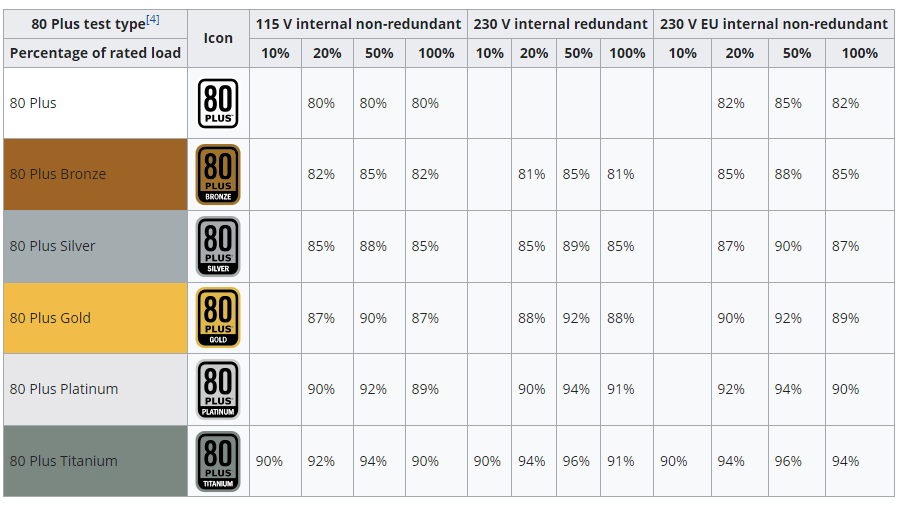
Comparing my findings to the efficency ratings of PSUs, as expected the bronze PSU uses the most amount of power, with a larger jump to gold PSU, and then again a smaller jump to Platinum PSU.

Taking just the average of the aggregated hourly values from each PSU; I get the following stats:

  • Bronze: 124 watts
  • Gold: 118 watts
  • Platinum: 115 watts

If we multiple each value with their respective expected power supply inefficiencies (.85, .90 and .92), we get an estimated component power draw during the three runs as:

  • Bronze: 105.5
  • Gold: 106.3
  • Platinum: 106.1

These numbers are within margin of error with each other, so I’ll accept attribution for all changes in powerdraw, to the construction of the power supplies themselves.

Savings

Going from bronze to platinum results a net saving of around 9 watts. That brings the yearly saved kilowatt hours to 76, which with current average power prices in Copenhagen, Denmark that to $20 saved per year. I think that is splendid.

I would not call it a way to get rich, but it’s an easy upgrade to make.

Thank you for reading

4 Likes

If you’re going that far to save money, don’t flush till it’s brown.:sweat_smile: I’m sure it’s helpful where power prices is going to skyrocket.

2 Likes

So you didn’t use a pre-determined load profile? How did you ensure, the actual resource use was exactly the same? Like the one day, there was an update, or you did a bit more actual video-editing etc. (or whatever your work is), or you took more coffee breaks…

What you did would be better to do in a lab with actually verified load profile etc. Basically like a professional PSU test lab would do.

Well, yeah, the more efficient PSU uses less power. but i have the feeling, I knew that before. And the exact savings aren’t that accurate.

And assuming a user wants a high-quality PSU, we basically are comparing Gold to Platinum. So, the saving isn’t that big compared to the huge premium in price depending on model.

2 Likes

@Glitch001 - thanks! :slight_smile: In peak periods, its not uncommon for power to be more than $1 per kilowatt hour here, so every saved watt counts.

@Lurker - The load on my SAN is very predictable and I am comfortable with benchmarking periods of time against other periods of time, as long as the period of time is long enough. 1 hour would be far to little; three days is enough for me. That being said; the whole point of this test, was to see if I’d be able to see measurable savings while running the active server. I’m not interested in 100% load, and neither am on idle times :slight_smile:

My only fear is that these results are not quite generalizable (is it a word?) since you are comparing bronze atx with gold sf with platinum fan-less all with different capacity. Good information to share nonetheless :smiley:

I wonder if a fan would make that platinum psu about as efficient as the gold? There is undoubtedly some effect from all 3 psu being at different points on an efficiency curve (resulting from different capacities), despite the same load.

3 Likes

I agree, my methodology is more of a real world application where a tonne of factors that don’t play a role in the lab, suddenly does.

The bronze PSU could not turn of it’s fan. It was also one of the only PSUs I’ve ever seen, where the fan was 80mm and mounted not on the top of the unit, but on the side, allowing complete front to back airflow.

The gold PSU does indeed have a fan. I originally chose that psu, because the SFX formfactor allowed the PSU to still draw air through the gap. I made a video about that as well, and got tonnes of critique, because some people seemingly was not able to understand, that the PSU did not suffocate lol. With that in mind, this old Toms Hardware article, mentions the fan first kicks in at around ~180 watts load, which my testing was was clear of. Also they did their testing at 36 celcius ambient, which is wild to me.

The Platinum PSU is an all fanless unit, so atleast for it’s sake, the fan is out of the equation. I do think I have an older 450 watt version of the same unit laying around - it could be interesting to see, how much efficiency is gained, by moving the power draw closer to 50%

1 Like

I’m not high enough level on this discourse to include links yet. I can’t edit posts yet either, so you’ll have to take my word for it.

Or google “Corsair SF600 Platinum PSU Review: Setting The SFX Performance Bar Higher”, from Jan 2019

To make it easier for anyone who is interested, I think this is that video:

I’ve been involved in the low-power/high-efficiency/passively-cooled/silent-computing space for over three decades. The summary is: Swapping from an over-specced Bronze to an over-specced Gold/Platinum/Titanium does produce energy savings, but not nearly as much as swapping the PSU from an over-specced one to a right-specced one.

As you say above and in your video, moving draw closer to 50% improves efficiency. Most folks, however, do not appreciate how much.

Here’s the efficiency curve for my Streacom ZF240 ­— the 240W PSU that powers my DB4:

As you can see, the efficiency improvement between 20% utilisation and 50% (at 220V) is ~12%. Your own tests showed going from Bronze to Platinum only gained you ~7%.

Right-sizing PSUs provides far more real-world savings than spending money on ‘better-rated’ PSUs. Getting your usage to the hump in the middle of the efficiency curve should be the primary goal. A better-rated PSU should be secondary — budget permitting.

Unfortunately, people have been brainwashed into buying over-sized PSUs for so long that it is hard to find power supplies less than 500W nowadays because manufacturers have simply stopped making them. Getting PSUs in the 150-250W range — ideal for the bulk of my machines — is tricky indeed.

4 Likes

OMG, THIS FORUM IS SO GREAT :handshake:

Really interesting graph, thank you for showing it. The efficiency losses at ~20% are rather extreme for that model

Right-sizing PSUs provides far more real-world savings than spending money on ‘better-rated’ PSUs.

Very valid point. I agree, and as you then later also state, getting you hands on lower powered PSUs are indeed a chore. As I can see, the zf240 is only 80 plus white certified. Have you thought of upgrading to the HDPLEX 250 watt GaN model? I’ve thought about using it for quite a few of my builds, but the cabling suddenly get’s messy, if I want 6x molex connectors out of it. It should “not” be a problem to double-wire the 4pin SATA connector housing to two sets of three connectors on a low guage wire, but it certainly is a bigger hassle, than just plugging in the right cable into the PSU

Correct, but it spends virtually no time at (20% * 240W =) 48W, so that doesn’t matter. The machine runs ‘light’ simulations that keep the PSU at ~50% and thus efficiency at 90-91%.

I built the DB4 in 2016. The HDPLEX 250 wasn’t available at that time. I think that came out in 2022? Upgrading would only get my efficiency from where it is now at 90-91% to maybe 94%. A 3% improvement is unlikely to ever pay for itself.

Of course, eventually the ZF240 will die and need to be replaced. When that happens the HDPLEX 250 will definitely be a PSU to consider — assuming the compute workload for that machine does not change.

When considering ‘daily driver’ machines, the PSU is commonly over-specced to cater for the worst possible case (gaming with CPU and dGPU @ 100% plus the other components and some overhead), which results in very common scenarios like 750W PSUs powering a system that spends >90% of it’s time ‘idling’ in web browsers and other low-power use-cases, drawing a nominal 50W or so. 50W is only 6.7% of 750W — it’s not even on the chart for Titanium-rated PSUs. If you spend >90% of your time in the uncharted waters to the left of the efficiency curve, then you can be assured that you are wasting an awful lot of power.

I will say that the higher a PSU’s rating, the ‘flatter’ the efficiency curve tends to be. As a result, spending time at the edges of (or off) the curve isn’t of as much consequence with a higher-rated PSU as it is with a lower-rated one. So if your load is more variable/less predictable, then higher-rated PSUs will save you more money than lower-rated ones — not because of the peak efficiency, but because the efficiency curve is flatter (and thus efficiency is better at the edges). A 90% efficiency Platinum could easily outperform a 93% Gold, for example.

1 Like

I think the “savings” should include the cost of the platinum PSU, because if the Seasonic 450W PRIME PX-450 is costing like $200+ as I see currently online, it will take 10+ years for the energy savings to pay for the PSU and only then it’s “free money” until the PSU fails from old age. This is very close to solar panel levels of return on investment, in my experience.

Assuming energy costs don’t change, anyway.

Well, at least the marginal cost (the extra one pays for upgrading from the reference/Bronze model).

While that is a reasonable thing to do, if you are going to factor that in, then you should also factor in lifespans as well. Bronze PSUs, for example, will almost certainly contain (some) components of a lower quality than Platinum PSUs from the same vendor. That will impact on the lifespan of the PSU. If a Bronze lasts 6 years, but a Platinum lasts 12, then it’s only fair and reasonable to double the cost of the Bronze scenario since you’ll be replacing it twice as often.

I have Gold and Platinum PSUs that have seen heavy (~16h) daily use for ~15 years, and are still stable. I can’t recall a Bronze ever doing more than 8 under similar conditions. Anecdotal, sure, but higher-rated PSUs are generally built better, and that counts for something.

Warranty periods can be used as a — albeit imperfect — proxy for PSU lifespans.

1 Like

Which PSU? I had a failure on a Gold PSU from Corsair after 7 years and another in 8 years. Thankfully they have warranty and they were replaced.
I had a PC Power & Cooling PSU that also degraded within 8 years and it was a Gold rated PSU.
I think it depends on how much power you actually use vs the rated output.

My oldest and, coincidentally, the one currently powering the daily driver I’m using to write this, is a Corsair AX750 (Gold). Purchased in late 2010, it will be turning 16 this year. It has never missed a beat.

I have a slightly younger Seasonic Platinum 860 (Platinum) which I purchased in 2011.

No doubt.

That Corsair has been used in multiple roles — server, daily driver, gaming rig — so the load profile is all over the shop. I doubt it has had many excursions over 67% (500W) though. The Seasonic has had a more stable server role for most of its life, humming along at about 35% utilisation (300W).

Neither has been ‘thrashed’. I don’t do that to my hardware.

Anyway, like I said, anecdotal. It makes sense, though, that if your PSU has better components, it should last longer — all other things being equal.

1 Like

Right, of course a better quality PSU is likely to last longer.
I was just making a point that it does depend on usage. I have servers that all ran on $20 Apex PSU’s for 6 & 8 years respectively. One of them was even installed upside down so it never got any air and it still lasted 6 years… simply because they were 300W (IIRC) PSU’s and the servers never used more than 100W. Mostly staying at low load and drawing around 35W.
My workstation PSU was the RM850i and it lasted around 8 years; however the system has primarily been a Threadripper workstation that idles at 250W basically… and it has been above 400W for a large portion of its life with plenty of time spent at 600W+.
I took that PSU out of my workstation and put it into a server where it lived for another year before causing issues in the server at 450W.

I have several PSUs though that are over 10Y old and still work fine, it is just that the rating decreases over time as the components age.

1 Like

Yep, if you don’t thrash them, they tend to last far beyond their warranty, but do derate over time. That said, you might be wasting a fair bit of power by idling them along on the left side of the efficiency curve, so swings and roundabouts.

I’ve read multiple times that for every additional 10°C electronics are subjected to, their lifespan is halved. I started reading that in the electrolytic capacitor era, so I’m not sure if it still applies. Thus, for example, a capacitor designed to last 150,000 hours at 45°C would only last 75,000 hours at 55°C, and 37,500 hours at 65°C. One assumes the converse is true: Running cool will extend their lives. Thus low utilisation » low heat » longer lifespan.

1 Like

Wow, many responses. I’ll try to answer all in a single message.

@Level1: The machine runs ‘light’ simulations that keep the PSU at ~50% and thus efficiency at 90-91%.

What a nifty little unit. It’s much more efficient, than what it’s 80+ white label might lead you on. I agree on your other points. I could quote all of them and write something additive, but I don’t feel like it adds anything to the discussion, which is significantlyt

@starshipeleven I think the “savings” should include the cost of the platinum PSU

Sure, if this experiment was done for the sake of investment, then it would matter. I cover RoI in the video which was linked - I did not put it in the writeup. I don’t agree with you though. There are many, many reasons why you’d want to change PSU. The Bronze unit is nearing it’s trusted lifetime, and I wanted a better unit anyways. Higher quality PSU will lead to more stabile power, cleaner power and better handling of brownouts. Outside of extreme scenarios, it’s hard to attribute those qualities to the lifetime of the other components, but I do know that the lights flicker when I turn on the vaccum, and I’d much rather have the higher quality unit in between my HDD array.

Those are valid arguments, but the problem is, once you include them, it blurs the exercise. The power cost savings could be €0 and still conclude that it’s worth it because of those other factors. But for the comparison to be relevant and one worth looking at, one would have to assume the € value matters, and if so, the price difference cannot be overlooked. Who knows, maybe the bronze is still inferior, but the gold one is the actual sweet spot of quality and cost.

I don’t know where you live and how much the power costs per kWh, but for a system that runs 24/7, $20 worth of power in a year is in the noise level.

Where I live, we pay 21.5 cents per kwh. So $20 is about 93 kwh.

For a system that runs continuously 24/7 (like a presume a Synology device would) we are a difference in continuous load of about 10W. Essentially nothing.

Let me ask you this:

If you bought that new PSU solely to save on power, how many years would it take to pay back the cost of the PSU?

-OR- if you were cross-shopping two otherwise equivalent PSU models, one with a Platinum rating and one with a Gold rating. How many years would it take for the platinum model to pay for the added cost over the gold model in power savings over that gold model?

In general if the payback period is more than 4-5 years it just isn’t worth it.

Back when I bought a PSU for my desktop I bought a Seasonic ultra titanium. Another reason other than reliability and power consumption to get a better PSU is noise. Having better efficiency also means that the FAN of you PSU rarely (if ever) has to spin. I wanted something I don´t have to worry about that also does not make any noise. I did not really feel the extra cost matters given that I expected it to last 12+ years (as thats the warrenty) and over that time it is still not all that expensive. I did not actually give a damn about power consumption back then as my parents paid the electricity bill. I should send them the math “Look at all the money I saved you” lul (not actually gonna do that…)