Have my pc hooked up currently via ethernet since I don't get internet from the router in my room, but to get internet on my ps3 I have to unplug it from the pc and into the ps3 then obviously the pc doesn't have internet.
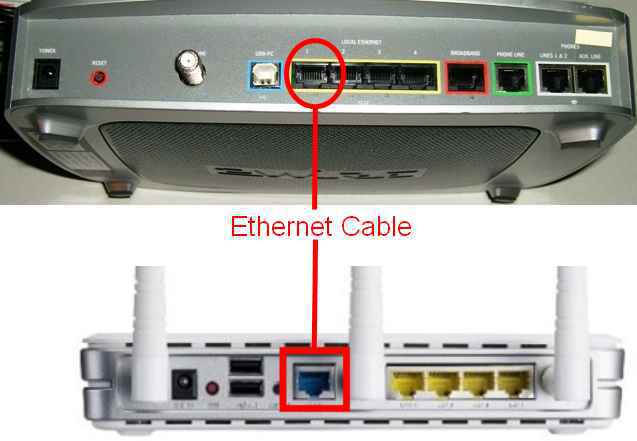
the thing on the top is what I tried I plugged the ethernet with internet into the red slot then the pc via another ethernet cable into the 1 slot, and it didn't work and got a orange light from the pc ethernet port.
What do
You can pick something like this up for very little. Plug your internet in and it will split the signal between different devices. You'll obviously need more cables, too.

was already looking into getting this: http://www.amazon.com/gp/product/B004BVA21Q/ref=ox_sc_act_title_1?ie=UTF8&psc=1&smid=ATVPDKIKX0DER would it work?
also is there no way to turn a modem into a network up / switch / internet splitter voodoo machine ?
I think you could find a cheaper box than that. I picked one up for £3 here in the UK. I used it at university and it just automatically sent signal to all my devices. We weren't allowed routers, so that's why I went down that path.
Looking at the pictures, I believe you could just throw some ethernet cables into those yellow ports and it should automatically do the same thing. Try that first.
I should ahve recommended that first, but I didn't look at the ports. I assumed the problem was there was only one cat5 connection.
Reading the 3 star review:
Pros: inexpensive, gets the job done
Cons: occasionally likes to drop my internet signal. Not a huge deal; unplug and plug it back in, it reboots and is ready to go again.
I'll use this until I can get a decent Gigabit Netgear. Then it'll go in the junk drawer, to only be broken out at a LAN party.
Might just be unlucky. What connection speed do you get at your home? I bought something similar to this for £3, and it worked flawlessly.
Also, did you try the yellow ports on the router to split the connection? Reading one of the 5 star reviews indicates trying another port, as the uplink port is wired to another - not a particularly good explanation, but that's what i says.